
Release date: July 7, 2026
Features
Account Portal
Account Portal will be reenabled for all libraries that had previously rolled back to the bookshelf. Account Portal Features include:
-
Account linking & linked account management (if enabled by the library)
-
Patron search & experience preferences
-
Searchable views
-
Cleaner UI with better visibility and navigation
Patron Registration
Vega Discover's Patron Registration configuration allows libraries to create Patron Registration forms at the Main Site and Collection Site levels allowing Consortia control over their individual self-registration process. The form is hosted in Vega Discover, creates patrons according to library configuration, and allows patron password setting email workflows so that patrons can gain immediate access to Vega Discover features if desired by the library.
This feature must be configured to appear to patrons. The configuration for a main site level form is located in the Cog Menu > Interface Configurations > Patron Registration settings. The configuration for the Site Level is located in the specific site configuration in the same menu.
Libraries choose the patron type/code, patron home library/registering library for created patrons and select displayed optional and required fields from available configurable form fields. An optional email workflow sends instructions for setting a password/pin to the patron after successful submission of the form allowing them to login to Vega Discover afterward and access account features. For Polaris, User Defined Fields or UDFs can be configured as defaults for the created patron or used as displayed optional or required form options as needed. Required privacy policies can be configured.
All form configurations, display text, messages, and email strings can be configured and translated in Vega Discover strings.
-
Patron Registration Form strings have a prefix of patronRegForm
-
Patron Registration Email strings have a prefix of shareItPatRegEmail
-
Staff Configuration strings have prefix of patronReg
-
Staff Patron Registration menu string is "menuPatronRegistration"
Documentation link:
Batch Hold Actions
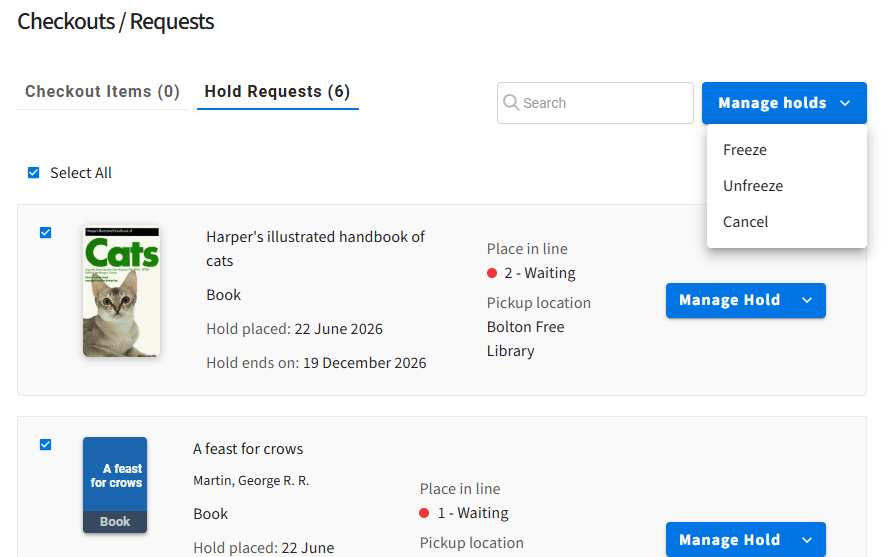
Patrons can batch freeze holds when they need a break from hold fulfillment. Polaris patrons can freeze holds with an automatic unfreeze date. All patrons can also batch unfreeze holds when they want to continue receiving materials. Batch cancellation of holds is also now possible.
Translation Strings:
"portalManageHolds"
Other New Strings have prefixes of: portalFreeze, portalHoldFreeze, portalHoldUnfreeze, portalCancel
Documentation link
Polaris Additional Text Notification
Polaris patrons can use a feature allowing them to receive a text notification in addition to their other default notification. This option is selected when editing the Patron Account info in Account Portal.
Setting Translation String:
"portalSendAdditionalTextMessageNotification"
Place Holds for Linked Accounts
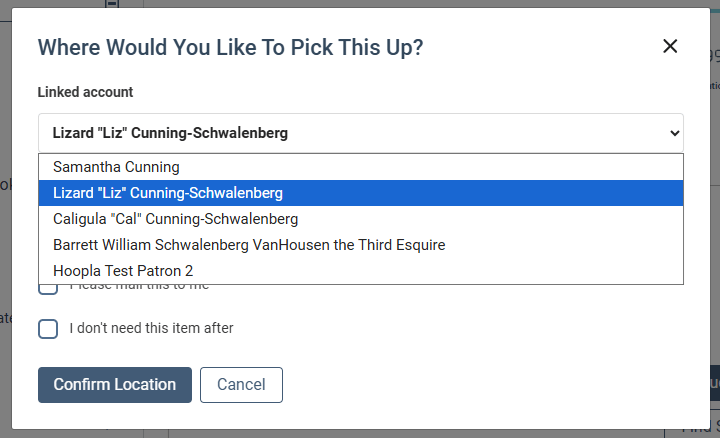
Managing linked account users are now able to place holds on library materials for their linked accounts.
-
Account linking must be turned on to use.
-
This feature only appears for 2 way account management relationship users and 1 way relationship account managers. Minors and recipients of 1 way links will not be able to place holds for users they are linked to.
-
The current user will always be selected by default allowing normal hold workflows to continue without additional steps.
Translation String:
"linkedAccountSelectLabel"
Serial Holdings Display Improvements
For all Libraries, the holdings display in the catalog has been improved by only displaying Holdings Details for the displayed location of the format group. Previously the holdings for any location could display if none existed for the displayed location. The "Library has" label for Holdings details has been updated to read, "This library has" to clarify that the holdings information being viewed for the displayed library.
Translation String:
"libraryHas"
Libraries also gain the ability to customize holdings browsing workflows with the new 'see other library holdings' string that appears instead of 'find a copy' for serials with holdings at multiple locations.
Translation String:
"viewAllHoldings"
If a library uses holdings level call numbers, materials can now be found using holdings call numbers that are displayed if present, on the card, and in the location drawer for each location that has holdings information.
If your library uses holdings level call numbers please reach out to Support to have these indexed for view in Vega Discover.
Vega Central Request Interface: No Pin Option
This feature allows libraries participating in a Vega Discover Central Request Interface catalog to control the no pin required login option. Previously this setting had to be hard-coded per library.
For all previously hardcoded libraries, this setting must be reapplied after the release in the new configuration in Vega Staff UI under the Third Party Connections for Rapido individually or using the Bulk workflow.
Fixes
-
A fix was applied to resolve issues loading Vega Discover for libraries with custom domains.
-
A fix was applied to improve our Hoopla integration so that full extractions can be completed successfully and in a shorter amount of time. If your library was previously experiencing issues completing a full Hoopla update to apply deletions/inactivations, and other updates to your subscription please reach out to support for assistance in reingesting your subscription collections.
-
The Citation Sharing Option was restored to the Interface Configuration > Experience Settings
-
Missing strings were added to translation files for account portal.
-
The Hoopla 'access now' button was removed from the holds/requests view. (this feature is not supported until Hoopla Flex is supported)
-
The Hoopla checkin button now displays in checkouts and can check in an item.
-
For Polaris Patrons, hold modifications to change pickup location/area now give a success or 'unable to change held pickup location 'message accordingly.
-
The Account Edit form was updated to correctly display uneditable fields as display only.
-
Holdings level call numbers can now be displayed in Vega Discover for Sierra libraries (request the correct b2mtab file be applied to your system to update)
-
When a new language is added to Vega Discover for display, the location hierarchy is created for that language automatically. This fix permanently resolves issues with location display and search results loading in libraries using multiple display languages.
-
When patrons have e-content items checked out from a vendor that are not in the Vega Discover Index we now display the title correctly instead of displaying, "Resource for checkout <UUID> is not available"
Vega Reports for Discover
Adding date partitions and default dashboard automation
By adding date partitioning and automating the default dashboard experience within the user interface, dashboard performance has been significantly improved, and load times have been reduced.
While the initial access to Vega Reports may still require some loading time, staff users will notice substantially faster dashboard load times after their first login compared to previous versions, resulting in a more responsive and efficient reporting experience.
Fixes
Scheduling reports (subscriptions)
What Changed:
Fixed an issue where scheduled reports configured to run on selected cadence were not being delivered to users
Impact:
Staff can now successfully schedule reports and receive them according to their selected delivery frequency.
Reports subscription schedules are based on the UTC time zone.
