
Release Date: June 9, 2026
Facet Auto-Application (MEEP Enhancement)
Facets now apply as you click them. The Apply step was removed. The Date facet was updated to use a modal for entering dates. If you put in only a from year it is assumed you want all materials from that year through future dates. If you put in only a to year it is assumed you want all materials up until that year.
Documentation link:
Partial Author Name Searching (MEEP Enhancement)
In the Everything and Author searches, if you enter partial author name data for a main author search Discover will return expected matching results. You can also combine a partial author name with a title in the Everything search.
Patron Assist GA
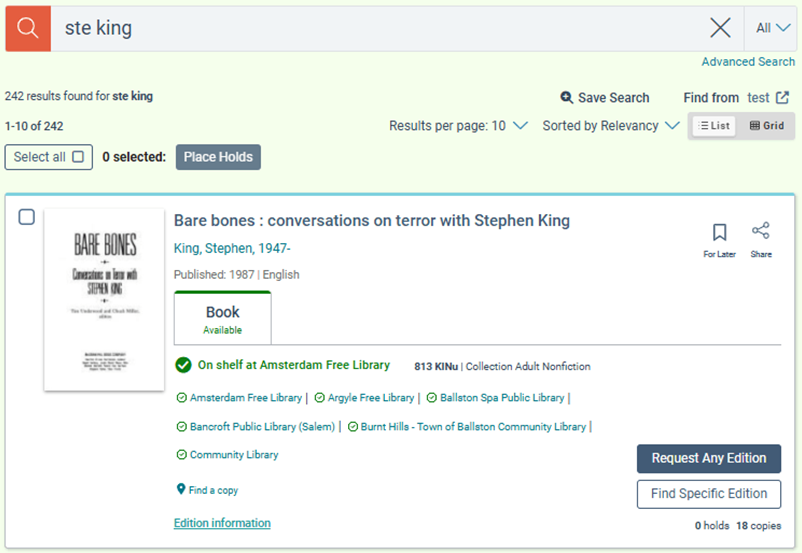
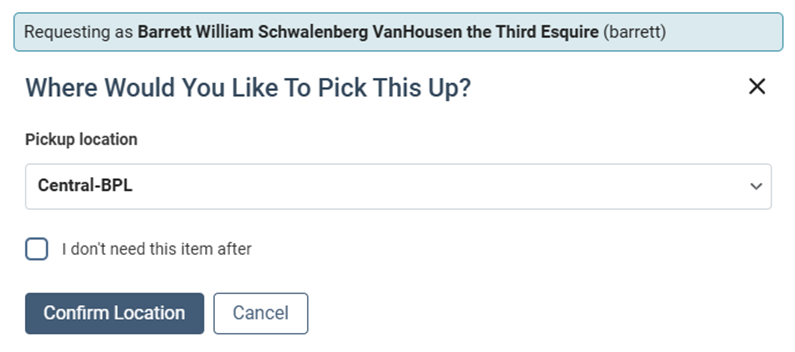
Patron Assist will be enabled for all libraries with this release. We would like to thank our Vega Discover INN-Reach and Vega Discover Central Request Interface groups for all of their valuable feedback during our Early Access testing that allowed us to make several improvements and fixes to these workflows. Please see the Fixes section below for the Early Access fixes that were applied for Patron Assist in this GA release.
Vega Discover library Super Admins and Main Site Admins can assign Patron Assist permissions to promoted patron users, Vega staff users, and Active Directory users. Patron Assist permissions must be assigned from the Main Site level but can be used in any site. Super Users have Patron Assist permissions by default. Please note that any permissions associated with viewing Patron Account data require the Account Portal feature be turned on to access. Account Portal will be turned back on for all libraries in the July Release and can be requested to be turned back on at any time if you previously had it turned off.
Patron Assist features are broken into four separate permissions that can be allocated to staff users according to your library's needs:
-
Holds & Checkouts allows staff to place holds, checkout items, and full access to all Account Portal checkout and hold screen features to manage holds, renew items, etc. Reading history is not viewable by staff users.
-
Patron Profile allows staff to view and edit all patron account information in the Account Portal. This includes account profile information, account linking, and personalization settings.
-
Fines & Fees allows staff to view and use any controls in the Fines and Fees Account Portal view on behalf of a patron.
-
Share Content provides staff an additional action in lists and saved searches to Share to Patron. Entering a patron barcode or username will share that list to the patron account and it will appear with a special icon and information to show it was created by staff. Share Content also allows staff to create lists in assist mode using bookmarking and to save searches. These lists and searches display to the patron as being created by staff. Staff will see the catalog level right side drawer access to lists and searches and the Account Portal lists and searches views when in assist mode for a patron -- however, they will only be able to view lists and searches made my staff members in these views. Patron created lists and searches are hidden from staff view.
Important Notes about Patron Assist
-
Patron Assist sessions will be denied for patrons that have a default catalog set that differs from the current site. You must start from the patron's preferred site if they are using this preference setting.
-
Staff cannot view: patron reading history, patron created lists and searches, any data of linked accounts for the assisted patron outside the account management page.
-
While Patron Assist permissions must be assigned at the Main Site level, staff users with these permissions can use them in any site they are authenticated to.
-
Account Portal is required for staff to access account related permissions, these permissions are not available in the old bookshelf views.
-
Resource Sharing versions of Vega Discover (INN-Reach Central and Central Request Interface versions) have limited patron related features and will not be able to use patron features that do not exist in these systems such as: account portal views and bookmarking.
Documentation links:
Polaris Borrow by Mail Limit by Registered Branch Option
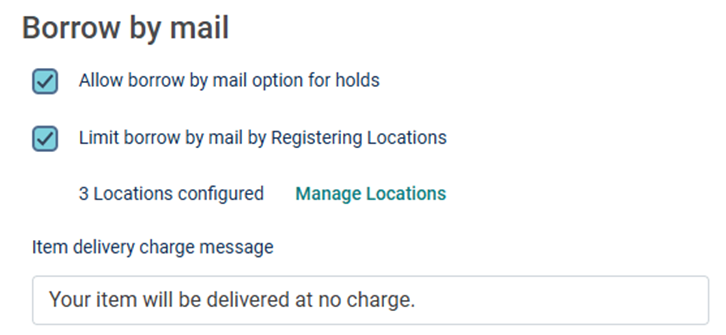
The Borrow by Mail feature for patrons previously applied to all collection sites and patrons when turned on. That option is still available. Another option has been added that allows libraries to specify which Registering Branches allow their patrons to use the Borrow by Mail feature. When Borrow by Mail is limited to Registering Branches, the feature will only appear to patrons that have the specified branches. This allows libraries to use this feature according to their library policies and attaches the feature to patrons rather than sites.
Documentation link:
Account Linking: Save and Sync Option
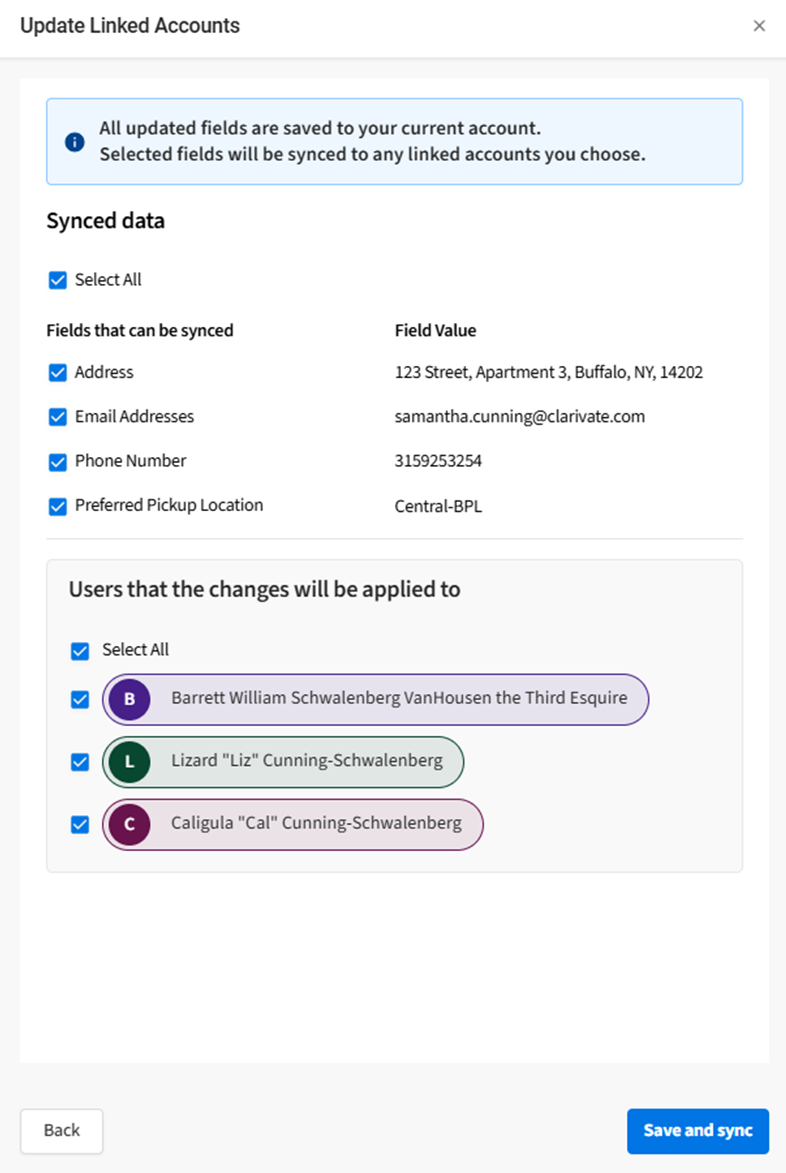
Patrons with managing linked accounts can update contact information for managed linked accounts when editing their own account info. A Save and sync button appears at the bottom of the edit account form. When this option is selected, an Update Linked Account step is shown allowing the current user to select from syncable fields and linked accounts to apply changes to. This feature allows guardians to update the email, address, home phone, mobile phone, and preferred pickup location for managed linked accounts at the same time without having to login to each account individually. Minor and non-managing accounts attached via 1 way links will not see this feature.
Documentation links:
Fixes
-
A fix was made for page flicker issues when navigating from available bookmarks to title details page result and back.
-
Failed hold cancelations now display error messages.
-
The manage hold button is now visible when viewing the account portal on mobile devices without scrolling to the right.
-
Account Portal responsiveness was updated on the following pages: overview, account, checkouts, holds, bills/fines, bookmarks, saved searches. (history view updates are still in progress but partially complete)
-
A fix was made for an issue that prevented Polaris patrons from updating their notification preference to text in the patron account edit view.
-
A fix was made for an issue where Syndetics Unbound content was unable to load on some title detail pages.
-
Vega Discover made an update to support a PayPal API change that previously broke fine payments and was subsequently rolled back by PayPal. PayPal will reimplement this change after testing.
-
Fixed the direct links to patron views so that they also use the centered larger login modal for Polaris.
-
Fixed a problem with pickup dates and due dates were one day off for Polaris libraries.
Patron Assist Early Access Fixes
-
Added the ability for both Vega Discover INN-Reach Central and Vega Central Request Interface Patron Assist users to start a session for a patron that has never logged into the system.
-
Updated the Main Site Admin permissions so that this type of user can assign Patron Assist Permissions in the User Management settings of Vega Discover Admin.
-
Fixed a problem where holds could not be placed in Patron Assist mode when assisting in a Collection Site.
Vega Reports for Discover
Features
-
Reports role-based access for Vega Reports in Discover: Role based access for Vega Reports in Discover, using Admin and Consumer report roles assigned at different site levels.
-
Vega Discover Dashboard: Provides a reporting and analytics platform for understanding how users engage with the Discover catalog.
-
Capability to create custom reports: Enables libraries to tailor insights to their specific needs and make more informed decisions.
Vega Reports for Discover is being rolled out in phases. Customers included in the June release will receive a direct email notification.
Documentation links:
Fixes
Vega Reports icon for tables and models
What Changed:
Fixed an issue where staff users creating custom Vega Reports could not distinguish between tables and models due to identical icons. Users can now clearly select either models or raw data, which then guides them to choose the appropriate model or specific data table.
