
Release Date May 5, 2026
A note about the Account Portal
Please reach out to Support if you would like to re-enable Account portal after reviewing the fixes below and our known issues list.
We plan to re-release Account Portal to all libraries in our July Vega Discover release, if you would like to prepare your patrons for this UI change.
Suppress bibs with no items settings
Documentation link: Hide Records From Catalog
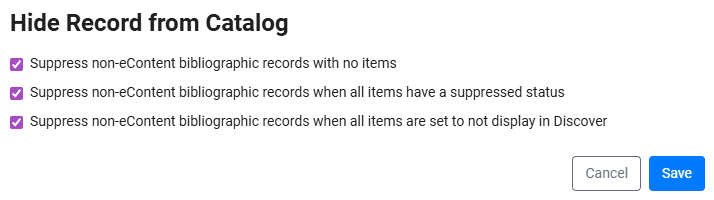
A feature was added to the Display Settings in the Vega Admin that allows libraries more flexibility in controlling the display of titles they feel should not display to patrons based on item record criteria. Three settings that can be individually toggled to create a combined coverage are:
-
Hide non-econtent records with no items attached.
-
Hide non-econtent records when all items are suppressed.
-
Hide non-econtent records when all items are set to do not display inPAC or Suppressed per Sierra item settings.
If both 2 & 3 are set, any combination of items that meet this criteria will cause the bib record to be suppressed. If a bib is suppressed by one or more of the settings above, the edition associated with that bib will not display in the title's full resource view editions table in Discover. If all editions in a format tab are suppressed, that format tab will not display in the format group. Fully suppressed format groups will not be returned in search results, and will not be included in facet count totals.
Facets related to bib- or item-level information (e.g. material types, collections, locations, etc) will ignore suppressed bibs in their filtering logic and the calculation of their facet count totals. For example, filtering on a location will only return format groups that contain at least one non-suppressed bib associated with that location.
This new setting will be located here: Vega Admin Settings > Cog Menu > Library Defaults > Display Settings > Hide Record from Catalog.
Graphic novel work type (MEEP 2025 Enhancement)
To apply this feature at your library please schedule a Full MARC extraction to update your current catalog to assign the new Work Type.
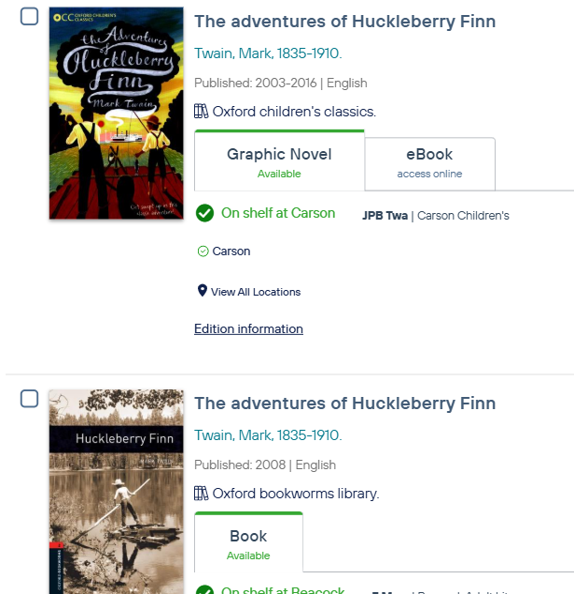
A new Graphic Novel Work Type has been added to our Vega BibFrame standard. This Work type will apply to all MARC records with a "6' in the 006/7-10 or 008/24-27 specifying that the Nature of Contents for this title is comics/graphic novels.
Graphic Novels can rollup with other editions of the same work. Graphic Novels will no longer rollup with textual works considered: books, audiobooks, ebooks, eaudiobooks.
Note that the Graphic Novel Work Type affects only how editions roll up together in Discover. It does not affect the format tabs, which are controlled by Material Types for Sierra libraries, and Types of Material for Polaris libraries. (Polaris libraries need to be on Polaris 8.1 or higher to create custom Types of Material).
Call number browse (MEEP 2025 Enhancement)
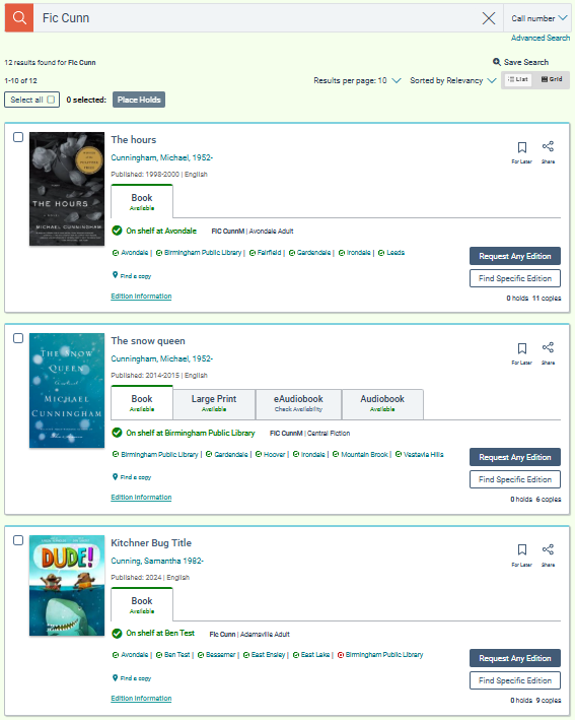
A new call number browse search index has been added to the Vega Discover search indexes. Bib and item level call numbers are indexed in this search. Type in the first portion of a given call number to find all works with a matching call number prefix.
Please remember that Vega Discover is a Work level catalog. In libraries where there is variance in call numbers across branches, a search for a specific call number may give the user a search result that displays their local library's item level call number but the search hit was on another library's item call number.
Advanced search feature toggle
A setting was added to the Display Settings at both Main Site and Collection Site levels that controls the display of the Advanced Search function. The default setting for this feature at release is set to 'display' and like all of our settings that apply to sites the default is for sites to inherit the Main site setting. Libraries that do not want to display the Advanced Search can turn it back off in the Display settings. Sites that would like to enable/disable differently than the Main site are able to do so in Site Level Display settings.
This new setting will be located here: Vega Admin Settings > Cog Menu > Library Defaults > Display Settings.
Rollup improvements: Exclamation marks and diacritics
To apply these improvemenst at your library please schedule a Full MARC extraction.
1. When titles include an Exclamation Mark this character is no longer considered required for rollup to occur.
2. When a title contains combining or non-combining diacritics we now roll up these titles as expected.
Bug fixes
Account Linking setting fix
The Account linking Global Setting was able to be unset by changing the Global Setting toggle for a site. This has been fixed and the Global Setting toggle now only applies to the site.
Account Portal: patron account editing updates
-
US States appear as only option for State/Region when editing patron address
-
Change Passcode workflow was moved OUT of Account Edit workflow.
-
Address Display Issues and Unable to save account information Sierra
-
Patron Settings for editing of Account data fields are now used including contact the library link for uneditable fields.
-
Preferred Notification Method workflows are now restored to previous functionality
Account Portal: OverDrive features
The Checkout and Hold view functions for currently circulating OverDrive materials have been restored:
Checkin, Get Item, Cancel Hold
Unuseable functions are no longer displayed for OverDrive circulating materials.
Account Portal: change passcode workflow
The Change Passcode workflow was moved out of the Account Edit workflow to a button displayed under the patron library card display in the Patron Account page. The missing 'passcode policy message' was added back that helps patrons set a valid passcode according to rules set in the ILS.
PayPal API user passwords update support
PayPal made a breaking change to their API User passwords for security reasons. We now support the API user used for the PayPal ecommerce integration having a password that follows the suggested and now enforced password requirements in the PayPal Manager User settings.
We recommend that existing libraries using PayPal for payments in Vega Discover consider updating their API user password to use these new security features.
All other minor fixes
-
Renewal Failure no longer traps patron in popup with no close option by adding an X button.
-
Corrected the display of titles with no author in the My Next Read section.
-
Fixed an issue where dates for various circulation and fine transactions were off by one day.
-
Fixed Chinese Language Strings file errors after recent translations caused a string display issue.
-
Fix for UI issue in Patron Info popup for patrons with lengthy names.
-
Fix for mobile views of libraries with custom domains to solve login issue on safari browsers.
-
Restored Vega Generated cover images in search results no Syndetics image is found.
-
Restored the "You have a copy checked out/on hold" link by sending user to correct title in Account Portal.
-
Various Accessibility fixes around colour contrast, missing aria labels, keyboard traps in the new Account Portal views.
-
BorrowBox Ingest fix: A problem with the ingestion of BorrowBox titles was fixed and Vega Discover updated to using the new release of BorrowBox APIs for content management.
Early access features
Patron assist early access
Patron Assist is being released for Early Access testing to our Vega Discover INN-Reach libraries, Vega Discover Central Request Interface libraries, and all libraries in these groups that also have Vega Discover as their discover layer. We plan to roll out this feature to all other libraries in the June Release.
With this feature, libraries gain access to granular permission-based workflows that allow staff to assist patrons to edit account information, place holds and econtent checkouts, renew, modify, and cancel transactions, pay fines, and create and share content for lists and saved searches to patron accounts. Patron Assist also protects patron privacy for lists, searches, reading history, and linked account privacy.
Overview of Patron Assist Permission Features
-
Holds & Checkouts permission allows staff to place holds, checkout items, and full access to all Account Portal checkout and hold screen features to manage holds, renew items,etc. Reading history is not viewable by staff users.
-
Patron Profile permission allows staff to view and edit all patron account information in the Account Portal. This includes account profile information, account linking, and personalization settings.
-
Fines & Fees permission allows staff to view and use any controls in the Fines and Fees view on behalf of a patron.
-
Share Content permission provides staff an additional action in lists and saved searches to Share to Patron. Entering a patron barcode or username will share that list to the patron account and it will appear with a special icon and information to show it was created by staff.
Share Content also allows staff to create lists in assist mode using bookmarking and to save searches. These lists and searches display to the patron as being created by staff.
Discover Preview Environment
-
We are looking for 5 customers to participate in vetting the Discover Preview environment and process as part of our June release
-
Each customer will get access to the Discover Premium site and their own collection site
-
We will leverage our first testers to make sure that the onboarding process works clearly and that all FAQs have been vetted for the rest of the group
-
We are excited to get the Preview environment launched and expect the first features to be on Preview as part of our August release
-
Please contact Ashley.barey@clarivate.com for details
Vega Reports for Discover
-
Reports role-based access for Vega Reports in Discover: Role based access for Vega Reports in Discover, using Admin and Consumer report roles assigned at different site levels.
-
Vega Discover Dashboard: Provides a reporting and analytics platform for understanding how users engage with the Discover catalog.
-
Capability to create custom reports: Enables libraries to tailor insights to their specific needs and make more informed decisions.
Vega Reports for Discover is being rolled out in phases. Customers included in the May release will receive a direct email notification. Information about following phase will be communicated with the June release.
