
Release date: September 8, 2026
Features
Hoopla Binge Pass Support
Hoopla Subscribing Customers who purchase Binge Pass content can now map this content to a specific Material Type (Sierra) or Type of Material (Polaris) for clear display and filtering in Vega Discover search results.
Binge Pass items will continue to use the Default Material mapping for Hoopla items as they previously did. If a library would like to create a specific Material Type (Sierra) or Type of Material (Polaris) or use an existing one this can be updated.
Once using a new Material Type (Sierra) or Type of Material (Polaris) Binge Passes can be found by filtering to their specific Format using the Format Facet filter in Vega Discover Search Results allowing patrons to easily locate these materials and for libraries to easily create showcases to market this content.
How do I configure this?
If a library wants to assign a new Material Type (Sierra) or Type of Material (Polaris) for Binge Pass, they should first create the new Material Type (Sierra) or Type of Material (Polaris).
After creating the new Material Type (Sierra) or Type of Material (Polaris), login to the Vega Admin as a Super User or Main Site Admin and run a Material Types sync from the Cog Menu > Integrations > ILS code synchronization settings.
The following steps should be coordinated with a support ticket:
-
Delete the current Hoopla Configuration.
-
This will deindex and delete all Hoopla content from Vega Discover.
-
Then the library should reconfigure Hoopla, selecting their desired Binge Pass format and have Support run a full extraction to repopulate all Hoopla materials into the catalog.
eContent Checkout for Linked Accounts
This feature allows linked account managers to use econtent workflows for: OverDrive, Hoopla, CloudLibrary, and Onleihe (Dibiost) to circulate econtent to their linked accounts. Note that BorrowBox support is in progress and will come in a later release.
Managing patron accounts that have account links will see an additional step in econtent get it workflows where they can select a linked account if they would like to checkout the material to a linked user instead of their own account. By default the current user's account is always selected allowing for click throughs for checking out econtent to the current user.
Vega INN-Reach Central Volume/Item Holds Support
The workflow for placing a hold on titles with volumes or items as volumes has been updated so that this type of request can be placed in an INN-Reach Central Vega Discover catalog. Staff using Patron Assist to help patrons can request materials in an assist session that have volumesor items as volumes data.
This feature may require changes to xcirc2 and wwwoptions for requests. Please reach out to support if you need help configuring these settings.
Accessibility Updates
Accessibility Fixes were applied throughout Vega Discover to correct issues from various WCAG 2.2 AA standard categories.
Accessibility remediation fixes were applied for issues with the following WCAG 2.2 AA criteria:
-
Keyboard Navigation
-
Color Contrast (regular text)
-
Custom Controls
-
Visible Labels
-
Focus Not Obscured
-
Descriptive Labels
-
Semantics
-
Timing Adjustable
-
Data Tables
-
Color as Information
-
Content on Hover or Focus
-
Titles on Pages
-
Reading Order
-
Status Messages
-
Non-Text Contrast (Graphical Objects)
-
Headings
-
Label in Name
-
Target Size
-
Text Spacing
Fixes
Search Results Paging Fix
When paging to the next page of search results the user is now returned to the top of search results page.
Scoping Fix for Saved Searches and Showcases
A problem was fixed where site level scoping was not being applied to saved searches and saved search showcases.
Generated Covers on Homepage Fix
A problem was fixed where titles with no Syndetics Unbound cover image were not displaying the generated cover in showcases onthe homepage.
Patron Holds: Freeze Dates Fix
Hold Freeze Dates can now be entered successfully on Chrome and Edge browsers.
Vega Central Request Interface Fixes
-
The request success message is now translatable and a typo has been corrected in the default message. The new string is"rapidoGetItSuccessDescription"
-
The unusable edition level request button has been removed from Rapido full title detail pages.
Patron Registration Fixes
-
Patron Registration configured at the Site Level now functions correctly if the Main Site Level is disabled.
-
A new customizable strings have been added for the default error message when a patron registration fails.
-
"patronRegFormCreatePatronError"
-
-
When email is not required for registration, a patron can now successfully register using the form.
-
Sierra patrons are now created with the correct Patron Type through Patron Registration.
-
The Patron Registered Library is now required in the Polaris Patron Registration configuration per PAPI requirements.
-
Polaris Registering Library now only displays Branches.
-
Patron Registration is no longer blocked when Polaris libraries use the 'numeric passwords only' option.
Vega Discover Preview
All Customer Sites have been created in the Preview Environment with staff admin users that will have permission to manage their site settings, create site home pages, create showcases, and create patron assist sessions.
Invites will be coming in a separate email soon with instructions for gaining access through Support.
Reports for Vega Discover
Features
50Mb CSV file upload
You can now upload a 50Mb custom csv file to Vega Reports. This functionality is available to Report Admins at the Main Site level, and Super Admins at the library.
How to configure:
Ensure that you have data file in csv format ready for upload.
By navigating through Vega Reports and selecting hamburger menu, you would be able to access to ‘Our Analytics’ collection. Navigate to top right corner of the embedded UI and you will find upload button. Once you click on it, select a file that you want to upload and upload will start. Once completed it will appear in the same collection folder.

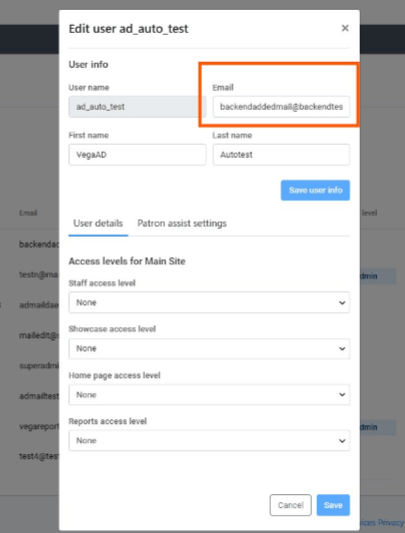
Staff users with Administrator role are now able to edit email, first and last name for Active Directory staff users
Customers with Admin role can now edit email address, first and last name for Active Directory Staff users. As email address is required for Vega Reports to work, this functionality will enable Active Directory Staff users to access Vega Reports.
How to configure:
No configuration is needed, this functionality is available to Super Admins, Main Site Admins and Collection Site Admins.
Discover Dashboard Performance Improvements
The new partitioned Vega Discover Dashboard is now the default dashboard for all customers, replacing the legacy version. This update delivers improved performance, faster load times, and a more consistent reporting experience.
How to configure:
Customers who have created custom reports or dashboard or reports subscriptions based on legacy dashboard models will need to recreate them using the new dashboard and data models.
Fixes
Site Filter Duplicate List
Fixed an issue that caused duplicate collection and kiosk sites to appear in the Vega Discover Dashboard site filter. Changes will take effect approximately one day after release date.
