
Creazione del pacchetto Linee PO in un PO
Questa pagina descrive come lavorare con la creazione del pacchetto di righe PO in un PO, inclusa la creazione manuale e automatizzata del pacchetto, la revisione dei PO e l'eliminazione dei PO. For a list of links to pages with instructions for purchasing in Alma including creating PO lines, renewals, working with vendors, etc., see Purchasing. For information on the overall purchasing workflow see Purchasing Workflow. For an overview of working with acquisitions in Alma, including links to relevant sections such as Infrastructure, Renewals, Invoicing, etc., see Introduction to Acquisitions.
- Operatore Acquisti
- Gestore Acquisti
La creazione del pacchetto di righe PO è il processo di creazione dell'ordine di acquisto che verrà inviato al fornitore.
If the Manual packaging option was assigned during PO line creation (in the PO Line Information section of the Details pane – see Creating PO Lines), PO lines must be packaged manually into POs. If manual packaging was not assigned, PO lines are packaged automatically into a single PO if the PO Line - Packaging job is enabled (see Configuring Acquisition Jobs) and all the following properties match:
- Account fornitore
- Proprietario
- Valuta
- Continuità – Singolo/continuo
- Metodo di acquisizione
- Source type – Source of the PO line creation for example Manual Entry (via the UI), API, EOD, etc.
- Biblioteca ordinante
- Fund (if the po_packed_by_fund parameter is set to true; see Configuring Other Settings)
- Se la riga PO è associata a più di un fondo, viene generato un errore e la riga PO deve essere pacchettata manualmente.
- The maximum number of PO lines that will be added to each PO is controlled on the Acquisition Jobs Configuration page; see Configuring Acquisition Jobs.
- If a PO line is assigned to a user, the PO Line Packaging job will not be able to process it. In tal caso, dovrebbe rilasciare l'Incarico.
Creazione del pacchetto all'interno del flusso di acquisti
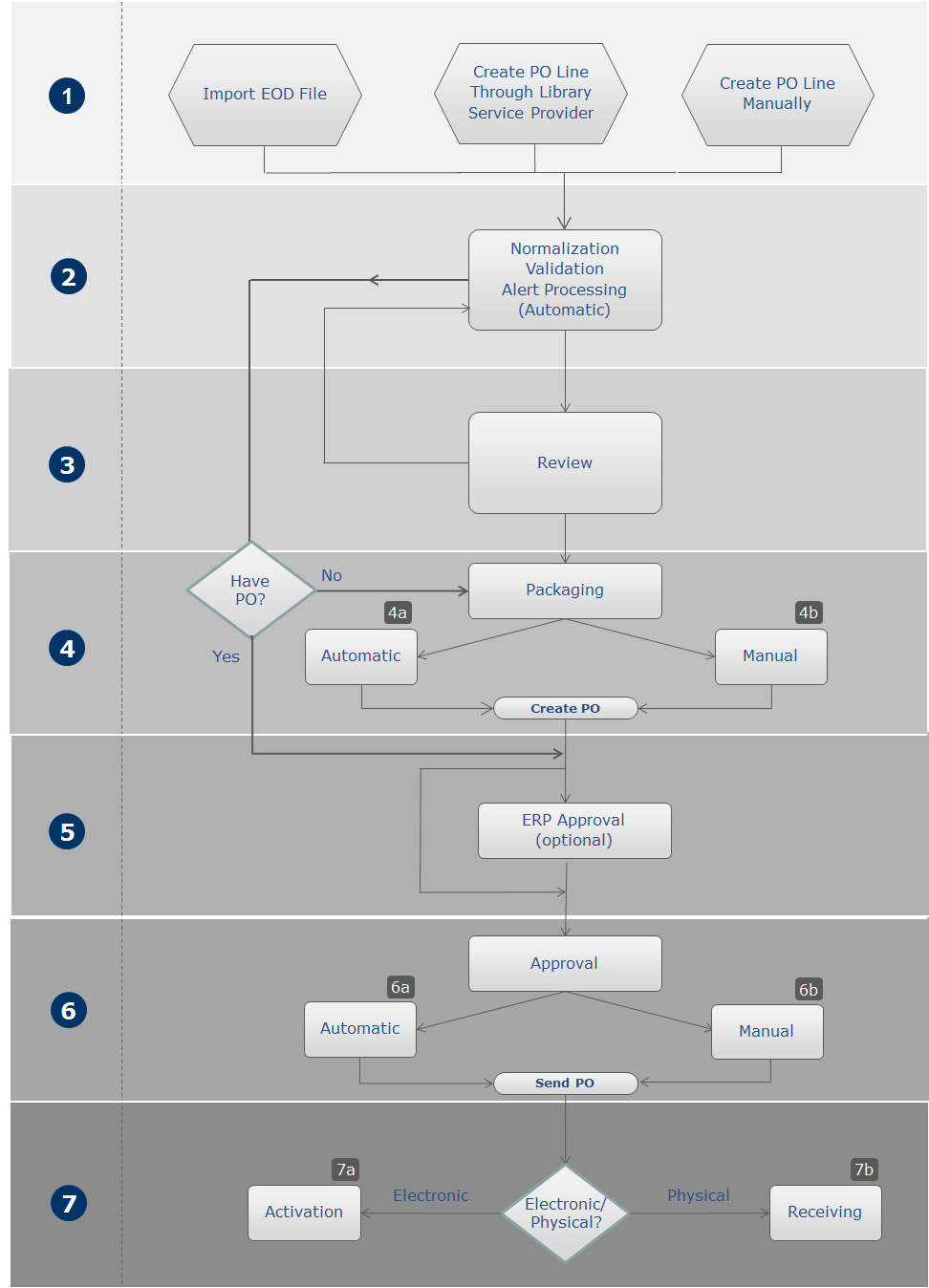
Gestione delle linee PO che richiedono la creazione manuale del pacchetto
You manage PO lines that require manual packaging in the PO Lines task list.
Individuazione delle linee d'ordine (POL) che richiedono la creazione manuale del pacchetto
You can find PO lines that require manual packaging by filtering the list of PO lines that appear in the task list (see Searching for PO Lines - New Layout).
- Quando la lista delle attività di PO Line è aperta, nel riquadro Faccette , sotto flusso Step, selezionare Creazione manuale del pacchetto.
- In the main menu, select Acquisitions > Purchase Order Lines > Package. La lista delle attività delle righe PO si apre con il filtro Creazione manuale del pacchetto preselezionato nelle faccette.
- in the Tasks List in the persistent menu, under Order Lines, select Package(see Tasks in the Task List). La lista delle attività delle righe PO si apre con il filtro Creazione manuale del pacchetto preselezionato nelle faccette.
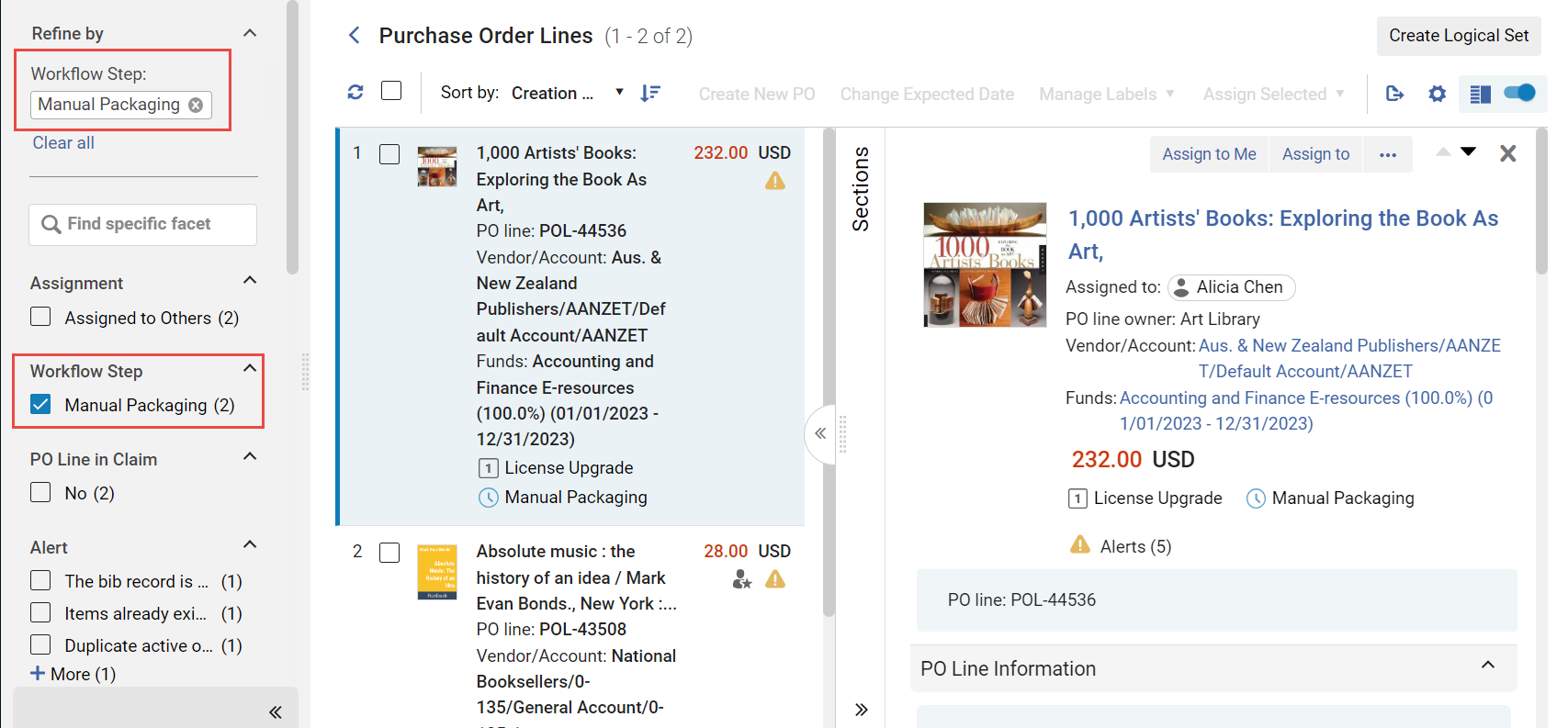
Azioni disponibili
Una volta individuata una riga di ordine di acquisto che richiede la creazione manuale del pacchetto, è possibile selezionare una delle seguenti opzioni dalle azioni di riga:
- Modifica – Modifica la riga dell'ordine di acquisto. See Reviewing PO Lines.
- Crea un nuovo ordine di acquisto – impacchetta la riga dell'ordine di acquisto in un proprio ordine di acquisto. The PO is sent for approval (see Approving and Sending POs). If a purchase order's acquisition method is Purchase, the process stops at the approval stage.
- Order Now – Send the PO line to the vendor without waiting for approval (see Approving and Sending POs). If you select this option, the Order Now Letter is sent to you after the order is sent for processing. The vendor receives the order as an Order List Letter. For information on these letters, see Configuring Alma Letters.
- Rinvia – Rinvia la riga dell'ordine di acquisto. See Deferring PO Lines.
- Ricollega – Ricollega la linea PO. See Relinking PO Lines.
- Cambia riferimento bibliografico – Cambia il riferimento bibliografico della riga PO. See Changing Bibliographic Reference.
- Annulla – Annulla la riga dell'ordine di acquisto. See Canceling PO Lines.
- Elimina – Elimina la riga della Linea PO. See Deleting PO Lines.
Creazione del pacchetto Linee PO
PO lines can be included in the same PO if they are for the same library, have a common vendor, vendor account and common currency, share the same order pattern (one-time/continuous), and share the same acquisition method and source type.
- Nell'elenco delle attività PO Lines, selezioni la casella di controllo a sinistra di ogni riga PO che desidera includere nell'ordine di acquisto.If the task list that is currently open has more than one page, you can select PO lines from multiple pages.
- In the Actions menu, select Create New PO(see also,Managing PO Lines - New Layout). The selected PO lines are packaged into a PO and the PO is sent for approval (see Approving and Sending POs).
Reviewing Purchase Orders
- Operatore Acquisti
Un ordine di acquisto (PO) viene inviato per revisione se le informazioni obbligatorie non sono valide o mancanti al momento della creazione del PO. After correcting or adding the mandatory information, the PO is packaged and moves to the Approval and Sending stage of the workflow (see Approving and Sending POs).
You review POs on the Orders in Review page (Acquisitions > Purchase Order (PO) > Review (PO)). You can also access this page by selecting the task Order Lines - Review (PO) in the Tasks List in the persistent menu (see Tasks in the Task List).
- Nella pagina Ordine di acquisto in revisione, selezioni Modifica nella lista delle azioni di riga per l'ordine di acquisto che desidera revisionare. Viene visualizzata la pagina Sommario PO.
- Modifichi il campo sulla pagina, come richiesto.
- I campi richiesti sono contrassegnati da un asterisco e devono essere completati prima che l'ordine di acquisto possa avanzare alla fase successiva del flusso.
- Il fornitore è di sola visualizzazione e non può essere modificato nel Sommario ordine di acquisto. To change a vendor, run Acquisitions > Advanced Tools > Change Vendor in Order. See Changing Vendors in PO Lines and POs.
- When Integrate by ERP Number is selected for the Export Orders (PO) job (see Financial Systems), a PO's ERP number must be filled in for the PO to proceed to the next stage of the workflow. Se il numero ERP non è compilato, l'ordine di acquisto viene inviato all'ERP per ricevere un numero, dopodiché viene reimportato in Alma utilizzando il processo Importa approvazioni PO. Se il numero ERP è compilato, l'ordine di acquisto (dopo essere stato approvato in Alma) viene inviato contemporaneamente al fornitore e all'ERP.
- Selezionare una delle seguenti:
- Salva – l'ordine di acquisto è stato salvato. Utilizzi questa opzione se non è sicuro di voler far proseguire l'ordine di acquisto alla fase successiva del flusso di lavoro di acquisto.
- Save and Continue – The information you modified is saved, the PO is packaged, and then proceeds to the approval and sending stage of the workflow (see Approving and Sending POs).
Quando si salva una riga PO, la Data di ricezione prevista della copia associata alla riga PO viene aggiornata.
On the Purchase Orders in Review page (Acquisitions > Purchase Order > Review), select View in the row actions list for the PO you want to view. Viene visualizzata la pagina Sommario PO. Non è possibile modificare il campo nella pagina.
- On the Purchase Orders in Review page (Acquisitions > Purchase Order > Review), select Edit in the row actions list for the relevant PO. Viene visualizzata la pagina Sommario PO.
- Nella tab tab Lista righe PO, selezioni Aggiungi riga PO. Viene visualizzato l'elenco delle linee PO che possono essere aggiunte all'ordine di acquisto. Note that only PO lines with a status of 'Ready' for manual packaging will appear in the list and are available to add to the PO. If the PO Line is 'In Review', it will not display in the list until all errors in the PO lines's Alerts have been resolved and that status changes to 'Ready'.
- Selezioni una o più righe d'ordine da aggiungere.
- Seleziona Seleziona. La/le linea/e dell'ordine di acquisto viene/vengono aggiunta/e all'ordine di acquisto.
Once an EDI PO line has been packaged into a PO, the Download EDI File option appears in the row actions of the PO line. Select this option to download the PO that contains the PO line as an EDI file for review. Il file EDI viene creato ad hoc sulla base dei dati correnti dell'Ordine. (Affinché questo collegamento appaia, il Fornitore deve essere configurato come Fornitore EDI e la riga dell'ordine di acquisto deve essere inclusa in un pacchetto di ordine di acquisto.)
Eliminazione degli ordini di acquisto
On the Purchase Orders in Review page (Acquisitions > Purchase Order > Review), select Delete PO in the row actions list and select Confirm in the confirmation dialog box.
Page tags: article:topicproduct:almacontent:Documentationlang:englishpackage purchase orderpackage POreview PODelete POadd PO line to PO
