
Searching with the A-Z List
The A-Z List consists of the following sections:
- Titles – Allows browsing and searching of journal titles
- Kanji Character Variant Searching – Configure title searching for varient Kanji characters
- Category – Allows browsing of journals by category
- Locate – Allows advanced searching options (search by journal title, ISSN, category, and vendor)
- CitationLinker – Form to fill in journal citation information in order to get a corresponding SFX menu. It can be used if the user found citation information prior to accessing the A-Z List.
Titles
The A-Z list supports three types of title searches:
- Starts with– The result set can be configured to be either:
- Browse list – A list of all the journal titles in alphabetical order, starting with the title searched or the closest point to it. From this list, you are able to browse though the entire A-Z journal list. The number of results is the total number of all journals indexed. Use the Previous and Next buttons to browse through the list. SFX tries to match the search term entered with a Main title in the A-Z index. If at least one match is found, it is the first journal displayed in the Browse list. Only main titles are searched. All other types of titles (abbreviated, alternative, uniform, and translation titles) are excluded from this type of search.
This option is available for all languages except for Japanese. If Japanese titles are searched, the Browse setting is ignored and a search result set is presented.
Search set – Displays a limited list of A-Z List journal titles that start with the search term used in any of the title fields of the journal. The result count number in the search set is the number of journals that start with the search term used.
The following is an example of a Browse list result:
 Browse List
The following is an example of a search set result:
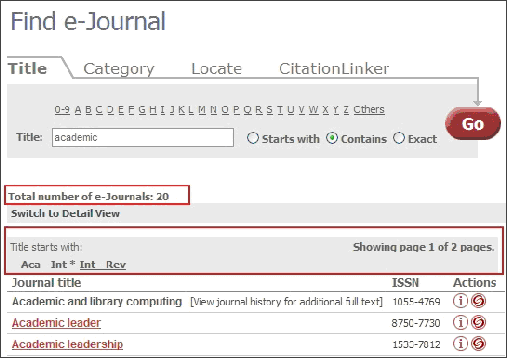 Search Set
The configuration of the Starts with search is described in Configuring the Journal Search, A-Z List, and Fetch Item.
- Browse list – A list of all the journal titles in alphabetical order, starting with the title searched or the closest point to it. From this list, you are able to browse though the entire A-Z journal list. The number of results is the total number of all journals indexed. Use the Previous and Next buttons to browse through the list. SFX tries to match the search term entered with a Main title in the A-Z index. If at least one match is found, it is the first journal displayed in the Browse list. Only main titles are searched. All other types of titles (abbreviated, alternative, uniform, and translation titles) are excluded from this type of search.
-
Contains – The result set includes all journal titles that contain the search terms entered. When multiple search terms are used, double quotes can be used to indicate a phrase search. In a phrase search, the order and adjacency of the search terms are taken into account when performing the search.
When no double quotes are used to indicate a phrase search, all search terms must exist in the main or abbreviated titles of the journals displayed, but adjacency and order of words are not taken into account.
For example, if you search for university journal, the following two results are displayed:
University journal of excellence in research Research journal from Columbia University
If you search for “university journal” only the first journal is displayed.
-
Exact – The result set includes all journal titles that match the search term exactly. The Exact search option is not shown when the AJAX auto-complete option is enabled, as its functionality is replaced by clicking a title within the auto-complete list. More information on AJAX can be found in AJAX Auto-Complete.
If the A-Z List is configured to display language control, language checkboxes are displayed. For example:
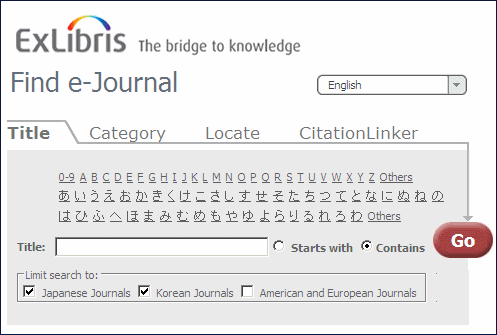
The language checkboxes allow you to restrict the results returned by SFX to a specific writing system. For example, if you select American and European Journals, the search results include only those journals with a language that uses the Latin writing system.
If you do not select a language checkbox, SFX performs a search without any restrictions.
The Limit search to checkboxes are displayed only in the Title tab of the A-Z List. In the Locate tab, the title search is performed without any writing system restrictions.
The Limit search to checkboxes are not displayed for the Starts with browse search, since the result are displayed not as a search set, but as a browsable list of all A-Z List journals.
For more information on configuring the Limit search to checkboxes, see UI Language Control.
Kanji Character Variant Searching
Some Japanese Kanji characters have variants that are treated as identical for title searching. For configuration information, see Country and Language Settings.
Category
Click the Category tab to search by category. The following is displayed:
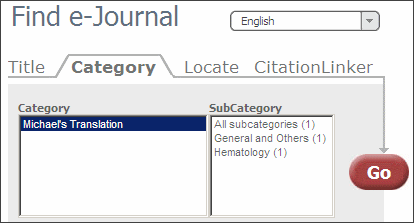
Select a category and subcategory and click Go.
Locate
Click the Locate tab to conduct an advanced search. The following is displayed:

CitationLinker
Click the CitationLinker tab to manually create an OpenURL that is then sent to the SFX server. The following is displayed:
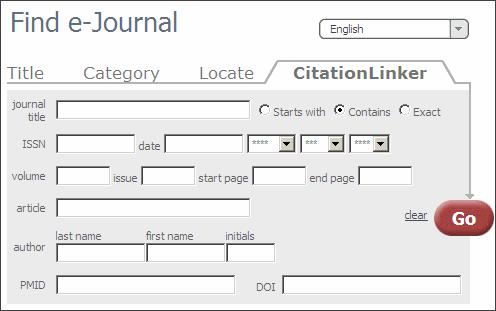
For more information, see CitationLinker and Fetch Item.
