
Configuring SIP2 Bin Configuration
Esta página describe cómo configurar SIP2 Bin para Alma. For links to all the main fulfillment documentation pages see Fulfillment.
Configurar la configuración SIP2 Bin
- Administrador general del sistema
- Administrador de servicios al usuario
You can configure rules that determine the sort bin field for SIP2 machines (self-check).SIP2 is the Standard Interchange Protocol v2, which provides a standard interface between a library's automated circulation system and a self-check machine. The sort bin is field in the protocol that determines into which bin (a phyiscal bucket inside the SIP2 machine) that a returned item is placed.. Se puede configurar el campo de conformidad con las reglas según diferentes valores, como clasificación y biblioteca de destino.
For more information on self-check machines, see https://developers.exlibrisgroup.com/alma/integrations/selfcheck.
You configure rules for self-check machine bin usage from the SIP2 Bin Configuration Rules page (Configuration Menu > Fulfillment > Library Management > SIP2 Bin Configuration).
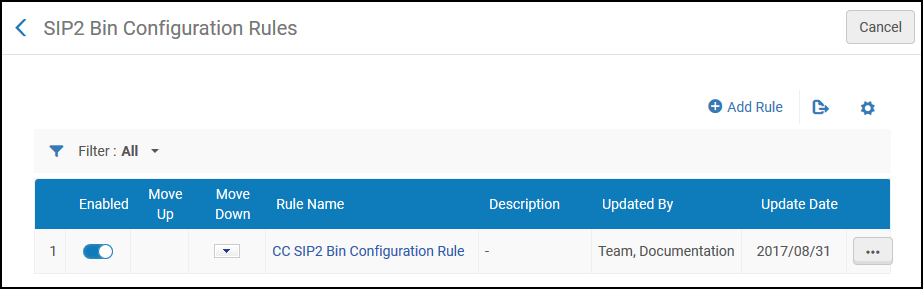
Se pueden efectuar las siguientes acciones en esta página:
- Adding a SIP2 bin configuration rule (see Adding a SIP2 Bin Configuration Rule)
- Editing a SIP2 bin configuration rule (select Edit from the row actions list)
- Deleting a SIP2 bin configuration rule (select Delete from the row actions list)
- Activar o desactivar la regla de configuración SIP2 Bin
Añadir una regla de configuración SIP2 Bin
Se puede añadir una regla de configuración SIP2 Bin.
- On the SIP2 Bin Configuration Rules page (Configuration Menu > Fulfillment > Library Management > SIP2 Bin Configuration), select Add Rule. Aparece la página Configuración SIP2 Bin.If you want to create a copy of a SIP2 bin configuration rule, select Duplicate from the row actions list. Una vez que se haya copiado la regla, se puede modificar según sea necesario.
- In the upper Input Parameters section, enter a name and description of the SIP2 Bin Configuration rule.
- In the lower Input Parameters section, specify the components of the input parameter (Name,Operator, and Value). A set of input parameters may look like this:Destination Library=ArtLibrary.The available Name field values (that is, the criteria which determine when the SIP2 Bin Configuration rule is to take effect) and their respective values are described in the following table:
Regla de configuración SIP2 Bin - Valores de parámetros de entrada Nombre Valor Biblioteca de destino La bibliotecas de la institución. For details on adding a library, see Configuring Libraries. Mostrador de circulación de destino Mostrador de circulación. For details on configuring circulation desks, see Configuring Circulation Desks. Unidades de servicio de destino Departamentos dentro de la institución, como departamentos de órdenes de trabajo y departamentos de digitalización. For details on configuring work order departments, see Configuring Work Order Departments. Desde la signatura The call number from which you specify the rule to take effect when the item's call number is numerically greater than the indicated value. Se solicita Indicates if the resource has been requested (Yes or No). Lexicográfico desde clasificación / signatura The call number from which you specify the rule to take effect when the item's call number is lexicographically (in other words, alphabetically) greater than the indicated value. Por ejemplo, 2 > 10 > 1 en orden lexicográfico. Lexicográfico a clasificación / signatura The call number from which you specify the rule to take effect when the item's call number is lexicographically (in other words, alphabetically) less than the indicated value. Por ejemplo, 1 < 10 < 2 en orden lexicográfico. Refrescar ubicación del ejemplar La biblioteca dentro de la institución donde se quiere volver a colocar el ejemplar en la estantería. For details on adding a library, see Configuring Libraries. Mostrador de circulación de autopréstamo El mostrador de circulación donde se desea realizar el autopréstamo. For details on associating a self-check machine with a circulation desk, see Self-Check Machines. A signatura The call number from which you specify the rule to take effect when the item's call number is numerically less than the indicated value.
The logic of the Lexicographical From call number and Lexicographical To call number parameters is:
First, try to compare the call number against the rule value as numbers. If this fails e.g., the call number/rule contains non-digit characters, then:
Extract only the numeric parts from the strings (removing all non-digit and non-dot characters) and compare those as numbers. If this fails as well e.g., no numeric characters are included, then:
Compare values as strings, regardless of the call number type.
- Select Add Parameter. El conjunto de parámetros internos se añade a la lista de parámetros para la regla de Configuración de ubicación SIP2 Bin.
- Repetir los dos pasos anteriores para añadir todos los parámetros requeridos para la regla.Se deben cumplir todos los parámetros de entrada para que se aplique la regla.
- In the Output Parameters section, enter a bin number – the number of the bin in which the self-check machine is to place the item. Comprobar que este número concuerde con el número de compartimento configurado en la máquina SIP2.
- Select Save to store the new rule. La regla se muestra en la página Reglas de configuración de ubicación SIP2 Bin.
- If you have defined more than one rule, use the Move Up and Move Down arrows to set the order of the rules. El orden de las reglas es importante, ya que el sistema aplicará la primera (y solo la primera) regla apropiada.
Page tags: article:topicFulfillmentConfiguring Fulfillmentproduct:almacontent:Documentationlang:englishcreating a reading roomItemless resource sharing libraryConfigure resource sharing library
