
Elaborazione dei solleciti
Questa pagina include collegamenti a informazioni per l'elaborazione delle richieste di risarcimento in Alma. For a high level overview of the receiving stage for physical items with links to details for closing PO lines, post receiving and processing claims see Receiving Material. For information on the overall purchasing workflow see Purchasing Workflow. For an overview of working with acquisitions in Alma, including links to relevant sections such as Infrastructure, Renewals, Invoicing, etc., see Introduction to Acquisitions.
- Operatore Acquisti
- Gestore Acquisti
I reclami vengono creati per le linee PO quando un Ordine non arriva o non viene attivato entro la data prevista. Claim notifications to vendors can be sent for electronic or physical PO lines, as explained below. In molti casi, più reclami da un singolo Fornitore possono essere combinati in un'unica notifica.
The following diagram provides an overview of the processing of claims:

- An order appears as In Claim only after the PO Line - Claiming job has run. (The process must be marked as Active on the Monitor Job page – see Viewing Running Jobs).
- I reclami per i tipi di Linea d'ordine (POL) con la continuità "Ordine permanente" e il Formato Inventory "Digitale" non sono attualmente disponibile in Alma. Questo non include il tipo di Linea d'ordine (POL) “Fisico - Ordine permanente non Monografia” che ha il tipo di continuità “Continuo” ed è elaborato nel meccanismo di reclamo.
Copie nei solleciti nell'elenco attività di linee d'ordine
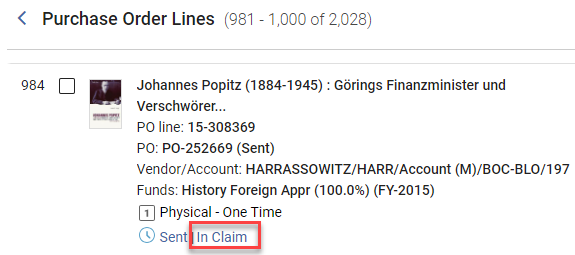
When one or more items in a PO line are in claim, the In Claim link appears beside the current workflow step (status) of the PO line in task list. For the criteria used to mark an item as in claim see Criteria for Marking PO Lines as In Claim.
In addition, for physical items, the Items in Claim section appears in the Details pane, below the Ordered Items section, and lists each of the items in the PO line that is in claim, along with its expected receiving date.
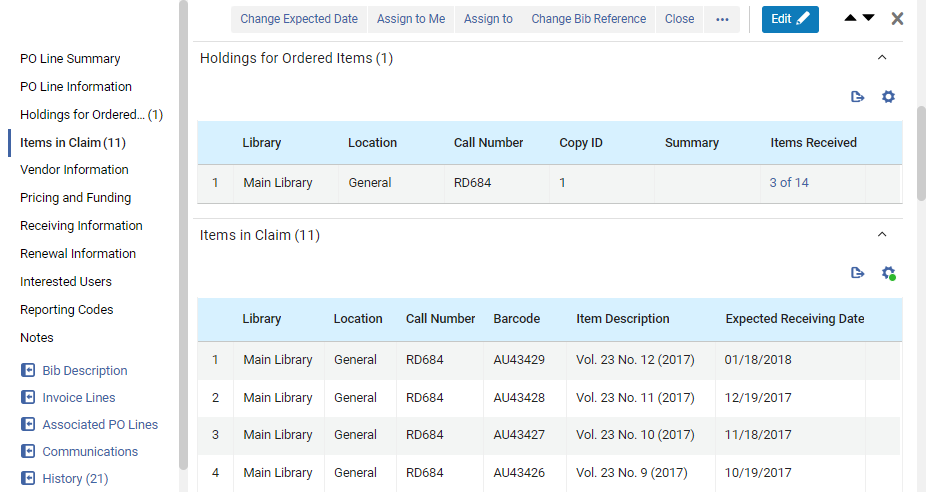
Per gli Ordini singoli Fisici, la Lista visualizza tutte le copie In ritardo non ricevute collegate a questa Linea d'ordine (POL). Select the barcode of an item in the Ordered Items section to open the item in the Physical Item Editor.(New for February 2026) Select this link to view the holdings record in a sliding panel.
It is also possible to receive a specific item in the Items in Claims section of the PO line by selecting Receive from the row actions menu. Quando si esegue l'operazione Ricevere in una Linea d'ordine (POL), viene visualizzata una finestra di dialogo che consente di aggiornare le informazioni di ricezione. See also Modifying Physical Item Information.
Per le Linee d'ordine (POL) continue Fisico, il reclamo si basa sui Modello di previsione, se Abilita. Per gli ordini in continuazione fisici, la lista mostra tutte le copie in ritardo non ricevute che appartengono agli holdings collegati a questa linea d'ordine (POL), secondo il modello di previsione. If there are items in claim, the link in the Holdings for Ordered Items section, under Items Received, opens the List of Items page in a sliding panel. In the row actions of an item, select View to open it in the Physical Item Editor. Quando una Linea d'ordine (POL) continua è in reclamo ma non ci sono copie effettive in reclamo, come quando la Linea d'ordine (POL) è in attesa di rinnovo, la sezione Copie in reclamo è vuota. For additional information about the criteria for determining which items are in claim, see Criteria for Marking PO Lines as In Claim, below.
Visualizzazione di un elenco di righe d’ordine in sollecito
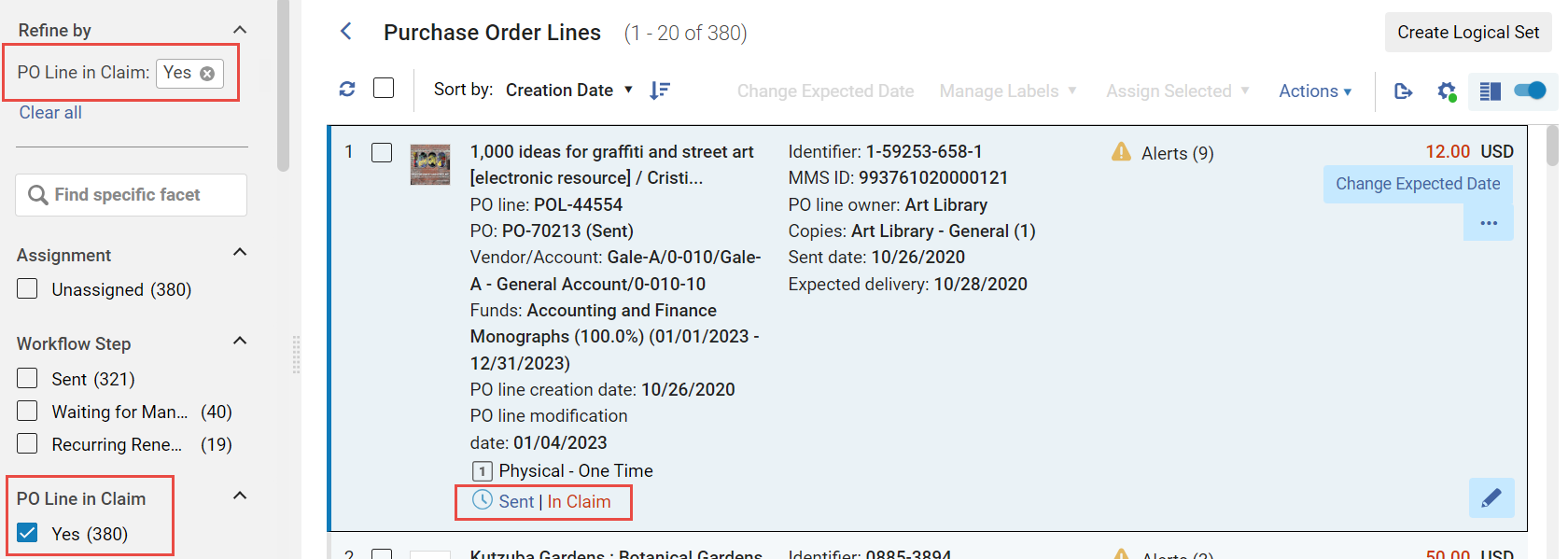
È possibile aprire una lista di righe di ordine di acquisto scadute filtrando la lista delle righe di ordine di acquisto nella lista delle attività per mostrare solo quelle in reclamo. È possibile aprire la lista delle attività con questo filtro attivato, oppure attivare il filtro dalle Faccette in qualsiasi momento quando la lista delle attività è aperta.
- Navigate to Acquisitions > Purchase Order Lines > Claim.
- In the persistent menu, in the Tasks list, select Order Lines > Claim(see Tasks in the Task List).
- Nelle Faccette, sotto Linea d'ordine (POL) in Reclamo, selezionare Sì. (For additional information about working with the facets, see New Layout 2022.)
- In the row or Details pane of a PO line that is In Claim, select the In Claim link.
Criteria for Marking PO Lines as In Claim
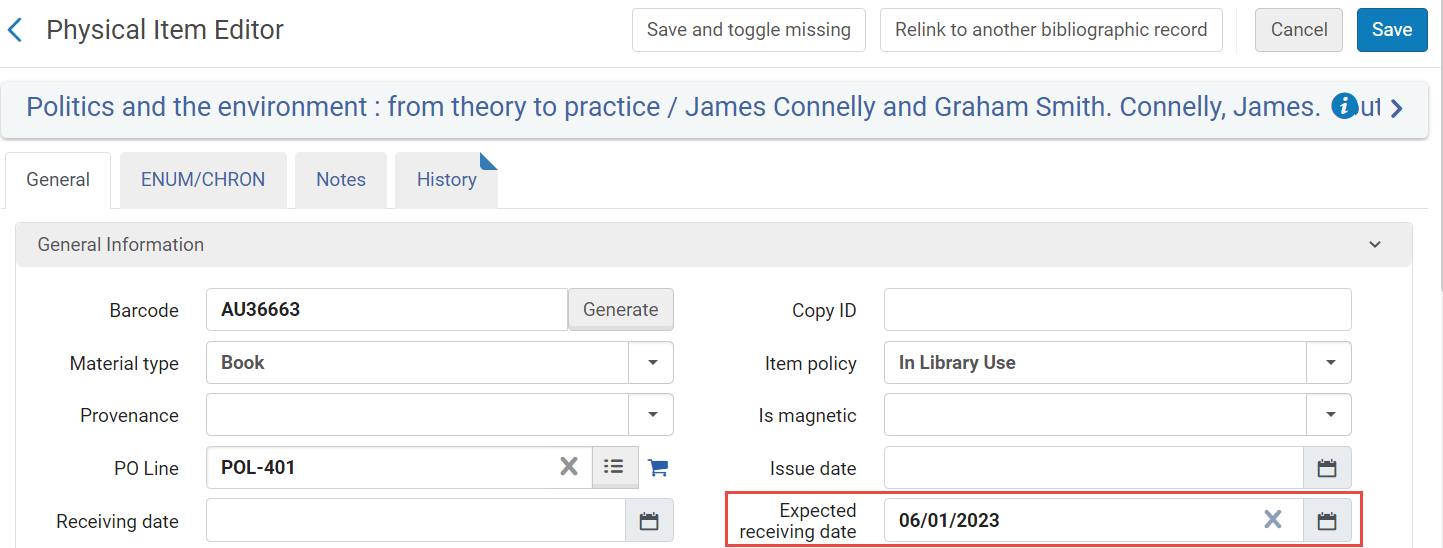
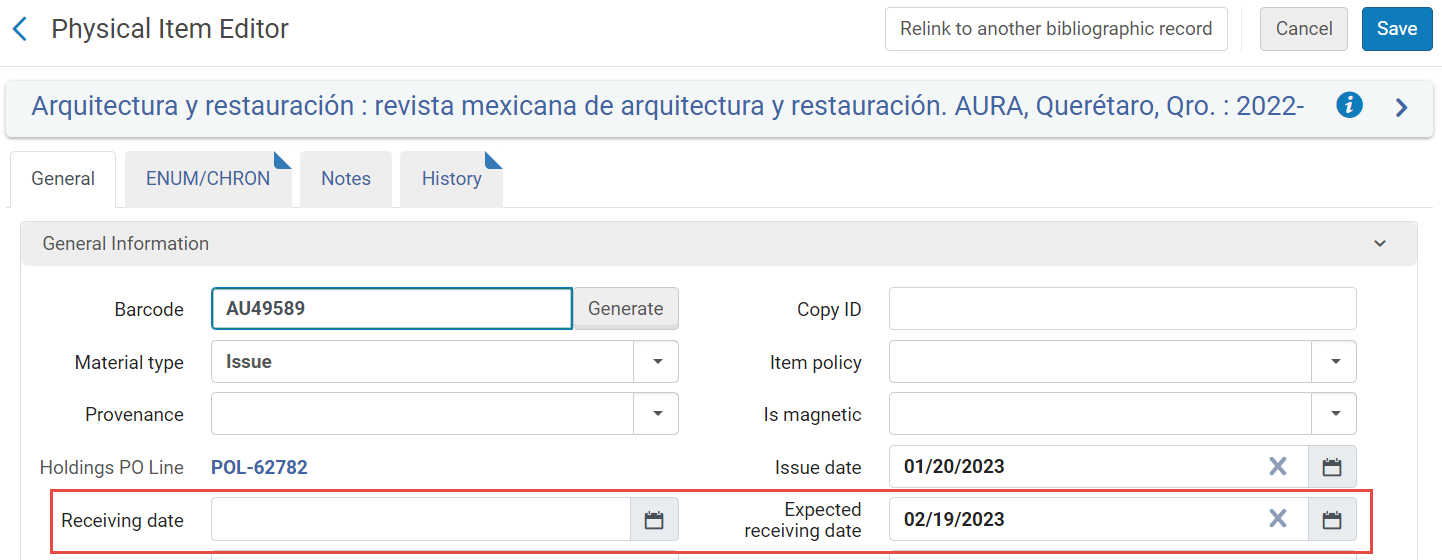
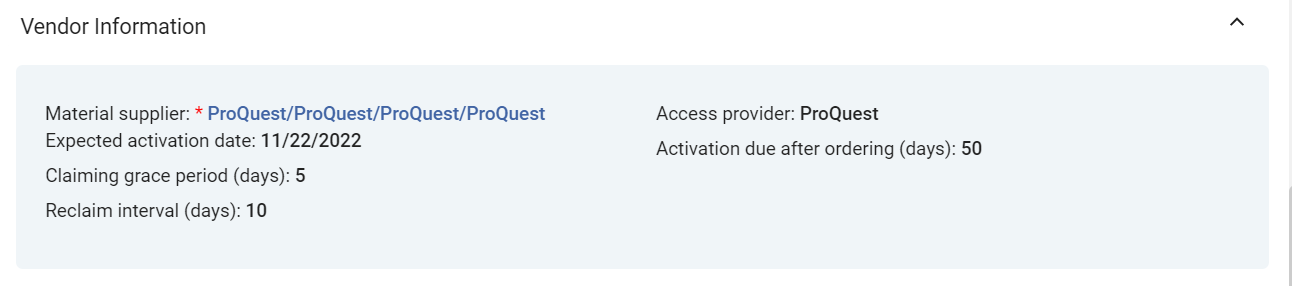
Several fields from the PO line are used by Alma to determine when a PO line is marked as In Claim. These fields appear in the Vendor Information section of the Details pane (see Manually Creating a PO Line). The expected receiving date that is calculated appears in the Expected receiving date field of the item information.
| Tipo di Linee PO | Solleciti |
|---|---|
| Per le linee fisiche di ordine singolo PO |
Alternative Ways of Specifying the Expected Receiving Date of an Item in the PO LIne's Vendor Information Section
|
| Per linee fisiche continue dell'ordine di acquisto |
When a continuous PO line does not have any expected items and the Expected receiving date is in the past, Alma marks the PO line as In Claim based on the Expected Receiving date+ grace period on the PO line. Se l'intervallo di sollecito è configurato, la data di sollecito viene ricalcolata ogni volta che la Linea d'ordine (POL) viene contrassegnata come In sollecito in base alla data di sollecito + intervallo di sollecito sulla Linea d'ordine (POL). Quando una linea di ordine di acquisto CO è in reclamo con informazioni di reclamo, modificare la Data di ricezione prevista nell'Editor di copia non rimuove la linea di ordine di acquisto dal reclamo e non ricalcola le date di reclamo.
The fields associated with the item are (see Prediction Patterns and Updating Item-Level Information):
|
| Per le linee PO elettroniche (sia singole che continue) |
Alma calculates claim dates as described above for physical PO lines, except that the Expected activation settings are used instead of the Expected receipt settings. When the Expected activation date+Claiming grace period arrives, and the PO line (either one-time or continuous) is still not activated, the PO line is marked as In Claim .
Example: If the vendor is configured with Expected activation > Days after ordering=5 and Claiming grace period=2, then if the electronic resource is ordered on April 20, it is expected to be activated by the end of April 27 (April 20 + 5 days + 2 days grace = April 27), and the PO line is marked as In Claim on April 28.
|



Notifiche di sinistro inviate tramite email/EDI
Una notifica di reclamo viene inviata automaticamente al Fornitore solo la prima volta che questa riga dell'ordine di acquisto viene contrassegnata come In Reclamo. Se successivamente un operatore aggiorna la Data di ricezione prevista della riga dell'ordine di acquisto e la riga dell'ordine di acquisto viene nuovamente contrassegnata come In Reclamo dopo la nuova data, non verrà inviata un'altra notifica.
A notification is automatically sent to the vendor using email when all of the below take place:
- The vendor has a defined email addresses (see Managing Vendors)
- If the email Claims Letter is enabled (see Enabling/Disabling Letters)
- If the relevant claim parameters is set to Y (see Configuring Other Settings):
- auto_claim parameter for physical one-time PO line
- auto_claim_co per la linea di ordine di acquisto continua fisica
- auto_claim_electronic per la linea di ordine di acquisto elettronico
For all PO line types, if EDI Claim Letters are enabled, then for vendors that use EDI and have enabled EDI claims, a notification is sent using EDI instead of email (Claims must be checked on the EDI Information tab of the vendor; see Electronic Data Interchange (EDI)).
Altrimenti, una notifica non viene inviata automaticamente, sia per email che per EDI. You can send a notification manually using email (see Communicating with Vendors).
When a claim letter is sent for a given month, and the item is never received, if the following month's item also goes into claim, a claim letter can be sent with details for both months. To enable this option, set the claim_continuous_item_level parameter to true(see Combined Email Claim Notifications below).
Alerts Generated
Quando una riga di ordine di acquisto è in ritardo, viene generato uno dei seguenti Avvisi:
- Linea d''ordine (POL) in ritardo – La Linea d''ordine (POL) non è stata Ricevere/Attiva entro il numero di giorni previsto dall''effettuazione dell''Ordine o entro la data di Ricezione/Attivazione prevista.
- Esistono reclami aperti per questa Linea d\'ordine (POL) – La Linea d\'ordine (POL) è stata contrassegnata come In reclamo. Per le Linee d'ordine (POL) Fisico Singolo (o per qualsiasi Linea d'ordine (POL), per i Fornitori che supportano le richieste EDI), viene inviata automaticamente un'email al Fornitore per richiedere informazioni sull'accesso tardivo dell'Ordine. This automatic email is sent only once per claimed item to the vendor. Note that even if the In Claim indication is removed from a PO line, this alert remains until the claim is closed. Subsequent communication with the vendor takes place using the Communications section of the PO line's Details pane (see Communicating with Vendors).
- <x> items were received out of <y> ordered – For one-time physical PO lines: How many items have been received out of the total number ordered. To see a list of all the items in the PO line: In the PO Line Summary section, select the Alerts link to open a list of the alerts attached to the PO line. Per questo avviso, seleziona Vai su Gestisci copie in ricezione. The Received Items List page opens in the sliding panel and displays the list. (Nota che devi essere nel Servizio corretto per farlo.)
- This POL has subscription interval of <Subscription interval> - at least 1 item did not arrive in this time frame – For continuous physical PO lines: The number of days that have passed since an item was received for this PO line is greater than the subscription interval. For example, if the PO line's subscription interval is 30 days, then every 30 days an item should be received. If for more than 30 days no item was received, the PO line is set to In Claim with this alert.
- Electronic resource was not activated – For electronic PO lines: The PO line's electronic resource has not yet been activated. To open the PO line in the Electronic Resource Activation Task List page, where you can activate the resource: In the PO Line Summary section, select the Sent link. (Note that you must be within the correct department to do this.) The Electronic Resource Activation Task List page opens in a sliding panel. For additional information, see Activating Electronic Resources and the Activation Task List.
Updating Claim Dates
Puoi modificare o aggiornare le date delle Linee d'ordine (POL) In ritardo. In alcuni casi, è possibile ricollegare, chiudere o Cancella una Linea d'ordine (POL) In ritardo, oppure Attiva una Linea d'ordine (POL) elettronico In ritardo. Most of these actions remove the In Claim indication, either immediately or after the PO Line - Claiming job runs.
Per dettagli, vedere le seguenti sezioni:
- Editing PO Line Information
- Updating Dates(below)
- Relinking PO Lines
- Canceling PO Lines
- Activating Electronic Resources
- Closing PO Lines
Aggiornamento date
Può inserire una nuova Data di ricezione prevista o una data di Attivazione prevista dal Fornitore. Quando la stessa data prevista si applica a più righe d'ordine, la nuova data può essere inserita globalmente per tutte le righe d'ordine applicabili. Quando viene inserita una data futura:
- Qualsiasi richiesta di Avviso applicata alle linee PO viene rimossa.
- Le righe dell'ordine d'acquisto non appaiono più come In-Claim nella lista delle attività.
- The PO lines no longer appear in the task list when the Order lines with claims link is selected in the task list (see Tasks in the Task List).
- Selezionare se aggiornare i dati globalmente o individualmente:
- Selezionare le caselle di controllo per tutte le righe di ordine di acquisto per le quali si desidera aggiornare la data (è possibile selezionare righe di ordine di acquisto da pagine diverse nella lista); il numero totale di righe di ordine di acquisto selezionate appare sopra la lista delle attività. Then, in the Actions menu, select Change Expected Date. After running this bulk action, information displays at the top of the page showing the results, including the number of successes and failures.
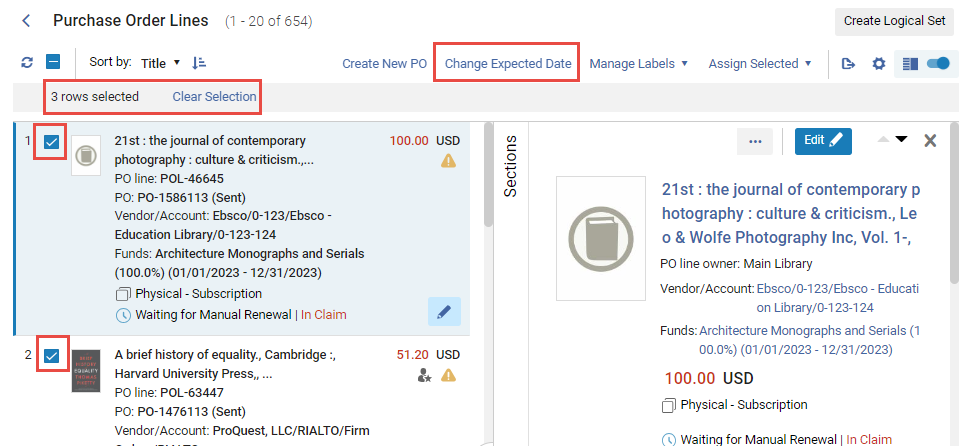
- To update the expected date for an individual PO line in the task list, select Change expected date in the row actions list (or update the date by editing the PO line – see Editing a PO Line in Review).
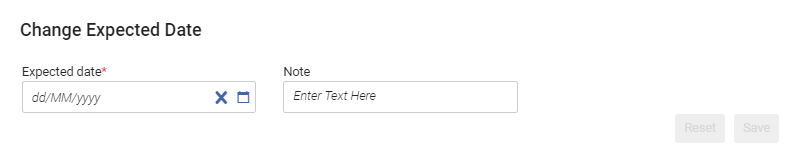 Finestra di dialogo Modifica data prevista
- Selezionare le caselle di controllo per tutte le righe di ordine di acquisto per le quali si desidera aggiornare la data (è possibile selezionare righe di ordine di acquisto da pagine diverse nella lista); il numero totale di righe di ordine di acquisto selezionate appare sopra la lista delle attività. Then, in the Actions menu, select Change Expected Date. After running this bulk action, information displays at the top of the page showing the results, including the number of successes and failures.
- Sotto Data prevista, seleziona una nuova data nel futuro.
- Facoltativamente, inserisca qualsiasi nota nell'area nota.
- Seleziona Salva. La data prevista viene aggiornata e le indicazioni di Avviso e IN Claim vengono rimosse dalle righe dell'ordine di acquisto.
Notifiche di reclamo e-mail combinate
When the PO Line - Claiming job runs, it checks if there are multiple claims from a single vendor. If there are, and the claim notification is going to be sent by email, Alma combines the notifications for all of the claims from that vendor into a single claim letter, the PO Line Aggregated Claim Letter. In un'unica notifica di questo tipo possono essere incluse sia copie fisiche che elettroniche.
"Le notifiche di reclamo inviate tramite EDI non possono essere combinate e vengono sempre inviate singolarmente per ogni Linea d'ordine (POL)."
I seguenti parametri del cliente possono influenzare la combinazione delle notifiche di reclamo. The values of these parameters can be modified in the Mapping Table page (Configuration > Acquisitions > General > Other Settings); see Configuring Other Settings (Acquisitions).
| Parametro cliente | Effetto sulla combinazione delle notifiche di sollecito |
|---|---|
| lettera di reclamo aggregata |
Controlla se più richieste sono incluse in una singola notifica:
If the claim_aggregated_letter Customer Parameter is set to TRUE, but the PO Line Aggregated Claim Letter letter is disabled, no claim letter is sent to the vendor. |
| acq_use_vendor_account_email |
Controlla se le notifiche vengono combinate per record del fornitore o per account del fornitore:
|
| claim_continuous_item_level |
For continuous orders, controls whether missing items for which a claim letter was already sent are included in new claim notifications. Ad esempio, se il fascicolo di maggio di un periodico non è stato ricevuto entro la data di richiesta e nemmeno i fascicoli di marzo e aprile sono stati ricevuti, questo parametro controlla se marzo e aprile sono inclusi nella notifica di richiesta per il fascicolo di maggio.
|
Page tags: article:topicproduct:almacontent:Documentationlang:englishClaiming grace periodExpected receipt after orderingExpected receipt dateSubscription intervalclaimsclaim PO linemissing orderclaim missing itemReceiving dateExpected receiving dateOverdue PO lineOpen claims exist for this PO lineNo item was receivedElectronic resource was not activated
