
Viewing Running Jobs
Questa pagina descrive come visualizzare i processi in esecuzione in Alma. For a page with links to information about managing jobs in Alma including scheduled and manual, see Managing Jobs in Alma.
You can view all jobs that are currently running on the Running tab of the Monitor Jobs page (Admin > Manage Jobs and Sets > Monitor Jobs). Inoltre, Alma include pagine dedicate che elencano i lavori in esecuzione e completati di tipologie specifiche. For the list of job types with their own Alma pages, see Job Types with Their Own Management Pages.
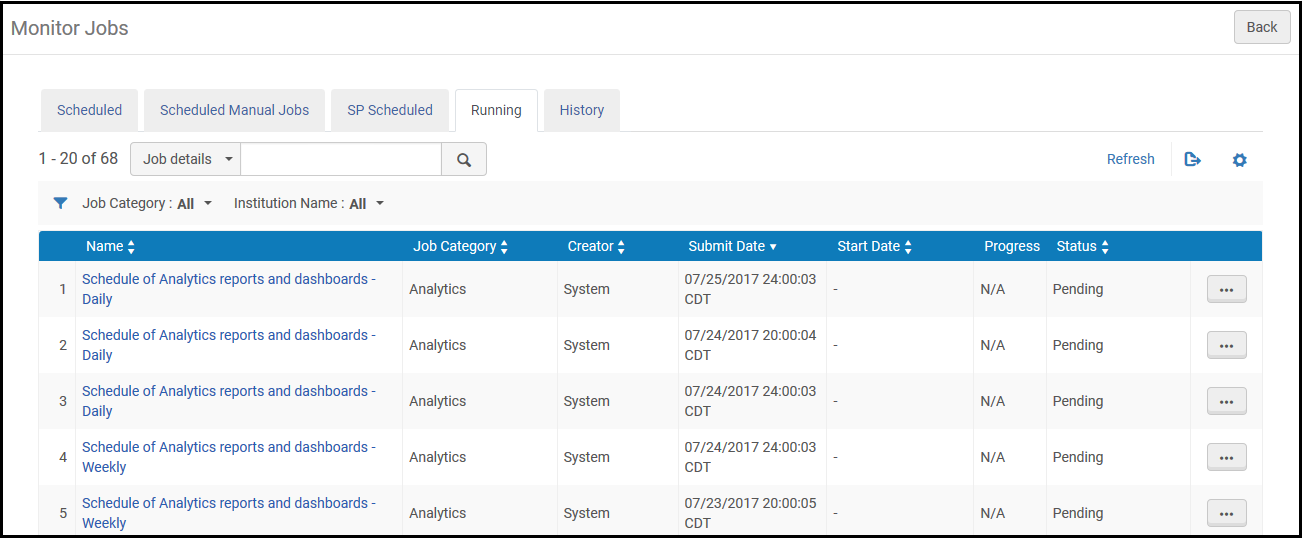
The Running tab of the Monitor Jobs page lists all running jobs. È possibile filtrare la Lista per categoria del processo e cercare utilizzando il campo di ricerca rapida Trova.
Nella Network Zone di una Rete Collaborativa, è possibile anche filtrare per nome dell'istituzione per visualizzare i lavori eseguiti su una specifica istituzione. Un amministratore nella Network Zone non può annullare un processo eseguito da un'istituzione membro.
I lavori di Alma vengono eseguiti in modalità single-thread o multi-thread. La differenza tra questi è:
- Single-threaded: questi lavori vengono elaborati in un'unica esecuzione, in un periodo di tempo relativamente breve (fino a 30 minuti). The progress of the job is not shown in the Running tab. Un esempio di lavoro a thread singolo è il job di rollover del periodo fiscale.
- Multi-threaded: questi lavori vengono elaborati in piccoli blocchi, utilizzando thread paralleli. The Running tab shows the job's progress as it is run. Esempi di un lavoro multi-thread sono Indicizzazione, Processo di pubblicazione e SIS Importazione/sincronizzazione.
Each job in the Running tab includes the following information:
| Nome Colonna | Descrizione |
|---|---|
| Nome | Il nome del processo. |
| Categoria Processo | Una categoria definita dal componente biblioteca e dall'utente ruolo associato al lavoro. |
| Creatore | L'Utente che ha eseguito il lavoro. For user-submitted jobs, the name is the user's user name. Per i lavori di sistema, il nome è System. |
| Data Invio | La data e l'ora in cui è stato inviato il lavoro. |
| Data di inizio | Data e ora di inizio del lavoro. |
| Progresso | La percentuale di avanzamento nell'esecuzione del lavoro. |
| Stato | Lo stato attuale del lavoro. Sono disponibili i seguenti stati:
|
Per aggiornare la visualizzazione della pagina durante l'avanzamento del lavoro, selezionare Aggiorna.
Job Types with their Own Management Pages
Alma include pagine che elencano i lavori in esecuzione e completati di tipi specifici. Tipi di lavoro con le proprie pagine Alma includono:
- Acquisizioni:
- Delete POs – See Deleting POs
- Roll over ledgers – see Rolling Over Ledgers
- Roll over encumbered PO lines – see Rolling Over PO Lines
- Roll over resource sharing requests – See Rolling Over Resource Sharing Requests
- Import an embedded order data or inventory using an import profile – Monitor and View Import Jobs
- EDI communication – see Monitoring EDI Jobs
- Amministrazione:
- Purge users – see Purging Users
- Waive fines – see Waiving Fines in Bulk
- Manage circulation desk operators – see Managing Circulation Desk Operators
- Health check –HealthCheck Tool
- profilo d'integrazione – Molti di questi lavori hanno le proprie pagine in esecuzione/storico. For more information, see Configuring Integration Profiles.
- Servizi:
- Change due dates – see Changing Loan Due Dates in Bulk
- Restore temporarily shelved items –Viewing Restore Request Jobs
- Upload loans and transactions created off-line – see Offline Circulation
- Mark items requiring action – see Items Requiring Action
- Run transfer requests – see Transferring All Requests to a Different Circulation Desk
- Create a fines and fees report – see Creating Fines and Fees Reports
- Match citations to inventory in bulk – see Matching Citations to Inventory in Bulk
- Lost Loans – see Viewing Overdue and Lost Loan Jobs
- Suggest alternate editions for citations – see Finding Alternate Resource Suggestions for Citations
- RENEW_PPU_LICENSE – see Renewing PPU Licenses After a Course Rollover
- Integrazione e processo di pubblicazione del profilo:
- Export/import invoice information from financial systems – see Financial Systems
- Send/receive EDI communication with vendors – see Monitoring EDI Jobs
- Publish inventories – see Publishing and Inventory Enrichment
- Import resource sharing borrowing requests – see Importing Resource Sharing Borrowing Requests From an External System
- Send requests to remote storage – see Requests to Remote Storage Facilities
- Import/export users from/to Student Information System (SIS) – see Student Information Systems
- Publish fines to a bursar system – see Bursar Systems
- Aleph Central Catalog – see Integrating an Aleph Central Catalog
- SBN – see SBN Job Report for Bibliographic and Authority Alignment
- Gestione delle risorse
- Import a file using an import profile – see Monitor and View Import Jobs
- Overlap and Collection Analysis – see Overlap and Collection Analysis
- Export records using a publishing profile – see Publishing Profiles
