
Elaborazione dei rinnovi
Questa pagina descrive come elaborare i rinnovi in Alma. For the renewal workflow see Renewal Workflow. For information on the overall purchasing workflow see Purchasing Workflow. For an overview of working with acquisitions in Alma, including links to relevant sections such as Infrastructure, Invoicing, Configuration, etc., see Introduction to Acquisitions.
- Operatore Acquisti
- Gestore Acquisti
È possibile modificare in qualsiasi momento le righe dell'ordine di acquisto contrassegnate per il rinnovo automatico o manuale. Tuttavia, non è possibile modificare il fornitore o i metodi di acquisizione di queste righe di ordine di acquisto. È possibile rinnovare anche le linee PO destinate al rinnovo manuale modificando la loro data di rinnovo.
You access and edit PO lines that are marked for renewal in the PO Lines task list (Acquisitions > Purchase Order Lines > All PO Lines). You can find the PO lines in this category by using the facets to filter the list for the following Workflow Steps(see Searching for PO Lines):
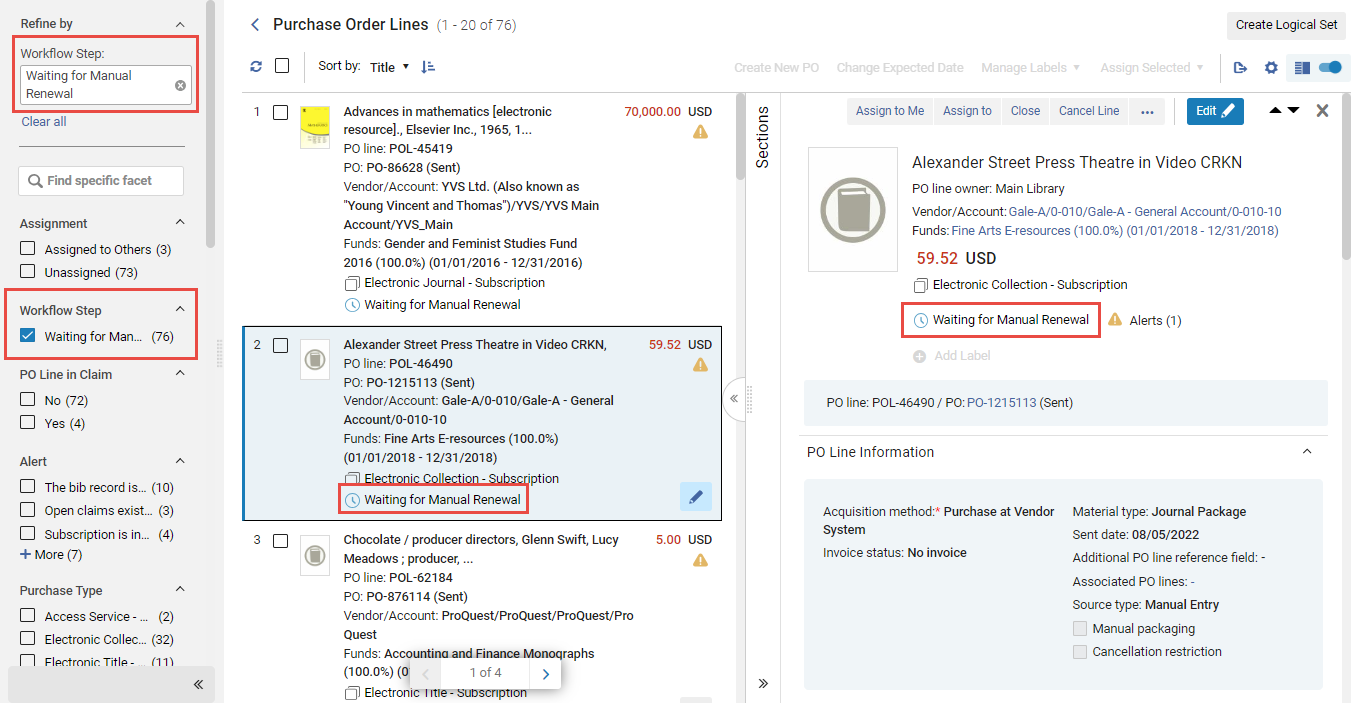
- Waiting for Manual Renewal – PO lines that must be renewed manually, and have reached the date at which they can be renewed
- Rinnovo ricorrente – linee di ordine di acquisto che si rinnovano automaticamente e linee di ordine di acquisto che devono essere rinnovate manualmente, ma che al momento non sono in attesa del rinnovo manuale
Editing PO Line Information – Renewals
PO lines that are marked for renewal can be edited to correct incorrect information, to add missing information, or to manually perform a renewal, in the Details pane. For information about the fields of a PO line, see Manually Creating a PO Line. For information about working with the Details pane, see New Layout 2022.
Può modificare qualsiasi riga dell'ordine di acquisto che Le è stata assegnata. Se una riga PO è assegnata a un altro Utente, è possibile visualizzarla ma non modificarla. Gli operatori addetti agli acquisti e i responsabili possono modificare le righe di ordine d'acquisto non assegnate, ma gli utenti senza uno di questi ruoli non possono. For information about changing the user assignment of a PO line, see Available Actions, below.
- Per accedere alla modalità di modifica, effettuare una delle seguenti operazioni:
- In the task list, select the Edit button (
 ).
- If the Details pane is opened, select the Edit button (
 ) that appears at the top of the pane.
- In the task list, select the Edit button (
- Nel riquadro Dettagli, modifichi il campo come richiesto.
- When you have finished editing the PO line, select Save in its row actions. Le modifiche che ha apportato sono state salvate. Se ha modificato la data di rinnovo di una riga di ordine d'acquisto in attesa del rinnovo manuale, l'abbonamento viene rinnovato anche per il periodo che termina alla nuova data di rinnovo e viene inviata una notifica al fornitore.
Modifica delle impostazioni di rinnovo
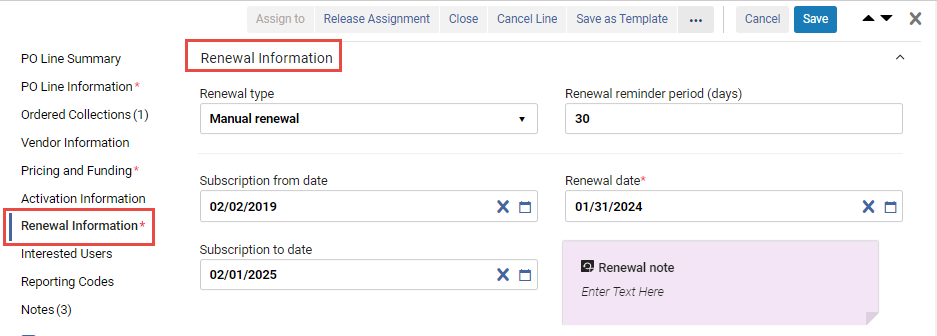
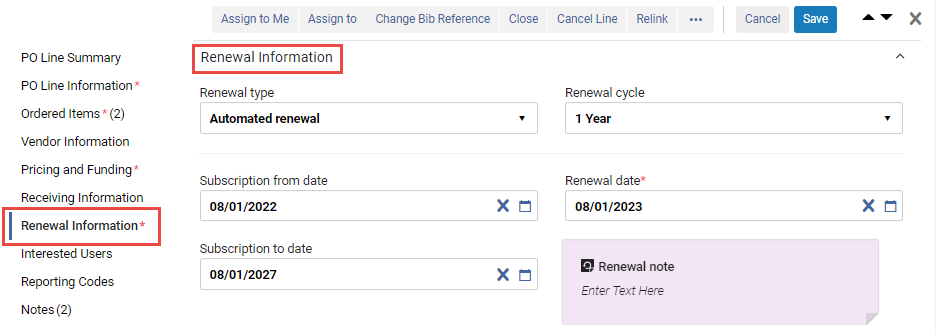
Le impostazioni di rinnovo per le linee continue di ordine di acquisto possono essere visualizzate e modificate nella sezione Informazioni sul rinnovo del riquadro Dettagli . For information about these fields, see Manually Creating a PO Line. For information about performing a manual renewal, see Managing Manual Renewals, below.
Azioni disponibili
Le seguenti azioni sono disponibili nelle azioni di riga delle linee d'ordine di acquisto contrassegnate per il rinnovo (non tutte le azioni sono disponibili per tutte le linee d'ordine di acquisto):
- Assegna a me – assegna la riga dell'ordine di acquisto a te stesso.
- Assign to – Open a dialog box in which you can assign the PO line to another user. (Se non si dispone del Ruolo necessario, non si vedrà questa opzione.)
- Rilascio della release – Per le linee PO che Le sono assegnate, rilasci l’Incarico e lasci la linea PO non assegnata.
- Relink – Change the bibliographic record to which the PO line is linked (see Relinking PO Lines).
- Cancel Line— The PO line is not renewed and is cancelled. A dialog box appears, requesting a reason for the cancellation and, if vendor notification is configured, a cancellation notification is sent to the vendor (see Cancelling PO Lines). Si noti che l'annullamento della riga PO creerà un disimpegno nel fondo.
- Change Bib Reference – Change the bibliographic record of the PO line. See Changing Bibliographic Reference.
- Save – Save the changes you made to the PO line.
- Salva e richiesta valutazione – Le informazioni inserite vengono salvate e viene richiesta una trial. Use this option if the PO line is assigned to you but you do not have the Trial Operator/Trial Manager role. The PO line's status changes to Under Evaluation and the PO line moves to the Manage Trials page with the status Requested, where the Trial Operator/Trial Manager can access it and continue with the evaluation workflow (see Evaluation Workflow). Questa opzione è disponibile solo per le linee PO elettroniche che creano Inventory.
- Salva e avvia la prova – Le informazioni immesse vengono salvate e viene avviata una trial. Utilizzare questa opzione se si dispone del ruolo di operatore di prova/responsabile di prova, la riga dell'ordine di acquisto è assegnata a Lei e si desidera avviare la trial. The PO line's status changes to Under Evaluation and the Trial Details page opens (continue with the evaluation workflow at step 3). Questa opzione è disponibile solo per le linee PO elettroniche che creano Inventory.
- Change Vendor - See Changing Vendors - Renewals.
- Chiudi – La linea d'ordine (POL) è chiusa. Select Confirm in the confirmation dialog box to close the PO line (see Closing PO Lines).
- Save as Template – Save the current settings as a template; see Managing PO Line Templates.
- Change Expected Date – For items in claim, enter a new expected receipt date or expected activation date that was received from the vendor. See Processing Claims.
- Download EDI File – For EDI vendors, download the PO that contains the PO line as an EDI file. Il file EDI viene creato ad hoc sulla base dei dati correnti dell'Ordine. See Packaging PO Lines into a PO.
Gestione dei rinnovi manuali
Per le linee PO continue, nei dettagli della linea PO è inclusa una sezione Informazioni sul rinnovo. You can see and edit this information for the selected PO line in the Details pane.
Individuazione delle linee PO che sono in attesa di rinnovo manuale
When the PO Line - Renewal job runs, the Workflow Steps of the PO Lines that are due for manual renewal are changed to Waiting for Manual Renewal. È possibile aprire una lista di linee PO che attualmente richiedono il rinnovo manuale filtrando la lista delle linee PO nella lista delle attività per mostrare solo quelle che si trovano in questo step del flusso. Può aprire la lista delle attività con questo filtro attivato, oppure attivare il filtro dalle Faccette in qualsiasi momento quando la lista delle attività è aperta.
- Navigate to Acquisitions > Purchase Order Lines > Renew.
- In the persistent menu, in the Tasks list, select Order Lines > Renew(see Tasks in the Task List).
- Nelle Faccette, sotto Fase del flusso di lavoro, selezionare In attesa di rinnovo manuale. (For additional information about working with the facets, see New Layout 2022.)
Esecuzione di un rinnovo manuale
If a PO line is marked marked for manual renewal, when the renewal date arrives, its Workflow Step is changed to Waiting for Manual Renewal. You can then manually update the renewal date and any other fields in the Renewal Information section of the PO line's Details pane that require modification.
The fund and price are taken from the previous year if a PO Line Rollover was done (see Fiscal Period Closure). Tuttavia, se necessario, è possibile modificare manualmente il valore.
- In the PO Line list, in the Details pane of the PO line, in the Renewal Information section, modify the Renewal date of the PO line to the last date of the next subscription period.
- Seleziona Salva. L'abbonamento viene rinnovato per il periodo che termina alla nuova data di rinnovo. When this date minus the renewal reminder is a future date, the Workflow Step of the PO line is once again set to Recurring Renewal, and a notification is sent to the vendor.
See Renewal Workflow for an overview of the process.
Annullamento di un abbonamento
If a PO line is marked for manual renewal and you do not want to renew it, you can cancel it as described in Available Actions.
Changing Vendors – Renewals
È possibile cambiare il Fornitore a cui viene inviata la riga dell'ordine di acquisto durante il rinnovo della stessa. La modifica del Fornitore chiude la riga PO e ne crea una nuova.
- After you have completed editing the PO line (see Editing PO Line Information – Renewals), select Change Vendor. Viene visualizzata la finestra di dialogo Cambia Fornitore:
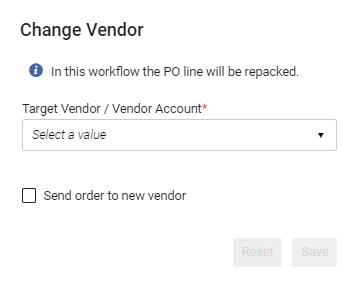 Finestra di dialogo Cambia Fornitore
- Selezionare l'Account target del fornitore,
- Se desidera inviare il nuovo Ordine al Fornitore target, selezioni Invia Ordine al nuovo Fornitore.
-
Seleziona Salva. Si verifica quanto segue:
- La linea PO attuale è chiusa.
- Viene creata una nuova riga PO per il nuovo Account del fornitore target.
- La nuova riga dell'ordine di acquisto è associata all'inventario della riga dell'ordine di acquisto chiusa.
- La nuova riga dell'ordine di acquisto è impostata sullo stato In revisione, da cui l'operatore può aggiornare la nuova riga dell'ordine di acquisto con nuove informazioni, in base alle informazioni comunicate al nuovo target fornitore.
Vendor Controlled Renewals
To save duplication of work by simultaneously renewing the vendor subscription and the matching continuous PO line in Alma, you can enable a vendor to automatically update a PO line once the subscription is renewed on the vendor side. At this time, the option is available for ProQuest (RenewMe) and EBSCO (EBSCONET) renewable subscriptions.
To enable this functionality for ProQuest renewable subscriptions, please contact ProQuest RenewMe customer support at:e-renewals@proquest.com.
To enable this functionality for EBSCONET renewable subscriptions, please contact the EBSCO Integration support team at ils-ediservices@ebsco.com.
- Generi la chiave API. To do so, see the Developer Network.
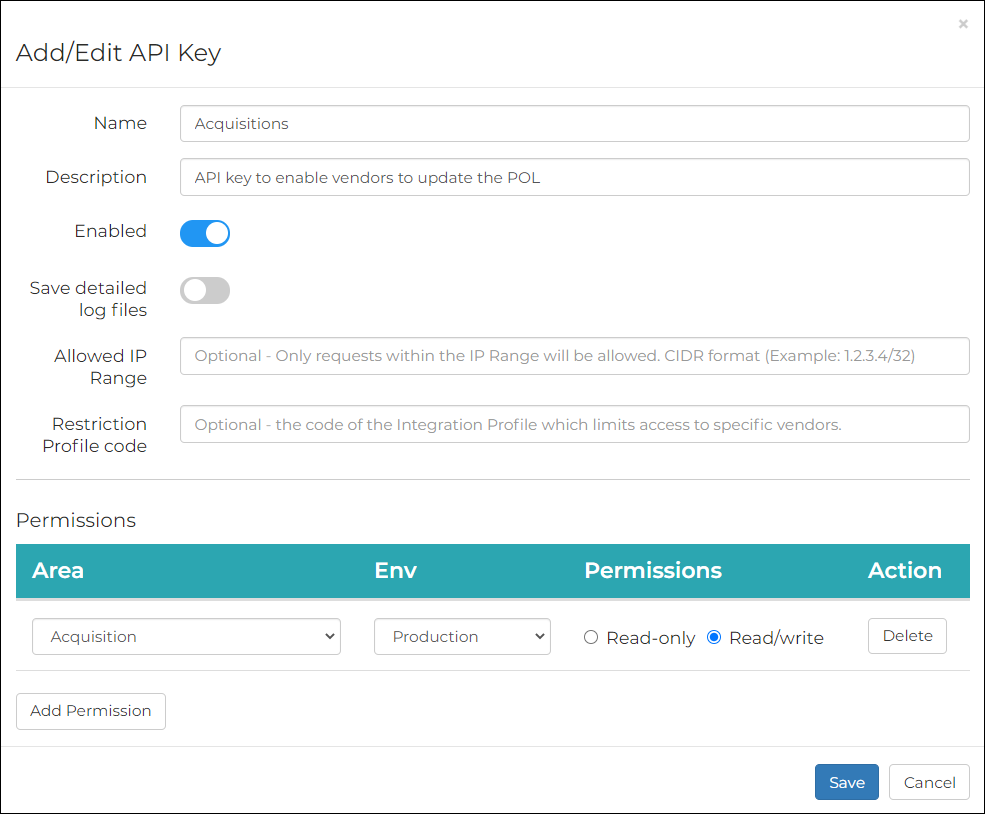 Aggiungi/Modifica chiave API
- Fornisca al Fornitore la Sua chiave API per consentirgli di eseguire aggiornamenti alla riga d'ordine in Alma.
- For ProQuest, send the API key to e-renewals@proquest.com.
- For EBSCONET, enter the API key within the designated field while setting up the EBSCONET ILS integration profile see more instructions here.
- Quando il processo di rinnovo è completato, la riga d'ordine Alma corrispondente viene aggiornata automaticamente con:
- Prezzo
- (Prossima) data di rinnovo
- Nota di rinnovo - compilata con le informazioni di rinnovo inviate dal fornitore.
- After the functionality is enabled by ProQuest RenewMe customer support, go to Acquisitions > Vendors > [select Edit from the row actions of the vendor] > Vendor Details > System Integration.
- Select the Renew at Vendor System checkbox.
- Selezionare il Tipo di Sistema.
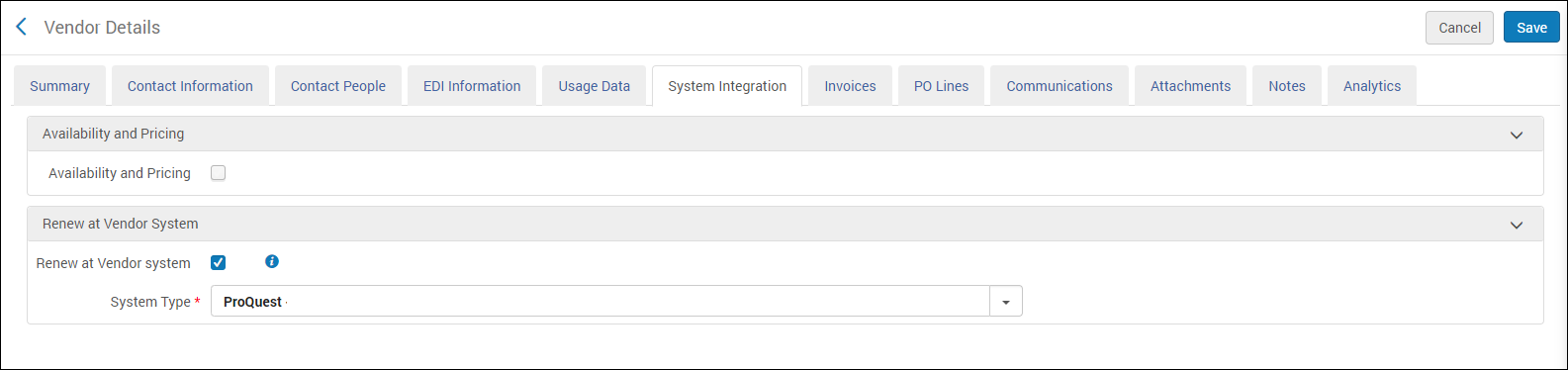 Vendor Details > System Integration
- Seleziona Salva. From this point onward, a Renew at vendor system button is added to the Purchase Order Line Details page of all continuous PO lines associated with the vendor.
When you select this button, a ProQuest RenewMe form which includes the Alma PO line number opens (in a separate browser tab). Selezioni Continua per procedere alla pagina di pagamento di RenewMe. For more information on how to renew the subscription in ProQuest, see the RenewMe program site.
Quando il processo di rinnovo è completato, la riga d'ordine Alma corrispondente viene aggiornata automaticamente con:- Prezzo
- (Prossima) data di rinnovo
- Renewal Note - populated with the renewal information sent by the vendor.
This process can also be launched from the vendor's email notification, which is sent to your institution periodically.
Il numero della riga PO corrispondente deve essere incluso nel modulo di rinnovo del fornitore. Se manca il numero della riga d'ordine (POL), la riga d'ordine non viene rinnovata in Alma.
If you are adding a new subscription on the vendor platform, and a new matching PO line in Alma, you must contact the vendor and give them the PO line number to associate with the subscription.
Page tags: article:topicproduct:almacontent:Documentationlang:englishRenewal DatePO Lines to Renewrenew PO linechange PO line vendoredit PO line renewalrenewal cyclemanual renewalrenewal reminder
