
Configuring Parameters of a Resource Sharing Library
Questa pagina descrive come configurare il parametro di una biblioteca di condivisione delle risorse, inclusa una biblioteca di condivisione delle risorse senza elementi. For links to all the main fulfillment documentation pages see Fulfillment.
For a list of links to the main resource sharing online help pages, see Resource Sharing.
Configuring Parameters of a Resource Sharing Library
Ripeta i due passaggi precedenti per aggiungere tutti i parametri richiesti per la regola.
- Amministratore di Sistema Generale
Le biblioteche all'interno di un'istituzione o di un campus possono essere configurate per avere relazioni che consentono agli utenti di effettuare la restituzione o il prestito delle Risorse (bibliografiche) in un'altra Localizzazione di biblioteca, inviare copie avanti e indietro o acquistare copie per conto reciproco. Se una Biblioteca è configurata per fare questo per le Biblioteche di altre istituzioni (e non solo all'interno dell'istituzione), è nota come Biblioteca dei Servizi Interbibliotecari.
A resource sharing library must have its own Fulfillment Unit (see Configuring Fulfillment Units) in order to be able to configure the Borrowing Request Rules and the Lending Request Rules with the relevant Borrowing Resource Sharing Terms of Use and the Lending Resource Sharing Terms of Use.
See Adding a Library for more information about configuring libraries.
- Navigate to the Summary tab page (Configuration Menu > Fulfillment > Library Management > Opening Hours).
- Set the Configuring filter (top left of the page) to the scope of the resource sharing library.
- Modify the Organization Unit Name and Description fields, as necessary (see Configuring the Institution and it's Libraries).
- Enter your ISIL code (see ISIL Code for more information).
-
Nella sezione Servizi interbibliotecari, selezionare Biblioteca dei Servizi Interbibliotecari. Vengono visualizzati i campi della sezione Informazioni ILL (Condivisione Risorse).
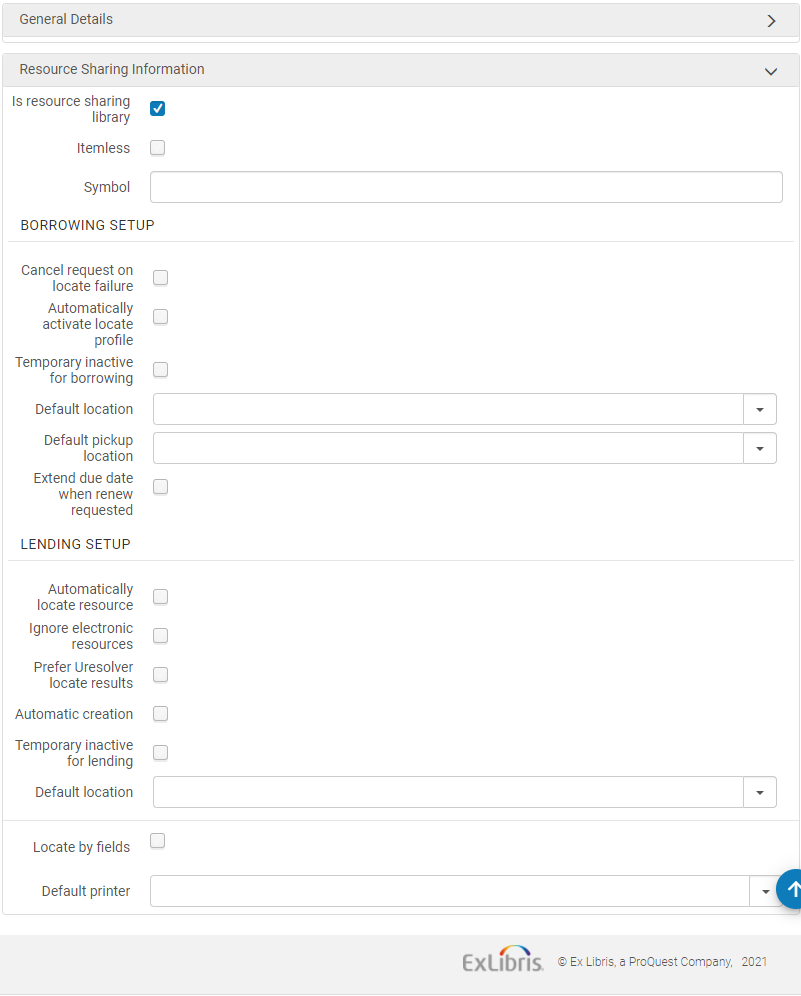
- Select Itemless to designate the library as an itemless resource sharing library (see Configuring an Itemless Resource Sharing Library).
- Inserisca il simbolo ISO della Sua biblioteca di condivisione delle risorse nel campo Simbolo ISO per indicare che la biblioteca opera con ISO.
- Per impostare le richieste di prestito in uscita:
- When Cancel request on locate failure is selected, Alma automatically cancels requests for which the borrowing locate process was not able to find a potential partner (see Borrowing Locate Process).
Seleziona Attiva automaticamente il Profilo di localizzazione per indicare che quando una Regole di assegnazione Rota è soddisfatta, un Profilo di localizzazione viene assegnato alla Rota attivata, in base alla Regole di assegnazione Rota. For details on rota assignment rules, see Configuring Rota Assignment Rules.
When selecting this option, the borrowing locate process is automatically triggered when a borrowing request is created from any interface – Alma, Primo or API (see Borrowing Locate Process).
La Localizza automatica può essere Attiva solo se sono state Attiva anche le Regole di Incarico Automatica dei Rota per allegare automaticamente una Rota alla richiesta. Il processo Localizza viene quindi eseguito sulla Rota collegata automaticamente.
- Selezionare Temporaneamente inattivo per la richiesta di prestito in uscita per indicare che questa biblioteca è bloccata per le richieste di prestito in uscita.
- When selected, the field,Inactive dates range, is displayed. Seleziona un intervallo di date per specificare che il blocco è applicabile solo durante il periodo di tempo specificato. Se l'intervallo di date viene lasciato vuoto, la biblioteca rimane inattiva finché non si deseleziona la casella di controllo Temporaneamente inattiva per il prestito. Questo stato inattivo blocca la Richiesta di prestito in uscita per questa biblioteca, indipendentemente dal fatto che venga creata tramite l'UI, un'API o in Primo. For Primo users, the resource sharing request link is hidden. For Alma UI users and API processes, when requesting an item, a block message is displayed. Il messaggio di blocco può essere ignorato nell'interfaccia utente di Alma.
- Nel campo Localizzazione di biblioteca predefinita, selezionare la localizzazione di biblioteca temporanea default in cui viene spostato l'inventario designato per i servizi della richiesta di prestito in uscita.
- Nel campo Luogo di ritiro predefinito, selezioni la biblioteca che sarà il default Luogo di ritiro per la richiesta di condivisione delle risorse. Se il campo Luogo di ritiro default viene lasciato vuoto, il campo Luogo di ritiro nel modulo di condivisione delle risorse sarà vuoto.
- To extend the loan due date of an RS loan: When a lender is asked to renew an RS loan that is about to become overdue, the loan due date can be extended by a configurable short period (up to nine days after the request renew date). In questo modo si evita che il prestito diventi scaduto e che vengano accumulate sanzioni mentre si contatta il creditore per concordare un rinnovo e una nuova data di scadenza. Once the renewal is confirmed with the lender, the loan and the borrowing request are renewed on the agreed upon due date (using the existing workflow).
Activate this option by selecting the "Extend due date when renew requested" checkbox and populating the new 'Extend due date by (days)' field on the resource sharing library configuration page.
Le "regole di stampa automatica" non vengono considerate se l'operatore clicca manualmente sul pulsante "Stampa ricevuta".
- Per configurare la richiesta di prestito:
Seleziona Individua automaticamente la risorsa affinché Alma tenti di localizzare la risorsa richiesta localmente. (For more information on this process, see Lending Locate Process.)
When selecting this checkbox, four additional checkboxes appear:
- Select the Reject request when locate fails checkbox to reject a lending request when the locate does not find any matching items.
- Select the Reject request when no available items checkbox to reject a lending request when there are no items available in place.
- Select the Reject request when no requestable items checkbox to reject a lending request when there are no items that are requestable for resource sharing, according to the applicable policy.
- Select the Reject request when only electronic available checkbox to automatically reject items that are only available electronically. When Reject request when only electronicavailable is selected, set the Electronic Rejection Rules to control automatic rejection rules based on the resource's license terms. To customize the description and translation text of request reject reasons when received (and recorded as a request note) on the borrower side, see Configuring Request Reject Reasons.
- Use the Electronic Rejection Rules to cause requests for electronic resources that are linked to licenses with any of the following terms to be automatically rejected:
- Prestito interbibliotecario elettronico
- Prestito interbibliotecario (stampa o fax)
- Indicatore obbligatorio di conservazione dei registri del prestito interbibliotecario
Trasmissione elettronica sicura del prestito interbibliotecario
Se si configura una regola per rifiutare una richiesta di una risorsa collegata a una licenza con uno qualsiasi dei termini sopra indicati, la richiesta verrà rifiutata. Non c'è alcun significato speciale per un termine di licenza o l'altro in merito a questo rifiuto automatico.
Watch the Electronic Rejection Rules video (5:27 min.).
- Seleziona Ignora risorsa elettronica per il processo di Localizza per considerare solo gli elementi fisici.
- Ignore electronic resources for physical-only requests- If selected, then the lender locate ignores electronic matches when the lending request is for a physical resource.
Seleziona Creazione automatica per rendere visibile il campo Partner nella pagina Fornitura di documenti. For details on automatic creation of lending requests from shipping items, see Shipping Items.
Alma può essere configurata per mostrare la preferenza per gli articoli in formato elettronico nel processo di localizzazione lato prestatore. Se un articolo richiesto viene trovato nel formato elettronico, tale risorsa viene considerata l’unica opzione per il prestatore. Altre possibili opzioni fisiche vengono prese in considerazione solo se non vengono trovate risorse elettroniche. This behavior is activated by the "Prefer Uresolver locate results" option which can be selected from the Lending Setup section of the resource sharing library. Electronic resources are considered a match only if their coverage matches the details of the request. Ciò influisce sia sul processo di localizzazione automatico che su quello manuale da parte del creditore.
- Select Temporarily inactive for lending to indicate that this library is blocked for borrowing requests. When selected, the following two options appear:
- Inactive dates range – Select a date range to specify that the block is only applicable during the specified time period. Se l'intervallo di date viene lasciato vuoto, la biblioteca rimane inattiva finché non si deseleziona la casella di controllo Temporaneamente inattivo per il prestito . Questo stato inattivo blocca la richiesta di prestito per questa biblioteca.
- (New for February 2026)Turn off lending for – Enables you to selectively deactivate specific lending services, rather than deactivating all services. You can deactivate Everything, temporarily deactivate Physical lending while keeping digital services active, or temporarily deactivate Digital from Physical lending while continuing physical shipping or electronic lending.
- In the Default location field, select the default temporary location to which designated inventory is moved for fulfillment of the lending request.
-
Select the Locate by Fields checkbox to filter the search in the resource sharing library. This process narrows the results available for the locate process. Questo processo restringe i risultati disponibili per il processo di individuazione.
La pagina si aggiorna e visualizza il nuovo campo di ricerca.
Seleziona i campi in base ai quali desideri che le Risorse (bibliografiche) vengano Ricerca nella Biblioteca dei Servizi Interbibliotecari.
- titolo
- Autore
- ISBN/ISSN
- Numero di Controllo del Sistema
- Edizione
- LCCN
- Altro ID Standard
- Codice a barre
- DOI
- Select Yes in the Locate only if all fields match field if you want the locate to be successful only when all selected fields match. If set to No, then:
- If the request has identifiers (such as ISBN, OCLC number, or LCCN), locate is successful if any of the selected identifier fields find a match. Other fields, such as Title and Author, are not used for the match.
- If no identifier fields exist on the request, locate is only successful if all of the other selected fields match.
- Selezionare la stampante predefinita per definire la stampante utilizzata per questa biblioteca di condivisione delle risorse quando un utente esegue un'azione che può essere eseguita quando non è alla scrivania (ad esempio la spedizione). Quando l'Utente è alla scrivania, la stampante default è basata sulla scrivania.
- Seleziona Salva.
Per informazioni sulla configurazione di una biblioteca per SLNP, consultare la Rete degli Sviluppatori.
Configurazione di una Biblioteca ILL senza esemplari
Per creare una biblioteca di condivisione risorse senza elementi, è necessario disporre di uno dei seguenti ruoli:
- Amministratore di Sistema Generale
- Amministratore di Sistema
- Operatore dei servizi di evasione (per la biblioteca di condivisione delle risorse)
- Responsabile dei Servizi (per la condivisione delle risorse della biblioteca)
Una Biblioteca dei Servizi Interbibliotecari senza copie non gestisce le copie. Questa biblioteca funge da intermediario per altre Biblioteche dei Servizi Interbibliotecari, trasferendo le richieste da una Biblioteca prestante a una biblioteca ricevente, senza un inventario effettivo delle copie.
Un processo di condivisione delle risorse gestito da una biblioteca di condivisione risorse senza elementi ha i seguenti attributi speciali:
- Le copie ricevute come parte di un processo di richiesta di Servizi interbibliotecari non vengono catalogate come copie temporanee.
- È possibile Invia Richiesta di prestito in entrata senza allegare un copia di Inventory reale alla richiesta inviata.
Tutti gli altri aspetti del processo di condivisione delle risorse, come lo scambio di messaggi tra la biblioteca richiedente e la biblioteca prestante, sono identici al processo gestito dalla normale biblioteca di condivisione delle risorse.
To designate a resource sharing library as itemless, select the Itemless checkbox on the Organization Unit Details page (see step 3 in To configure resource sharing library information:).
- Create a resource sharing borrowing request (Fulfillment > Resource Sharing > Borrowing Requests, select Add > From Search or Add > Manually). Assicuratevi di selezionare Ritiro presso = Biblioteca di condivisione risorse e di assegnare il partner alla richiesta.
- Selezionare Invia. Lo Stato della richiesta = Richiesta inviata al partner.
- Per ricevere la risorsa richiesta, selezioni Ricevi per la richiesta. Viene visualizzata la pagina Copia ricevuta.
- Nel campo Nota interna, inserisci una nota per indicare le informazioni che descrivono lo scopo per cui la Risorse (bibliografiche) è richiesta. The request's status changes to Physically Received by Library.
When shipping an itemless lending request, ensure that the Scan Item Barcode field is blank on the Shipping Items page (see Shipping Items).
For more information about itemless broker requests, see the More Information About Itemless Broker Workflow video (14:44 mins).
Temporarily Closing a Resource Sharing Library for Lending with Inactive Date Range
(New for May 2026)
To configure contact information, you must have one of the following roles:
- Gestore attività Servizi
- Amministratore Servizi
- Fulfillment Operator (requires opening a ticket with the Clarivate Support team to enable it)
This feature enables staff members to temporarily close the library for lending.
- Select the Temporary Inactive Date Ranges (Fulfillment > Resource Sharing > Temporary Inactive Date Ranges) link.
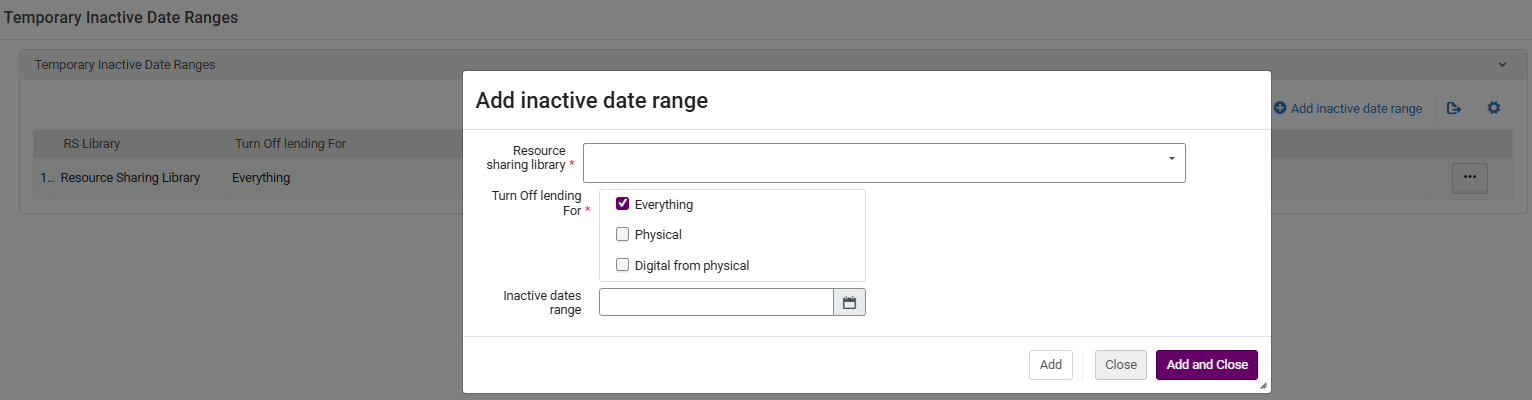
- Select Add inactive date range.
-
Enter the Resource sharing library, select what to turn off lending for, and enter the Inactive dates range.
-
The library/ies that were added as inactive appear in the Temporary Inactive Date Ranges page.

