
リモートストレージ施設の設定
リモートストレージ機能とその動作の一部を定義します。
このページでは、機関内でリモートストレージを構成する方法について説明します。For links to all the main fulfillment documentation pages see Fulfillment.
- 一般システム管理者
図書館には、リソースの一部が保存されるリモートストレージ機能があります。ユーザーは、これらのリモートストレージロケーションに直接物理的にアクセスすることはできません。代わりに、ユーザーは、リモートストレージ施設にあるアイテムをリクエストする必要があります。その後、リクエストされたアイテムは、ユーザーが受け取れるロケーションに配送されます。For more information, see Requests to Remote Storage Facilities.
機関内のリモートストレージ機関を定義します。図書館に物理的なロケーションを追加するときに、そのロケーションにリモートストレージ機能があることを指定できます。For details, see Configuring Physical Locations.
You configure the remote storage facilities from the Remote Storage List page (Configuration Menu > Fulfillment > Locations > Remote Storage) or (General System Administrator only)Configuration Menu > General > Locations > Remote Storage)
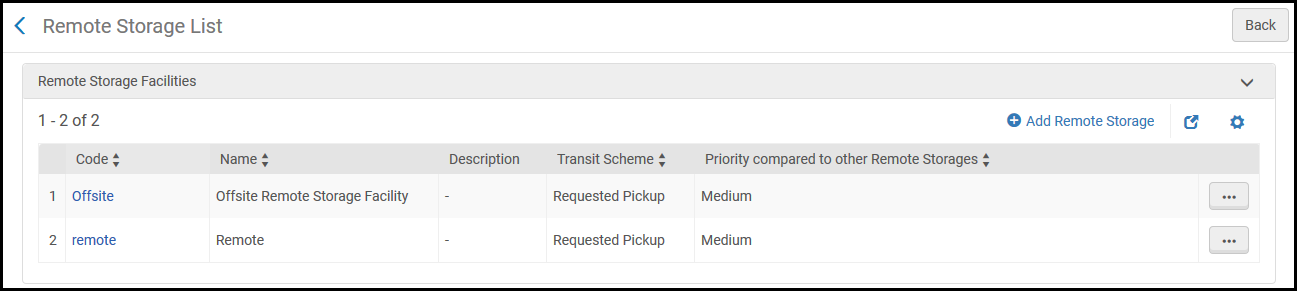
このページでは、次のアクションを実行できます。
- Add a Remote Storage Facility (see Adding a Remote Storage Facility)
- Edit a Remote Storage Facility (see Editing Remote Storage Facility Details)
- リモートストレージ施設を削除 (行のアクションリストで削除)
For information on how items requested from a location with "remote storage" checked are added to the xml file that Alma uses to communicate with third-party inventory products, see the Developer Network.
Adding a Remote Storage Facility
新しいリモートストレージ機能を機関に追加できます。After you add a remote storage facility, the facility will be included in the Remote storage drop-down list when you add a physical location to one of the institution's libraries.For details, see Configuring Physical Locations.
- [リモートストレージリスト]ページ([設定メニュー]> [フルフィルメント]> [ロケーション]> [リモートストレージ])で、リモートストレージの追加を選択します。[リモートストレージの追加]ダイアログボックスが表示されます。[リモートストレージの追加]ダイアログボックス
- 新しいリモートストレージ機能のコード(必須)、名前(必須)、説明(オプション)を入力します。
- In the Prefer over other locations drop-down list, select from the following options:
- Set as last option- When you select this option, the remote storage location will only be selected if there are no other available holdings.
- Do not prefer over other locations - When you select this option, the remote storage items are considered like any other item for prioritization purposes.
- Prefer over other locations - When you select this option, Alma will select the remote storage location as the preferred holding.
For details on the Resource Request Monitoring page, see Managing Requests and Work Orders. - 他のリモートストレージと比較した優先度ドロップダウンリストから、ストレージ機能の優先度を選択します。利用者が特定のタイトルをリクエストし、そのタイトルが複数のリモートストレージ施設に存在するとします。その場合、システムはこのリクエストを最高の優先順位を持つリモートストレージ施設に配置します。
- Select an integration profile for the storage facility from the Integration profile drop-down list.リモートストレージシステムがAlma以外のシステムによって管理されている場合、Almaは指定された統合プロファイルを使用して他のシステムと通信します。For information on configuring a remote storage system profile, see Requests to Remote Storage Facilities.
- リモートストレージ施設の通過スキームを選択します。通過スキームでは、リクエストしたユーザーが受け取るためにリモートストレージ施設からリクエストされたアイテムを配送するロケーションを定義します。
- デスクを所有する – リクエストを提供する施設の所有デスクにアイテムが転送され、そこからアイテムが受け取り場所まで送られます。
- リクエスト済みピックアップ – 商品は、リクエストされた受け取り場所に直接送られます。
- リモートストレージ機能でリクエストされたアイテムをデジタル化する場合は、デジタル化リクエストをローカルで処理するチェックボックスをオンにします。
- アイテムを返却するときにアイテムプロセスタイプをリモートストレージへの通過中に設定するには、リターン時にリモートストレージへの通過中として定義チェックボックスをオンにします。このオプションは、ロケーションがリモートストレージに接続されているアイテムを操作するときに使用されます。アイテムがASRSに返却されると、アイテムが配置されていることを示すメッセージが送信されます。アイテムのステータスは配置済みのアイテムに変わり、リモートストレージへの通過中プロセスタイプは削除されます。このオプションが選択されていない場合、Almaは、アイテムが実際にリモートストレージのロケーションに戻る前であっても、アイテムが配置済みであることを示します。このオプションは、IRメッセージをサポートするASRSでのみ使用可能です。
- デフォルトでは、手動による説明のリクエストを許可するが選択されています。チェックボックスが選択されていない場合、リモートストレージに対して手動の説明を含むリクエストが入力されない場合があります。この場合、手動説明オプションはリクエストフォームに表示されません。
- 追加して閉じるを選択して、ダイアログボックスを閉じます。新しいリモートストレージ機能が、リモートストレージリストページのリモートストレージ機能のリストの下部に表示されます。
リモートストレージ機能の詳細の編集
リモートストレージ機能の詳細を編集できます。
- [リモートストレージリスト]ページ([設定メニュー]> [フルフィルメント]> [ロケーション]> [リモートストレージ])で、情報をアップデートする特定のリモートストレージ機能レコードの行アクションリストで編集を選択します。[リモートストレージ機能の編集]ページが表示されます。リモートストレージ施設を編集する
- リモートストレージの編集セクションで、必要に応じて詳細を編集します。See Adding a Remote Storage Facility for details.
- カレンダー管理セクションで、必要に応じてフルカレンダーおよびレコードの追加を選択し、リモートストレージ機能の開閉を定義する詳細を編集します。For details, see Adding/Editing Calendar Details.タイプがイベントのレコードを追加する場合、シャトルがリモートストレージ施設を出て図書館にアイテムを持ち込む時間を定義できます。
- 保存を選択して、リモートストレージ機能の詳細への変更を保存します。
Page tags: article:topicFulfillmentproduct:almacontent:Documentationlang:englishRemote Storage facilityAdd remote storage facility
