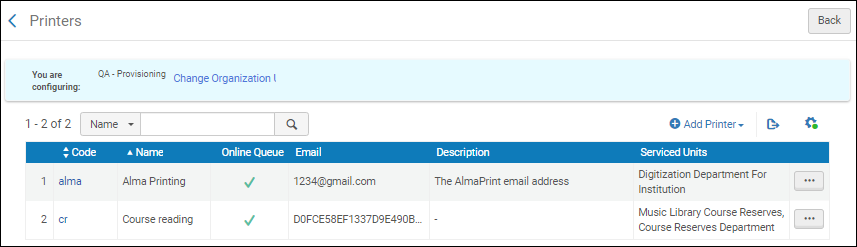
このページでは、Almaでのプリンターの構成について説明します。For links to all the main fulfillment documentation pages see Fulfillment.
プリンターの設定
プリンターを設定するのは、次のいずれかの役職でなければなりません。
一般システム管理者
フルフィルメント管理者
AlmaはSaaS環境でホストされています。セキュリティ上の問題と技術的な制限により、SaaS環境はローカルプリンターまたはネットワークプリンターの直接接続をサポートしていません。代わりに、Almaでの印刷は、Eメールまたは印刷列を使用して機能します。Printout queue is the preferred option though email printing is still supported (see Printouts Queue).各図書館/機関は、AlmaにあるローカルプリンターのEメールアドレスを定義する必要があります。このプリンターは、スタッフ向けのAlma発祥のEメール(リクエストおよび通過伝票を含む)を適切なプリンターにルーティングします。The printing queue method is the preferred method when printing to a physical printer.
For information on printing in Alma, watch Printing (3:22)
In the Add Printer dialog box, enter a code and a name (both required).If you are not using the printouts queue or quick printing (see Printouts Queue), enter an email address for the printer.必要に応じて、説明も追加します。
[プリンターの追加]ダイアログボックス
追加して閉じるを選択して、ダイアログボックスを閉じます。定義されたプリンターは、[プリンター]ページのプリンターのリストに追加されます。プリンターページプリンターを定義し、どの貸出・返却受付とサービスユニットがプリンターによってサービスされるかを指定できます。For details, see Editing Printer Information.
プリンター情報の編集
任意のプリンターの詳細を編集できます。詳細については、次のとおりです。
一般的なプリンター情報
プリンターが提供する貸出・返却受付とサービスユニット
プリンター情報を編集する場合:
On the Printers page (Configuration Menu > Fulfillment > General > Printers), in the Code column, select the printer code link, or select Edit from the row actions list for the specific printer record whose information you want to update.[プリンターの編集]ページが開きます。
プリンターの編集で、必要に応じて一般的なプリンターの詳細を編集します。When you want print routed to a queue in addition to an email address, select the Printout Queue option.See Printouts Queue for more information.印刷列オプションを選択すると、プリンターのリストに追加の列(オンライン列)が表示され、オンライン列オプションが選択されていることを示すチェックマークが付きます。