
Local Authorities
Using the Local Authorities subject area you can create reports and dashboards for Local Authority records that are defined locally in the institution.
Authority records are part of process that organizes bibliographic information to create uniformity in the names of people, topics, and places in a bibliographic record so that it is easy to search for the record in the repository. This creates a single, distinct spelling of a name (heading) or a term for each topic.
Each Authority record contains a subject, such as an author, topic, series, or corporation and a particular unique identifier or heading term which is then used consistently, uniquely, and unambiguously for all references to that subject.
A library may use local authority records in the following cases:
- None of the many authority vocabularies in the Community Zone meet the needs of the institution.
- An authority vocabulary of the Community Zone does meet the needs of the institution but:
- the institution wants to change a particular authority heading because they do not like the way it appears or think that an end user will find records more successfully with a different heading.
- the institution wants to use a heading that does not exist in the specific authority vocabulary of the Community Zone.
When local authority records are used, Alma first checks the local authorities and if there is a match, the local authority record is used. If there is no match, Alma checks the global authority records. Therefore, local authority records can be used to override global authority record.
You can use the Local Authorities subject area to answer the following types of business questions:
- How many local authority records are created, deleted, and revised on monthly and annual basis?
- How can I generate reports that allow counting authority records and listing the detail of these records, for example: by creator, date of creation or modification, heading type, etc.?
- How many bibliographic headings or records are linked to an individual authority record?
- Which authority records are not linked to any bib headings searchable authority RDA elements, for example, records that contain keyword from MARC tags 37X, 667, 670 and some local fields?
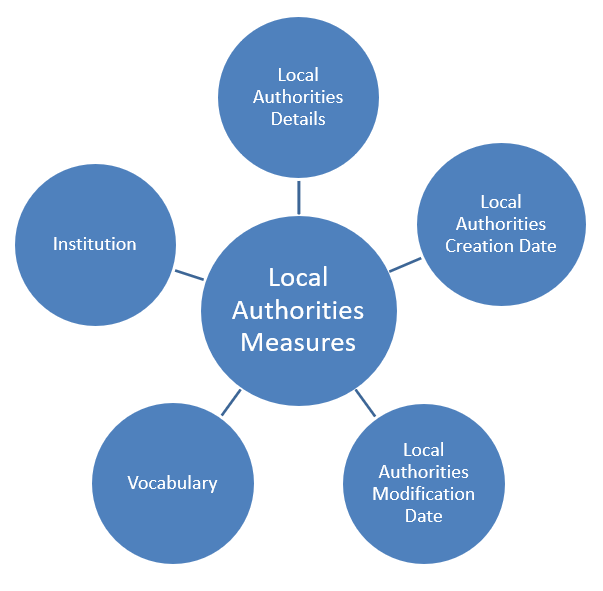
Field Descriptions
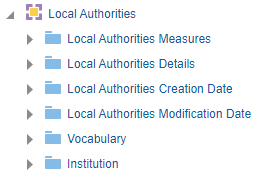
The following lists the fields available in Local Authorities
Local Authorities Measures
Local Authorities Measures is a fact table that stores measures relating to local authorities.
| Field | Description | Additional Information |
|---|---|---|
| No. of Authorities Records (All) | The total number of authorities records | |
| No. of Authorities Records (In Repository) | The number of authorities records in the repository | |
| No. of Authorities Records (Deleted) | The number of authorities records that were deleted |
Local Authorities Details
Local Authorities Details is a dimension table that stores details relating to local authorities.
| Field | Description | Additional Information |
|---|---|---|
| Associated Group (373) | The associated group (373) of the authority record | |
| AUTH 008 MARC | The contents of the AUTH 008 MARC field of the authority record | |
| AUTH LDR MARC | The contents of the AUTH LDR MARC field of the authority record | |
| Authorities Heading ID | The authorities heading ID of the authority record | |
| Cataloging Source (040) | The cataloging source (040) of the authority record | |
| Creator | The creator of the authority record | |
| Display Value | The display value of the authority record | |
| Gender (375) (Not in Use) | The gender (375) of the authority record | |
| Is Linked to BIB | Indicates if the authority record is linked to the bibliographic record | |
| Is Preferred | Indicates if the authority record is the preferred record | |
| Language | The language of the authority record | |
| Lifecycle | The lifecycle of the authority record | |
| MMS ID | The MMS ID of the authority record | |
| Modified By | The user who modified the record | |
| Normalized Value | The normalized value of the authority record | |
| Number of Linked BIB | The number of linked bibliographic records to the authority record | |
| Originating System | The originating system of the authority record | |
| Originating System ID | The originating system ID of the authority record | |
| Other Standard Identifier (024) | The other standard identifier (024) of the authority record | |
| Record Number (035) | The record number (035) of the authority record | |
| Source Type | The source code of the heading | Possible values:
For more information, see Browsing Bibliographic Headings. |
Local Authorities Creation Date
The Local Authorities Creation Date table is a dimension table that stores details on the local authorities creation date.
| Field | Description | Additional Information |
|---|---|---|
| Creation Date | The date that the local authority record was created | |
| Creation Start of Week | The creation start of the week | |
| Creation Week Number | The creation week number | |
| Creation Month Key | The creation month (for example 2 for February) | |
| Creation Full Month | Stores the month and the year of the date in a display format such as Feb 12 | This field is useful when comparing data on a month basis between years. |
| Creation Month | The creation month | |
| Creation Quarter | The creation quarter | |
| Creation Year | The creation year | |
| Creation Fiscal Month | The creation fiscal month | |
| Creation Fiscal Year | The creation fiscal year | |
| Creation Year-Month | The year and the month in a format such as 2023-1 |
Local Authorities Modification Date
The Local Authorities Modification Date table is a dimension table that stores details on the local authorities modification date.
| Field | Description | Additional Information |
|---|---|---|
| Modification Date | The date that the local authority record was modified | |
| Modification Start of Week | The modification start of the week | |
| Modification Week Number | The modification week number | |
| Modification Month Key | The modification month (for example 2 for February) | |
| Modification Full Month | Stores the month and the year of the date in a display format such as Feb 12 | This field is useful when comparing data on a month basis between years. |
| Modification Month | The modification month | |
| Modification Quarter | The modification quarter | |
| Modification Year | The modification year | |
| Modification Fiscal Month | The modification fiscal month | |
| Modification Fiscal Year | The modification fiscal year | |
| Modification Year-Month | The year and the month in a format such as 2023-1 |
Vocabulary
The Vocabulary table is a dimension table that stores details on the vocabulary of the local authority records.
| Field | Description | Additional Information |
|---|---|---|
| Vocabulary Code | The vocabulary code | |
| Vocabulary Description | The vocabulary description | |
| Vocabulary Family | The vocabulary family | |
| Vocabulary Language | The vocabulary language | |
| Vocabulary Name | The vocabulary name | |
| Vocabulary Type | The vocabulary type |
Institution
The shared Institution dimension allows the Network Zone to view reports according to institution. If an analytics report is run from the Network Zone in a collaborative network implementing a Network Zone, all member institutions are included in the report for Institution Code and Institution Name. If an analytics report is run from an institution that is not part of a collaborative network implementing a Network Zone, only the single institution from which the report is run is included in the report for Institution Code and Institution Name.
This dimension is available in every subject area. It contains the following fields:
| Field | Description | Additional Information | Data Type | Data Size |
|---|---|---|---|---|
| Institution Code | The code of the institution. |
Configured from: Configuration > General > Add a Library or Edit Library Information > Summary tab. The label in Alma is Code located on the right pane. |
VARCHAR | 50 |
| Institution Name | The name of the institution. |
Configured from: Configuration > General > Add a Library or Edit Library Information > Summary tab. The label in Alma is Organization unit name. |
VARCHAR | 255 |
| Institution Address Line 1 | The first line of the address of the institution. It usually includes the building number and the street name. |
Configured from: Configuration > General > Add a Library or Edit Library Information > Contact Information tab. This is taken from the address configured as the Preferred address. The label in Alma is Address Line 1. |
VARCHAR | 1000 |
| Institution City | The city of the institution. |
Configured from: Configuration > General > Add a Library or Edit Library Information > Contact Information tab. This is taken from the address configured as the Preferred address. The label in Alma is City. |
VARCHAR | 255 |
| Institution State Province | The state or province of the institution. |
Configured from: Configuration > General > Add a Library or Edit Library Information > Contact Information tab. This is taken from the address configured as the Preferred address. The label in Alma is State/Province. |
VARCHAR | 320 |
| Institution Country | The country of the institution. |
Configured from: Configuration > General > Add a Library or Edit Library Information > Contact Information tab. This is taken from the address configured as the Preferred address. The label in Alma is Country. |
VARCHAR | 320 |
| Institution Postal Code | The postal code of the institution. |
Configured from: Configuration > General > Add a Library or Edit Library Information > Contact Information tab. This is taken from the address configured as the Preferred address. The label in Alma is Postal code. |
VARCHAR | 200 |
| Institution Timezone | The timezone of the institution. | The timezone is set during implementation. | VARCHAR | 255 |
| Data Available As Of | When the institution data became available in analytics. | Displayed at the bottom of the main Analytics menu. | VARCHAR | 255 |
| Data Updated As Of | When the institution data was taken from the Alma database. | Displayed at the bottom of the main Analytics menu. | VARCHAR | 255 |
Page tags: article:topicproduct:almacontent:Documentationlang:english
