
System Events
This subject area replaces the former Events subject area, which reported on a very large number of events, some of them redundant or not used. This made it very difficult to produce effective reports on events that run in a reasonable amount of time. The current System Events subject area includes only a select number of events, so that reports can be run quickly and efficiently.
The events in the System Events subject area has been collected from a list that includes:
- Event that are used in reports that the institution created and ran at least once in the past year.
- Events in out-of-the-box reports under Alma/shared/events/reports
- Events related to the creation, deletion, and update of invoice lines and invoices
For a list of the events available in the System Events subject area, see List of Events in the Alma Analytics System Events Subject Area.
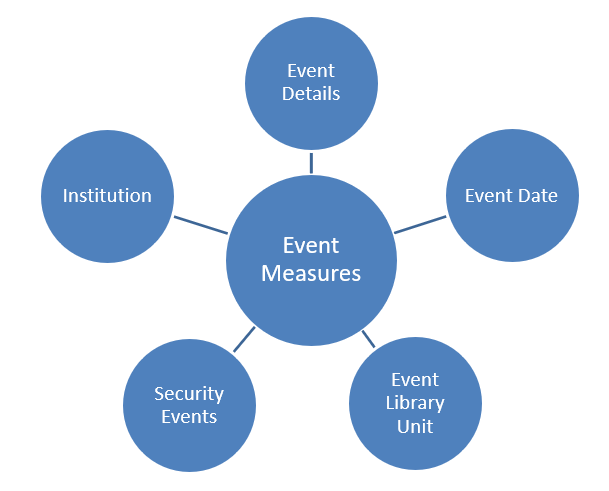
Field Descriptions
The following lists the fields available in System Events:
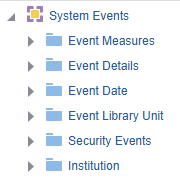
Event Measures
The Event Measures table is a fact table that stores the number and duration of events.
| Field | Description | Additional Information |
|---|---|---|
| Number of Events | Stores the calculated fields that count all the unique events (by distinct event ID). Each event can have several entries in the table with different keys and values. |
Event Details
The Event Details table is a dimension table that stores additional details about the event.
| Field | Description | Additional Information |
|---|---|---|
| Event Category | Stores the category of the event | |
| Event Creator | Stores the creator of the event | To have this field anonymized, contact Ex Libris support |
| Event Description | Stores the description of the event with parameters | |
| Event ID | Stores the unique ID of the event | |
| Event Key Name | Stores the key name – a category of event, such as Account Type and Action | |
| Event Key Value | Stores the key value – a member of the key name such as Public and Staff | To have this field anonymized, contact Ex Libris support |
| Event Message | Stores the message with fillers for the parameters | |
| Event Module | Stores the module of the event | |
| Event Purge Policy | Stores the purge policy of the event | |
| Event Severity | Stores the severity of the event | |
| Event Sub Module | Stores the sub module of the event | |
| Event Type | The number of the event | For more information on event types, see the List of Events in the Alma Analytics System Events Subject Area. |
| Session ID | Stores the session ID |
Event Date
The Event Date table is a dimension table that stores details about the date of the event such a month, year, and quarter. Key fields may be used when calculations are required. Descriptions fields may be used for formatting the display of the report.
Using this dimension, users may drill down from year to month to the specific event. The number of events are accumulated to the relevant level in the hierarchy.
| Field | Description | Additional Information |
|---|---|---|
| Event Date and Time | The date and time of the event | |
| Date Key | Stores the date in the format 2/29/2012 | |
| Start of Week | The date of the first business day of the week | |
| Week Number | The number of the week of the year | |
| Month Key | Stores the month of the date in number format such as 2 for February | This field is useful when you want to sort by month |
| Fiscal Month Key | Stores the fiscal month of the date in number format such as 2 for February | This field is useful when you want to sort by month |
| Month Desc | Stores the month of the date in month description format such as February | |
| Year Key | Stores the year of the date in string format such as 2012 | |
| Fiscal Year Key | Stores the fiscal year of the date in string format such as 2012 | |
| Year Desc | Stores the year of the date in string format such as 2012. | |
| Full Month Desc | Stores the month and the year of the date in a display format such as Feb 12 | |
| Full Month Key | Stores the month in a number format such as 9 for September and the year | |
| Full Quarter Desc | Stores the quarter of the date in a display format such as Q1 and the year | |
| Full Quarter Key | Stores the quarter of the date in a display format such as 1 and the year | |
| Quarter Desc | Stores the quarter of the date in a display format such as Q1 | |
| Quarter Key | Stores the quarter of the date in a display format such as 1 | |
| Date Filter | Used to filter report results by date. | |
| Event Date | Stores the Hierarchy column that allows the user to drill down from the year to the month to the specific event date. Using this column provides the user with the option to view the accumulative measures in each level of the hierarchy. |
Event Library Unit
The Event Library Unit is a dimension table that displays information about the library that in which the event occurred.
| Field | Description | Field Location in Alma | Additional Information | Data Type | Data Size |
|---|---|---|---|---|---|
| Library Address Line 1 | The first line of the address of the institution. It usually includes the building number and the street name. |
Configuration > General > Add a Library or Edit Library Information > Contact Information tab. This is taken from the address configured as the Preferred address. The label in Alma is Address Line 1. |
VARCHAR | 1000 | |
| Library City | The city of the library. |
Configuration > General > Add a Library or Edit Library Information > Contact Information tab. This is taken from the address configured as the Preferred address. The label in Alma is City. |
VARCHAR | 255 | |
| Library Code | The library code | Configuration > General > Libraries > Add a Library or Edit Library Information > Libraries tab > Path [the text after the period] | VARCHAR | 50 | |
| Library Code (Active) | The code of active (not deleted) libraries | Configuration > General > Libraries > Add a Library or Edit Library Information > Libraries tab > Path [the text after the period] | The same as Library Code without deleted libraries. | VARCHAR | 50 |
| Library Country | The country of the library. |
Configuration > General > Add a Library or Edit Library Information > Contact Information tab. This is taken from the address configured as the Preferred address. The label in Alma is Country. |
VARCHAR | 320 | |
| Library Description | The library description |
Configuration > General > Libraries > Add a Library or Edit Library Information > Libraries tab The label in Alma is Description. |
VARCHAR | 100 | |
| Library Name | The library name |
Configuration > General > Libraries > Add a Library or Edit Library Information > Libraries tab The label in Alma is Organization Unit Name. |
VARCHAR | 255 | |
| Library Name (Active) | The library name of active (not deleted) libraries |
Configuration > General > Libraries > Add a Library or Edit Library Information > Libraries tab The label in Alma is Organization Unit Name. |
The same as Library Name without deleted libraries. | VARCHAR | 255 |
| Library Postal Code | The postal code of the library. |
Configuration > General > Add a Library or Edit Library Information > Contact Information tab. This is taken from the address configured as the Preferred address. The label in Alma is Postal code. |
VARCHAR | 200 | |
| Library State Province | The state or province of the library. |
Configuration > General > Add a Library or Edit Library Information > Contact Information tab. This is taken from the address configured as the Preferred address. The label in Alma is State/Province. |
VARCHAR | 320 | |
| Unit Type | The type of organization unit |
Configuration > General > Libraries > Add a Library or Edit Library Information > Libraries tab The label in Alma is Organization Unit Type. |
Values can be Institution/Library | VARCHAR | 20 |
Security Events
The Security Events table is a dimension table that stores details of security events generated by Alma. This table stores events associated with CATEGORY=SECURITY and MODULE=USER_MANAGEMENT. Using this dimension, a user may create the FERPA (Family Educational Rights and Privacy Act) reports that indicates which users in Alma may view details of other users. Use of fields from this folder restricts the report to information related only to the security category. Even if other event types are present in the data, they do not appear in the report.
| Field | Description | Additional Information |
|---|---|---|
| Accessing User ID | Stores the user ID of the user that accessed other user information | To have this field anonymized, contact Ex Libris support |
| User ID | Stores the user ID of the user whose details have been seen | To have this field anonymized, contact Ex Libris support |
| User Accessing Operations | Indicates when the Viewed operation was used to access the information | |
| User Subentity List Name | Describes the entity that has been seen such as address, email, and so forth. |
Institution
The shared Institution dimension allows the Network Zone to view reports according to institution. If an analytics report is run from the Network Zone in a collaborative network implementing a Network Zone, all member institutions are included in the report for Institution Code and Institution Name. If an analytics report is run from an institution that is not part of a collaborative network implementing a Network Zone, only the single institution from which the report is run is included in the report for Institution Code and Institution Name.
This dimension is available in every subject area. It contains the following fields:
| Field | Description | Additional Information | Data Type | Data Size |
|---|---|---|---|---|
| Institution Code | The code of the institution. |
Configured from: Configuration > General > Add a Library or Edit Library Information > Summary tab. The label in Alma is Code located on the right pane. |
VARCHAR | 50 |
| Institution Name | The name of the institution. |
Configured from: Configuration > General > Add a Library or Edit Library Information > Summary tab. The label in Alma is Organization unit name. |
VARCHAR | 255 |
| Institution Address Line 1 | The first line of the address of the institution. It usually includes the building number and the street name. |
Configured from: Configuration > General > Add a Library or Edit Library Information > Contact Information tab. This is taken from the address configured as the Preferred address. The label in Alma is Address Line 1. |
VARCHAR | 1000 |
| Institution City | The city of the institution. |
Configured from: Configuration > General > Add a Library or Edit Library Information > Contact Information tab. This is taken from the address configured as the Preferred address. The label in Alma is City. |
VARCHAR | 255 |
| Institution State Province | The state or province of the institution. |
Configured from: Configuration > General > Add a Library or Edit Library Information > Contact Information tab. This is taken from the address configured as the Preferred address. The label in Alma is State/Province. |
VARCHAR | 320 |
| Institution Country | The country of the institution. |
Configured from: Configuration > General > Add a Library or Edit Library Information > Contact Information tab. This is taken from the address configured as the Preferred address. The label in Alma is Country. |
VARCHAR | 320 |
| Institution Postal Code | The postal code of the institution. |
Configured from: Configuration > General > Add a Library or Edit Library Information > Contact Information tab. This is taken from the address configured as the Preferred address. The label in Alma is Postal code. |
VARCHAR | 200 |
| Institution Timezone | The timezone of the institution. | The timezone is set during implementation. | VARCHAR | 255 |
| Data Available As Of | When the institution data became available in analytics. | Displayed at the bottom of the main Analytics menu. | VARCHAR | 255 |
| Data Updated As Of | When the institution data was taken from the Alma database. | Displayed at the bottom of the main Analytics menu. | VARCHAR | 255 |
Shared Dimensions with Other Subject Areas
None.
Page tags: article:topicproduct:almacontent:Documentationlang:english
