
AlmaとHappiness®Gatewayの統合
- 統括システム管理者
Happiness音訳ツールを使用して日本語のテキストを強化する必要がある教育機関の場合、そのための統合プロファイルを作成する必要があります。With a properly configured integration profile, you can send a record with the primary Japanese script (Kanji + Kana with no spaces or punctuation between some or all words) from the MD Editor to Happiness using the Enhance the Record feature and, depending how you have configured Happiness, receive back an enriched record with the Morphemes, Kana, and Romanji fields.

AlmaをHappiness向けに設定する
In order to integrate Happiness with Alma, you must use the Metadata External Enhancement integration type option.
- 統合プロファイルリストページ(設定メニュー > 一般 > 外部システム > 統合プロファイル)で、統合プロファイルを追加を選択します。
- 統合プロファイルのコードと名前を入力します。
- Select Metadata External Enhancement for Integration Type.
- Select Happiness - Japanese Transliteration Tool as the system type for External System.
- Optionally, select Default if you want this profile to be your default integration profile, and enter a Description to provide more detail for the profile that you are creating.
- 次を選択します。
- 定義ページで、アクティブを選択し、HappinessサーバーのURLアドレスを入力し、必要に応じてHappinessのユーザー名とパスワードを入力します。
- [保存]を選択します。
MDエディターを使用して日本語レコードを強化する
After you have created the Metadata External Enhancement integration profile for the Happiness transliteration tool, you can use the MD Editor to enrich records using the Happiness - Japanese Transliteration Tool option.
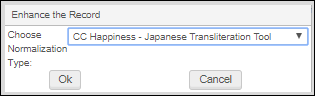
To enrich a Japanese record using the MD Editor, open or create the bibliographic record that you want to update using Happiness, select Enhance the Record(Edit > Enhance the Record); and from the Choose Normalization Type list of options, select the integration profile that you created with the Happiness - Japanese Transliteration Tool option.
Happiness音訳ツールは、どのフィールドを強化するかを決定し、音訳されたレコードをAlmaに返します。After the enriched record from Happiness appears in the MD Editor and you save the record, normal MD Editor record processing operations such as validation and so forth are available for editing the updated record.
Page tags: article:topicproduct:almacontent:Documentationlang:english
