
KERIS(韓国教育学術情報院)への公開
KERISへの公開の概要と、KERIS公開プロファイルの設定手順。
KERISへの公開を設定するには、次のいずれかの役職が必要です。
- 目録管理者
- リポジトリ管理者
- 統括システム管理者
韓国の図書館は、KERIS中央目録と直接連携し、所蔵をKERIS中央目録に継続的に自動公開できます。これにより、KERISはセントラルサービスに使うための所蔵情報を迅速かつ正確に取得することができます。
KERISに公開するための一般プロファイルを設定するには:
- [公開プロファイルの詳細]ページ([リソース] > [公開] > [公開プロファイル] )で、[プロファイルの追加] > [一般プロファイル] を選択します。[公開プロファイル詳細]ページが開きます。
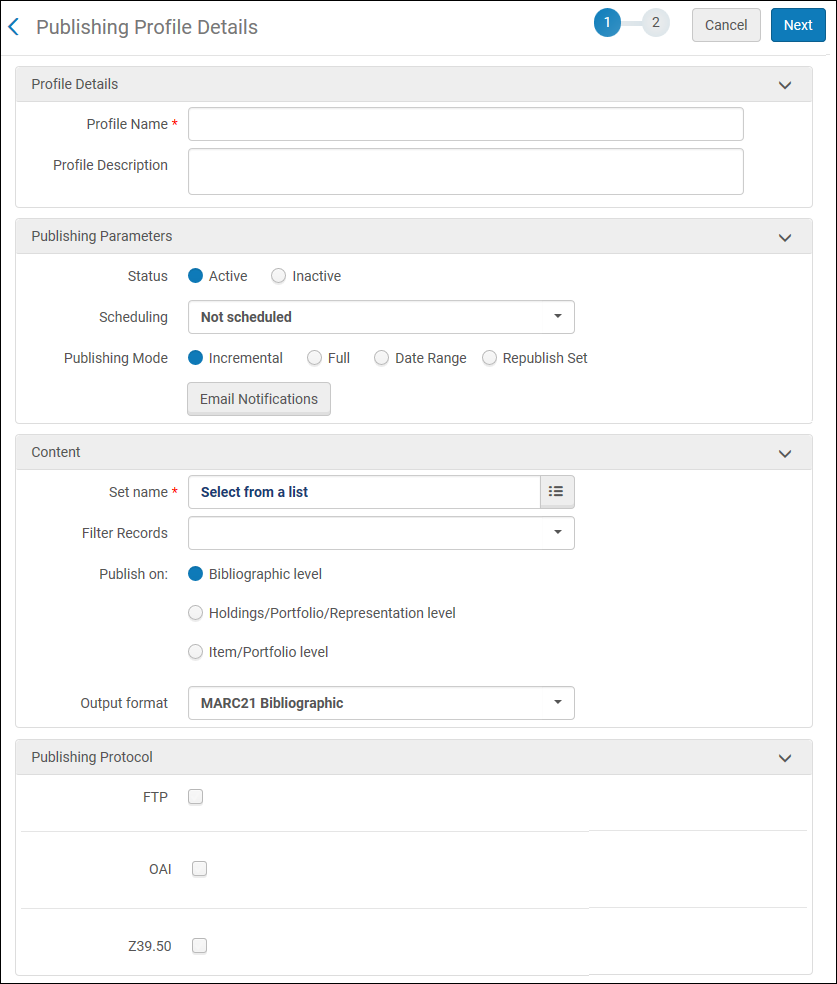
公開プロファイルの詳細ページ - KERISへの公開の要件に一致する公開プロファイルパラメータを入力します。
- 公開するレコードのタイプに応じて、[出力フォーマット]パラメータに[MARC 21 書誌]または[KORMARC 書誌]を選択します。
- 公開プロトコルにZ39.50を選択し、以下のZ39.50パラメータにKERISで識別/調整した値を入力します。
- ホスト
- ポート
- データベース名
- グループID
- ユーザー名
- パスワード
- See the procedure in Publishing and Inventory Enrichment (General Publishing) for additional information regarding creating a General Profile.
- 次へを選択します。
- Complete the following sections using the details provided in the procedure in Publishing and Inventory Enrichment (General Publishing).
- 書誌事項正規化
- 冊子目録の充実化
- 電子目録の充実化
- デジタル目録の充実化
- 蔵書の充実化
- 保存を選択します。公開プロファイルが保存されます。If you selected a scheduling option, the profile becomes a scheduled Publishing job (Publishing Platform Job <profile name>) on the Monitor Jobs page.See Viewing Scheduled Jobs.
Page tags: article:topicproduct:almacontent:Documentationlang:englishKERIS
