
Webhook
Webhooksタイプの統合プロファイルを設定するための概要と手順。
- 統括システム管理者
Webhookは、通常何らかのイベントによってトリガーされるユーザー定義のHTTPコールバックであり、そのイベントの結果またはステータスに関する情報が含まれます。
次のいずれかが発生すると、Almaはwebhookを送信できます:
- ジョブの実行が完了した(Alma UIまたはAPIを使用)。
- ユーザーがアップデートされた。
- 次の通知のいずれかが送信されます:
- リクエストキャンセルレター (全文)
- 取寄せアクティビティレター
- 貸出ステータス通知
- 取り置きレター
- 保留、予約、移動、デジタル化、またはワークオーダーのリクエストが作成され、クローズされ、または取置き棚に置かれました。
- 貸出が作成、返却、または紛失したと通知されました。
- A bibliographic record is changed.
- 物理的なアイテムが変更されました。
- An item from a continuous PO line was received.
For a complete list of events that trigger webhooks, see Supported Events in the Developer Network.
webhookをアクティブにするには、Almaにwebhook統合プロファイルが設定されている必要があります(以下を参照)。
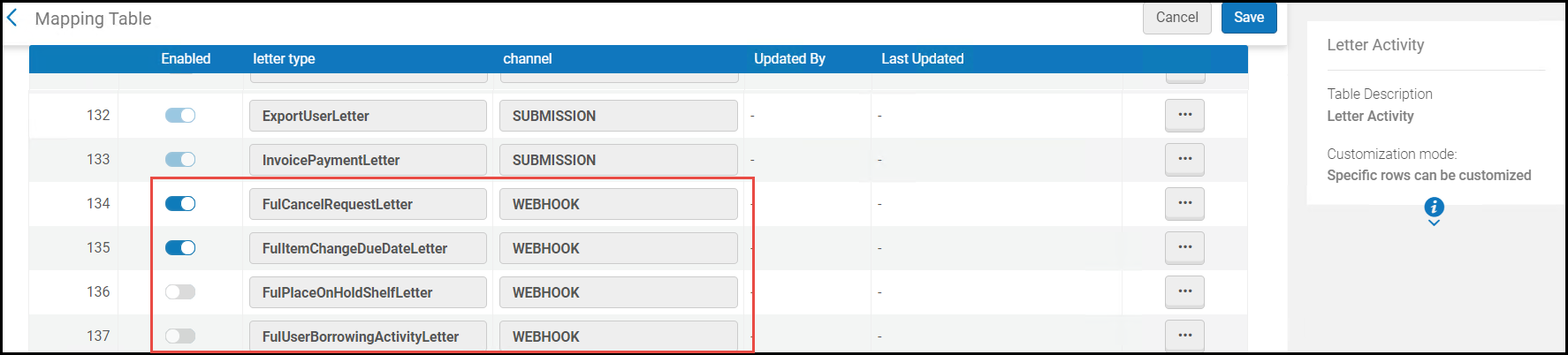
For webhooks that use notifications, as part of the integration profile creation, activate the desired webhooks in the Letter Activity code table.However, once the integration profile is created, you can activate additional webhooks or deactivate webhooks from the Letters Configuration table.
For detailed information on these webhooks, see Developer Network.
Configuring a Webhooks Integration Profile
- 統合プロファイルリストページ(設定メニュー > 一般 > 外部システム > 統合プロファイル)で、統合プロファイルを追加を選択します。統合プロファイルウィザードの最初のページが開きます。
- 統合タイプのドロップダウンリストから、Webhookを選択し、プロファイルのコードと名前を入力します。
- 次へを選択します。ウィザードの2ページ目が開きます。
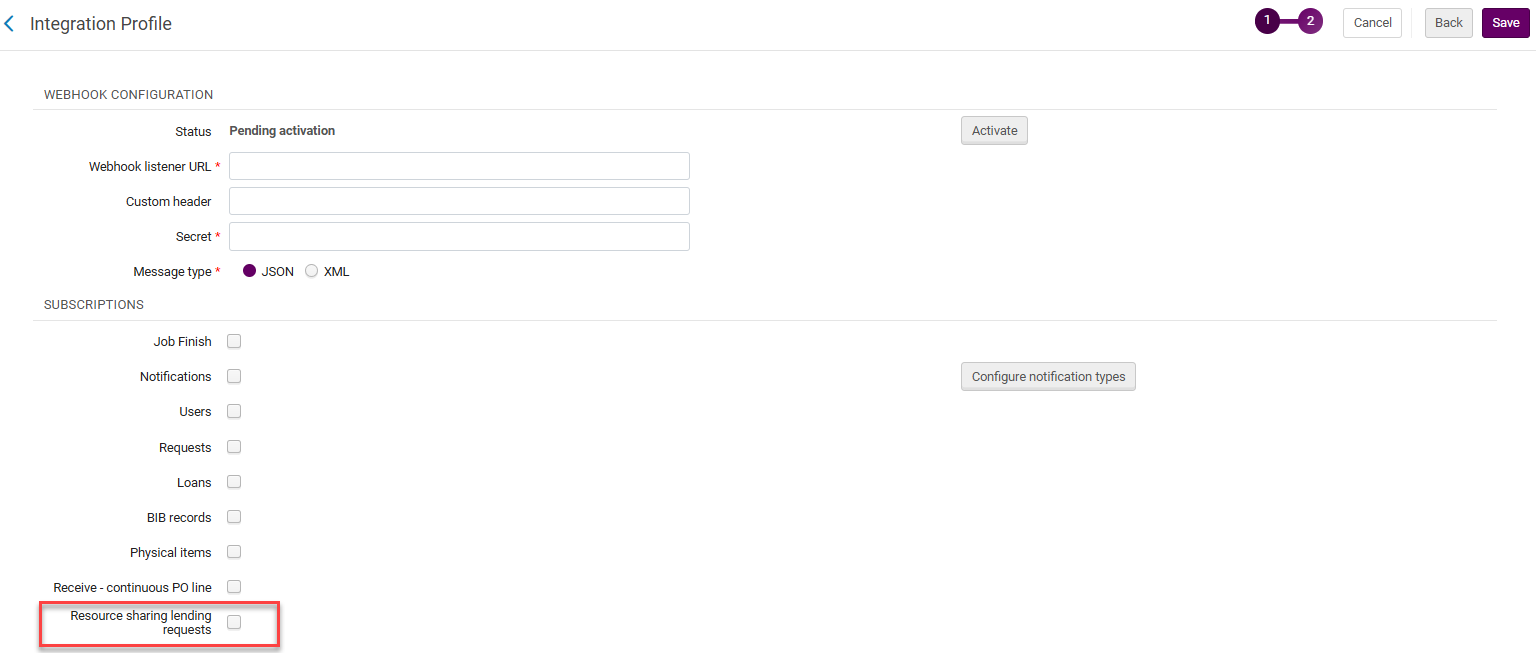 Webhook設定
- 有効化を選択して、Webhook統合プロファイルをアクティブにします。プロファイルがアクティブになるまで、ステータスは有効化待ち になります。
- リスナーURLをWebhookリスナーURLに、シークレットコードをシークレットに入力します。For information on the values to be entered here, see the Security section in Webhooks.
- メッセージタイプがXMLまたはJSONのいずれかを選択します。
- 購読で:
- ジョブの実行が完了したら、ジョブ完了を選択して、Webhookを送信 します(Alma UIまたはAPIを使用して)。
- Select Notifications to send a webhook when one of the notifications listed above is sent.Select Configure Notification Types to open the Letter Activity code table, and scroll to the very bottom to activate the webhooks for these notifications.The webhooks that were previously activated (either here or in the Letters Configuration table) show as activated; and the webhooks you activate here are displayed as activated in the Letters Configuration table.Select Save when you have activated the desired notifications to go back to the integration profile.
- ユーザー情報がアップデートされたときにwebhookを送信するには、 ユーザーを選択します。これには、ユーザージョブによって行われた変更を含む、履歴が登録されているすべてのユーザー変更が含まれます。APIを使用してユーザーを変更しても、webhookは送信されないことにご注意ください。ユーザーグループボックスで、Webhookを送信するユーザーグループを選択します。If no user groups are specified, a webhook is sent for all user groups.
- 保留、予約、移動、デジタル化、またはワークオーダーのリクエストが作成された、閉じられた、または取置き棚に置かれたときに、 リクエストを選択してwebhookを送信します。
- ローンの作成、返却、または紛失の申告がされたときに、ローンを選択してwebhookを送信します。
- 書誌レコードが変更されたときに、[書誌レコード]を選択してwebhookを送信します。
- 冊子アイテムが変更されたときに、冊子アイテムを選択してwebhookを送信します。
- Select Receive - continuous PO line to send a webhook when a continuous PO line is received.
- Select Resource sharing lending requests to send a webhook for lending resource sharing requests.
- [保存]を選択します。設定したプロファイルが、統合プロファイルリストに表示されます。
-
統合プロファイルを定義したら、統合プロファイルアクションのリストからログの表示を選択できます。このオプションを使用すると、webhookイベントのログを表示できます。次に、テーブルのURLとペイロード要素を検索できます。You can display the request body for each webhook request (the display is truncated after 4000 characters, but the full request body is sent to the listener).
- webhookの試行が失敗した場合、webhookプロファイルの連絡先情報タブで規定されているすべてのEメールアドレスにEメールが送信されます。
- In Premium Sandbox environments, the Webhook Listener URL is removed and the profiles are set to inactive.これは、Sandbox環境で行われたWebhookアクションが、本番データと同じようにリスナーサーバーに着地するため、テストデータと本番データが混在してしまうためです。サンドボックス環境で統合プロファイルをアクティブ化したい場合は、上記の手順4と5の指示に従って続行します。
Page tags: article:topic product:alma content:Documentation lang:english webhooks FulCancelRequestLetter FulUserBorrowingActivityLetter FulItemChangeDueDateLetter FulPlaceOnHoldShelfLetter
