Almaは、Libraries Australiaへのレコードの公開をサポートしています。これには、初期および継続的な公開、所蔵マッピング、およびNational Union Catalog(NUC)定義用に構成できるプロファイルが含まれます。
Libraries Australiaへの公開の概要
埋め込み所蔵情報つきの書誌レコードと、Libraries Australia(LA)を自動的に同期できます。Almaは、LAが発行するNUCシンボルをサポートしています。After creating and scheduling the publishing profile, the Upload Holdings to Libraries Australia job is scheduled.
Almaでは、書誌/所蔵レコードをLAと同期する各機関は、NUCコード(シンボル)を持っている必要があります。Also, specific libraries may have a NUC symbol that overrides the institution's NUC code (see To configure a library NUC symbol that is different from the institution's NUC symbol below).
If the same record is subsequently set to Don't publish in the MD Editor, Alma supports publishing this record to the LA so that the LA is synchronized to know that this is a suppressed record.
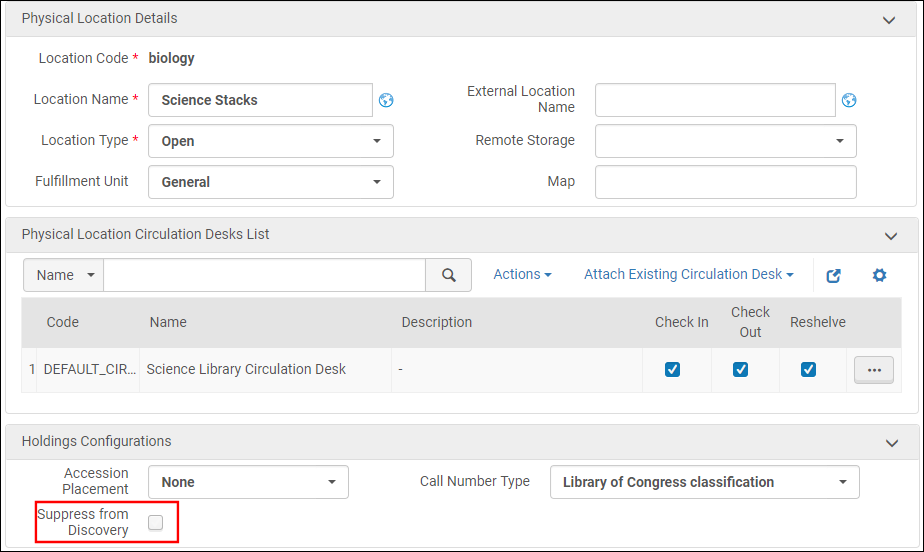
On the Edit Physical Locations page (Configuration Menu > General >(select the correct location in configuring)> Locations > Physical Locations; select Edit in the row actions list for the relevant location), select Suppress from Discovery.
国立図書館目録とMMSを同期ジョブを実行すると、大量まとめ公開するレコードをマークします。For more information, see Running Manual Jobs on Defined Sets and step 2 of To do an initial publishing with Libraries Australia:.
レコードは、インポートプロファイルを使用してレコードインポートプロセスの一部としてLibraries Australiaに公開するようにマークできます。(This is the recommended practice when the import will result in records ready to publish to Libraries Australia, to ensure an optimal, ongoing update process for Libraries Australia.) For more information, see Creating/Editing an Import Profile: Set Management Tags.
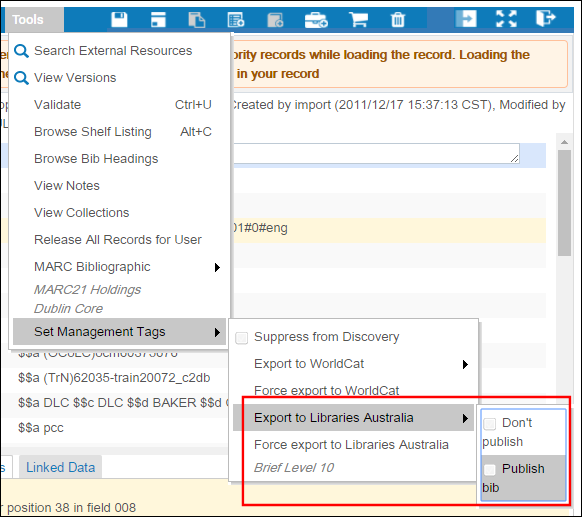
書誌レコードまたは書誌レコードにリンクされている所蔵レコードが最後に公開されてから変更されたか、スタッフユーザーがエクスポートするレコードを手動で選択(強制エクスポート)しているとき。(Select Force export to Libraries Australia from the MD Editor's Tools > Set Management Tags menu, refer to the figure below.)
Note that if the Upload Holdings to Libraries Australia job fails, the records that are marked for publishing will continue to remain marked for publishing until the Upload Holdings to Libraries Australia job runs successfully.This is true even if you run the Synchronize MMS with National Catalog job before running the Upload Holdings to Libraries Australia job again.The synchronization job does not remove the publishing indication/flag (publish or don't publish), that is, unless someone in the interim actually changed the flag.エラー、スキップされたレコード、FTPの問題など、何が起こったのかを示すために、失敗したジョブを報告するジョブレポートも参照する必要があります。
See Configuring Related Records for Physical Inventory for more information regarding related records.
関連レコードを目録化(作成または削除)する場合、関連レコード情報をLibraries Australiaに公開する前に、MMS - レコードリレーションの構築ジョブを最初に実行する必要があります。MMS - レコード関係構築ジョブは、1日に1回実行されるようにスケジュールされています。See Viewing All Scheduled Jobs for more information.
Mark the bibliographic records that you want published to Libraries Australia using the MD Editor (see the information provided under Overview of Publishing to Libraries Australia)
Alternatively, run the Synchronize MMS with national catalog job to mark one or more sets of records; for more information, see Running Manual Jobs on Defined Sets
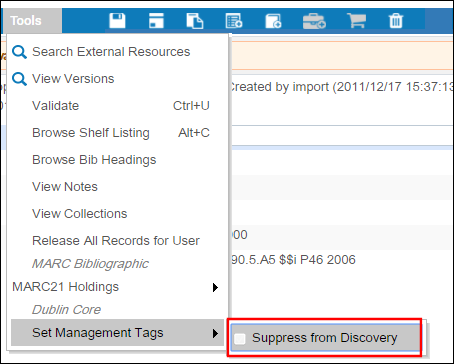
公開する所蔵記録を特定します。より具体的には、抑制するレコードをマークします。所蔵レコードは、その保管場所によって、グループとして抑制することができます。または、MD エディタを使用して個々のレコードを抑制することができます。See Location configuration and Using the MD Editor for more information.
Libraries Australia公開プロファイルを設定します。See Libraries Australia Publishing Profile(the next section) with particular attention to the following:
For a library or library and location (with a NUC symbol that is different from the institution's, the symbol needs to be specified in the Symbol field located in the Institution NUC Symbol configuration (Resource Management > Resource Configuration > Configuration Menu > Record Export > Institution NUC symbol).[シンボル]フィールドで指定されたシンボルは、[公開プロファイルの詳細]ページの[NUCコード]フィールドで指定されたものを上書きします。
機関NUCシンボルマッピングテーブル
公開パラメータ:
全公開の実行
これを選択して、Libraries Australiaへの最初の公開を完了します。See Initial Publishing to Libraries Australia for more information.
使用するFTP設定を指定します。Select the FTP configuration that contains the appropriate server, port, user name, and password for the connection (see Configuring S/FTP Connections).
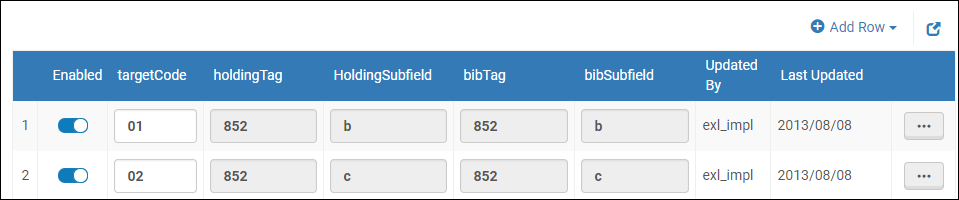
Libraries Australiaのための所蔵マッピングは、[マップ上の所蔵フィールド]上で書誌レコードに設定します。Libraries Australiaマッピングテーブルへの公開のために(設定メニュー > リソース > レコードエクスポート > 所蔵フィールドをLibraries Australiaの書誌レコードにマッピング)。For more information about mapping tables, see Mapping Tables.
You can configure a library's NUC symbol that is different from the NUC of the Alma institution on the Institution External Symbol Libraries Australia mapping table (Configuration Menu > Resources > Record Export > Map Holdings Field into Bib Record for Libraries Australia).For more information about mapping tables, see Mapping Tables.
図書館に固有で、機関のNUCコードとは異なるNUCシンボル
To configure a library NUC symbol that is different from the institution's NUC symbol:
Enter the Library Code(as found in the 852 $$b) and the Symbol(unique to the library and different from the NUC code specified for the institution on the Publishing Profile Details page).

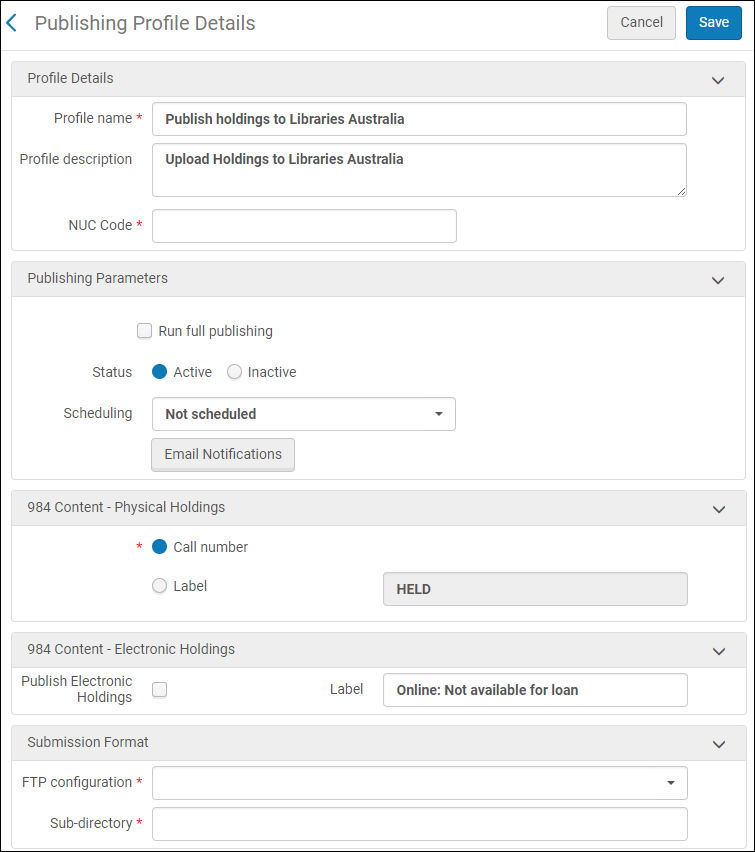 [プロファイルの詳細を公開]ページ
 機関NUCシンボルマッピングテーブル