
PubMedへの公開
PubMedへの公開を設定するための概要と手順。
- 目録管理者
- リポジトリ管理者
- 一般システム管理者
The Publish electronic record to PubMed publishing profile was deprecated.For more information about how to set up the PubMed Outside Tool to place a link on every PubMed record, see https://www.ncbi.nlm.nih.gov/books/NBK3803/#related.Outside_Tool.
PubMedに関連する電子ジャーナル目録をPubMedと共有できます。この情報を共有することにより、(NLMが管理する)PubMedは、図書館が全文アクセス権をもつPubMedタイトルをビジュアル表示し、また、Alma リンクリゾルバの使用によるアクセスができるようにします。After creating and scheduling the publishing profile, a Publish Records to PubMed job is scheduled.
PubMed公開プロファイルで次の詳細を識別/カスタマイズできます。
- あなたのPubMed ID
- PubMed検索結果に表示されるアイコン/グラフィックファイルを識別するURL
- PubMed検索結果に表示されるリンクラベルのテキスト
- PubMed検索結果からリソースにアクセスするためのPrimoベースURL/AlmaリンクリゾルバベースURL。
Almaから生成されたXMLファイルには以下が含まれます。
- PubMed ISSN (or EISSN) available in the Alma inventory
- カバレッジ(適用範囲)情報(年/月/日から年/月/日まで)(ただし利用可能な場合のみ)
- 公開差し止め/開始年の情報(ただし利用可能な場合のみ)
PubMed公開プロファイルの設定
以下の手順を使用して、PubMed公開プロファイルを設定します。
- 公開プロファイルの詳細ページ(リソース > 公開 > 公開プロファイル)を開き、[PubMedへの電子記録を公開する]公開プロファイルの行にあるアクションリストで編集を選択します。PubMed公開プロファイルの[公開プロファイルの詳細]ページが表示されます。
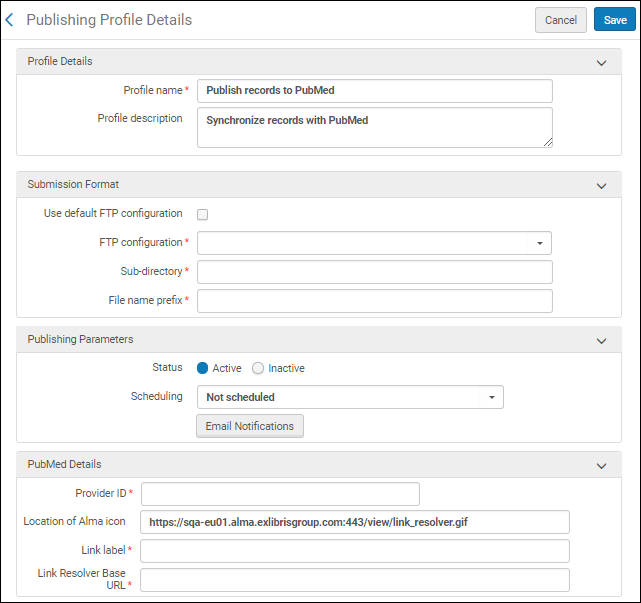 PubMed公開プロファイルの詳細ページ
- 次の表を使用して、公開プロファイルの設定を完了します。
PubMed Publishing Profile Configuration Options パラメータ 説明 プロファイル名 プロファイルの一意の名前。 プロファイルの説明 プロファイルのフリーテキストの説明。 提出フォーマットセクション: デフォルトFTP設定を使用
Select to use the current FTP server identified by PubMed. The details for this FTP server appear when this parameter is selected.
このパラメータを選択すると、他のFTPオプションは使用できなくなります。
The default option is the current recommended configuration option, officially supported by PubMed (Library LinkOut).It is recommended that you use it and not the manual FTP configuration option.The manual option remains available for customers who have a special workflow approved and working with Library LinkOut.(Issues related to the manual FTP workflow are not supported.)
Additional information regarding Library LinkOut can be found at https://www.nlm.nih.gov/pubs/techbull/ma19/ma19_linkout_consolidation_announcement.html.
FTP設定 Select the FTP configuration to use (see Configuring S/FTP Connections). サブディレクトリ FTPアップロード用にファイルを配置するサブディレクトリ。 S/FTP接続設定のためのサブディレクトリフィールドにAlmaを指定し、このサブディレクトリフィールドに PubMedを入力した場合、データはAlma/PubMedディレクトリにエクスポートされます。 ファイル名のプレフィックス 作成されるファイル名のプレフィックスとして使用する英数字。Almaは、シーケンス番号(1から始まる)と日付末尾接辞(YYYYMMDDhhmmの形式)と、.xmlの拡張子を追加します。When there are more than 50,000 records, Alma creates a new file and the sequence number is incremented. Publishing Parameters section: ステータス アクティブまたは非アクティブ。 スケジューリング
Select the scheduling option for the profile to run.
Alma can be scheduled to publish to PubMed every week on Monday.
PubMedは、月の最初の月曜日に公開されたファイルを取得することに注意してください。完全公開モードは、PubMedへの公開に使用されます。
Eメール通知 公開プロファイルの実行後にEメール通知を受領するユーザーとメールアドレスを指定します。 PubMed Details section: プロバイダID PubMedから提供されたID。 名前の略称
と
LinkOutから取得
When you select Use default FTP configuration, the Name Abbreviation field and Get from LinkOut action appear.
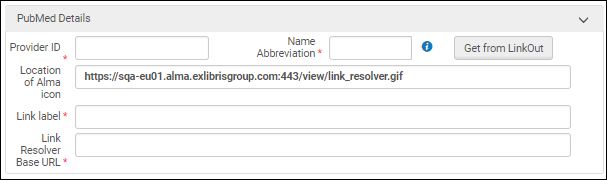
Name Abbreviation is determined by PubMed and is required for the FTP file naming convention.Enter the Name Abbreviation or select one using Get from LinkOut.Library LinkOut provides the mapping for the Provider ID to Name Abbreviation.You must first enter your Provider ID for Get from LinkOut to work.See the tooltip icon for more information.
Additional information regarding Library LinkOut can be found at https://www.nlm.nih.gov/pubs/techbull/ma19/ma19_linkout_consolidation_announcement.html.
Alma アイコンの配置場所 PubMed検索結果のAlma リンクリゾルバアイコン(または選択した他のアイコン/グラフィックファイル)のURLアドレス。The following icon is provided:http://<Alma domain>/view/link_resolver.gif This field is optional; an icon is only published only when specified. リンクラベル The text to identify the link's title in the PubMed results (such as Link to Alma). リンクリゾルバベースURL The base URL for the Alma Link Resolver using the following format and inserting your institution's information where indicated:http://<primo server host:port>/openurl/<primo institution_code>/<primo view_code> Do not add a question mark (?) to the end of the URL.Almaリンクリゾルバの基本URLに不案内な場合は、Ex Librisのサポートに連絡してください。 - 保存を選択します。
レコードを手動で公開するには、プロファイルを実行します。
Page tags: article:topicproduct:almacontent:Documentationlang:englishPubMedpublish electronic record to PubMed
