
SRU/SRW検索
SRU/SRW統合プロファイルを設定するための概要と手順。
- 統括システム管理者
Almaを使用することによって、所属の機関はSRU/SRW検索に開かれ、Almaリポジトリを検索しようとする外部システムとの統合が可能になります。(SRU/SRWは、URL/Webサービスを介した検索のための、XMLベースのプロトコルです。)この機能を有効にするには、各機関が独自のSRUサーバー統合プロファイルを定義および有効化し、SRUクエリへの応答で利用可否情報を返すかどうかを示す必要があります。
SRUリクエストの実行の詳細については、[Alma ディベロッパーネットワーク]の以下のページを参照してください:
Configuring an SRU Server Type Integration Profile
各機関ごとに、SRUサーバー統合プロファイルは1つのみ存在できます。
- 統合プロファイルリストページ(設定メニュー > 一般 > 外部システム > 統合プロファイル)で、統合プロファイルを追加を選択します。外部システムウィザードのページ1が開きます。
- 新しい統合タイプに固有のコードを入力します。
- 新しい統合タイプの固有の名前を入力します。
- 統合タイプには、SRUサーバーを選択します。この統合タイプでは、デフォルトのチェックボックスは機能しません。
- 次を選択します。
- 以下の表のパラメータの説明を使用して、SRU統合プロファイルを設定します。
SRU Integration Profile Settings パラメータ 説明 Bibliographic Options 有効 書誌事項オプションを有効にするには、このパラメータを選択します。 利用可否を追加 AVA(冊子の利用可否)、AVE(電子版の利用可否)、およびAVD(デジタルの利用可否)フィールドに格納されている利用可否情報をSRUクエリのリクエストへの応答に含めるかどうか。For more information, see The Retrieve Bib API. Include results of e-resources managed in the Network このチェックボックスは、ネットワークゾーンのメンバーのみが使用できます。
When this option is activated, then when performing a Institution Zone holding lookup using the SRU protocol, the results will include:
- 既存の目録や他の存在するエンティティに関係のない機関ゾーンの書誌レコード、
- 活動化ステータスに関係のない機関ゾーンの書誌レコード:コレクションまたはポートフォリオに「有効化」、
- Network Zone bibliographic records that belong to a portfolio or an electronic collection that has the "available for group" for the owning member Institution.
In consortia where the configuration of SRU integration profile is done by the Network and is distributed to all members, the SRU integration profile is marked as "Managed in Network".In this cases, this option is visible in the Network Zone institution as well.The network can determine whether this profile is distributed to members with this option activated or disabled.Any member using this profile can decide to opt out and manage the profile locally by editing the Network configuration (see Unlink from Network).
When the SRU Server receives an MMS ID, it does not know whether the origin of the identifier is the Institution Zone or the Network Zone.Therefore, when searching by MMS ID, you need to conduct two searches - one in the Institution Zone and another in the Network Zone:
- 機関ゾーンMMS IDは、機関ゾーン電子インベントリを取得します。
- The Network Zone MMS ID retrieves the Network Zone electronic inventory.
メンバーの(ネットワークゾーンでの)利用可否で強化
ネットワーク機関がSRUプロトコルを使用して検索を完了するとき、ネットワークの各メンバーの所蔵利用可否を取得するかどうか。
- SRU/SRWでは、Dublin Core(Simple DC およびQualified DC)フォーマットと、すべてのMARCスキーマ(UNIMARCおよびCNMARCを含む)がサポートされています。次の相互変換がサポートされています:
- Dublin CoreおよびMARCXMLから他のすべてのフォーマット(ダブリンコア、MARCXML、CNMARCXML、KORMARCXML、およびUNIMARCXML)
- すべてのフォーマット(Dublin Core、MARCXML、CNMARCXML、KORMARCXML、およびUNIMARCXML)からDublin Core およびMARCXMLへ。CNMARCXML、KORMARCXML、およびUNIMARCXML間の相互変換はサポートされていません。元のレコードのフォーマットからリクエストされたフォーマットへの変換が利用できない場合、Almaは元のレコードを返却します。For more information, see the Developer Network.
- 代表のあるDublin Coreレコードの場合、DC識別子フィールドに各代表のURLが追加されます。
MARCXMLの場合、所蔵の利用可否の表示は、次のMARCXMLフォーマットを使用して処理されます:
- MARC852フィールド
- $a 場所 - 機関コード
- $6 リンケージ – MMS ID
- $9 ローカルフィールド – P(印刷)/E(電子)/D(デジタル)
印刷物や電子ファイルなど、1つの機関で複数の資料タイプが利用可能な場合、852フィールドには複数の$9エントリが含まれます。
代表情報を追加 非リモート代表情報を外部システムに公開するかどうか。 リモート表記情報を追加 リモート代表情報を外部システムに公開するかどうか。 正規化を適用
Select this parameter to normalize Alma bibliographic records prior to any additional enrichment and being presented to an external system as a result of a Z39.50 request.Normalization can be applied to MARC 21, KORMARC, UNIMARC, CNMARC, and Dublin Core bibliographic records using the following normalization processes provided out of the box or by customizing these processes with normalization rules that you create: Marc21 Bib normalize on external search, KORMARC Bib normalize on external search, UNIMARC Bib normalize on external search, CNMARC normalize on external search, and Qualified Dublin Core Bib normalize on SRU search.
 CNMARC書誌メタデータ設定プロファイルの正規化ルールの例
提供される正規化ルールは、書誌レコードから次の情報を削除します:590ローカルメモ(MARC 21)、590ローカルメモ(KORMARC)、900ローカルフィールド(UNIMARC)、および300一般メモ(CNMARC)。See Working with Normalization Rules for more information.
正規化処理が完了した後に強化プロセスが実行されるので、正規化処理は強化によって追加されたフィールドには影響しません。
These normalization rules use the following drools files (specified on the Task Parameters tab): drools/remove590.dslr, drools/remove900.dslr, and drools/remove300.dslr.
 Z39.50/SRU検索正規化ルールで正規化するCnmarc書誌からのDroolsファイルの例
For more information, see Working with Normalization Processes.
ユーザー名/パスワード
(基本認証を使用して)SRU/SRW検索クエリを認証したい場合は、ユーザー名とパスワードを入力します。If the SRU/SRW search query does not provide a user name and password (when you have configured them in your integration profile) or provides an incorrect username or password, the response to the SRU request indicates that the request is not authorized.
ユーザー名とパスワードは、HTTPリクエストのAuthorizationヘッダーで送信する必要があります。For more information, see Basic access authentication.
If you do not specify a user name and password in the SRU Server integration profile, SRU/SRW search queries are not authenticated.
外部検索からのレコードを抑制する Select this parameter to exclude records with a Suppress from External Search tag from being exposed to the external system. Holdings Options (ISO 20775)ISILコードは、SRU応答の所蔵オプションと連携するように設定する必要があります。See ISIL Code for configuration information.所蔵オプションは、統合が構成されている環境にのみ適用されます。For example in the Network Zone, only availability for inventory managed in the Network Zone is displayed.Holdings or availability in member institutions are not displayed.コミュニティゾーンからアクティブ化されたポートフォリオにはバグが一つあることがわかっています。これらのポートフォリオが非シリアルと見なされる場合があり、したがって、SRU応答に、カバレッジとその他の関連情報が含まれないことがあります。アクティブこのパラメータを選択して、SRU ISO 20775所蔵スキーマを有効にします。利用可否計算オプションが表示されます。Select one or more of the following Availability Calculation Options if you want them excluded from the availability calculations:- 書架にないアイテムを除外する
- リソース共有にリクエストできないアイテムを除外する
- 電子およびデジタル資源を除外する
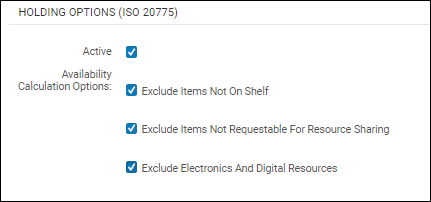
利用可否計算オプション 所蔵SRUを使用すると、クエリの目録の詳細を取得できます。以下のクエリ結果の例をご覧ください。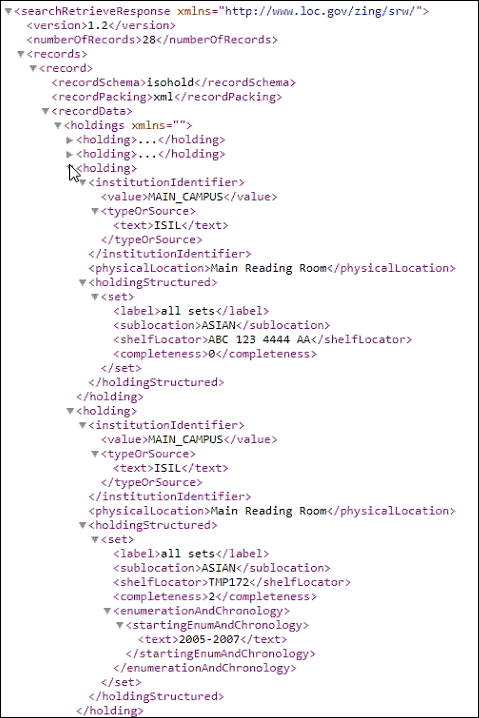
クエリ結果の例 利用可否計算オプション以下のオプションを1つ以上選択して、検索結果で利用可能な目録として表示するものを特定します。検索結果には、アイテムの数(コピーも含む)と、このパラメータに対して選択したオプションによって決定される計算された利用可否数が表示されます(下図を参照)。次のオプションのいずれも選択されていない場合、クエリ結果は、すべてのアイテムが常に利用可能であると見なします。- 書架にないアイテムを除外する - このオプションを選択すると、クエリ結果は書架にある目録のみを利用可能と見なします。
- リソースシェアにリクエストできないアイテムを除外する - このオプションを選択すると、クエリ結果は、リソースシェアにリクエスト可能な目録のみを利用可能と見なします。
- 電子資源とデジタル資源を除外する(現在は使用不可) – この機能は今後のリリースで実装されます。
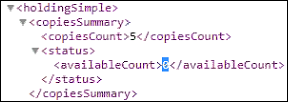
SRUコピー情報 -
保存を選択します。SRUサーバー統合プロファイルを保存した後、このプロファイルに対して次の行のアクションを使用できます:
- 編集
- Manage in Network – This action is only available in the Network Zone.ネットワーク管理の変更をメンバーに通知ジョブを使用して、この設定をメンバー機関に通知するには、このアクションを選択します。See Centrally Managing Configurations in a Network Zone and Distribute Network Administration Changes to Members for more information.
- Stop Network Management – This action is only available in the Network Zone.Select this action to disable distribution of this configuration to member institutions when using the Distribute network administration changes to members job.See Centrally Managing Configurations in a Network Zone and Distribute Network Administration Changes to Members for more information.
- Unlink from Network – This action is only available for member institutions.When the SRU Server integration profile is distributed to a member institution (that is, the integration profile is linked to the Network), the member institution may select the Unlink from Network action to disconnect from the Network Zone version of the integration profile and modify it for local use.
- ジョブ履歴
- 削除
を選択します。
Page tags: article:topicproduct:almacontent:Documentationlang:englishSRUSRWSRU server
