
Z39.50検索
Z39.50サーバー統合プロファイルを設定するための概要と手順。
- 一般システム管理者
An institution's catalog can be made searchable by external applications.これはいくつかの目的で必要になる場合があります。For example, if the institution serves as a copy cataloging source or participates in a resource sharing network, it's catalog may need to be searched externally.
For general information about the Z39.50 protocol, see http://www.loc.gov/z3950/gateway.html#about
Z39.50サーバー統合プロファイルが設定されている場合、Almaは外部から入ってくるZ39.50検索を受信します。着信リクエストが検出されると、AlmaはZ39.50応答を返します。この応答には、クライアント設定に応じて、MARCまたはOPACフォーマットのレコード情報が含まれます。
- 1つの機関に対して設定できるZ39.50プロファイルは1つだけです。
- Z39.50検索のために機関目録を開くと、Ex Librisはそれをコピー目録作成に使用できる外部検索リソースのプールに追加する場合があります。
- 次の属性がAlmaでサポートされています。キーワード(1016、1017);著者(1、1003、1004);主題(21);タイトル(4); ISBN(7); ISSN(8);日付(31);識別子(12); OCLC番号(1211)。
- 属性識別子 (12) - ローカル番号。Almaはこの「ローカル番号」を、035と関連レコードの001で構成される、MMS IDまたはその他のシステム番号(運用記録検索セクションのother_system_number)の検索として解釈します。次のフィールドを検索して、関連レコードが取得されます:019az, 035az, 773w, 774w, 775w, 777w, 786w, 800w, 810w, 811w。
- Z39.50クライアントマシンでAlma IPアドレス、ポート、およびデータベース名を設定する必要があります。The IP address/port to configure is:<Alma server>:1921(or 210, if you are working with Refworks – see Configuring a Z39.50 Refworks Client).これらのポートは、特定のIPアドレスの制限なく、すべてに開かれていることに注意してください。したがって、Alma側に新しいIPアドレスを追加する必要はありません。The database name to use is the Alma institution code—for example,60univ_inst.For information about your Alma server domain, see Your Alma Domain Names.
- For filtering Alma's Z39.50 response at a campus level in a multicampus environment, you must add the campus code to the database name that is configured on the Z39.50 client machine using the following format:base (institution ID>/<campus code>.For example,base 60univ_inst/Springfield may be used at the client Z39.50 machine where 60univ_inst= the Alma institution code and Springfield= the Alma campus code.When this is implemented, Alma's Z39.50 search and present results are displayed/filtered only for resources that are owned by the campus (and its libraries).これにより、複数キャンパス環境の機関は、選択したキャンパス内で識別された図書館の結果のみを提供できます。
- Z39.50を使用して外部検索を実行し、10,000以上のレコードを取得しようとすると、Almaは10,000の制限を超えた後のレコードを一括取得するときにエラーメッセージで応答します。Z39.50統合は、図書館間の貸与、目録コピー、および選択を可能にするために、Alma検索を他の自動システムと統合することを目的としています。レコードの一括エクスポートの実行など、他のワークフローにZ39.50統合を使用することはサポートされていません。
MARCレコード情報の返却は、以下のルールにしたがって処理されます。
- MARC所蔵レコードは、[所蔵で強化] チェックボックスが選択されている場合にのみ戻ります(以下の手順を参照)。所蔵で強化パラメータを選択すると、852などのMARC 21所蔵フィールドでMARC 21の結果が強化されます。
- MARC所蔵レコードは、永続的な場所についてのみ返却されます。
- (MDエディターでレコードに対してディスカバリーから抑制が選択されているとき)抑制されたMARC所蔵レコードは除外されます。
- MARC holdings records from suppressed locations (Suppress from discovery is selected for the location; see Configuring Physical Locations) are excluded.
- (ディスカバリーから抑制 がMDエディターでレコードに対して選択されているとき)抑制されたMARC書誌レコードおよびそれらに関連付けられた所蔵レコードは除外されます。
OPACレコード情報の返却は、以下のルールによって処理されます:
- OPACの所蔵レコードは、永続的な場所と一時的な場所の両方について返却されます(場所ごとの所蔵について)。
- (MDエディターでレコードに対してディスカバリーから抑制が選択されているとき)抑制されたOPAC所蔵レコードは除外されます。
- OPAC holdings records from suppressed locations (Suppress from discovery is selected for the location; see Configuring Physical Locations) are excluded.
- (ディスカバリーから抑制がMDエディターでレコードに対して選択されているとき)抑制されたOPAC書誌レコードおよびそれらに関連付けられた所蔵レコードは除外されます。
Alma Z39.50サーバーサポートには、メンバー機関からの情報で強化されたネットワークゾーンレコードに対するUNIMARCサポートが含まれています。AlmaへのZ39.50コールがUNIMARCフォーマットを指定すると、AlmaはUNIMARCフォーマットのZ39.50presentResponse出力で応答します。利用可否の表示は、次のUNIMARCフォーマットを使用して処理されます:
- MARC852フィールド
- $a 場所 - 機関コード
- $6 リンケージ – MMS ID
- $9 ローカルフィールド – P(印刷)/E(電子)/D(デジタル)
印刷物や電子ファイルなど、機関で複数の資料タイプが利用可能な場合、852フィールドには複数の$9エントリが含まれます。
Z39.50検索タイプ統合プロファイルの構成
For each institution, there can be only one Z39.50 Server integration profile.
- 統合プロファイルリストページ(設定メニュー > 一般 > 外部システム > 統合プロファイル)で、統合プロファイルを追加を選択します。統合プロファイルウィザードの最初のページが表示されます。
- 定義するプロファイルのコードと名前を入力します。
- 統合タイプのドロップダウンリストから、Z39.50 サーバーを選択します。この統合タイプでは、デフォルトのチェックボックスは機能しません。
- 次へを選択します。
-
Complete the export parameters using the information provided in the table below.
Z39.50エクスポートパラメータ パラメータ 説明 ユーザー名/パスワード
AlmaがZ39.50クライアントマシンと通信するためのユーザー名とパスワード(オプション)を入力します。
Z39.50のユーザー名とパスワードは大文字と小文字を区別せず、次のものを含めることができます:
- 10文字以内
- 大文字/小文字、数字、アンダースコアパスワードには特殊文字(#や$など)を含めることはできません。
For example, if you set the user name/password to Alma_12_34, it is possible to authenticate with all of following options:alma_12_34,ALMA_12_34, and alMA_1234.
ユーザー名とパスワードが設定されている場合、ユーザー名とパスワードが提供されない限り、Almaは検索できません。
アクセスを許可する
Z39.50クライアントマシンがAlmaにアクセスできるようにするには、このパラメータを選択します。
所蔵で強化
このパラメータを選択すると、Almaが返すZ39.50応答に、書誌情報に加えて所蔵情報が含まれます。
Z39.50 retrieves related holdings but not items.これは設定変更できません。
電子目録の強化Select this parameter to search in electronic inventory in the Institution Zone.The response will include information about the electronic inventory available in the institution.ネットワークで管理されている電子リソースの結果を含めるこのチェックボックスは、ネットワークゾーンのメンバーのみが使用できます。When this option is activated, then when performing a Institution Zone holding lookup using the Z39.50 protocol, the results include:-
既存の目録や他の存在するエンティティに関係のない機関ゾーンの書誌レコード、
-
活動化ステータスに関係のない機関ゾーンの書誌レコード:コレクションまたはポートフォリオに「有効化」、
-
Network Zone bibliographic records that belong to a portfolio or an electronic collection that has the "available for group" for the owning member Institution.
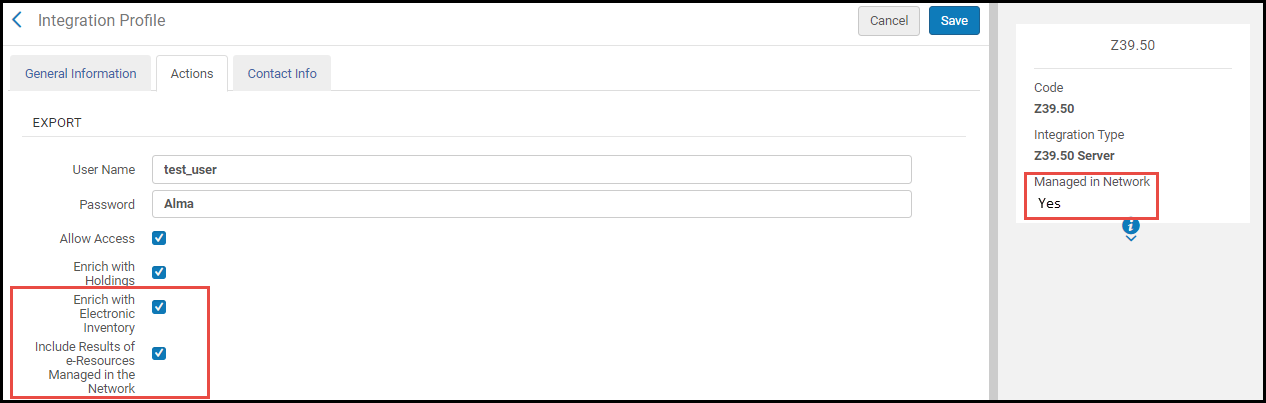 In consortia where the configuration of Z39.50 integration profile is done by the Network and is distributed to all members, the Z39.50 integration profile is marked as "Managed in Network".In this cases, this option is visible in the Network Zone institution as well.The network can determine whether this profile is distributed to members with this option activated or disabled.Any member using this profile can decide to opt out and manage the profile locally by editing the Network configuration (see Unlink from Network).
メンバーアクセス権限で強化する
ネットワークゾーンでこのプロファイルを設定している場合、このパラメータを選択して、Z39.50応答でメンバー機関の所有権を返却します。
ネットワークゾーンへのリクエストにのみ、メンバー機関の所有権が含まれます。返却される情報には、機関、書誌レコード(MMS ID)、およびフォーマット(冊子、電子、またはデジタル)が含まれます。この機能は、共同ネットワークメンバーによるより効率的なクエリをサポートし、サードパーティの統合とリソースシェアの目的でしばしば必要になります。
メンバー機関の所有権情報は、次のMARC 21 852サブフィールドに返却されます:
- $a - 機関コード
- $6 - MMS ID
- $9 - P(印刷)、E(電子)、またはD(デジタル)
代表で強化
このパラメータを選択して、非リモート代表情報を外部システムに公開します。
リモート代表で強化する
リモート代表情報を外部システムに公開するには、このパラメータを選択します。
正規化を適用
Select this parameter to normalize Alma bibliographic records prior to any additional enrichment and being presented to an external system as a result of a Z39.50 request.Normalization can be applied to MARC 21, KORMARC, UNIMARC, and CNMARC bibliographic records using the following normalization processes provided out of the box or by customizing these processes with normalization rules that you create: Marc21 Bib normalize on external search, KORMARC Bib normalize on external search, UNIMARC Bib normalize on external search, or CNMARC normalize on external search.
 CNMARC書誌メタデータ設定プロファイルの正規化ルールの例
提供される正規化ルールは、書誌レコードから次の情報を削除します:590ローカルメモ(MARC 21)、590ローカルメモ(KORMARC)、900ローカルフィールド(UNIMARC)、および300一般メモ(CNMARC)。See Working with Normalization Rules for more information.
正規化処理が完了した後に強化プロセスが実行されるので、正規化処理は強化によって追加されたフィールドには影響しません。
The normalization rules that are provided out of the box use the following drools files (specified on the Task Parameters tab): drools/remove590.dslr, drools/remove900.dslr, and drools/remove300.dslr.
 Z39.50/SRU検索正規化ルールで正規化するCnmarc書誌からのDroolsファイルの例
For more information, see Working with Normalization Processes.
Suppress records based on "Suppress from External Search" tag Select this parameter to exclude records with a Suppress from External Search tag from being exposed to the external system. リモート・ストレージ・データで拡張する Select this parameter to have the 'callNumber' element of the Z39.50 Present response (when using the OPAC format) be populated with the 'Storage location ID' of holdings' items instead of the call number.If the same holdings record's items have different 'Storage location ID' values then one of them will be included in the response. -
[保存]を選択します。
Actions Available for the Z39.50 Profile
- 編集
- Manage in Network – This action is only available in the Network Zone.ネットワーク管理の変更をメンバーに通知ジョブを使用して、この設定をメンバー機関に通知するには、このアクションを選択します。See Centrally Managing Configurations in a Network Zone and Distribute Network Administration Changes to Members for more information.
- Stop Network Management – This action is only available in the Network Zone.Select this action to disable distribution of this configuration to member institutions when using the Distribute network administration changes to members job.See Centrally Managing Configurations in a Network Zone and Distribute Network Administration Changes to Members for more information.
- Unlink from Network – This action is only available for member institutions.When the Z39.50 Server integration profile is distributed to a member institution (that is, the integration profile is linked to the Network), the member institution may select the Unlink from Network action to disconnect from the Network Zone version of the integration profile and modify it for local use.
- ジョブ履歴
- 削除
Z39.50 Refworksクライアントの設定
- Refworksクライアント管理アプリケーションで、[検索] > [オンライン目録またはデータベース]を選択します。[オンライン目録]または[データベース]ダイアログボックスが開きます。
- Z39.50サイトをリクエストリンクを選択します。[リクエスト]ダイアログボックスが開きます。
Z39.50サイトをリクエストする - Z39.50サイト名ボックスに、Refworksで機関に表示する名前を入力します。
- 詳細フィールドで、次のように入力します:
- Server – The Alma server:<Alma domain>APAC諸国では、代替Almaドメイン<Alma alternate domain>を使用する必要があります。See Your Alma Domain Names.
- ポート - 210を指定
- データベース – これは、01_EXL_INSTなどのAlma機関コードです。
- ユーザーとパスワード(Almaで定義されている場合)
- Server – The Alma server:<Alma domain>
- 送信リクエストを選択します。
Refworksクライアント設定の例
The following is an example of one Alma customer's Refworks client settings (note that this has not been verified by Ex Libris):
- URL:university.alma.exlibrisgroup.com(see Your Alma Domain Names)
- Port:210
- Database:01_EXL_INST
- Record Syntax:USmarc
- Element Set Name:F
- Import Filter:MARC Format
- Character Set:ANSEL/ALA/USmarc
- Requires Password:No
- Any Field:1016
- Author Field:1003
- Year Field:31
- Title Field:4
- Keyword Field:21
Timeout Time When Using Z39.50 Search
When searching via z39.50, the session timeout for Alma is 2 minutes.After 2 minutes, the session terminates, and your work may be lost.
Page tags: article:topicZ39.50Z39.50 serverproduct:almacontent:Documentationlang:englishZ39.50 server integration typeZ39.50 Refworks
