
OAI統合のセットアップ
メタデータ収集のためのOpen Archives Initiative Protocol for Metadate Harvesting([メタデータ収集のための公開アーカイブイニシアチブプロトコル];以下OAI-PMH)とAlmaとの統合の概要、およびOAIリポジトリ定義統合タイププロファイルの設定手順。
The Open Archives Initiative Protocol for Metadata Harvesting (OAI-PMH) is a low-barrier mechanism for developing and promoting inter-operability standards that aim to facilitate efficient dissemination of content across repositories.Data Providers are repositories that expose structured metadata through OAI-PMH.Service Providers then make OAI-PMH service requests to harvest that metadata.OAI-PMHは、HTTP内で呼び出される6つのリクエストタイプ(「動詞」)を使用します。この機能を使用すると、Almaは(データプロバイダーとして)メタデータを公開でき、そのメタデータは外部ツール/リポジトリ(データ収集機能)によって収集されます。
OAI統合プロファイルの設定は、OAIを介した公開に向けた最初のステップです。OAI統合プロファイルを設定すると、AlmaはレコードをOAIタイプとして公開し、そのタイプに応じてそれらを収集します。
まずOAI統合プロファイルを設定すると、公開プロファイルを設定できるようになります。これが完了すると、OAIセットアップが完了し、データベースを読み込みできる状態になります。For information on setting up a publishing OAI profile, see Publishing and Inventory Enrichment.
See Making the Alma Repository Available via OAI for more information.
- 統合プロファイルリストページ(設定メニュー > 一般 > 外部システム > 統合プロファイル)で、統合プロファイルを追加を選択します。2ステップ統合ウィザードの最初のステップが表示されます。
- From the Integration Type drop-down menu, select OAI Repository Definition(do not select the code and the name).ページが更新され、プロファイルに関連するフィールドが表示されます。この統合タイプでは、デフォルトのチェックボックスは機能しません。

- 統合プロファイルのためのオプション説明を入力し、次へを選択します。統合プロファイルウィザードのステップ2が表示されます。以前にOAI統合プロファイルを設定している場合、既存のプロファイルを編集するよう求められます。
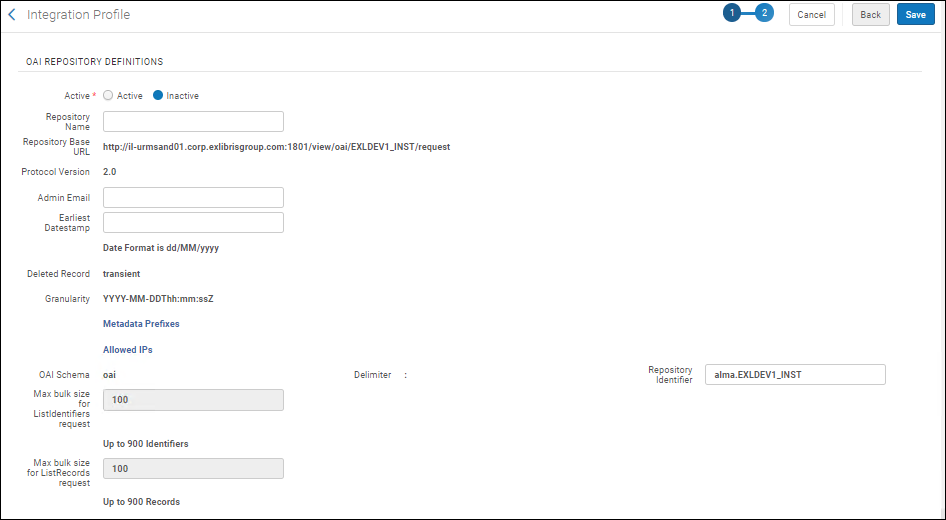
- 必要に応じてOAIリポジトリ定義を入力します。
- Active/Inactive(required) - Select Active.
- Repository Name- The repository when calling the OAI API.
- Repository Base URL- The fixed, auto-generated base URL for all OAI links, not editable.
- Protocol Version- The protocol version used.このパラメーターにはバージョンが自動的に入力され、編集できません。
- Admin Email(required) - The email address where you want communications related to the integration profile to be sent.
- Earliest Datestamp(required) - The first date stamp of the repository records (which can be used, for example, when querying the repository by date).
- Deleted Record- This is automatically identified as transient and is not editable.
- Granularity- The data/timestamp granularity is automatically identified as YYYY-MM-DDThh:mm:ssZ and is not editable.See ISO 8601 for an explanation of this format.
- Metadata Prefixes- Select to open a page enable or disable prefixes.This page is a mapping table; for more information, see Mapping Tables.このページではプレフィクスのみを有効または無効にできます。
- Allowed IPs- Select to open a page to configure IP ranges for users/locations who can access the repository.This page is a mapping table (see Mapping Tables for more information).このページで範囲を追加、編集、または削除できます。For an IP range, use a hyphen with no spaces (-) between strings (Syntax corrections are noted in error messages).Allowed IPs are the IP addresses/ranges that have access to Alma OAI.Any IP that is not in this list gets an error response when one tries to access the Alma OAI.If no IP is defined in this mapping table, no one can access Alma via OAI requests.
- OAI Schema- This is identified as oai and is not editable.
- Delimiter- The delimiter is identified as a colon (:) and is not editable.
- Repository Identifier- Enter a string that identifies the repository that is compliant with OAI-PMH requirements.この値は、ピリオドで区切られた、特殊文字を含まない2つの文字列でなければなりません(例えば、01BC.INST)。
- Max bulk size for ListIdentifiers request(required) - A value from 100 to 900 is specified by Ex Libris.この設定を変更するには、サポートにお問い合わせください。
- Max bulk size for ListRecords request(required) - A value from 100 to 900 is specified by Ex Libris.この設定を変更するには、サポートにお問い合わせください。
- 保存 を選択して、プロファイルを完了します。
AlmaではOAIは一つしか設定できないため、統合プロファイルを変更したい場合は アクションメニューから編集を選択し、既存のプロファイルを編集しなければなりません。
Page tags: article:topicproduct:almacontent:Documentationlang:englishOAIOAI-PMHOAI Repository Definition
