
Bulk Change Hold Requests
The Bulk Change option allows staff to edit multiple hold requests inside the Request Manager and Picklist Processing workforms.
This option helps reduce repetitive work and manage holds more efficiently in situations like branch closures when patron requests need to be prolonged or moved to a different branch. You can update the Pickup Branch, Pickup Areas (if available), and the Date (depending on the status of hold request: Hold To Date, Expiration Date, or Need By Date) .
Bulk Change is available in the following views in the Request Manager:
-
Holds tab
-
By: Pickup
-
Status: Active, Inactive, Held
-
-
ILL tab
-
By: Pickup
-
Status: Active, Not Active, Received - Held
Bulk Change option is not available for INN-Reach view. -
Bulk Change option is also available in the Picklist Processing utility, under:
-
Pending tab
-
Located tab
Using Bulk Change
When one or more holds are selected using check-boxes in the leftmost column, the Bulk Change button enables, allowing you to edit the following fields:
-
Pickup Branch: shows a drop-down of available locations.
-
Pickup Area: shows a drop-down of areas available for the chosen location (if the branch has areas enabled).
-
Date: shows a calendar date picker; name of the field depends on the workform you are in.
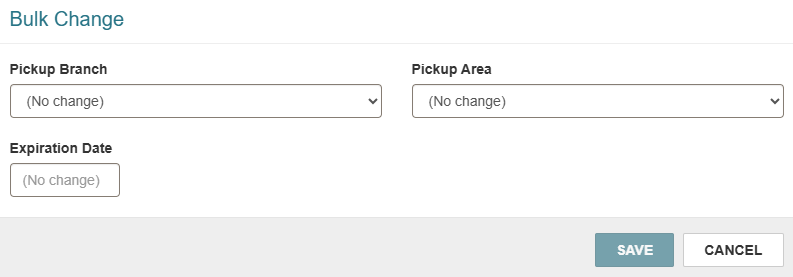
When a branch location is changed from the on you are logged into to another, holds automatically switch to Shipped status. As a result, the date field is disabled because it becomes irrelevant.
If the branch location is changed for holds from another branch, the date field remains available, and a note appears, informing staff that the items with location change will remain in held status until checked in for reroute.
Pressing Update Items in the Bulk Change modal opens a confirmation dialogue with:
-
Number of records affected by this update.
-
Warning that the changes cannot be automatically undone.
After confirming, the user is presented with a message about a successful update, and a warning if any errors are found.
Bulk Change operation will not break if some of the items fail to update. Failed items will be skipped and reported.
Required Permissions
To have Bulk Changes enabled, staff members need to have Hold requests bulk change permission set to Allow.
The following permissions are required for to use the Bulk Change option in the Request Manager:
For the Holds view:
-
Access Hold Request Manager: Allow
-
Hold Requests: Modify
For the ILL view:
-
Access ILL Request Manager: Allow
-
ILL Requests: Modify
For Picklist Processing:
-
Picklist application - Allow
-
Picklist application- Modify circulation status
-
Hold Requests: Modify
