
Configuring Ex Libris Secure FTP Service
Ex Libris provides out-of-the-box FTP servers using Ex Libris Secure FTP service for file transfer between Alma and external systems. This is an alternative to using institution's own FTP solutions, the option that remains available (see Configuring S/FTP Connections).
El servidor FTP seguro de Ex Libris proporciona un directorio diferente para cada cliente. This folder contains two sub-directories: Production and Sandbox. Usted tiene acceso de Lectura/Escritura a estos directorios. See more regarding this feature in the video Using the Ex Libris Secure FTP Service.
Limitations to the Ex Libris FTP server directories:
- Max 4GB for the directory
- Data retention period - 30 days
The ability to use the Ex Libris FTP server is enabled by default. You can select to use the connection to the Ex Libris Secure FTP Service from the List of S/FTP Connections page (Configuration Menu > General > External Systems > S/FTP Definitions).
The Ex Libris Secure FTP Server is always located in the same region as the Alma institution: for EU customers, it will be in the EU, for CA customers -- in CA, etc.
Para algunos clientes, el entorno de Sandbox usa un servidor diferente del entorno de Producción. Se pueden acceder a ambos servidores con la misma clave privada, sin importar dónde se haya generado.
To select the Ex Libris FTP server connection:
-
The Ex Libris Secure FTP Service section appears on the List of S/FTP Connections page (Configuration Menu > General > External Systems > S/FTP Definitions). You do not need to configure any information here, because the server/port and the user are already provided.

-
To get the private key with which to log into the Ex Libris Secure FTP Service, select Regenerate private key. Alma downloads a file with the RSA private key. Use the key to log in to the Ex Libris Secure FTP Service (using FileZilla or another FTP client of your choice). For more information about the Ex Libris Secure FTP Service, click here.
Once you received the RSA private key and connected to the Ex Libris Secure FTP Service, save the key file in a secured location. Make sure to not select Regenerate private key again. La regeneración de una nueva clave reseteará la conexión al servicio FTP de Ex Libris. -
Optionally, click Optional Parameters to configure PGP public-key encryption for files created by Alma.
Examples for Working with the Ex Libris Secure FTP Service
Once the connection to Ex Libris Secure FTP Service was established, you can select the Ex Libris Secure FTP in all locations in Alma where a connection to FTP server needs to be established.
For example:
- You can select it on the I ntegration Profiles page. Aparece como la primera opción en el menú desplegable "Tipo de conexión S/FTP":

- You can select it in Import Profile Details page and EDI Vendor page. (On these pages, select the FTP connection via a radio button and not a dropdown.)
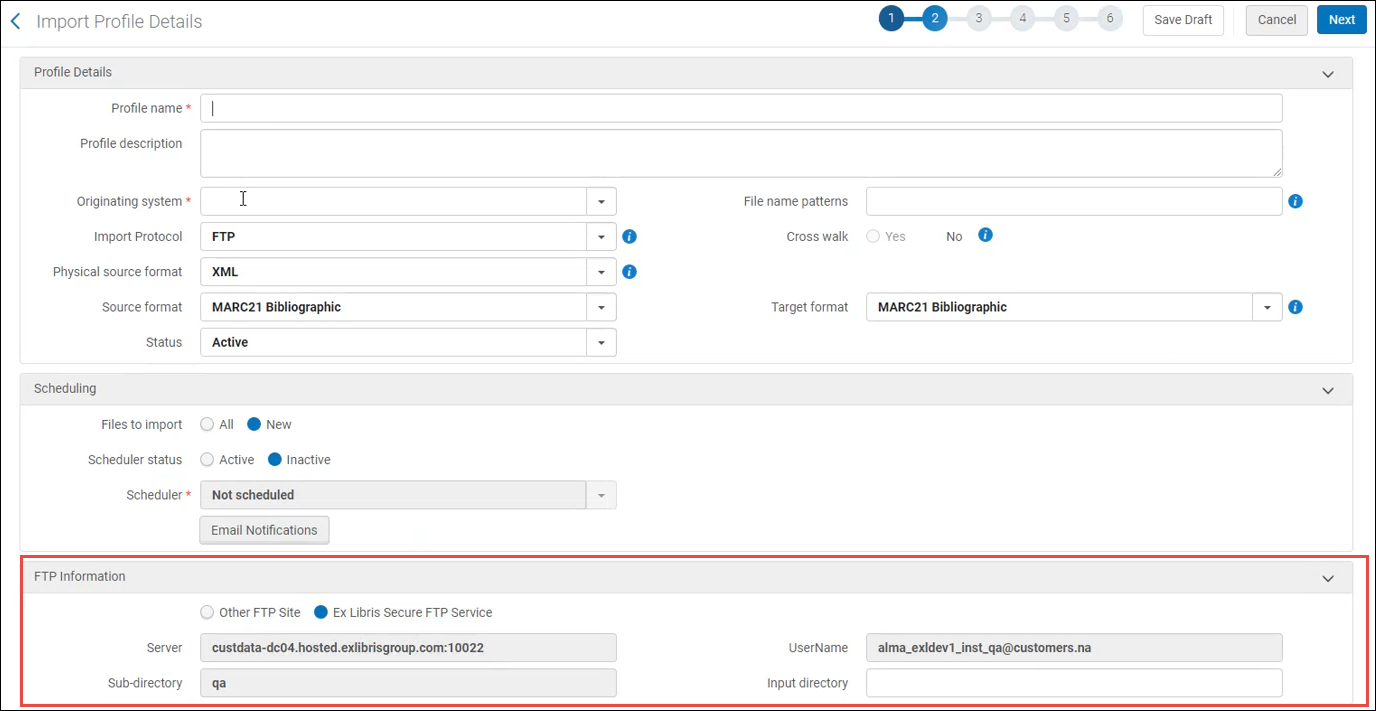
In both cases, when you selected the Ex Libris Secure FTP Service option, the other fields related to FTP definition become disabled.
