
Configurar los idiomas de la institución
- Administrador general del sistema
The Institution Languages mapping table (Configuration Menu > General > General Configuration > Institution Languages) allows you to configure which languages are supported by the institution. Los idiomas disponibles son predefinidos por Ex Libris; cada idioma está o bien activado o bien desactivado. Los idiomas pueden ser soportados en los siguientes contextos:
- Interfaces orientadas al usuario – Incluye notificaciones (correo electrónico y SMS), mensajes de máquina de autopréstamo y las pestañas Primo VE, Get It, View It y Mi Cuenta en Primo.
- Interfaces orientadas al personal – Incluye las interfaces orientadas al usuario y todos los otros elementos administrativos de Alma.
En algunos casos, si utiliza traductores externos, es posible que observe problemas de despliegue y funcionalidad con determinadas etiquetas y botones. Recomendamos utilizar los idiomas admitidos en la tabla de mapeo Idiomas de la institución, como se describió anteriormente.
La tabla de mapeo Idiomas de la institución contiene los siguientes idiomas:
| Código de idioma | Nombre del idioma |
|---|---|
| ar | Árabe |
| ca | Catalan; Valencian |
| cs | Checo |
| cy | Galés |
| da | Danés |
| de | Alemán |
| en | Inglés |
| es | Español |
| eu | Vasco |
| fi | Finlandés |
| fr | Francés |
| ga | Irlandés |
| gl | Gallego |
| haw | Hawaiano |
| he | Hebreo |
| hu | Húngaro |
| is | Islandés |
| it | italiano |
| ja | Japonés |
| ko | Coreano |
| It | Lituano |
| mi | Maori |
| ms | Malayo |
| nb | Bokmål, Norwegian; Norwegian Bokmål |
| nl | Dutch; Flemish |
| nn | Norwegian Nynorsk; Nynorsk, Norwegian |
| no | Noruego |
| pl | Polaco |
| pt | Portugués (Brasil) |
| ru | Ruso |
| se | Sami del Norte |
| sv | Sueco |
| .º | Tailandés |
| tr | Turco |
| uk | Ucraniano |
| zh | Chino |
| zh-tw | Chino tradicional |
For more information about mapping tables, see Mapping Tables.
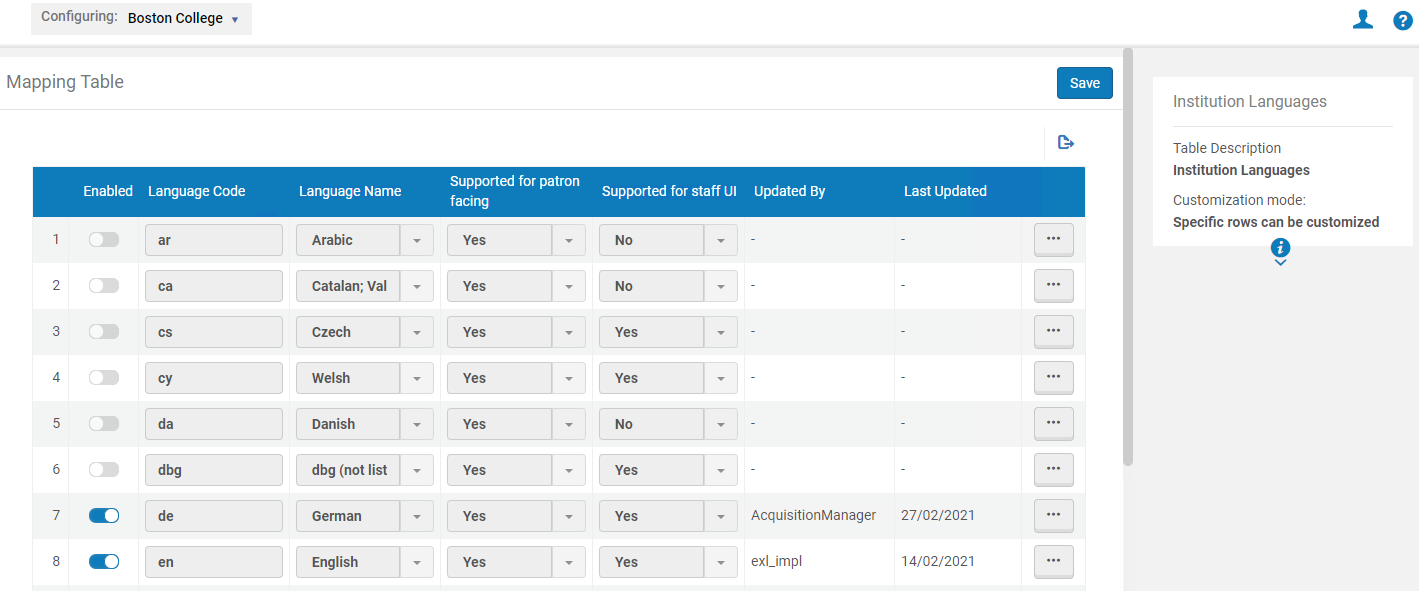
En esta página, puede activar o desactivar los idiomas. Es posible que necesite iniciar y finalizar la sesión en Alma para ver los cambios.
The Supported for Patron Facing column indicates whether the language is supported in patron-facing interfaces, such as notifications (email and SMS), self-check machine messages, and Get It, View It, and My Account tabs in Primo. The Supported for Staff UI column indicates whether the language can be selected as the staff-facing interface (when you select the name of the user in the top right-hand corner of Alma and select the language from the Language drop-down list):
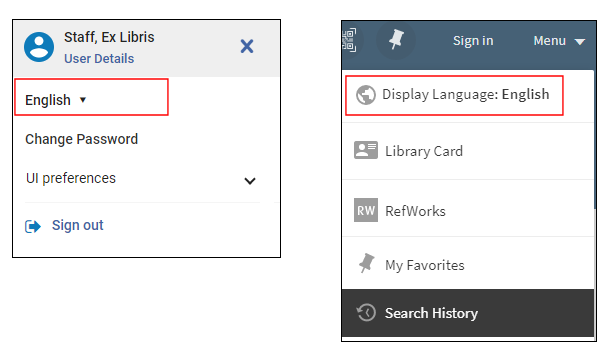
For information regarding the configuration of the display languages for Primo, see Configuring Display Languages for Primo.
The values in the Supported for Patron Facing column and Supported for Staff UI column are read-only and cannot be edited.
If a staff user selected an enabled language as their interface language, then physical location names can only be edited for that language. To change the name of a physical location in a different language, select that language as the interface language.
If a patron selected an enabled language as their Preferred Language, all emails received by the patron display in this language (see the Preferred Language field in the Quick User Management Page Fields table in Adding Users).
