
Configurazione delle regole di revisione degli acquisti

Traducibile
Per configurare le regole di revisione degli acquisti, è necessario avere il seguente ruolo:
  • Amministratore Acquisizioni
  • Amministratore di Sistema Generale

Purchasing review rules define whether automatically created PO lines (either via API or EOD) undergo manual review or are sent immediately to packaging. Le regole si applicano a tutti i tipi di righe PO create e a tutte le biblioteche all'interno dell'istituzione. For information on reviewing PO lines including available facets, inventory information, updating PO lines, etc., see Reviewing PO Lines.

Watch the Configure Purchasing and Invoice Rules video.

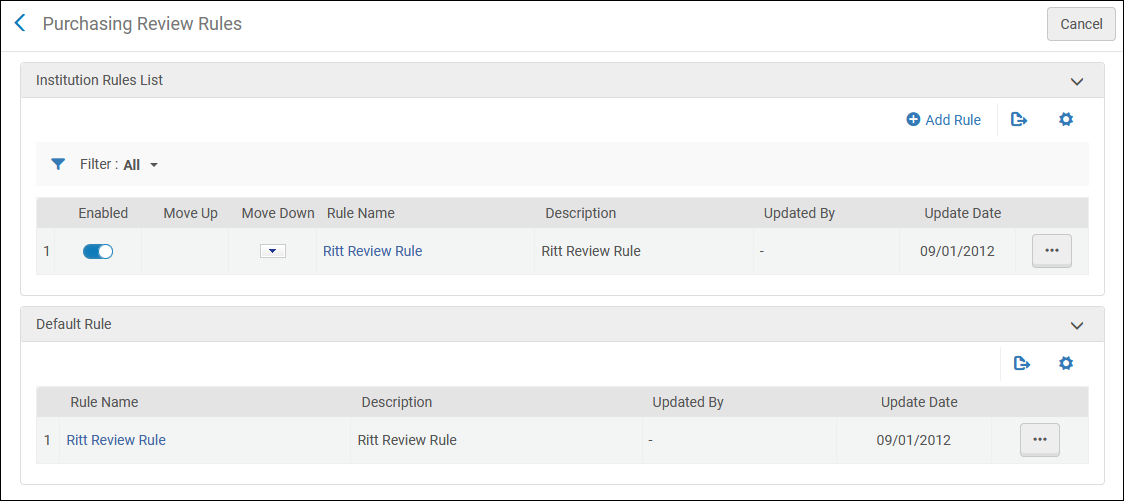
You configure purchasing review rules on the Purchasing Review Rules rules table (Configuration Menu > Acquisitions > Purchase Orders > Purchasing Review Rules). For more information about rules tables, see Rules Tables.
Purchasing_Review_Rules

Pagina delle regole di revisione degli acquisti
  • Queste regole si applicano solo alle righe di ordine di acquisto create automaticamente; le righe di ordine di acquisto create manualmente saltano il processo di revisione se seleziona Ordina ora o Salva e continua, oppure rimangono In revisione se non lo fa (ad esempio, se seleziona Salva).
  • Unlike most rules tables,the default purchasing review rule is checked first.

The rules are checked for each automatically created PO line, as soon as a rule matches the PO line, its Result(Output Parameters) is checked. If the result is True, the PO line is sent for review; otherwise, the PO line continues on to packaging.The default rule is checked first. La regola default non ha criteri configurabili; può essere solo Vero o Falso, come segue:

  • Vero – tutte le linee PO vengono inviate per la revisione.
  • Falso – le regole vengono controllate per verificare se la riga dell'ordine di acquisto viene inviata per la revisione. Se non ci sono altre regole o nessuna delle regole corrisponde, la riga dell'ordine di acquisto non viene inviata per revisione e procede alla creazione del pacchetto.

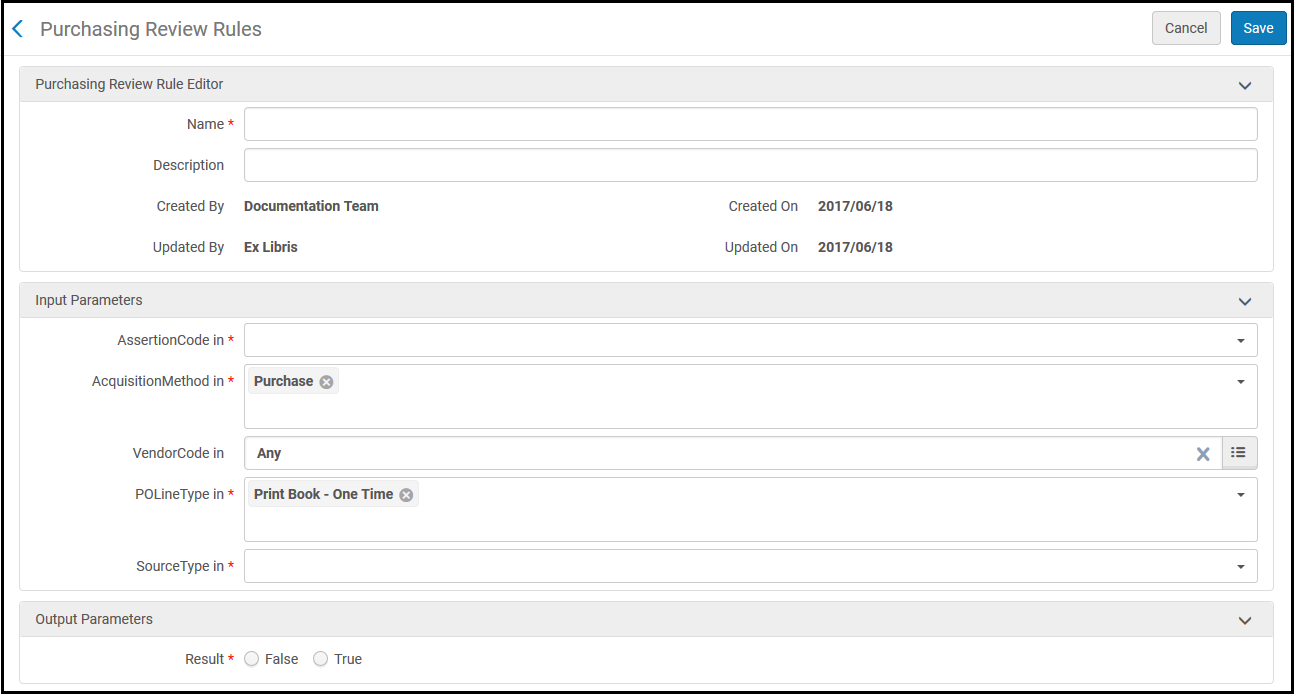
Aggiungere o modificare le regole nella pagina Regole di revisione degli acquisti (selezionare Aggiungi Regola o selezionare Modifica nella lista azioni di riga).
purchasing_review_rules_add_ux

Pagina dell'Editor delle regole di revisione degli acquisti Editor

Per una descrizione dei criteri (parametri di input), vedere la tabella seguente. For Result,True indicates that the PO line is sent for review.False indicates that the PO line is not sent for review and proceeds to packaging.

Regole di revisione degli acquisti parametro di input
Parametro Descrizione
Codice della dichiarazione

Il tipo di Alert generato. Per attivare le Regole di Acquisto, è necessario specificare un Codice di Asserzione. These alerts may appear when creating or saving a PO line manually (see Manually Creating a PO Line), when importing EOD records (see Importing Records Using an Import Profile), or when using the API (see https://developers.exlibrisgroup.com/alma/apis/acq).

For information on enabling/disabling alerts, see Managing Acquisition Alerts. I valori possibili sono:

  • Access model field does not match the access model on the portfolio. Saving the POL will overwrite the access model on the portfolio. – L’Utente ha cambiato il valore nel campo Modello di accesso della riga PO, e attualmente non corrisponde al durante l'importazione di record EOD (vedivalore del campo Modello di accesso pubblico del portafoglio. This alert appears when the user tries to save the changes to the PO line, and indicates that if the user saves the changes, the value of the Public Access Model field of the portfolio will be updated automatically to match the value in the Access Model field of the PO line, because these values must always match.
  • Already Has Inventory – The PO line item already exists in your inventory. Questo avviso è visibile solo nell'API.
  • At least one item has a user request. Are you sure you want to continue? – When the Save and receive action is selected in the Received Items List page (Acquisitions > Receiving and Invoicing > Receive > Manage Items [in the row actions of a PO line]) for an item that has one or more patron or library requests associated with it, this alert appears.
  • At least one of the received items is assigned to a remote host location – In an institution that operates as part of a network zone, when items are received, and one or more of those items were purchased by the institution but are going to be located at a different institution in the network (the "remote host"), this alert appears.
  • Manca almeno uno dei report Codice – L'istituzione ha configurato Alma per richiedere la selezione di valori per determinati report Codice (possono essere richiesti fino a cinque report Codice) per ogni riga dell'ordine di acquisto. Questo avviso appare se l'Utente salva una riga di ordine di acquisto quando non sono selezionati tutti i report Codice richiesti. See also Configuring Reporting Codes.
  • Created from import EOD- The PO line was created using EOD.
  • Ordine attivo duplicato – la copia della riga PO è già parte di un'altra riga PO attiva.
    In the same scenario, when saving a PO line, the message There is an active order <order number> for this ordered resource appears in the confirmation dialog box.
  • Il pacchetto elettronico esiste già nell'archivio – Il pacchetto elettronico della linea PO esiste già nell'archivio.
  • Electronic portfolio already exists in the repository – This alert appears when the user tries to create an order from the Community Zone for portfolios that already exist in the institution.
  • La risorsa elettronica non è stata attivata – La risorsa elettronica della linea PO non è stata attivata. Questo avviso può apparire dopo l'invio della riga d'Ordine.
  • Fund is over encumbered – The PO line or invoice links to funds that were overencumbered and there is an active overexpenditure rule with a warning threshold, which has been reached. Ciò significa che il Fondo si sta avvicinando al suo limite e non potrà avere ulteriori impegni o transazioni di spesa.
  • Fondo da un Registro diverso – Il Fondo stipulato nella riga PO appartiene a un Registro diverso.
  • Invoice contains vendor account which differs from one or more linked PO lines. – The value in the Vendor Account field of the invoice is different from the value in the Vendor Account field of the PO lines in the invoice.
  • Stato della Fattura – Non in uso.
  • La copia è già esistente nell'Archivio – La copia fisica esiste già nell'Archivio. In altre parole, l'Ordine è per un record bibliografico che ha già un inventario fisico. This alert is seen in the PO line creation ‘prerequisite' page (when ordering an existing title in Alma). It may also be seen during other workflows such as EOD, purchase requests, etc.
  • Informazioni obbligatorie mancanti o errate – Le informazioni incluse nella riga dell'ordine di acquisto sono insufficienti o errate.
  • Manually marked for review – Stops the PO line for review when the PO line is created via API or EOD
  • Non totalmente ricevuto – la riga dell'ordine di acquisto non è stata completamente ricevuta. Ad esempio, sono state ordinate tre copie, ma ne sono arrivate soltanto due. Se non si prevede di ricevere la copia rimanente e si desidera chiudere la riga dell'ordine di acquisto, aggiornare la riga dell'ordine di acquisto per riflettere il numero di copie ricevute. La linea PO potrebbe quindi essere chiusa.
  • Esistono reclami aperti per questa linea di ordine di acquisto – Non in uso.
  • Linea PO scaduta – La data di ricezione prevista della linea PO è passata. La riga PO verrà visualizzata nella pagina Reclami.
  • Il tipo di riga PO è disabilitato e il suo valore default non è selezionato. The PO Line was created with the original type – The PO line was created automatically (via API or EOD) with a PO Line Type that is disabled in the institution. Per il tipo disabilitato non è configurato alcun tipo di linea PO predefinito , pertanto alla linea PO è stato assegnato il tipo disabilitato. See also Enabling/Disabling PO Line Types.
  • PO Line type is disabled and was replaced to default value – The PO line was created automatically (via API or EOD) with a PO Line Type that is disabled in the institution. A Default PO Line Type is configured for the disabled type, and was assigned to the PO line. See also Enabling/Disabling PO Line Types.
  • Risorsa ordinata precedentemente annullata – La riga dell'ordine di acquisto faceva parte di un ordine di acquisto che è stato annullato. La riga PO è ora collegata al record bibliografico invece che alla copia. Se vede questo messaggio nell'interfaccia UI, dovrebbe collegare la riga PO a una copia.
  • Limite di prezzo raggiunto – Il prezzo della riga dell'ordine di acquisto è superiore al valore specificato (10.000 per default). This threshold can be customized for each relevant library in Configuration > Acquisitions > Purchase Orders > PO Line Price Threshold. For details, see Manage Price Threshold and Amount Threshold for PO Lines and Invoices at the Library Level. Questo avviso può apparire dopo l'invio della riga d'Ordine.
  • Price limit reached using currency conversion – The PO line price, after conversion to the currency of the fund associated with the PO line, is greater than a specified value (10,000 by default). Questo valore è lo stesso della soglia descritta sopra, per l'avviso Limite di prezzo raggiunto. Questo avviso appare quando la valuta della linea PO è diversa dalla valuta del fondo e il limite di prezzo nella valuta del fondo è stato superato. Questo avviso può apparire dopo l'invio della riga d'Ordine.
  • Esiste una decisione di acquisto – Il responsabile della prova ha deciso di acquistare la copia della riga PO.
  • Stato di ricezione – non in uso.
  • la data di promemoria è arrivata – La data di promemoria del Differimento (se esiste) per la riga PO (situata nella pagina di revisione differita) è arrivata.
  • Renewal date past the subscription end date – The PO line's renewal date is later than the date on which the subscription ends. La riga PO per il rinnovo appare nell'elenco delle attività di rinnovo ricorrente. Se vede questo messaggio nell'interfaccia UI, chiuda la riga dell'ordine di acquisto o aggiorni la data di rinnovo della riga dell'ordine di acquisto.
  • Manca il report Codice – Non è stato inserito alcun report Codice per la riga PO. Il report Codice appare nell'area Dettagli riga ordine nella tab tab Riepilogo. I codici report vengono spesso utilizzati come parte del processo di creazione dei report per Alma Analytics. Avvisi simili appaiono per i report di Codice secondario o terziario, se definiti in Alma ma non assegnati alla riga d'ordine.
  • Alcune linee di fattura differiscono nel prezzo dalle loro linee PO collegate. – I prezzi indicati per una o più Linee di fattura nella Fattura non corrispondono ai prezzi delle relative Linee PO associate. – The prices given for one or more of the invoice lines in the invoice do not match the prices of their associated PO lines.
  • Subscription is inactive – The expected receipt date of the PO line has passed, but no claim was made on the PO line. Questo avviso può apparire dopo l'invio della riga d'Ordine.
  • Il BIB (record bibliografico) è breve – Il record è breve e deve essere esteso o sostituito. Visualizzerà questo messaggio meno frequentemente abbassando la soglia del Livello breve. See the brief_level parameter in Configuring Other Settings (Resource Management).
  • Il BIB (record bibliografico) è parte di una serie/set di libri – Il record è parte di una serie. Ciò potrebbe significare che per una record bibliografica di Rivista/seriale è stata utilizzata una monografia di tipo Ordine PO.
  • Le seguenti linee di ordine di acquisto hanno una richiesta associata al loro Titolo. Are you sure you want to continue? – When multiple PO lines are selected for receiving in one action, if one or more of the PO lines has a requests associated with it, this alert appears.
  • Il proprietario della Fattura è l'istituzione. Tutte le linee PO associate appartengono a un'unica biblioteca. You can change the invoice owner to match the PO line owner. – The value of the Owner field of the invoice is different from the values of the Owner fields of all of the PO lines under the invoice, all of which are identical.
  • La risorsa ordinata è stata annullata in un precedente Ordine n. {0} – Quando un Ordine viene creato manualmente, se un Ordine per la stessa risorsa è stato precedentemente annullato, appare questo avviso.
  • The ordered resource already exists in the Inventory ({0} electronic collections) – When an order is created manually for an electronic resource that already exists in the system, this alert appears.
  • La risorsa ordinata esiste già in Inventory: {0} copie nella biblioteca: {1}. – When an order is created manually for a physical resource that already exists in the system, this alert appears.
  • There is an active order #{0} for this ordered resource in library: {1}. – When an order is created manually, if an active order for the same resource already exists, this alert appears.
Metodo di acquisizione The method used to acquire the item. See Configuring Acquisitions Methods.
Codice fornitore
Il fornitore.
Tipo di Linee PO Il tipo di acquisto (ad esempio, libro stampato, materiale audiovisivo e così via). See Enabling/Disabling PO Line Types.
Sorgente
Il processo che ha creato la linea d'ordine (PO). Le opzioni disponibili sono:
  • Copia selezione
  • Importa EOD
  • Importazione pronta per lo scaffale
  • API
  • Richiesta d'acquisto
  • Qualsiasi