
Digital Waitlist
You can use the fields of the Digital Waitlist subject area to create reports that describe the usage of the waitlist feature in Alma, such as the number of users in the waitlist, average waiting time per resource, grace period usage, as well as data on the actual viewing session of the resource.
This subject area allows you to answer the following business questions:
- How many sessions were in a specific timeframe?
- How many of those sessions were in the waitlist?
- How many session returned the resource early?
- What is the average actual session time?
- What is the average session length?
- What is the average waiting time for a given Rep ID?
- What is the actual session length for a given Rep ID?
- How many users missed the Grace Period?
- What is the average Grace Period used?
For more information about the Waitlist feature in Alma, see Configuring a Patron Waitlist.
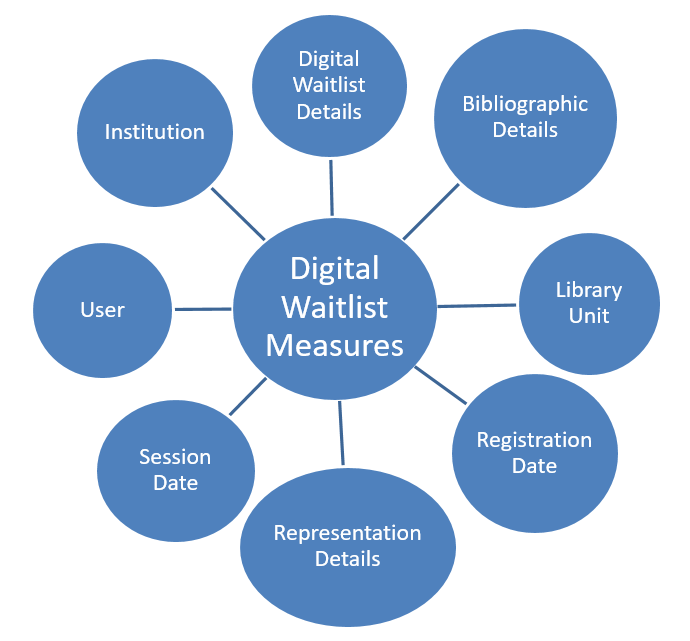
Field Descriptions
The following lists the fields available in the Digital Waitlist subject area:
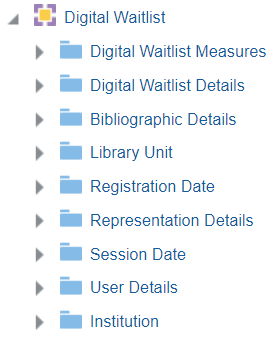
Digital Waitlist Measures
Digital Waitlist Measures is a fact table that stores measures relating to digital waitlist activities.
| Field | Description | Additional Information |
|---|---|---|
| Num of Requests | The number of times someone joined a waitlist for a requested item | |
| Num of Requests with No Sessions | The number of requests without the resource being accessed | This is the number of users who missed the grace period |
| Num of Sessions | The number of times the digital resource was viewed. This field only displays resources with Waitlist functionality configured | |
| Num of Sessions Returned Early | The number of sessions that were returned early before expiration | |
| Num of Sessions following Waitlist | The number of sessions that were accessed after being in waitlist | |
| Actual Session Length (Min) | The length of the session counting early returns | |
| Amount Grace Period Used (Min) | The amount of grace period used | |
| Waiting Time (Min) | The amount of time on the waitlist | |
| Avg Actual Session Length (Min) | The average time of a session | |
| Avg Grace Period Used (Min) | The average time of a grace period | |
| Avg Waiting Time (Min) | The average waiting time on a waitlist |
Digital Waitlist Details
Digital Waitlist Details is a dimension table that stores details about digital waitlist activities.
| Field | Description | Additional Information |
|---|---|---|
| Configured Session Period | The length that the session is configured | |
| Grace Period | The length of the configured grace period | |
| Grace Period End Time | The end time of the grace period | |
| Grace Period Start Time | The start period of the grace period | |
| Internal Request ID | The internal ID of the request | |
| Priority | The order of the user in the waitlist | |
| Registration Time | The time of the registration of the waitlist | |
| Send SMS | Indicates if an SMS is sent to notify the patron when the resource is available | |
| Session Expiration Time | The time the session expired | |
| Session Flag | Indicates if there was a session | |
| Session Returned Early | Indicates if the session was returned early | |
| Session Returned Early Time | The time that the session was returned early | |
| Session Start Time | The time the session started |
Bibliographic Details
The Bibliographic Details table is a dimension table that stores the bibliographic details of the borrowing request item. The primary key of the table is MMS_ID.
The field descriptions can be found in the Bibliographic Details shared dimension.
Library Unit
Library Unit is a dimension table that stores information about the library that is the owner of the representation.
Registration Date
Registration Date is a dimension table that stores information about the date that the patron registered for the waitlist.
| Field | Description | Additional Information | Data Type | Data Size |
|---|---|---|---|---|
| Registration Date | The current course end date of the purchase request | The date in the format DD/MM/YYYY | DATE | |
| Registration Start of Week | The date of the first business day of the week | The date in the format DD/MM/YYYY | DATE | |
| Registration Week Number | The number of the week of the year | There are 52 weeks in a year. | VARCHAR | 2 |
| Registration Month Key | The month of the date in number format | For example - February will show the number 2 in this column. This field is useful when you want to sort by month. | INT | |
| Registration Month | The month of the date in text format | The month, for example, "February" | VARCHAR | 20 |
| Registration Full Month | The year and month that the purchase request was modified | The month in text format and the year. For example - Feb 25 (for February 2025) | VARCHAR | 20 |
| Registration Quarter | The quarter in the year in which the purchase request was modified | The quarter of the date in a display format such as Q1 | VARCHAR | 20 |
| Registration Year | The year in which the purchase request was modified | The year of the date in the format YYYY . For example - 2025 | VARCHAR | 20 |
| Registration Year-Month | The year and the month in which the purchase request was modified | The year and the month in the format YYYY-MM | VARCHAR | 250 |
| Registration Date Filter | Used to filter report results by date | Possible values:
|
VARCHAR | 100 |
| Registration Date | The date in a hierarchy format | Enables the user to drill down from the year to the month to the specific date. Using this column provides the user with the option to view the accumulative measures in each level of the hierarchy. |
Representation Details
The Representation Details table is a dimension table that stores information about digital representations.
| Field | Description | Additional Information |
|---|---|---|
| IED | The IED (Intellectual entity digital) value | |
| Is Deposit | Indicates if the representation entered the repository as a deposit | |
| Is Digitization | Indicates if the representation entered the repository from a digitization request | |
| Rep Creation Date | Stores the representation creation date in the date format 2/29/2012 | |
| Rep Creator | The creator of the representation | |
| Rep Delivery URL | The delivery URL of the representation | |
| Rep Deposit ID | The deposit ID of the representation | |
| Rep Digitization ID | The digitization ID of the representation | |
| Rep Entity Author | The author of the representation entity | |
| Rep Entity Creator | Th creator of the representation entity | |
| Rep Entity Date | The date of the representation entity | |
| Rep Entity Day in Month | The date of the month of the representation entity | |
| Rep Entity End Page | The end age of the representation entity | |
| Rep Entity End Time | The end time of the representation entity | |
| Rep Entity Issue | The issue of the representation entity | |
| Rep Entity Number | The number of the representation entity | |
| Rep Entity Season Month | The month that the representation entity | |
| Rep Entity Start Page | The start page of the representation entity | |
| Rep Entity Start Time | The start time of the representation entity | |
| Rep Entity Title | The title of the representation entity | |
| Rep Entity Track | The track of the representation entity | |
| Rep Entity Type | The type of the representation entity | |
| Rep Entity Volume | The volume of the representation entity | |
| Rep Entity Year | The year of the representation entity | |
| Rep ID | The ID number of the representation | |
| Rep Label | The label of the representation | |
| Rep Last View Date | The last view date of the representation | |
| Rep Lifecycle | The lifecycle of the representation | |
| Rep Link Param 1-5 | The representation link parameters 1-5. This is relevant only for remote citations. | |
| Rep Modification Date | The modification date of the representation | |
| Rep Modified By | The user who modified the representation | |
| Rep Originating System ID | The origination system ID of the representation | |
| Rep Public Note | The public note of the representation | |
| Rep Remote Code | The remote code of the representation | |
| Rep Type Code | The type code of the representation | |
| Rep Usage Type | The usage type of the representation |
Session Date
The Session Date table is a dimension table that stores information about the dates of the waitlist sessions.
| Field | Description | Additional Information | Data Type | Data Size |
|---|---|---|---|---|
| Session Date | The current course end date of the purchase request | The date in the format DD/MM/YYYY | DATE | |
| Session Start of Week | The date of the first business day of the week | The date in the format DD/MM/YYYY | DATE | |
| Session Week Number | The number of the week of the year | There are 52 weeks in a year. | VARCHAR | 2 |
| Session Month Key | The month of the date in number format | For example - February will show the number 2 in this column. This field is useful when you want to sort by month. | INT | |
| Session Month | The month of the date in text format | The month, for example, "February" | VARCHAR | 20 |
| Session Full Month | The year and month that the purchase request was modified | The month in text format and the year. For example - Feb 25 (for February 2025) | VARCHAR | 20 |
| Session Quarter | The quarter in the year in which the purchase request was modified | The quarter of the date in a display format such as Q1 | VARCHAR | 20 |
| Session Year | The year in which the purchase request was modified | The year of the date in the format YYYY . For example - 2025 | VARCHAR | 20 |
| Session Date Filter | Used to filter report results by date | Possible values:
|
VARCHAR | 100 |
| Session Year-Month | The year and the month in which the purchase request was modified | The year and the month in the format YYYY-MM | VARCHAR | 250 |
| Session Date | The date in a hierarchy format | Enables the user to drill down from the year to the month to the specific date. Using this column provides the user with the option to view the accumulative measures in each level of the hierarchy. |
User
The User table is a dimension table that stores information about the waitlist user.
| Field | Description | Additional information |
|---|---|---|
| Birth Date | Stores the birth date of the user | |
| Campus Code | Stores the campus code of the user | |
| Can't edit restricted users | Indicates if the user can edit restricted user groups | |
| Cataloger Level | The cataloger level of the user | |
| Creation Date | Stores the date that the user was created in the system | |
| Creator | Stores the user name of the user that created the user in the system | |
| Default Language | Stores the default language of the user | |
| Disable All Login Restrictions | Indicates if the user has IP login restrictions disabled | |
| Expiry Date | Stores the date on which the user is to expire and no longer be able to get service from the system |
Changing the user expiry date is one way to control item due dates that extend beyond the end of a semester and must be shortened to the end of the semester. For more information, see How to Make Items Have Due Dates at the End of the Semester. |
| External ID | Stores the ID of the user in the originating system | |
| First Name | Stores the user's first name | |
| Full Name | Store's the user's full name | |
| Gender (Not in Use) | Stores male or female | |
| Has Role Other Than Patron | indicates if the patron has a role other than Patron | |
| Has Role Other Than Patron and Instructor | Indicates if the patron has a role other than Patron and Instructor | |
| Identifier 1 | Stores identifier 1. | The identifier field allows you to enrich the user details exported to Analytics with additional identifiers. Choosing a specific identifier to be included in the user details is done in Alma (in a table that is currently restricted to Ex Libris staff). For assistance in defining this field, contact Ex Libris Support.
Only one value per identifier is supported. |
| Identifier 2 | Stores identifier 2. See details in "identifier 1" above. | |
| Is Blocked | Indicates if the patron is blocked | |
| Job Category | Stores the job category definition to which the user belongs based on the Job Categories code table | |
| Job Description | Stores free-form text that describes the function of the user in the library | |
| Job Title | The title of the job | |
| Last Activity Date | The last date that a patron made a request or borrowed or returned an item | |
| Last Name | Stores the user's last name | |
| User – Linked From Institution Code | The code of the institution from which the user is linked | |
| User – Linked From Institution Name | The name of the institution from which the user is linked | |
| User – Linked From Other Institution | Indicates if the user is linked from another institution | Possible values:
|
| Linked To Other Institution | Indicates if the user accessed Primo/Alma for services in another institution. Note that this does not necessarily indicate that the services were actually supplied or that a linked account was created. | Possible values:
|
| Middle Name | Stores the middle name of the user | |
| Modification Date | Stores the date of the modification of the user record | |
| Modified By | Stores the name of the user that modified the user record | |
| Patron Letters Opt In | The letters for which the patron has opted in | |
| Patron Letters Opt Out | The letters for which the patron has opted out | |
|
Preferred First Name |
Stores the user's preferred first name |
See Preferred first / middle / last names for more information. |
|
Preferred Last Name |
Stores the user's preferred last name |
|
|
Preferred Middle Name |
Stores the user's preferred middle name |
|
| Primary Identifier | Stores the primary identifier that the user uses in order to log on to Alma | |
| Purge Date | Stores the date on which the user record is to be deleted from Alma | |
| Resource Sharing Library | The resource sharing library assigned to the user. | |
| Resource Sharing Library Code | The code of the resource sharing library assigned to the user. | |
| Statistical Categories 01-10 | These fields allow you to map ten statistical categories. This allows you to filter reports based on advanced user information typically stored in the statistical category fields. For more information, see Configuring Statistical Categories for Analytics. | |
| Status | Indicates if the user is active | |
| Status Date | Stores the date on which the patron was registered in the university | |
| User Group | Stores the group with which the user is associated such as Faculty, Graduate, or Student | |
| User Group Code | Stores the code of the user group | |
| User ID | Stores a unique internal ID of the user | |
| User Record Type | Indicates if the user is a Public, Staff, or Contact User | |
| User Status Type | The status type of the user | |
| User Title | The title of the user | |
| User Type | Stores the values Internal and External. |
|
