
Configurations (Limited)
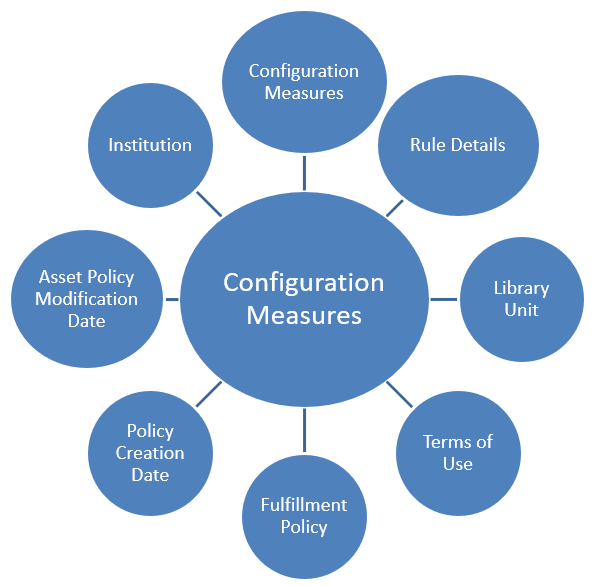
You can use the fields of the Configurations (Limited) subject area to create reports that describe the configurations implemented in Alma for your institution. Currently, this subject area can be used to create reports concerning Fulfillment Policies and Terms of Use configurations. These fields are found in Alma in several configuration pages under Configuration Menu > Fulfillment > Physical Fulfillment.
This subject area can be used to answer the following business questions:
- What are the configurations and terms of use for the policies in the system?
- How many policies and terms of use are there? What are the break down and the differences and similarities between libraries in the institution regarding policies and terms of use?
- (For consortia) What are the break down and differences and similarities between institutions in the network regarding policies and terms of use?
Field Descriptions
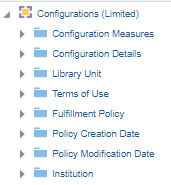
The following lists the fields available in Configurations (Limited).
Configuration Measures
The Configuration Measures table is a fact table that contains measure fields concerning Alma configurations, such as Num of Fulfillment Policies and Num of Terms of Use.
| Field | Description | Additional Information |
|---|---|---|
| Number of Configuration Rules | The number of rules configured. | Includes only terms of use and fulfillment policy rules |
| Number of Configuration Rule Parameters | The number of rule parameters. | Includes only terms of use and fulfillment policy rules |
| Number of Fulfillment Policies | The number of fulfillment policies. | |
| Number of Terms of Use | The number of terms of use. |
Rule Details
| Field | Description | Field Location in Alma | Additional Information | Data Type | Data Size |
|---|---|---|---|---|---|
| Is Active | Indicates if the fulfillment unit rule is active. | Configuration > Fulfillment > Physical Fulfillment > Fulfillment Units > Edit Fulfillment Unit > Fulfillment Unit Rules tab. The label in Alma is Enabled. |
VARCHAR |
3 |
|
| Is Default | Indicates if the fulfillment unit rule is the default. | Configuration > Fulfillment > Physical Fulfillment > Fulfillment Units > Edit Fulfillment Unit > Fulfillment Unit Rules tab. |
VARCHAR |
3 |
|
| Operator ID | The ID number of the operator. |
NUMBER |
|||
| Operator Name | The name of the operator of the fulfillment unit rule parameter. | Configuration > Fulfillment > Physical Fulfillment > Fulfillment Units > Edit Fulfillment Unit > Fulfillment Unit Rules tab. The label in Alma is Operator. |
VARCHAR |
255 |
|
| Rule Create Date | The date the fulfillment unit rule was created. | Configuration > Fulfillment > Physical Fulfillment > Fulfillment Units > Edit Fulfillment Unit > Fulfillment Unit Rules tab. The label in Alma is Created On. |
DATE |
||
| Rule Creator | The user who created the fulfillment unit rule. | Configuration > Fulfillment > Physical Fulfillment > Fulfillment Units > Edit Fulfillment Unit > Fulfillment Unit Rules tab. The label in Alma is Created By. |
VARCHAR |
255 |
|
| Rule ID | The ID number of the fulfillment unit rule. |
NUMBER |
|||
| Rule Modification Date | The date the fulfillment unit rule was modified. | Configuration > Fulfillment > Physical Fulfillment > Fulfillment Units > Edit Fulfillment Unit > Fulfillment Unit Rules tab. The label in Alma is Update Date. |
DATE |
||
| Rule Modified By | The user who modified the fulfillment unit rule. | Configuration > Fulfillment > Physical Fulfillment > Fulfillment Units > Edit Fulfillment Unit > Fulfillment Unit Rules tab. The label in Alma is Updated By. |
VARCHAR |
255 |
|
| Rule Name | The name of the fulfillment unit rule. | Configuration > Fulfillment > Physical Fulfillment > Fulfillment Units > Edit Fulfillment Unit > Fulfillment Unit Rules tab |
VARCHAR |
50 |
|
| Rule Param Value | The value of the parameter of the fulfillment unit rule. | Configuration > Fulfillment > Physical Fulfillment > Fulfillment Units > Edit Fulfillment Unit > Fulfillment Unit Rules tab > Edit Input Parameter. The label in Alma is Value. |
VARCHAR |
4000 |
|
| Rule Parameter Create Date | The date that the parameter of the fulfillment unit rule was created. |
DATE |
|||
| Rule Parameter Creator | The user who created the parameter of the fulfillment unit rule. |
VARCHAR |
255 |
||
| Rule Parameter ID | The ID of the parameter of the fulfillment unit rule. |
NUMBER |
|||
| Rule Parameter Key | The parameter code. |
VARCHAR |
200 |
||
| Rule Parameter Modification Date | The date that the parameter of the fulfillment unit rule was modified. |
DATE |
|||
| Rule Parameter Modified By | The user who modified the parameter of the fulfillment unit rule. |
VARCHAR |
255 |
||
| Rule Parameter Name | The name of the fulfillment unit rule parameter. | Configuration > Fulfillment > Physical Fulfillment > Fulfillment Units > Edit Fulfillment Unit > Fulfillment Unit Rules tab > Edit Input Parameter. The label in Alma is Name. |
VARCHAR |
255 |
|
| Rule Parameter Type | Indicates if the fulfillment unit rule parameter is an output or input parameter. |
Possible values:OUT Currently, only OUT is applicable because the Subject Area includes Terms of Use (TOU), which corresponds to OUT. |
VARCHAR |
255 |
|
| Rule Type | The type of rule. | Configuration > Fulfillment > Physical Fulfillment > Fulfillment Units > Edit Fulfillment Unit > Fulfillment Unit Rules tab
Configuration > User Management > Roles and Registration > User Registration Rules > Add/Edit Fulfillment Unit Rules |
Possible values:
|
VARCHAR |
255 |
Library Unit
The Library Unit table is a dimension table that displays details about the library that manages configurations. The list of active libraries and their codes can be found in Configuration > General > Libraries > Add a Library or Edit Library Information > Libraries tab.
| Field | Description | Field Location in Alma | Additional Information | Data Type | Data Size |
|---|---|---|---|---|---|
| Library Address Line 1 | The first line of the address of the institution. It usually includes the building number and the street name. |
Configuration > General > Add a Library or Edit Library Information > Contact Information tab. This is taken from the address configured as the Preferred address. The label in Alma is Address Line 1. |
VARCHAR | 1000 | |
| Library City | The city of the library. |
Configuration > General > Add a Library or Edit Library Information > Contact Information tab. This is taken from the address configured as the Preferred address. The label in Alma is City. |
VARCHAR | 255 | |
| Library Code | The library code | Configuration > General > Libraries > Add a Library or Edit Library Information > Libraries tab > Path [the text after the period] | VARCHAR | 50 | |
| Library Code (Active) | The code of active (not deleted) libraries | Configuration > General > Libraries > Add a Library or Edit Library Information > Libraries tab > Path [the text after the period] | The same as Library Code without deleted libraries. | VARCHAR | 50 |
| Library Country | The country of the library. |
Configuration > General > Add a Library or Edit Library Information > Contact Information tab. This is taken from the address configured as the Preferred address. The label in Alma is Country. |
VARCHAR | 320 | |
| Library Description | The library description |
Configuration > General > Libraries > Add a Library or Edit Library Information > Libraries tab The label in Alma is Description. |
VARCHAR | 100 | |
| Library Name | The library name |
Configuration > General > Libraries > Add a Library or Edit Library Information > Libraries tab The label in Alma is Organization Unit Name. |
VARCHAR | 255 | |
| Library Name (Active) | The library name of active (not deleted) libraries |
Configuration > General > Libraries > Add a Library or Edit Library Information > Libraries tab The label in Alma is Organization Unit Name. |
The same as Library Name without deleted libraries. | VARCHAR | 255 |
| Library Postal Code | The postal code of the library. |
Configuration > General > Add a Library or Edit Library Information > Contact Information tab. This is taken from the address configured as the Preferred address. The label in Alma is Postal code. |
VARCHAR | 200 | |
| Library State Province | The state or province of the library. |
Configuration > General > Add a Library or Edit Library Information > Contact Information tab. This is taken from the address configured as the Preferred address. The label in Alma is State/Province. |
VARCHAR | 320 | |
| Unit Type | The type of organization unit |
Configuration > General > Libraries > Add a Library or Edit Library Information > Libraries tab The label in Alma is Organization Unit Type. |
Values can be Institution/Library | VARCHAR | 20 |
Terms of Use
The Terms of Use table is a dimension table that contains fields describing different parameters for terms of use configurations.
| Field | Description | Field Location in Alma | Additional Information | Data Type | Data Size |
|---|---|---|---|---|---|
| TOU Create Date | The date the terms of use was created. |
DATE |
|||
| TOU Creator | The user who created the terms of use. |
VARCHAR |
255 |
||
| TOU Definition Level | The level on which the terms of use is defined. | Possible values: Institution and Library. |
VARCHAR |
25 |
|
| TOU Description | The description of the terms of use. | Configuration > Fulfillment > Physical Fulfillment > Terms of Use and Policies |
VARCHAR |
255 |
|
| TOU ID | The ID number od the terms of use. |
NUMBER |
|||
| TOU Modification Date | The date the terms of use was modified. |
DATE |
|||
| TOU Modified By | The user who modified the terms of use. |
VARCHAR |
255 |
||
| TOU Name | The name of the terms of use. | Configuration > Fulfillment > Physical Fulfillment > Terms of Use and Policies |
VARCHAR |
255 |
|
| TOU Originating ID | The ID number of the original terms of use in the Network Zone if it was distributed from the Network Zone. |
NUMBER |
|||
| TOU Type | The type of the terms of use. | Possible values:
|
VARCHAR |
255 |
Fulfillment Policy
The Fulfillment Policy table is a dimension table that contains fields describing different parameters for fulfillment policy configurations.
| Field | Description | Field Location in Alma | Additional Information | Data Type | Data Size |
|---|---|---|---|---|---|
| Policy Active | Indicates if the policy is active. | Configuration > Fulfillment > Physical Fulfillment > Terms of Use and Policies > select a terms of use > edit a policy. Label in Alma is Value: True or False |
VARCHAR |
3 |
|
| Policy Additional Data | Data in any additional fields that the policy has. |
VARCHAR |
255 |
||
| Policy Constant | For some policies, this displays the value of the policy. |
VARCHAR |
50 |
||
| Policy Create Date | The date the policy was created. |
DATE |
|||
| Policy Creator | The user who created the policy. |
VARCHAR |
255 |
||
| Policy Definition Level | The level on which the terms of use is defined. | Possible values: Institution and Library. |
VARCHAR |
25 |
|
| Policy Description | The description of the policy. | Configuration > Fulfillment > Physical Fulfillment > Terms of Use and Policies > select a terms of use > edit a policy. |
VARCHAR |
255 |
|
| Policy ID | The ID number of the policy. |
NUMBER |
|||
| Policy Is Default Value | Indicates if the policy is marked as the default. | Configuration > Fulfillment > Physical Fulfillment > Advanced Policy Configuration | Possible values; True and False. |
VARCHAR |
3 |
| Policy Modification Date | The date the policy was modified. |
DATE |
|||
| Policy Modified By | The user who modified the policy. |
VARCHAR |
255 |
||
| Policy Name | The name of the policy. | Configuration > Fulfillment > Physical Fulfillment > Advanced Policy Configuration |
VARCHAR |
255 |
|
| Policy Originating ID | The ID number of the original policy in the Network Zone if it was distributed from the Network Zone. |
NUMBER |
|||
| Policy Type | The type of the policy. | Configuration > Fulfillment > Physical Fulfillment > Advanced Policy Configuration |
VARCHAR |
25 |
|
| Policy Unit of Measurement | The unit of measurement of the policy. | Configuration > Fulfillment > Physical Fulfillment > Advanced Policy Configuration | Possible values are:
|
VARCHAR |
255 |
| Policy Value | The value of the policy. | Configuration > Fulfillment > Physical Fulfillment > Advanced Policy Configuration |
VARCHAR |
255 |
Policy Creation Date
The Policy Creation Date table is a dimension table that contains fields describing the date the fulfillment policy was created in different formats. Key fields are used whenever calculations are required. Description fields may be used for formatting the display of the report.There are two type of date fields:
- Calendar Fields – These are date fields as they display in the calendar.
- Fiscal Date Fields – These are date fields that match the institution's fiscal period.
| Field | Description | Additional Information | Data Type | Data Size |
|---|---|---|---|---|
| Policy Creation Date | The creation date of the fulfillment policy. | The date in the format DD/MM/YYYY | DATE | |
| Policy Creation Start of Week | The date of the first business day of the week. | The date in the format DD/MM/YYYY | DATE | |
| Policy Creation Week Number | The number of the week of the year. | There are 52 weeks in a year. | VARCHAR | 2 |
| Policy Creation Month Key | The month of the date in number format. | E.g. February will show the number 2 in this column. This field is useful when you want to sort by month. | INT | |
| Policy Creation Month | The month of the date in text format. | The month, e.g. February | VARCHAR | 20 |
| Policy Creation Full Month | The year and month that the fulfillment policy was modified. | The month in text format and the year. E.g. Feb 25 (for February 2025) | VARCHAR | 20 |
| Policy Creation Quarter | The quarter in the year in which the fulfillment policy was modified. | The quarter of the date in a display format such as Q1. | VARCHAR | 20 |
| Policy Creation Year | The year in which the fulfillment policy was modified. | The year of the date in the format YYYY . E.g. 2025 | VARCHAR | 20 |
| Policy Creation Fiscal Month Key | The fiscal month of the date in number format. | E.g. If the fiscal year starts in June, this column shows the number 1 for June, the number 2 for July, and so on. | INT | |
| Policy Creation Fiscal Year | The fiscal year of the date in string format. | The year is presented according to the description in the mapping table Fund and Ledger Fiscal Period. For more information, see Configuring Fund and Ledger Fiscal Periods. | VARCHAR | 50 |
| Policy Creation Date Filter (under construction) | Used to filter the policy creation date.
The functionality of this field may change in the future, so this field should not be used for saved reports. |
Possible values:
|
VARCHAR | 100 |
| Policy Creation Year-Month | The year and the month in which the fulfillment policy was modified. | The year and the month in the format YYYY-MM | VARCHAR | 250 |
| Policy Creation Date | Stores the date in a hierarchy format | The Hierarchy column that allows the user to drill down from the year to the month to the specific policy creation date. Using this column provides the user with the option to view the accumulative measures in each level of the hierarchy. |
Policy Modification Date
The Policy Modification Date table is a dimension table that contains fields describing the date the fulfillment policy was modified in different formats.
| Field | Description | Additional Information | Data Type | Data Size |
|---|---|---|---|---|
| Policy Modification Date | The modification date of the fulfillment policy. | Stores the date in the format DD/MM/YEAR | DATE | |
| Policy Modification Start of Week | The date of the first business day of the week. | Stores the date in the format DD/MM/YEAR | DATE | |
| Policy Modification Week Number | The number of the week of the year. | There are 52 weeks in a year. | VARCHAR | 2 |
| Policy Modification Month Key | Stores the month of the date in number format . | E.g. February shows the number 2 in this column. This field is useful when you want to sort by month. | INT | |
| Policy Modification Month | Stores the month of the date in text format. | E.g. February | VARCHAR | 20 |
| Policy Modification Full Month | The year and month that the fulfillment policy was modified. | Stores the month in text format and the year. E.g. Feb 25 (for February 2025) | VARCHAR | 20 |
| Policy Modification Quarter | The quarter in the year in which the fulfillment policy was modified. | Stores the quarter of the date in a display format such as Q1 | VARCHAR | 20 |
| Policy Modification Year | The year in which the fulfillment policy was modified. | Stores the year of the date in YYYY format. E.g. 2025 | VARCHAR | 20 |
| Policy Modification Fiscal Month Key | Stores the fiscal month of the date in number format. | E.g. If the fiscal year starts in June, this column shows the number 1 for June, the number 2 for July, and so on. | INT | |
| Policy Modification Fiscal Year | Stores the fiscal year of the date in string format. | The year is presented according to the description in the mapping table Fund and Ledger Fiscal Period. See- Configuring Fund and Ledger Fiscal Periods. | VARCHAR | 50 |
| Policy Modification Date Filter (under construction) | Used to filter report results by date. |
Possible values:
|
VARCHAR | 100 |
| Policy Modification Year-Month | The year and the month in which the fulfillment policy was modified. | Stores the year and the month in a display format such as 2023-1 | VARCHAR | 250 |
| Policy Modification Date | Stores the date in a hierarchy format. | Stores the Hierarchy column that allows the user to drill down from the year to the month to the specific loan date. Using this column provides the user with the option to view the accumulative measures in each level of the hierarchy. |
Institution
The shared Institution dimension allows the Network Zone to view reports according to institution. If an analytics report is run from the Network Zone in a collaborative network implementing a Network Zone, all member institutions are included in the report for Institution Code and Institution Name. If an analytics report is run from an institution that is not part of a collaborative network implementing a Network Zone, only the single institution from which the report is run is included in the report for Institution Code and Institution Name.
This dimension is available in every subject area. It contains the following fields:
| Field | Description | Additional Information | Data Type | Data Size |
|---|---|---|---|---|
| Institution Code | The code of the institution. |
Configured from: Configuration > General > Add a Library or Edit Library Information > Summary tab. The label in Alma is Code located on the right pane. |
VARCHAR | 50 |
| Institution Name | The name of the institution. |
Configured from: Configuration > General > Add a Library or Edit Library Information > Summary tab. The label in Alma is Organization unit name. |
VARCHAR | 255 |
| Institution Address Line 1 | The first line of the address of the institution. It usually includes the building number and the street name. |
Configured from: Configuration > General > Add a Library or Edit Library Information > Contact Information tab. This is taken from the address configured as the Preferred address. The label in Alma is Address Line 1. |
VARCHAR | 1000 |
| Institution City | The city of the institution. |
Configured from: Configuration > General > Add a Library or Edit Library Information > Contact Information tab. This is taken from the address configured as the Preferred address. The label in Alma is City. |
VARCHAR | 255 |
| Institution State Province | The state or province of the institution. |
Configured from: Configuration > General > Add a Library or Edit Library Information > Contact Information tab. This is taken from the address configured as the Preferred address. The label in Alma is State/Province. |
VARCHAR | 320 |
| Institution Country | The country of the institution. |
Configured from: Configuration > General > Add a Library or Edit Library Information > Contact Information tab. This is taken from the address configured as the Preferred address. The label in Alma is Country. |
VARCHAR | 320 |
| Institution Postal Code | The postal code of the institution. |
Configured from: Configuration > General > Add a Library or Edit Library Information > Contact Information tab. This is taken from the address configured as the Preferred address. The label in Alma is Postal code. |
VARCHAR | 200 |
| Institution Timezone | The timezone of the institution. | The timezone is set during implementation. | VARCHAR | 255 |
| Data Available As Of | When the institution data became available in analytics. | Displayed at the bottom of the main Analytics menu. | VARCHAR | 255 |
| Data Updated As Of | When the institution data was taken from the Alma database. | Displayed at the bottom of the main Analytics menu. | VARCHAR | 255 |
Page tags: article:topicproduct:almacontent:Documentationlang:english
