
Users
Create reports/dashboards for the Users area.
By using the Users area, the Design Analytics user is able to create reports/dashboards about users. The user is able to get the following details:
- A list of all the users that are assigned to specific roles
- A list of users that have blocks
- A list of users with their preferred address, phone, and email that have fines and fees
- The number of users there are in each user group or user type
- A list of users and the notes associated with them
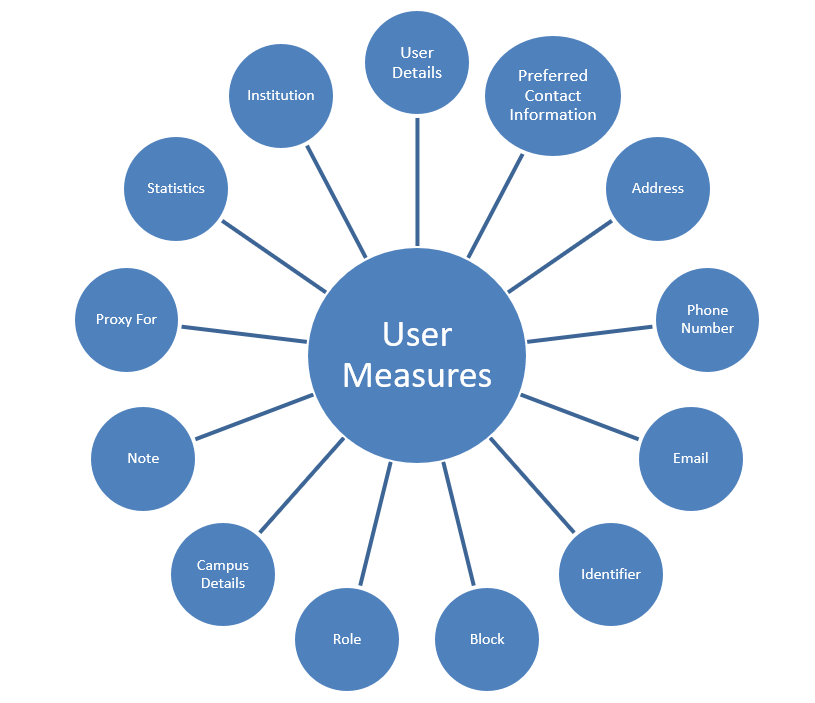
Field Descriptions
The following are the fields available in Users.
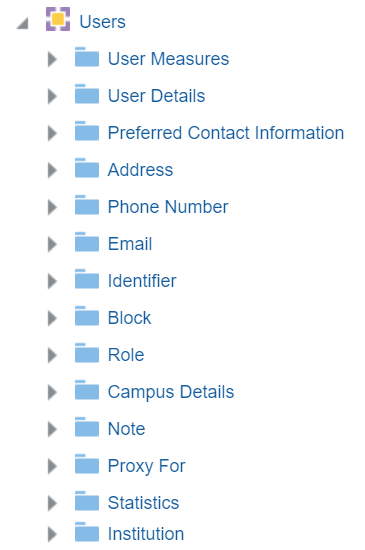
User Measures
The User Measures table is a fact table that stores details about the number of users. The counts for these fields are derived from the User Details > Record Type field.
| Field | Description | Additional Information |
|---|---|---|
| Number of Users | The number of users | |
| Number of Users (Contact) | The number of Contact Users | |
| Number of Users (Public) | The number of Public users | |
| Number of Users (Staff) | The number of Staff users |
User Details
The User Details table is a dimension table that stores details about Staff and Public users. The primary key of the table is USER_ID.
Note that the User Details folder within the Users subject area cannot be used as a shared dimension.
| Field | Description | Additional information |
|---|---|---|
| Creation Date | Stores the date that the user was created in the system | See the field location in Alma in the image below. |
| Creator | Stores the user name of the user who created the user in the system | See the field location in Alma in the image below. |
| Modification Date | Stores the date of the modification of the user record | See the field location in Alma in the image below. |
| Modified By | Stores the name of the user who modified the user record | See the field location in Alma in the image below. |
| Birth Date | Stores the birth date of the user | See the field location in Alma in the image below. |
| Campus Code | Stores the campus code of the user | See the field location in Alma in the image below. |
| Cataloger Level | The cataloger level of the user | |
| Disable All Login Restrictions | Indicates if the user has IP login restrictions disabled | |
| Expiry Date | Stores the date on which the user is to expire and no longer be able to get service from the system | See the field location in Alma in the image below.
Changing the user expiry date is one way to control item due dates that extend beyond the end of a semester and must be shortened to the end of the semester. For more information, see How to Make Items Have Due Dates at the End of the Semester. |
| External Id | Stores the ID of the user in the originating system | |
| First Name | Stores the user's first name | See the field location in Alma in the image below. |
| Full Name | The user's first and last name | There is no option to include the middle name. |
| Gender (Not in Use) | Stores male or female | See the field location in Alma in the image below. |
| Has Role Other Than Patron | indicates if the patron has a role other than Patron | |
| Has Role Other Than Patron and Instructor | Indicates if the patron has a role other than Patron and Instructor | |
| Identifier 1 | Stores identifier 1. | The identifier field allows you to enrich the user details exported to Analytics with additional identifiers. Choosing a specific identifier to be included in the user details is done in Alma (in a table that is currently restricted to Ex Libris staff). For assistance in defining this field, contact Ex Libris Support.
Only one value per identifier is supported. |
| Identifier 2 | Stores identifier 2. See details in "identifier 1" above. | |
| Is Blocked | Indicates if the patron has an active block on the user record | |
| Job Category | Stores the job category definition to which the user belongs based on the Job Categories code table | See the field location in Alma in the image below. |
| Job Description | Stores free-form text that describes the function of the user in the library | See the field location in Alma in the image below. |
| Last Activity Date |
Stores the last activity date for specific activities in the Last Patron Activity field of the User Details Page:
|
|
| Last Name | Stores the user's last name | See the field location in Alma in the image below. |
| Linked From Institution Code | The code of the institution from which the user is linked | |
| Linked From Institution Name | The name of the institution from which the user is linked | |
| Linked From Other Institution | Indicates if the user is linked from another institution | Possible values:
|
| Linked To Other Institution | Indicates if the user accessed Primo/Alma for services in another institution. Note that this does not necessarily indicate that the services were actually supplied or that a linked account was created. | Possible values:
|
| Middle Name | Stores the middle name of the user | See the field location in Alma in the image below. |
| Patron Letters Opt In | The letters for which the patron has opted in | |
| Patron Letters Opt Out | The letters for which the patron has opted out | |
| Preferred First Name | Stores the user's preferred first name |
See Preferred first / middle / last names for more information. |
| Preferred Language | The preferred language | |
| Preferred Last Name | Stores the user's preferred last name | |
| Preferred Middle Name | Stores the user's preferred middle name | |
| Primary identifier | Stores the primary identifier that the user uses in order to log on to Alma | See the field location in Alma in the image below. |
| Purge Date | Stores the date on which the user record is to be deleted from Alma | See the field location in Alma in the image below. |
| Resource Sharing Library | The resource sharing library assigned to the user. | |
| Resource Sharing Library Code | The code of the resource sharing library assigned to the user. | |
| Statistical Categories 01-10 | These fields allow you to map ten statistical categories. This allows you to filter reports based on advanced user information typically stored in the statistical category fields. For more information, see Configuring Statistical Categories for Analytics. | No data will appear if statistical categories are scoped to specific libraries. (See Managing User Statistics). Data appears only when it is on the institutional level. |
| Status | Indicates if the user is active | See the field location in Alma in the image below. |
| Status Date | The date of the last status change of the user.
The Status Date in the user record is updated when the status is updated manually. Additionally, the Status Date will be updated:
|
See the field location in Alma in the image below. |
| User Group | Stores the group with which the user is associated, such as Faculty, Graduate, or Student | See the field location in Alma in the image below. |
| User Group Code | The user group code | |
| User ID | Stores a unique internal ID of the user | |
| User Record Type | Indicates if the user is a Public, Staff, or Contact User | See the field location in Alma in the image below. |
| User Title | The title of the user | |
| User Type | Stores the values Internal and External. |
See the field location in Alma in the image below.
|
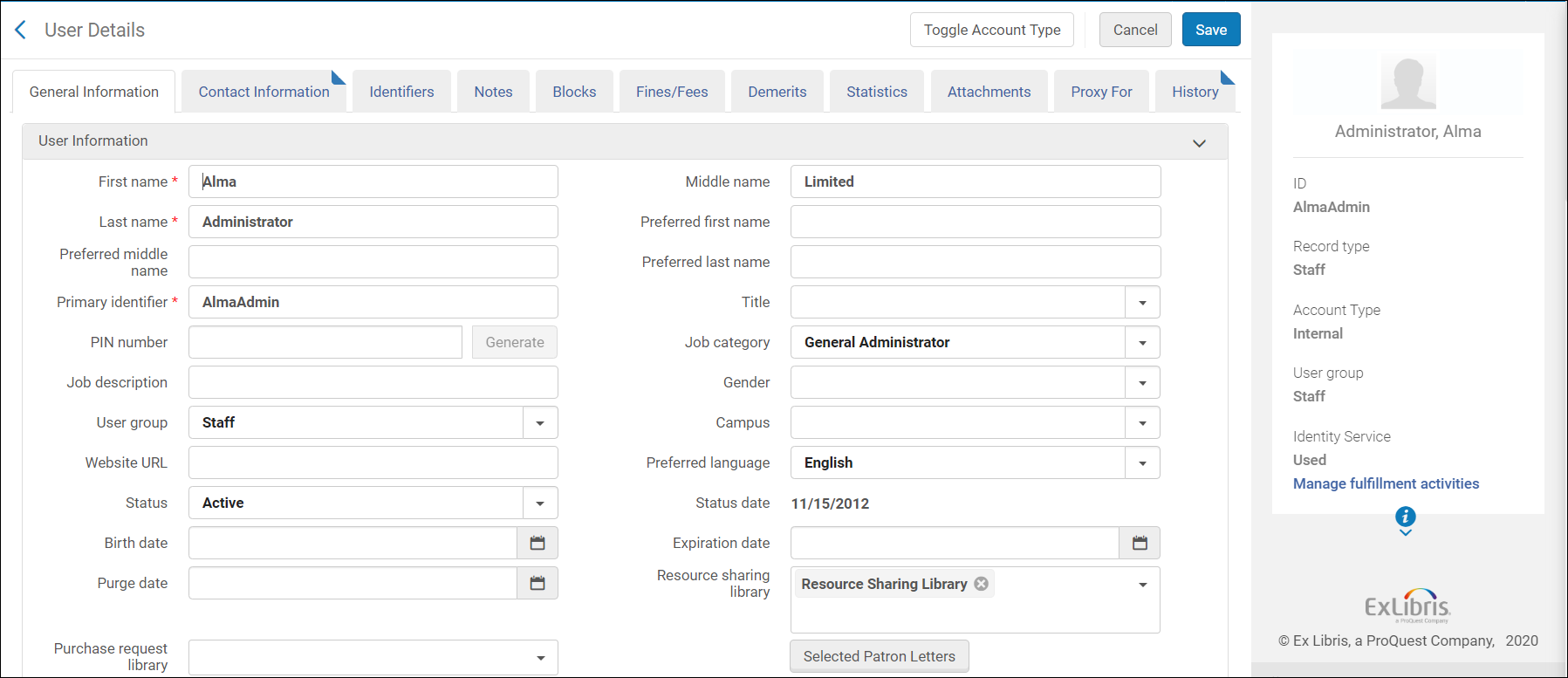
Some of the fields of the User Details dimension are taken from the fields of the User Details page:
Preferred Contact Information
The Preferred Contact Information table is a dimension table that stores details about preferred contact information for staff and public users including:
Address
The Address table is a dimension table that stores all address details of users. This table includes all addresses including the preferred one.
| Field | Description | Additional Information |
|---|---|---|
| Line1 | Stores the first line of the user's address | |
| Line2 | Stores the second line of the user's address | |
| Line3 | Stores the third line of the user's address | |
| Line4 | Stores the fourth line of the user's address | |
| Line5 | Stores the fifth line of the user's address | |
| City | Stores the city of the user's address | |
| Postal Code | Stores the postal code of the user's address | |
| Country | Stores the country of the user's address | |
| State Province | Stores the state or province of the user's address | |
| Address Type | Stores the type of address such as home, work, and so forth | |
| Is Preferred | Indicates if this is the preferred address for mail purposes | |
| Start Date | Stores the date from which this address is relevant (for informational purposes only) | |
| End Date | Stores the date after which this address is no longer relevant (for informational purposes only) | |
| Address Note | Stores a note regarding the users address | |
| External ID | Stores the ID of the user in the originating system |
Phone Number
The Phone Number table is a dimension table that stores all the phone numbers of a user. This table includes all the phones numbers of a user including the preferred one.
| Field | Description | Additional Information |
|---|---|---|
| Is Preferred SMS | Indicates if this is the preferred number for SMS purposes | |
| Phone Number Type | Indicates the type of phone number such as home, mobile, office, fax, and so forth | |
| Is Preferred Phone Number | Indicates if this is the preferred number for calling purposes | |
| Phone Number | Stores the phone number | |
| External ID | Stores the ID of the user in the originating system |
The email table is a dimension table that stores all email addresses that are part of a user's record. It includes the preferred email address.
| Field | Description | Additional Information |
|---|---|---|
| Email Type | Stores the email type: work, general, claim, etc. | |
| Stores the email address | ||
| Is Preferred | Indicates if this email address is the preferred one for contacting the user | |
| Description | Stores the description of the email | |
| External ID | Stores the ID of the user in the originating system |
Identifier
The Identifier table is a dimension table that stores details of a user's different identifiers such as barcode, system ID, etc. See Managing User Identifiers.
| Field | Description | Additional Information |
|---|---|---|
| Identifier Status | Indicates whether the identifier is active or not | |
| Identifier Type | Indicates the type of the identifier. See Viewing Additional User Identifier Types. | |
| Identifier Value | Stores the identifier value | |
| Identifier Note | Stores the note associated with the identifier | |
| External ID | Stores the ID of the user in the originating system |
Block
The Block table is a dimension table that stores detail of all blocks incurred by a user. Blocks are restrictions to a user's privileges that indicate that fines exceed limits, there are outstanding loans, repeated late book returns, etc.
| Field | Description | Additional Information |
|---|---|---|
| External ID | Stores the ID of the user in the originating system | |
| Block Status | Indicates whether or not the block is active | |
| Block ID | Stores the block description as chosen from the predefined User Block Definitions mapping table | |
| Block Description | A description of the block. | |
| Block Type | Stores the block type as defined in the predefined User Block Definitions mapping table | |
| Block Note | Stores a note with additional details about a user's block | |
| Block Expiration Date | The expiration date of the block | |
| Block Expiration Date and Time | The expiration date and time of the block | |
| Library Code | The code of the library | |
| Library Description | The description of the library |
Role
The Role table is a dimension table that stores details of all roles of the user. User roles define a user's functions and privileges. Users may be assigned multiple roles.
| Field | Description | Additional Information |
|---|---|---|
| Role Cant Edit Restricted User | Indicates if the user can edit restricted user groups | |
| Role Status Date | Stores the date from which this role is active | |
| Role Expiry Date | Stores the date after which this role is no longer active | |
| Role Status | Indicates whether or not the role is active | |
| Role Type | Stores the role that defines a set of permissions for functions that a user can perform in Alma | |
| Role Scope | Stores the institution or a specific library in which the role privileges are granted | |
| Role Scope Code | Stores the code of the scope in which the permissions are granted | |
| Role Internal Note | Stores a note regarding the user's role | |
| Role Product | Stores the specific Ex Libris product for which the role is assigned |
Campus Details
The Campus table is a dimension table that stores the details of the user's campus.
| Field | Description | Additional Information |
|---|---|---|
| Campus Name | Stores the name of the campus to which the user belongs | |
| Campus Desc | Stores the description of the campus to which the user belongs | |
| Campus Code | Stores the code of the campus to which the user belongs |
Note
The Note table is a dimension table that stores details of all notes associated with a user. Notes, internal or otherwise, may be attached via the Notes tab. Depending on the note type (such as Address, Circulation, Library, Registrar, and so forth), these notes display in different parts of the system, usually in a fulfillment context.
| Field | Description | Additional Information |
|---|---|---|
| Note | The contents if the note | |
| Note Type | Stores the type of the note taken from a predefined code table | |
| Note External ID | Stores the content of the note regarding the External ID | |
| Note User Viewable | Indicates if you want the user to be able to view the note | |
| Library Code | The code of the library | |
| Library Description | The description of the library |
Proxy For
The Proxy For table is a dimension table that stores details about the users for whom the patron is a proxy.
| Field | Description | Additional Information |
|---|---|---|
| Proxy For Primary Identifier | The primary identifier of the user for whom the patron is a proxy | |
| Proxy For User First Name | The first name of the user for whom the patron is a proxy | |
| Proxy For User Last Name | The last name of the user for whom the patron is a proxy | |
| Proxy For User Email | The email of the user for whom the patron is a proxy | |
| Proxy For User Type | The user type of the proxy | Possible Values:
This field is useful for owners of both Alma and Esploro to determine if the proxy displayed in a report is relevant for Alma (Circulation / Fulfillment) or Esploro (Researchers). |
Statistics
The Statistics table is a dimension table that stores details of all statistic categories associated with a user. Each institution can create several different user statistical categories. This enables the institution to better classify the different patrons in its system. For more information, see Managing User Statistics.
The user administrator defines the different statistical categories.
| Field | Description | Additional Information |
|---|---|---|
| User ID | The ID of the user in Alma | |
| Statistical Category | The description of the Statistical Category | |
| Statistics Note | The content of the statistics note | |
| Statistics External Id | The ID of the user in the originating system | |
| Statistical Category Description | The description of the statistical category | |
| Statistical Category Type | The description of the Category type taken from a predefined code table | |
| Statistics Library Code | The owner code of the Statistical Category. For institutions, it is empty. | |
| Statistics Library Name | The owner name of the Statistical Category. For institutions, it is empty. |
Institution
Shared Dimensions with Other Subject Areas
For information concerning shared dimensions with other subject areas, see Shared Dimensions.
Page tags: article:topicInstitutionStatisticscontent:Documentationlang:englishemailUser DetailsPreferred Contact InformationAddressPhone NumberidentifierBlockroleCampus DetailsNoteproduct:alma_specto
