
Leganto Student Usage
Create reports/dashboards relating to Leganto Student Usage.
Using the Leganto Student Usage subject area, you can create reports/dashboards relating to Leganto Student Usage and answer the following types of business questions:
- How many students at the institution use Leganto?
- How engaged are students with the reading list?

Field Descriptions
The following fields are available in Leganto Student Usage.
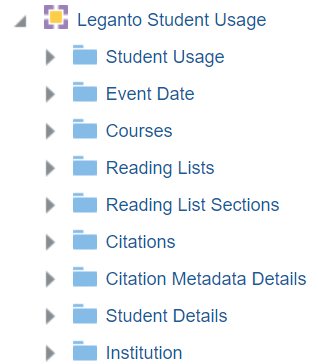
Student Usage
The Student Usage table is a fact table that stores all measures relating to student usage, such as the number of active students, the number of reading list views, number of portfolios, and the number of students that viewed a reading list.
- Counts for unique users are those that contain the word Students. Those that start with Number count total selects.
- A student is someone without the instructor role.
- This subject area includes only student and guests usage and not library staff or instructor usage.
- The Student Usage table only contains courses, reading lists, and citations that had some student usage. Reading lists with no usage do not appear in the Student Usage data.
- Courses, reading lists, and citations that had student usage and were then deleted and purged display usage information, but no additional details. For example, the list name or citation name may be blank.
| Field | Description | Additional Information |
|---|---|---|
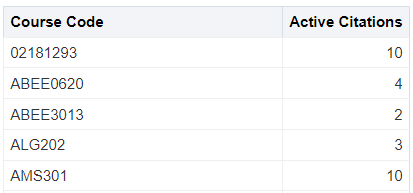
| Active Citations |
The number of citations with any student usage |
|
| Active Courses | The number of courses linked to reading lists with any student usage |
|
| Active Reading Lists | The number of reading lists with any student usage |
|
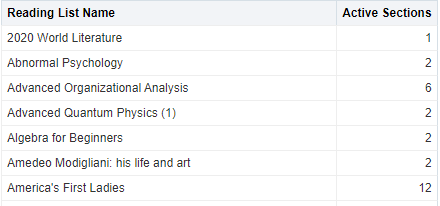
| Active Sections |
The number of sections with any student usage |
|
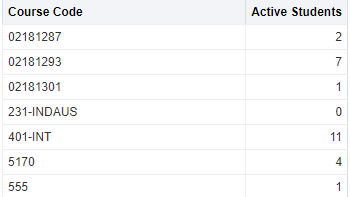
| Active Students | The number of unique students that interacted with the list or citation in any way, for example, selected, liked (relevant for classic UI), commented (relevant for classic UI) , or viewed the material |
|
| Activity Score | The average number of citations interacted with by each student | This is calculated according to the following formula:[Sum (Active_Students per Active_citation) / (Total_Num_participants X Total citations)] X 100
For example: A Reading list with 10 citations and 10 total participants
|
| Browser Type | The browser the student used | |
| Browser Version | The browser version the student used | |
| Citation Origin | Where the citation originated | Possible values are:
|
| Event Type | The type of event that occurred in Leganto. | Possible Values are:
|
| Link Type | The type of link that was selected | Possible values:
|
| Leganto Annotations | The number of annotations per file | Includes private and public annotations |
| LTI Profile Code | The LTI profile code | |
| LTI Version | The version of LTI | |
| New UI | Indicates if the usage was made in the new Leganto UI. | |
| Number of Citations Views | The total number of times users accessed the full view of a citation | |
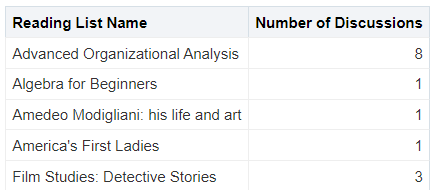
| Number of Discussions | The total number of comments in the student discussion thread on the list or any citation | Relevant for classic UI.
|
|
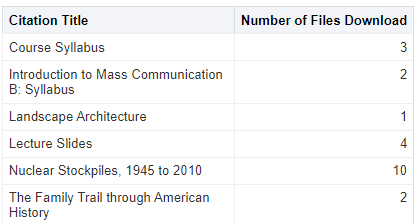
Number of Files Downloaded |
The total number of times any file of any citation was downloaded (multiple downloads by the same student count multiple times) |
|
| Number of File Views | The total number of times users viewed the file in the Leganto PDF viewer | |
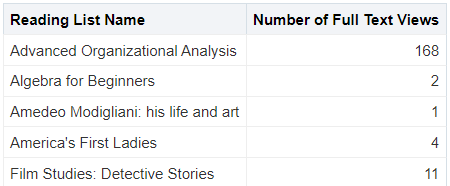
| Number of Full Text Views | The total number of times any full text link on a citation was clicked (either from the brief view of the full view of the citation) |
This includes related records. Multiple accesses by the same student count multiple times.
|
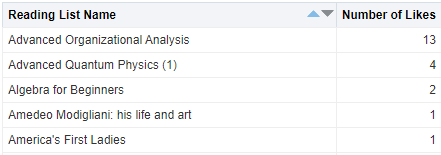
| Number of Likes | The total number of likes | Relevant for classic UI.
|
| Number of Marked as Done |
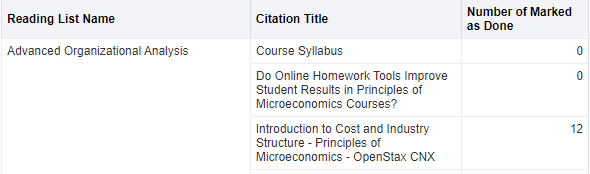
The total number of times any citation was marked "Done" |
|
| Number of Mobile Activities | The total number of activities from mobile devices | |
| Number of Non-Mobile Activities | The total number of activities from non-mobile devices | |
| Number of Reading List Views | The total number of reading list views | |
| Operating System | The operating system of the student's device | |
|
Number of Student Discussions |
The number of unique students that commented | Relevant for classic UI. |
| Student Type | The student type | Possible values are:
|
| Students that Added Private Annotations | The number of unique students that added private annotations to a citation | |
| Students that Added Public Annotations | The number of unique students that added public annotations to a citation | |
| Students that Clicked Like | The number of unique students that selected Like on a citation | Relevant for classic UI. |
| Students that Downloaded Files | The number of unique students that downloaded a file | |
| Students that Marked as Done | The number of unique students that marked a citation as Done | |
| Students that Viewed Citation | The number of unique students that viewed a citation in full view | This includes guest users. |
| Students that Viewed Files | The number of unique students that viewed files in the Leganto PDF viewer | |
| Students that Viewed Full Text | The number of unique students that clicked on a full text link on a citation | This includes related records. |
| Students that Viewed Reading List | The number of unique students that viewed the reading list | |
| Total Events |
The total number of events that students performed in Leganto, including access from the LMS and shareable links. The events counted are the following:
|
|
| Total Events using LTI | The total number of events (likes (relevant for classic UI), selects, comments (relevant for classic UI) , and so forth) that a student who accessed Leganto from an LMS using a Learning Tools Interoperability (LTI) link performed | |
| User Role | The user role | Use this field to filter reports to display student usage without guest usage, for example.
Possible values are:
|
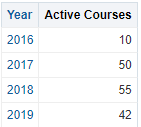
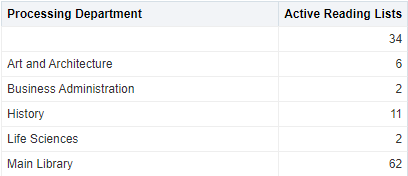
Event Date
The Event Date dimension is a dimension table that stores details about the date of events.
| Field | Description | Additional Information |
|---|---|---|
| Date | Stores the date in number format, for example: 2/29/2012 | |
| Date and Time | Stores the date and time in number format, for example: 2/29/2012 12:35 PM | |
| Time | Stores the time in the format configured by your institution, for example:12:35 PM | |
| Week Number | The number of the week of the year | This field is useful when you want to see usage by week |
| Start of Week | The date of the first business day of the week | This field is useful when you want to see usage by week |
| Month Key | Stores the month of the date in number format such as 2 for February | This field is useful when you want to sort by month |
| Month Desc | Stores the month of the date in month description format such as February | |
| Full Month Desc | Stores the month and the year of the date in a display format such as Feb 12 | |
| Quarter | Stores the quarter of the date in a display format such as Q1 | |
| Year | Stores the year of the date in string format such as 2012 | |
| Fiscal Month Key | Stores the fiscal month of the date in number format such as 2 for February | |
| Fiscal Year | Stores the fiscal year of the date in string format such as 2012 | |
| Date Filter | Used to filter report results by date | Includes the option to filter by Current Academic Year, which is determined by your country as outlined in the table below |
| Year-Month | The year and the month in a format such as 2023-1 |
The current academic year of your institution is determined by your country, according to the following table:
| Country | Code | Start Month | End Month |
|---|---|---|---|
| Argentina | 54 | March | February |
| Australia | 61 | January | December |
| Austria | 43 | October | September |
| Belgium | 32 | August | July |
| Botswana | 267 | August | July |
| Brazil | 55 | January | December |
| Canada | 01 | August | July |
| Chile | 56 | January | December |
| China | 86 | September | July |
| Colombia | 57 | January | December |
| Czech Republic | 420 | September | August |
| Denmark | 45 | August | July |
| Ecuador | 593 | September | August |
| Finland | 358 | August | July |
| France | 33 | September | August |
| Germany | 49 | September | August |
| Hong Kong | 852 | August | July |
| Ireland | 353 | September | July |
| Israel | 972 | October | September |
| Italy | 39 | September | August |
| Japan | 81 | April | March |
| Luxembourg | 352 | September | August |
| Macau | 853 | August | July |
| Malta | 356 | September | August |
| Mexico | 52 | January | December |
| Netherlands | 31 | August | July |
| New Zealand | 64 | January | December |
| Norway | 47 | July | June |
| Peru | 51 | January | December |
| Philippines | 63 | September | August |
| Poland | 48 | October | September |
| Portugal | 351 | September | August |
| Qatar | 974 | September | August |
| Singapore | 65 | August | July |
| South Africa | 27 | January | December |
| South Korea | 82 | March | February |
| Spain | 34 | September | August |
| Sweden | 46 | August | July |
| Switzerland | 41 | September | August |
| Taiwan | 886 | September | August |
| United Arab Emirates | 971 | September | August |
| UK | 44 | September | August |
| USA | 01 | August | July |
| Vietnam | 84 | January | December |
Courses
The Courses table is a dimension table that stores details about the course, including the course name, the course year, and the course creator. The primary key of the table is COURSE_ID.
| Field | Description | Additional Information |
|---|---|---|
| Academic Department | The academic department of the course | |
| Academic Department Description | The description of the academic department | |
| Campus Name and Participants |
The campus description and the number of participants per campus |
|
| Course Code | The course code of the course | |
| Course Creation Date | The date that the course was created | |
| Course Created By | The creator of the course | |
| Course Submit List By | The Submit Lists By date of the course, which is the date the library requests that all reading lists for the course be submitted | |
| Course End Date | The end date of the course | |
| Course_ID | The ID of the course | |
| Course Instructor |
Lists the names of all course instructors, separated by (;) |
Example: Smith, John; Jones, Susie |
| Course Instructor Preferred Email |
Lists the preferred email address of all course instructors, separated by a semicolon (;) |
Example: John.Smith@institution.com; Susie.Jones@institution.com |
| Course Instructor With Primary Identifier |
Lists the name and primary identifier of all course instructors, separated by a semicolon (;) |
Example: 12345678 – John Smith; 22334455 – Jones, Susie |
| Course Instructor Identifier |
Lists the primary identifiers of all course instructors, separated by a semicolon (;) |
Example: 12345678; 22334455 |
| Course Modification Date | The date that the course was last modified | |
| Course Modified By | The person who last modified the course | |
| Course Name | The name of the course | |
| Course Section | The section of the course | |
| Course Start Date | The start date of the course | |
| Course Status | The status of the course | Possible values: Active, Inactive |
| Course Term | The term of the course | |
| Course Visibility | Indicates if the course is archived or unarchived | |
| Course Year | The year of the course | |
| No list Expected | Indicates if the No List Expected checkbox for the course is selected or not | Possible values: Checked and Unchecked. You select this checkbox to alert the librarian that this course deliberately does not include a reading list. For more information on this checkbox, see Indicating that Courses Deliberately Have No Reading List. |
| Number of Citations | The total number of citations on lists associated with the course | |
| Number of Participants | The total number of participants in the course | |
| Processing Department | The processing department of the course | |
| Processing Department Code | The code of the processing department | |
| Rolled Over from Code |
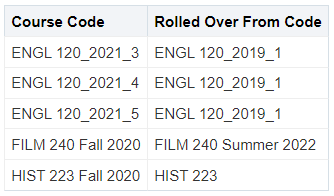
The code of the course from which the course was rolled over |
|
| School-Faculty | The school or faculty of the Academic Department in which the course was given | |
| Searchable ID 1-10 | Searchable ID 1- 10 of the course | |
| Weekly Hours | The weekly hours of the course |
Reading Lists
The Reading Lists table is a dimension table that stores details relating to a reading list, including the reading list name, the reading list status, and the reading list creation date. The primary key of the table is READING_LIST_ID.
| Field | Description | Additional Information |
|---|---|---|
| First Sent for Library Review Date | The date and time that the reading list was first sent for review | |
| First Sent for Library Review Date (Calendar) | The date that the reading list was first sent for review (calendar format) | This field is useful for filtering by selecting dates from a calendar |
| Instructors and Collaborators IDs | The IDs of the instructors and collaborators | |
| Leganto Last Sent for Library Review Date | The date and time that the reading list was last sent for review | |
| Leganto Last Sent for Library Review Date (Calendar) | The date that the reading list was last sent for review (calendar format) | This field is useful for filtering by selecting dates from a calendar |
| Leganto Reading List Last Set Complete By | The last recorded date that this reading list was finalized and set to Complete in Leganto. | |
| Leganto Reading List Last Set Complete Date | Stores the date of when the list was last set to complete manually and automatically by the system. | |
| Leganto Reading List Last Set Complete Date (Calendar) | Stores the date of when the list was last set to complete manually and automatically by the system. | |
| Number of Active Students on the List | The number of unique students who engaged with this list in any way (including simply viewing the list and exiting) | |
| Number of Citations | The total number of citations on a list | |
| Leganto List Num of Suggestions | The number of suggestions for the reading list | The suggested replacement (new edition available) is not counted under this measure. |
| Publication List Visibility |
The publication status of the list |
Possible values are:
|
| Publication Status |
Whether a reading list is published to students or not |
Possible values are:
|
| Reading List Associated to a Course | Indicates if the reading list is associated to a course | Possible values: Yes, No |
| Reading List Code | The code of the reading list | |
| Reading List Creation Date | The date that the reading list was created | |
|
Reading List Created By |
The creator of the reading list |
|
| Reading List Deleted | Indicates if the reading list was deleted | Possible values: Yes, No |
| Reading List Description | The description of the reading list | |
| Reading List Due Back Date | The due back date of the reading list | |
| Reading List ID | The ID of the reading list | |
| Reading List Locked | Indicates if the reading list is locked | Possible values: Yes, No |
| Reading List Modification Date | The date that the reading list was last modified | |
| Reading List Modified By | The person who last modified the reading list | |
| Reading List Name | The name of the reading list | |
| Reading List Number of Loans | The number of loans for the reading list | If an item appears on the reading list multiple times, loans for that item are counted only once. |
| Reading List Number of Participants | The total number of participants on the courses associated with the reading list | |
| Reading List Owner |
Lists the names of all reading list owners/collaborators, separated by a semicolon (;) |
Example: Smith, John; Jones, Susie |
| Reading List Owner Preferred Email |
Lists the preferred email address of all reading list owners/collaborators, separated by a semicolon (;) |
Example: John.Smith@institution.com; Susie.Jones@institution.com |
| Reading List Reset Date | The date the reading list was last reset | The reset is performed by the Reading List Bulk Update Job. |
| Reading List Status | The status of the reading list | |
| Reading List Score | The score of the reading list | The list score (level of completeness) as calculated by the list advisor. Institutions that disabled the list advisor from display in Leganto still see a score. |
| Reading List Type | The reading list type | Possible values are Parent and blank (no value) |
| Reading List Visible Start Date | The date that the reading list is visible to students | |
| Reading List Visible End Date | The date that the reading list is no longer visible to students | |
| Reading List Sticker Price | The total price of the citations with a sticker price | |
| Reading List Sticker Price (Covered by Library) | The total sticker price of the citations that are covered by the library | |
| Review Requester Name | The name of the review requester | Last name, first name format |
| Review Requester Name and ID | The name of the review requester with the requester's ID | ID, last name, first name format |
| Review Requester Preferred Email | The preferred email of the review requester |
Reading List Sections
The Leganto Reading List Sections table is a dimension table that stores details relating to a reading list, including Section Name, Section Order, and Section Creation Date.
| Field | Description | Additional Information |
|---|---|---|
| Section Creation Date | The creation date of the section | |
|
Section Created By |
The creator of the section | |
| Section Description | The description of the section | |
| Section End Date | The end date of the section | |
| Section ID | The ID of the section | |
| Section Library External Tags Code | The code of the library external tags section | |
| Section Library External Tags Description | The description of the library external tags section | |
| Section Library Internal Tags Code | The code of the library internal tags section | Include tags of type "Library-Internal". |
| Section Library Internal Tags Description | The description of the library internal tags section | |
| Section Locked | Indicates if the section is locked | Possible values: Yes, No |
| Section Modification Date | The last modification date of the section | |
| Section Modified By |
The person who last modified the section |
|
| Section Name | The name of the section | |
| Section Number of Citations | The number of citations in the section | |
| Section Order | A number indicating the place of the section in the list | The first section in the list is 0, followed by 1,2,3, etc. |
| Section Start Date | The start date of the section |
Citations
The Reading List Citation table is a fact table that stores the measure relating to number of citations. This table also holds details about the citation, including citation creator, citation status, and citation type. The primary key of the table is CITATION ID.
| Field | Description | Additional Information |
|---|---|---|
| Citation Alma Digital Downloads |
The number of times the Alma digital citation was downloaded during the course dates |
|
| Citation Alma Digital Views |
The number of times the Alma digital citation was viewed during the course dates |
|
| Citation Attribute (1-5) | The citation attribute |
For information on configuring the citation attribute fields, seeDisplaying Citation Attributes in Analytics Reports. |
| Citation Copyright Status | The citation copyright status | |
| Citation Covered by Library |
Indicates if the citation is covered by the library collections |
Possible values: Yes, No Value is Yes if the citation is attached to an MMS ID or if “Links & Availability” in Leganto includes an Alma link resolver URL. |
| Citation Creation Date | The creation date of the citation | |
|
Citation Created By |
The creator of the citation | |
| Citation Due Date | The due date of the citation | |
| Citation File Size (KB) | The size of the citation file | |
| Citation Has Assignment | Indicates if the citation has an assignment linked to it | Possible values: Yes, No |
| Citation Has Public Note | Indicates if the citation has a public note | Possible values: Yes, No |
| Citation Hidden Links | Indicates if there are hidden links in the citation | Possible values:
|
| Citation ID | The ID of the citation | |
| Citation Instructor Library Tags Code | The code of the library tags of the citation | Includes tags of type "Instructor-Library" |
| Citation Instructor Library Tags Description | The description of the library tags of the citation | Includes tags of type "Instructor-Library". |
| Citation Library External Tags Code | The code of the library external tags of the citation | Includes tags of type "Library-External". |
| Citation Library External Tags Description | The description of the library external tags of the citation | Includes tags of type "Library-External". |
| Citation Library Internal Tags Code | The code of the library internal tags of the citation | Includes tags of type "Library-Internal". |
| Citation Library Internal Tags Description | The description of the library internal tags of the citation | Includes tags of type "Library-Internal". |
| Citation License Type | The license type of the citation | Possible values: CLA, CCC, Creative Commons, Self-Declared, Bolk |
| Citation Link Set First | Indicates (Yes/No) if a link is set first in the citation | |
| Citation Locate Status | The locate status of the citation | Possible values are:
|
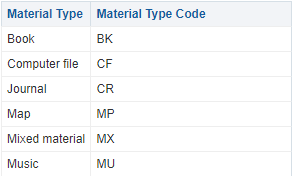
| Citation Material Type | The material type of the citation | Example: Book Chapter, DVD, Article |
| Citation Material Type Code | The material type code of the citation |
Example: BK(If citation material type is book), AR (If citation material type is Article), PATENT(If citation material type is Patent)
|
| Citation Material Visibility End Date | The visibility end date of the citation material | |
| Citation Material Visibility Start Date | The visibility start date of the citation material | |
| Citation Modification Date | The last modification date of the citation | |
| Citation Modified By | The user who last modified the citation | |
| Citation Number of Loans | The number of times the citation was loaned during the course dates | Calculated for physical items, per bibliographic record. This value is the number of times the item was loaned for the course or for any other reason. |
| Citation Order | A number indicating the position of the citation within the section | The first citation in a section is 0, followed by 1,2,3, etc. Combine with the Section Order in the Section table to see the citation position within the full list |
| Citation Public Note | The public note of the citation | Contains the text of the note. |
| Citation Public Tags Code | The code of the public tags of the citation | Includes tags of type "Public". |
| Citation Public Tags Description | The description of the public tags of the citation | Includes tags of type "Public". |
| Citation Resolving Disabled | Indicates if the resolving feature is disabled for the citation | Possible values: Yes, No. |
| Citation Source | The source URL of the citation | The value in the "Source" (Alma) or "URL" (Leganto) field in the citation. |
| Citation Status | The status of the citation | |
| Citation Sticker Price |
The value in the "Sticker price" field in the citation |
|
| Citation System Tags Code | Displays the code of all tags not mapped to a tag type, including tags added from the integration with the UK Digital Content Store and possibly tags added from the Leganto Questions feature. | |
| Citation System Tags Description | Displays the description of all tags not mapped to a tag type, including tags added from the integration with the UK Digital Content Store and possibly tags added from the Leganto Questions feature. | |
| Citation Thumbnail File Size (KB) | The size of the citation thumbnail file | |
| Citation Type | The citation type | Possible values are:
|
| Citation Uploaded File | Indicates if the citation has an uploaded file | Possible values: Yes, No |
| Citation Visibility End Date | The visibility end date of the citation | |
| Citation Visibility Start Date | The visibility start date of the citation | |
| Course End Date | The end date of the course | |
| Course Start Date | The start date of the course | |
| Is Alma Digital Citation | Indicates if the citation is an Alma digital resource | Possible values: Yes, No |
| Is Repository Citation | Indicates if the citation is linked to the repository | Possible values are:Yes, No |
| Link to PDF | The URL of the PDF of the citation | The URL of the Link in Record. See Link in Record for more information. This link displays in Leganto as GetPDF.
For this field to display data, you must activate Quicklinks in Primo. For more information, see Default Settings. |
| MMS ID | The MMS ID of the citation | |
| Num of Assignments | The number of assignments that are linked to a citation | |
| Num of Private Annotations | The number of private annotations on the citation | |
| Num of Public Annotations | The number of public annotations on the citation |
Citation Metadata Details
The Citation Metadata Details table is a dimension table that stores the citation metadata details of the course reserves.
| Field | Description | Additional Information |
|---|---|---|
| Additional Person Name | The additional person name | |
| Author | The author of the article | |
| Book Call Number | The call number of the book | |
| Book Chapter Author | The author of the book chapter | |
| Book Chapter Editor | The editor of the book chapter | |
| Book Chapter Number | The chapter number of the book | |
| Book Chapter Title | The title of the book chapter | |
| Book Edition | The edition of the book | |
| Barcode | The barcode of the physical item | |
| DOI | The digital object identifier | |
| End Page | The end page of the article | |
| End Page 2 | An additional end page of the article | |
| ISBN | The ISBN of the book | |
| ISSN | The ISSN of the journal | |
| Issue | The issue of the journal | |
| Journal Title | The title of the journal | |
| Language | The language of the citation | |
| Normalized Citation Title | The citation title in normalized form – in lowercase with all special characters removed | |
| Normalized ISBN | The ISBN in normalized form – in lowercase with all special characters removed | |
| Normalized ISSN | The ISSN in normalized form – in lowercase with all special characters removed | |
| Normalized Journal Title | The journal title in normalized form – in lowercase with all special characters removed | |
| Note | The note on the citation | |
| Number of Pages | The number of pages in the article | This field includes the number of pages between the Start Page and End Page fields and the Start Page 2 and End Page 2 fields |
| OCLC Number | The OCLC number | |
| Pages | The pages of the citation | |
| Part | The part | |
| Publication Date | The date of publication | |
| Publication Place | The place of publication | |
| Publisher | The publisher | |
| Start Page | The start page of the article | |
| Start Page 2 | An additional start page of the article | |
| Title | The title of the citation | |
| Volume | The volume of the citation |
Student Details
The Student Details table is a dimension table that stores information concerning student details. It contains information only when the institution has opted into the Student Success Measurements Service, tracking individual student information.
Institution
Leganto Usage Dashboard
The Leganto Usage data visualization dashboard displays reports on student usage. It is located in the Leganto Analytics catalog under Leganto > Data Visualization > Leganto usage tracking.
The dashboard contains several tabs:
- Course Usage Overview – an overview of student usage:
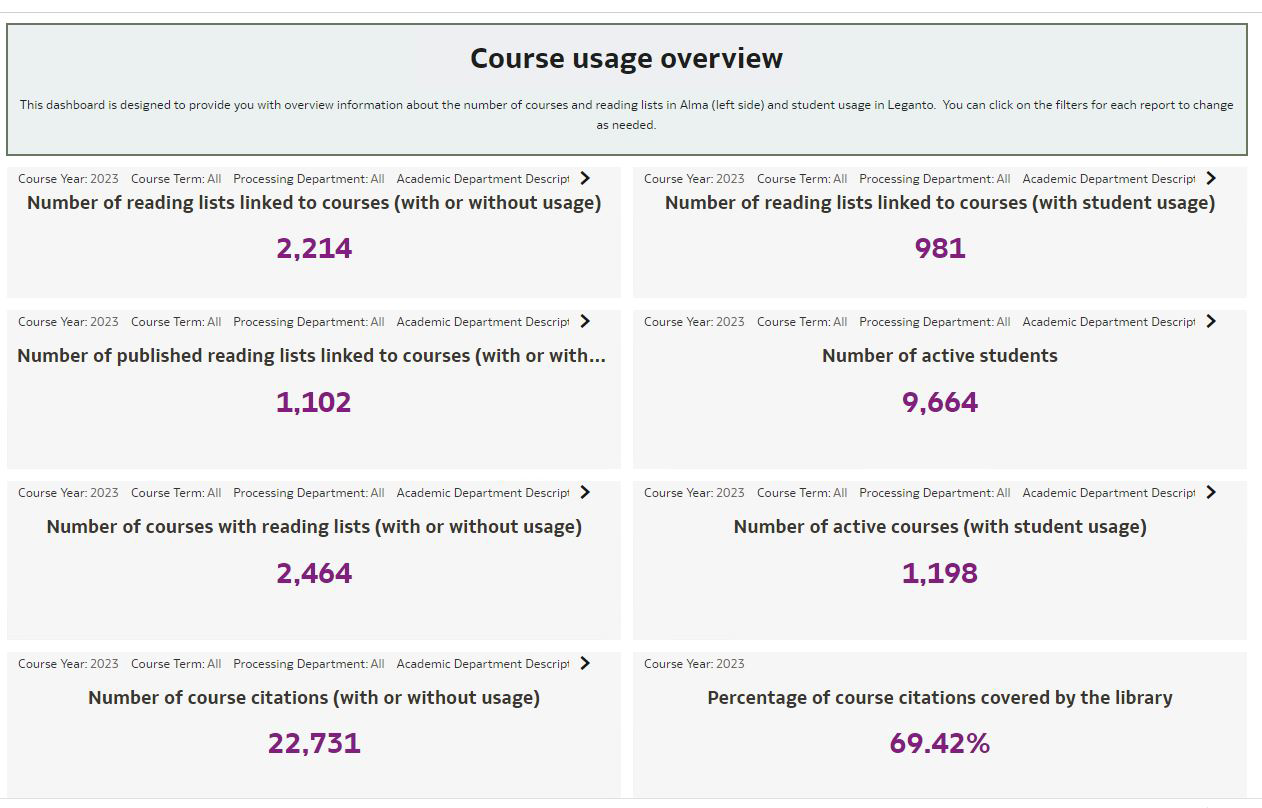 Course Usage Overview Tab
The following reports are displayed:
- Number of reading lists – the reading lists that are associated with a course, except publication visibility deleted and archived
- Number of published reading lists – the reading lists that are associated with course except publication visibility deleted, archived, and draft
- Number of reading lists with active users – the reading lists that are associated with a course with active users, including publication visibility deleted and archived
- Number of courses with reading lists – the courses that are associated with a reading list, except courses with visibility archived
- Number of courses with active users – the courses which associated with a reading lists that has active users, includes courses with visibility archived
- Number of students impacted (yearly) – the number of unique active students (excluding guests)
- Percentage of citations covered by the library – (x/y)*100, where:
- X= number of citations covered by the library that are associated with reading list, except publication visibility deleted and archived
- Y= total number of citations that are associated with a reading list, except publication visibility deleted and archived
- Number of citations – the citations that are associated with a reading list, except publication visibility deleted and archived
You can filter the results according to the following criteria:
- Course year
- Course term
- Course processing department
- Course academic department
- Course campus
- List Usage Overview – data about reading lists that were used by students. It displays three reports:
- Active reading lists by academic department
- Active reading lists by month
- Active reading lists by month – departments
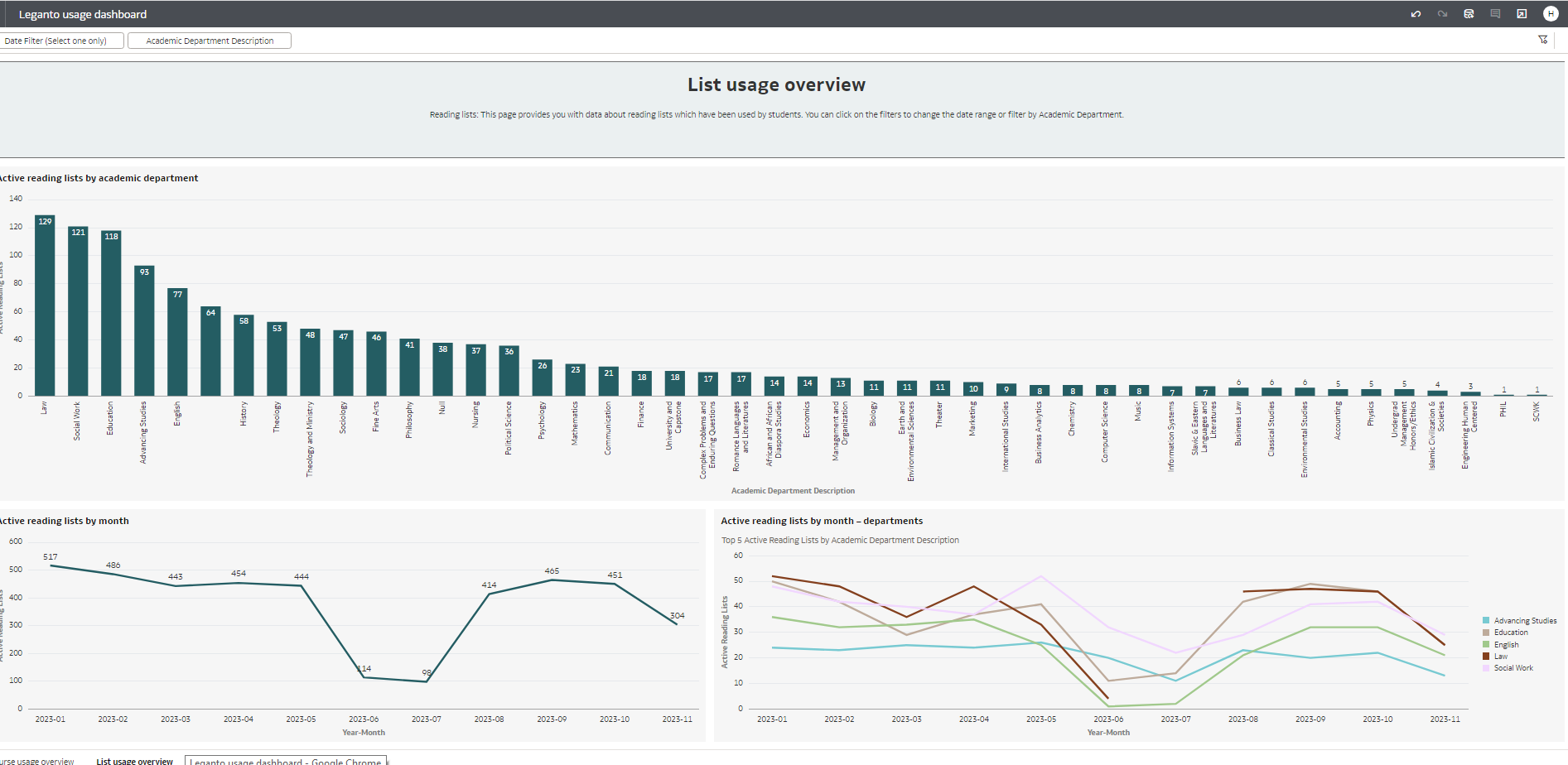 List Usage Overview Tab
 - Detailed list usage – a detailed list of student usage in Leganto:
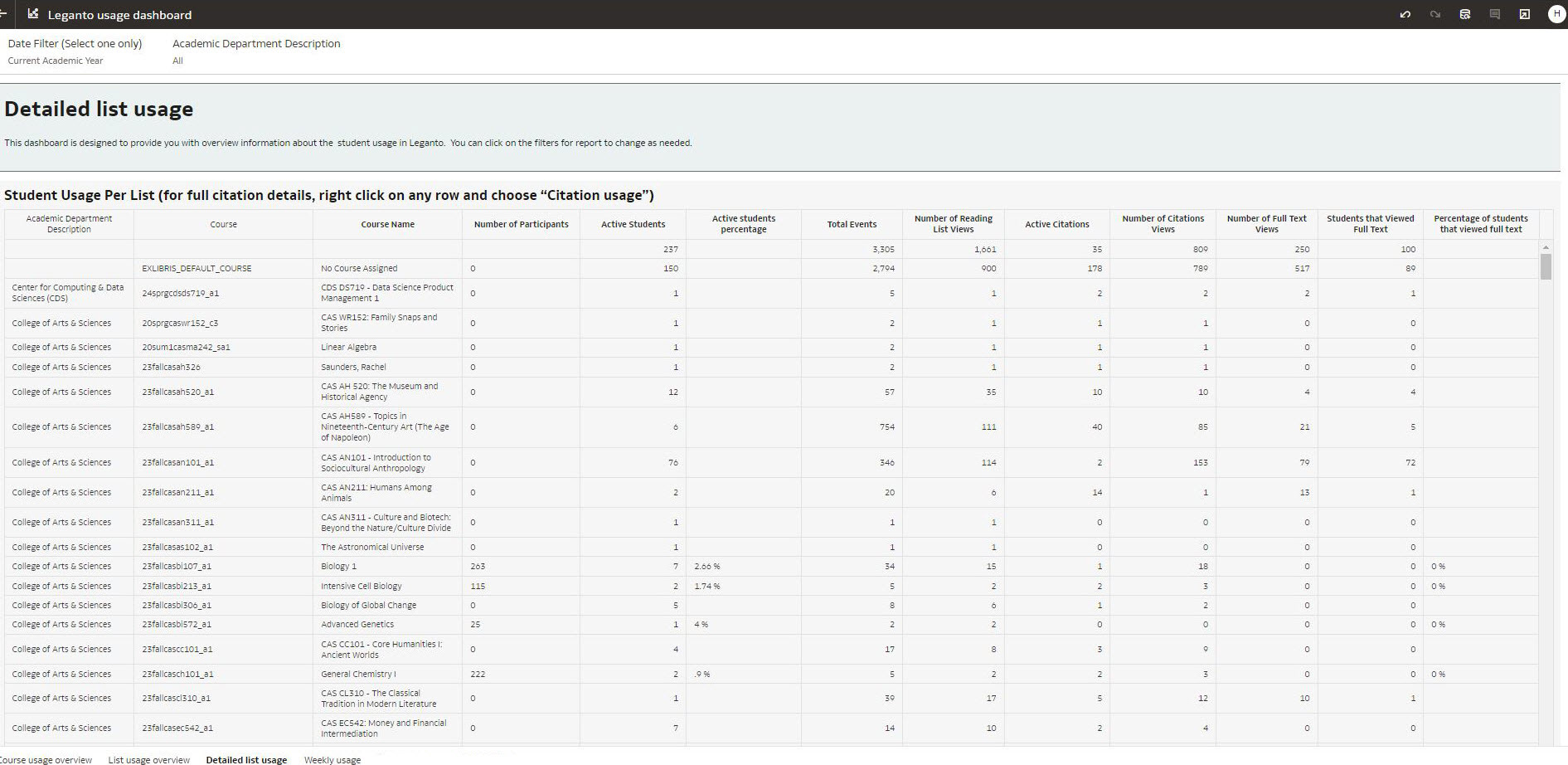 Detailed List Usage Tab
 - Citation Usage – a table with the following columns concerning student citation usage for a reading list:
- Title
- Author
- Citation material type
- Citation public tag
- Active students
- Total events
- Students that viewed citation
- Number of citation views
- Students that viewed the full text
- Number of full text views
- Students that downloaded files
- Number of files downloaded
- Citation number of loans (from citations folder)
- Students that marked as done
 Citation Usage
 - Weekly Usage – data concerning weekly student usage. You can filter the results with the Date filter and the Academic Department Description filter.
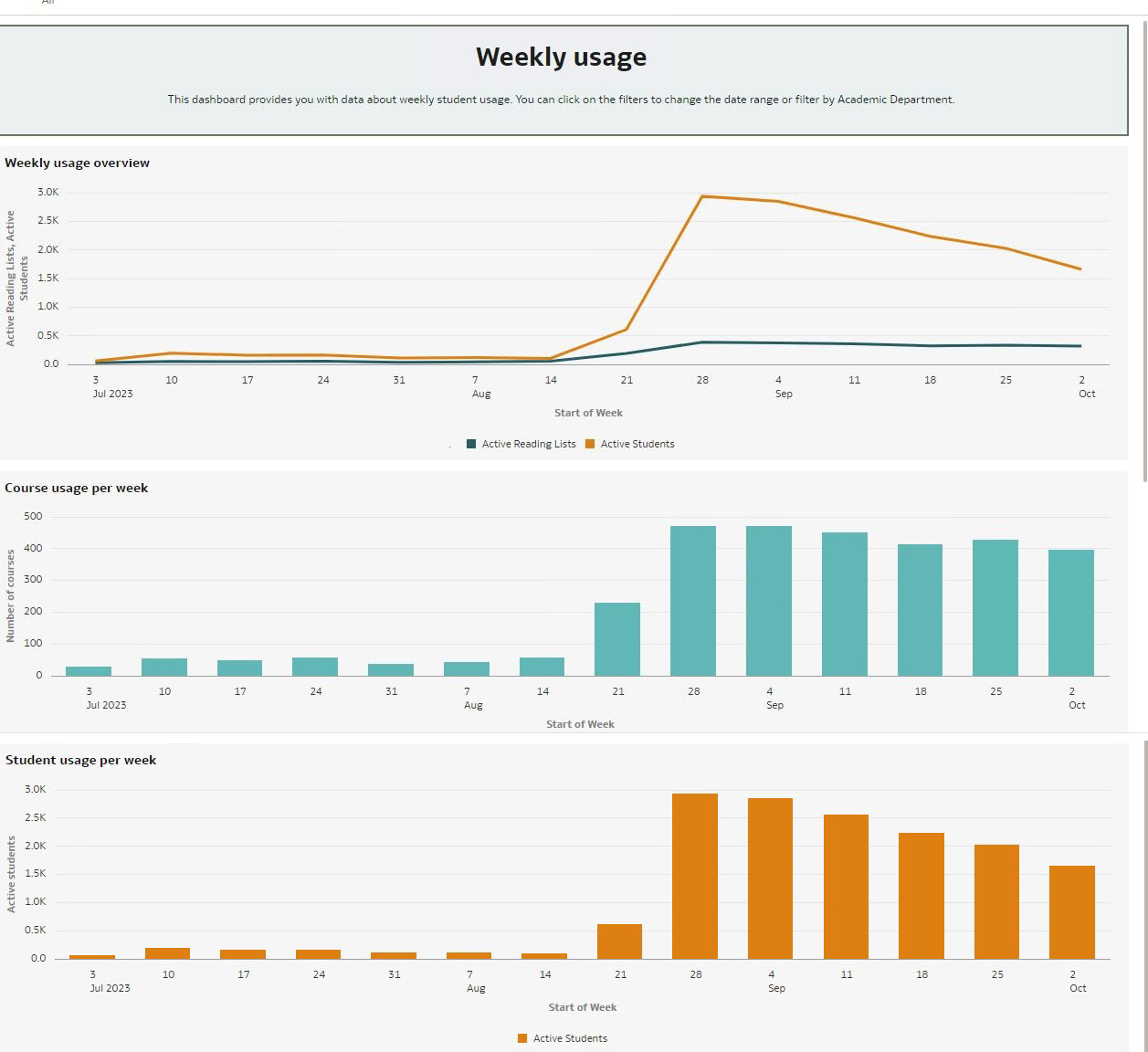 Weekly Usage Tab
The tab displays the following reports:
- Weekly usage overview – active reading lists and active students per start of week
- Course usage per week – number of courses per start of week
- Student usage per week – active students per start of week
- Year Over Year – displays the following information concerning Leganto usage across multiple years, including future projections:
- Number of active students per year
- Number of active courses per year
- Number of active reading lists per year
- Number of active citations per year
- Number of full text views per year
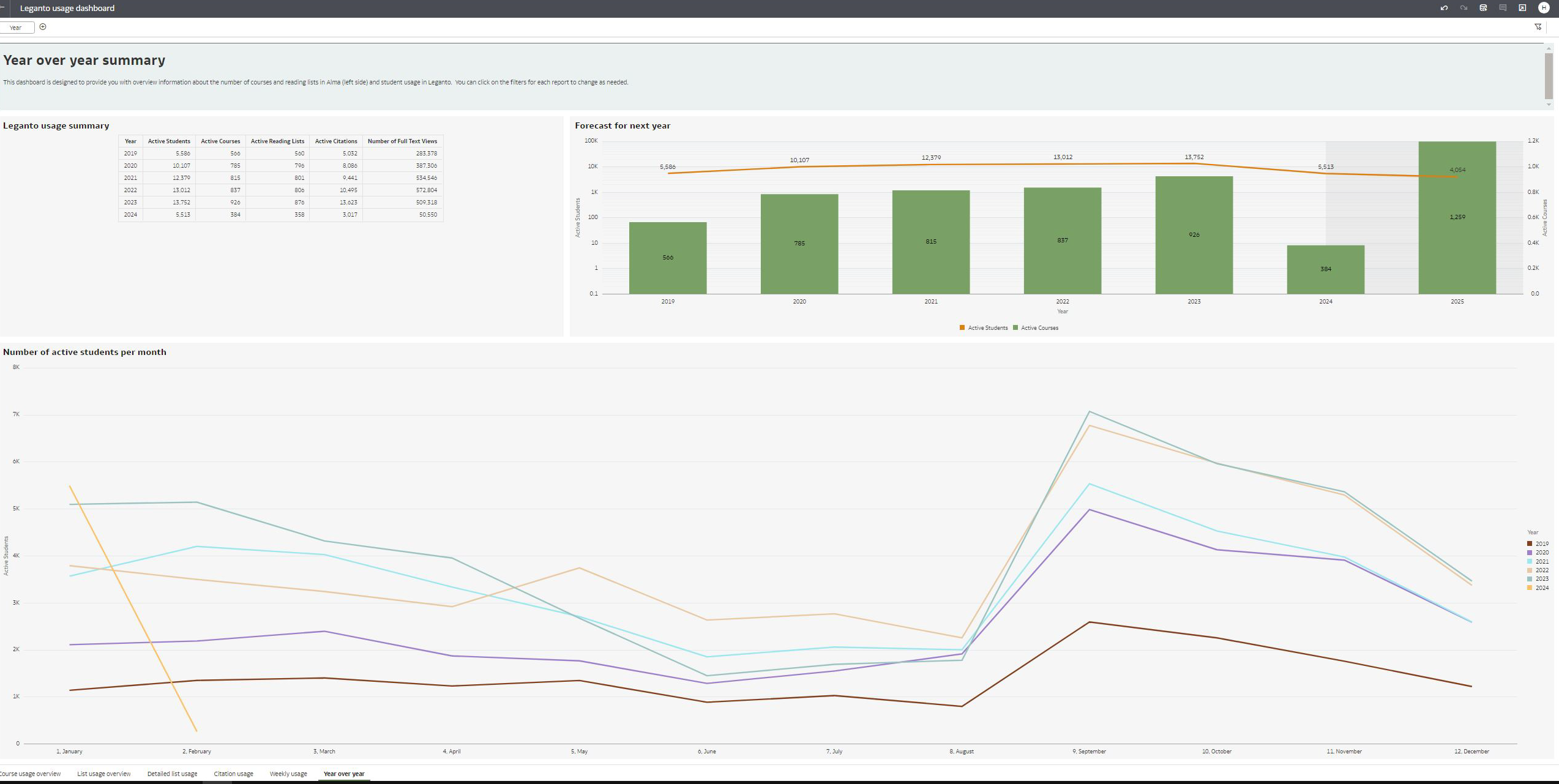 Year Over Year
Leganto Student Savings Dashboard
The Leganto Student Savings data visualization dashboard contains reports that display how much money students save by accessing their course material through Leganto rather than buying physical copies. Estimates are based on a cost of $75 per student per cost. It is located in the Leganto Analytics catalog under Leganto > Data Visualization > Leganto Student Savings.
The dashboard contains the following tabs:
- Savings image (by Enrollment) – a quick visual displaying the estimated cumulative savings based on enrollment in courses that have reading lists
 Savings Image (by Enrollment)
 - Savings per Year (by Enrollment) – a graph of the estimated savings per year based on enrollment in courses that have reading lists. Students enrolled in several courses are counted for each course:
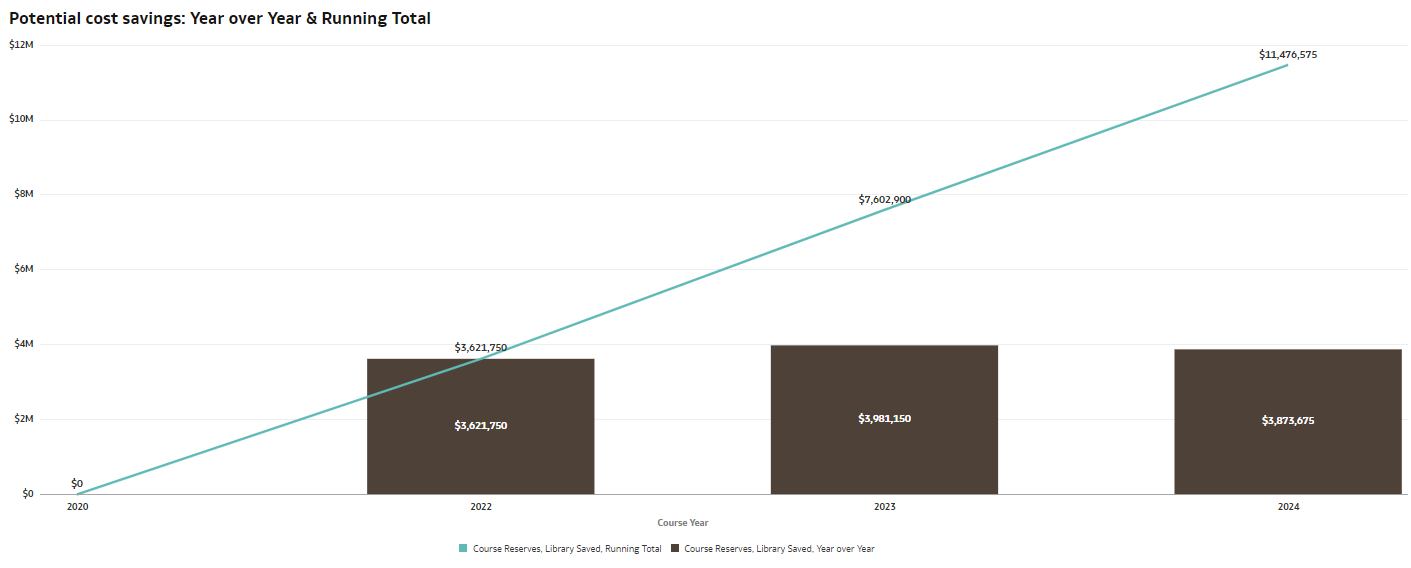 Savings per Year (by Enrollment)
 - Savings by Enrollment – summary information as well as a chart that displays the amount that students saved per course that have a reading list:
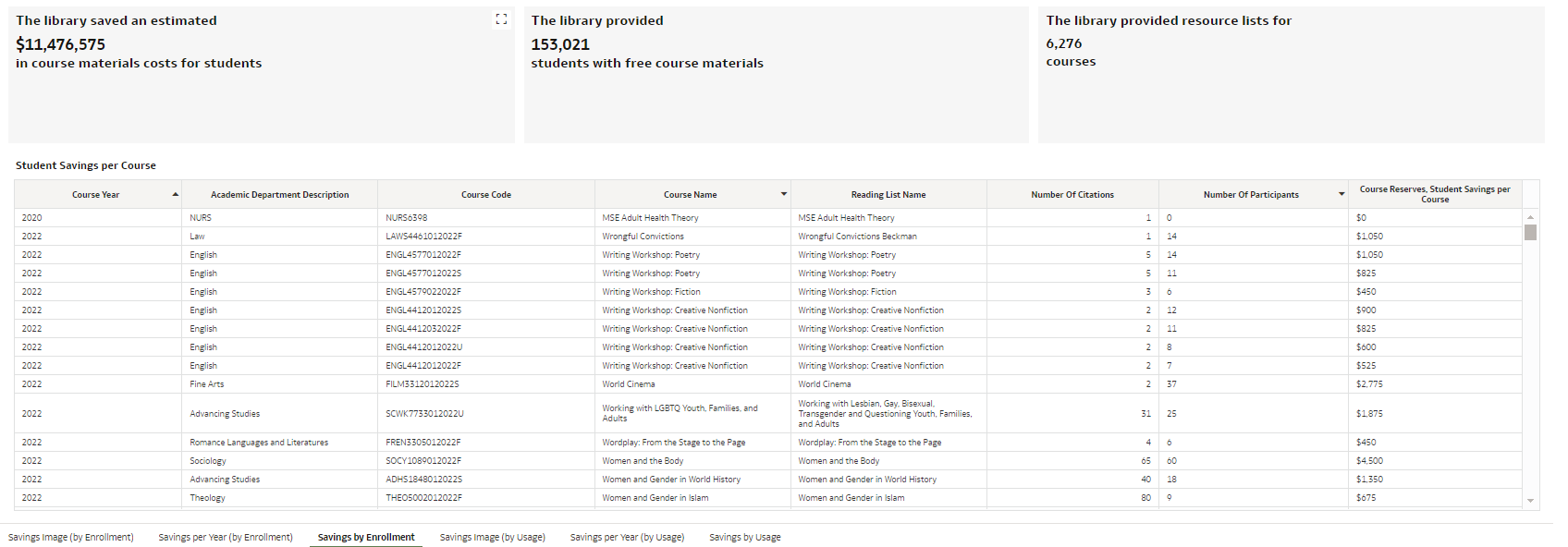 Savings by Enrollment
 - Savings Image (by Usage) – a quick visual displaying the estimated cumulative savings based on the number of students that accessed the materials for their course in Leganto:
 Savings Image (by Usage)
 - Savings per Year (by Usage) – a graph of the estimated savings per year based on the number of students that accessed the materials for their course in Leganto:
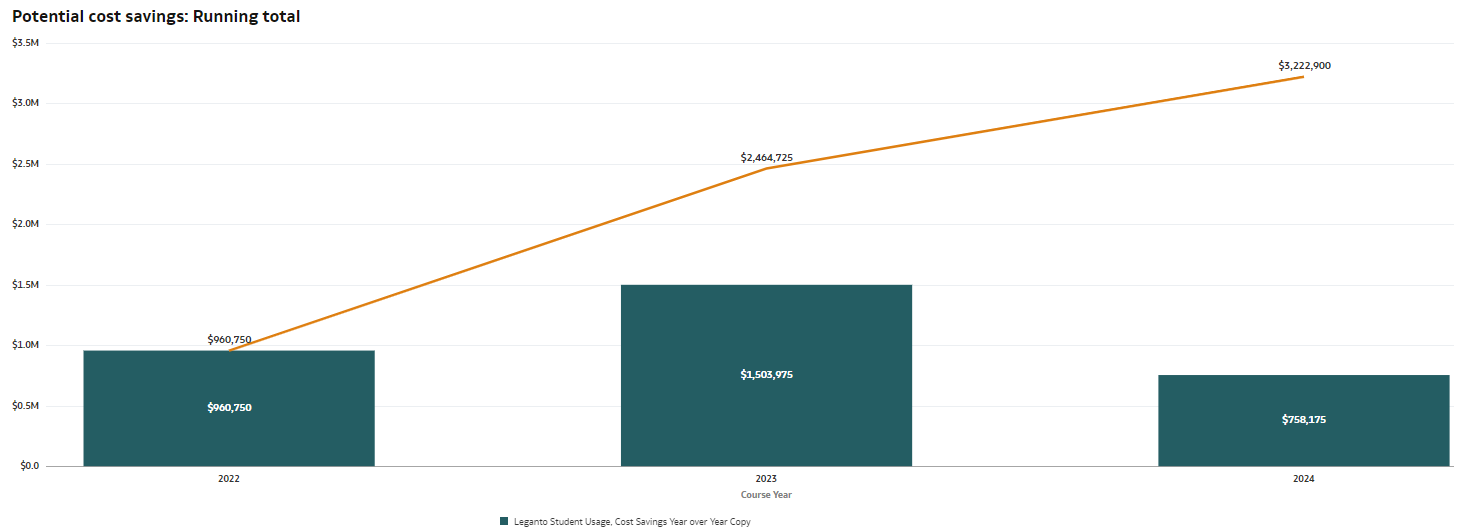 Savings per Year (by Usage)
 - Savings by Usage – summary information as well as a chart that displays the amount that students saved per course based on the number of students that accessed the materials for their course in Leganto:
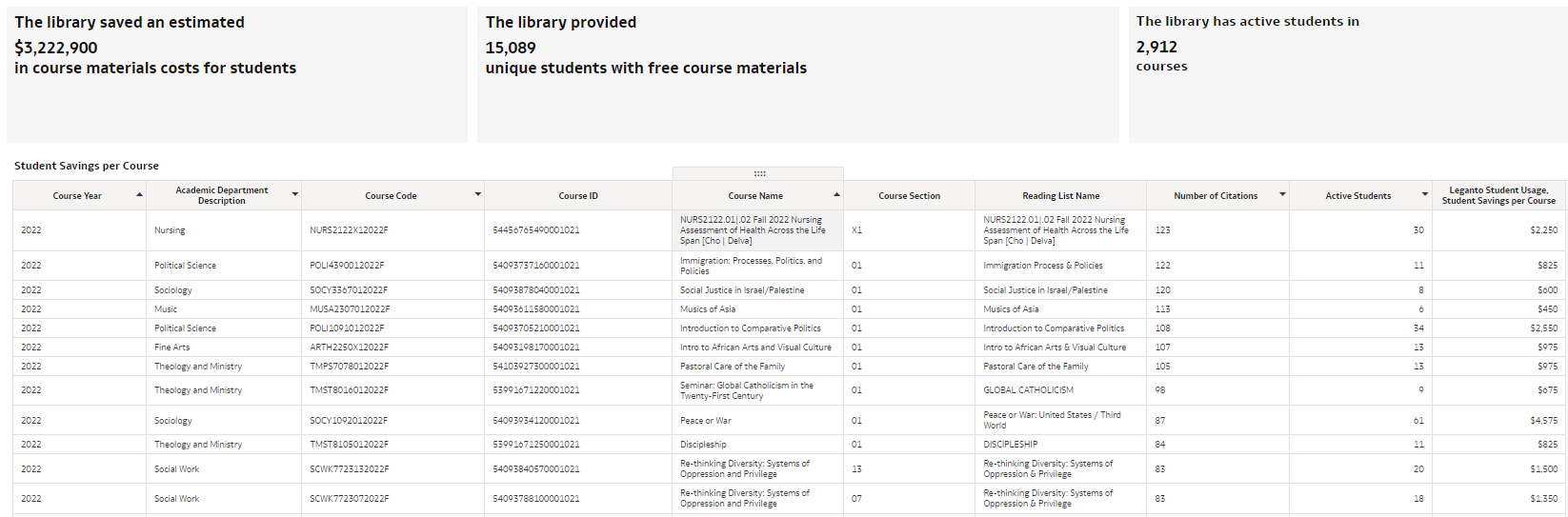 Savings by Usage
Page tags: article:topicInstitutionproduct:almacontent:DocumentationReading Listlang:englishCitationsCoursesCitation Metadata DetailsStudent UsageStudent Weekly UsageWeeksReading List Section
