
Usage Data (COUNTER)
Create reports/dashboards for the Usage Data area.
Using the Usage Data (COUNTER) area, the Design Analytics user may create reports/dashboards for the Usage Data (COUNTER) area and is able to answer the following types of business questions:
- Most frequently used journals
- Annual journal usage trend
- Total and monthly number of successful requests per each journal
- Database Usage - Annual Trend
- Most Frequently Used Databases
- Total number of searches and sessions per each database and the monthly/yearly search statistics
For a video describing how to manage monthly usage data, see Monthly Usage Data Dashboard.
Field Descriptions
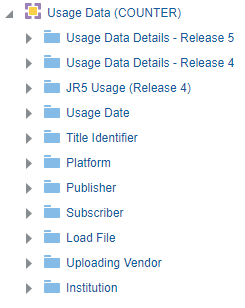
The following lists the fields available in Usage Data.
Usage Data Details - Release 5
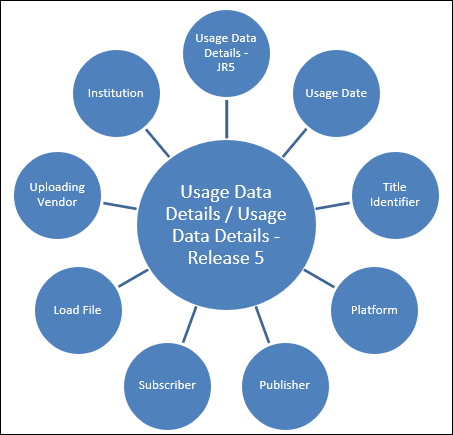
The Usage Data Details - Release 5 table is a fact table that stores all measures relating to specific Title/platform/publisher/subscriber for COUNTER version 5 and 5.1. The data contained in the Usage Data subject area originates from the COUNTER reports loaded by the Alma institution.
COUNTER R5.1 reports' usage is comparable with usage data in R5. This is aligned with the COUNTER guidelines (see "Are Release 5.1 reports comparable to Release 5 reports?" in the FAQs). See also Moving from R5 to R5.1.
| Field | Description | Additional Information | Data Type | Data Size |
|---|---|---|---|---|
| Title Identifier Count | The number of unique title identifiers | |||
| Usage Measures Total |
The sum total of all of the other measures for the particular query. This includes the usage measures from both Release 4 and Release 5. |
|||
| DR - Searches Automated | The number of automated searches | |||
| DR - Searches Federated | The number of federated searches | |||
| DR - Searches Regular | The number of regular searches | |||
| DR - Total Item Investigations | The total number of item investigations | |||
| DR - Total Item Requests | The total number of item requests | |||
| DR - Unique Item Investigations | The number of unique item investigations | |||
| DR - Unique Item Requests | The number of unique item requests | |||
| DR - Unique Title Investigations | The number of unique title investigations | |||
| DR - Unique Title Requests | The number of unique title requests | |||
| DR - No License | No license | |||
| DR - Limit Exceeded | Limit exceeded | |||
| DR_D1 - Searches Automated | The number of automated searches | |||
| DR_D1 - Searches Federated | The number of federated searches | |||
| DR_D1 - Searches Regular | The number of regular searches | |||
| DR_D1 - Total Item Investigations | The total number of item investigations | |||
| DR_D1 - Total Item Requests | The total number of item requests | |||
| DR_D1 - Unique Item Investigations | The total number of times a content item, or information about it, such as metadata or abstract, was accessed. | This includes full-text views and abstract views, with duplicate clicks filtered. Any user activity that can be attributed to a content item will be considered an Investigation including downloading or viewing the item. | NUMBER | 19 |
|
DR_D1 - Unique Item Requests |
The number of unique content items (e.g., articles, chapters, records) successfully requested within a single user session, from a specific database. Focuses on usage of databases as a whole. | This count includes requests for the full text, such as HTML or PDF downloads, but counts each item only once per session, no matter how many times the user accesses it. If the same content is requested multiple times, it is only counted once. | NUMBER | 19 |
| DR_D2 - No License | No license | |||
| DR_D2 - Limit Exceeded | Limit exceeded | |||
| PR - Searches Platform | The searches platform | |||
| PR - Total Item Investigations | The total number of item investigations | |||
| PR - Total Item Requests | The total number of item requests | |||
| PR - Unique Item Investigations | The number of unique item investigations | |||
| PR - Unique Item Requests | The number of unique item requests | |||
| PR - Unique Title Investigations | The number of unique title investigations | |||
| PR - Unique Title Requests | The number of unique title requests | |||
| PR_P1 - Searches Platform | The searches platform | |||
| PR_P1 - Total Item Requests | The total number of item requests | |||
| PR_P1 - Unique Item Requests | The number of unique item requests | |||
| PR_P1 - Unique Title Requests | The number of unique title requests | |||
| TR - Total Item Investigations | The total number of item investigations | |||
| TR - Total Item Requests | The total number of item requests | |||
| TR - Unique Item Investigations | The number of unique item investigations | |||
| TR - Unique Item Requests | The number of unique item requests | |||
| TR - Unique Title Investigations | The number of unique title investigations | |||
| TR - Unique Title Requests | The number of unique title requests | |||
| TR - No License | No license | |||
| TR - Limit Exceeded | Limit exceeded | |||
| TR_B1 - Total Item Requests | The total number of item requests | |||
| TR_B1 - Unique Title Requests | The number of unique title requests | |||
| TR_B2 - No License | No license | |||
| TR_B2 - Limit Exceeded | Limit exceeded | |||
| TR_B3 - Total Item Investigations | The total number of item investigations | |||
| TR_B3 - Total Item Requests | The total number of item requests | |||
| TR_B3 - Unique Item Investigations | The number of unique item investigations | |||
| TR_B3 - Unique Item Requests | The number of unique item requests | |||
| TR_B3 - Unique Title Investigations | The number of unique title investigations | |||
| TR_B3 - Unique Title Requests | The number of unique title requests | |||
| TR_J1 - Total Item Requests | The total number of item requests | |||
| TR_J1 - Unique Item Requests | The number of unique item requests | |||
| TR_J2 - No License | No license | |||
| TR_J2 - Limit Exceeded | Limit exceeded | |||
| TR_J3 - Total Item Investigations | The total number of item investigations | |||
| TR_J3 - Total Item Requests | The total number of item requests | |||
| TR_J3 - Unique Item Investigations | The number of unique item investigations | |||
| TR_J3 - Unique Item Requests | The number of unique item requests | |||
| TR_J4 - Total Item Requests | The total number of item requests | |||
| TR_J4 - Unique Item Requests | The number of unique item requests | |||
| IR - Total Item Requests | The total number of item requests | |||
| IR - Unique Item Requests | The number of unique item requests | |||
| IR - Total Item Investigations | The total number of item investigations | |||
| IR - Unique Item Investigations | The number of unique item investigations | |||
| IR - No License | No license | |||
| IR - Limit Exceeded | Limit exceeded | |||
| IR_A1 - Unique Item Requests | The number of unique item requests | |||
| IR_A1 - Total Item Requests | The total number of item requests | |||
| IR_M1 - Total Item Requests | The total number of item requests | |||
|
IR_M1 - Unique Item Requests |
The number of distinct multimedia items that were successfully accessed (e.g., streamed or downloaded), counting only once per item per session. Covers multimedia content items like videos, audio, images. | This count includes requests for the full text, such as HTML or PDF downloads, but counts each item only once per session, no matter how many times the user accesses it. If the same content is requested multiple times, it is only counted once. | NUMBER | 19 |
| Access Method | Indicates if the purpose of the access is for regular use or for text and data mining (TDM). | |||
| Access Type | The access type - either open access or controlled (requiring a license) | |||
| Data Type | The type of content usage being reported on. | Possible values include: book, book segment, database, dataset, journal, multimedia, newspaper, newsletter, platform, other, repository item, report, thesis, and dissertation. | ||
| Material Type Indicator | The material type indicator, based on the Metric Type and Data Type fields from COUNTER reports. | Possible values include: book report, journal, database, multimedia, and platform. | ||
| Section Type | The type of section that was accessed by the user. | Possible values include: article, book, chapter, and other section. Used primarily for reporting on book usage where content is delivered by section. | ||
| Year of Publication | The year of publication |
| Name | Description | Data Type | Data Size |
|---|---|---|---|
| Parent Article Version | ALPSP/NISO code indicating the version of the parent work (e.g., Accepted Manuscript, Version of Record). | VARCHAR | 255 |
| Parent Authors | Authors of the parent work (in the same format as the Item “Authors” field). | VARCHAR | 2500 |
| Parent Data Type | Identifies the nature of the parent (e.g., Journal, Book). | VARCHAR | 255 |
| Parent DOI | DOI assigned to the parent item in the format {prefix}/{suffix}. | VARCHAR | 255 |
| Parent ISBN | ISBN of the parent item in ISBN-13 format with hyphens. | VARCHAR | 255 |
| Parent Online ISSN | Online ISSN of the parent item in the format nnnn-nnn[nX]. | VARCHAR | 255 |
| Parent Print ISSN | Print ISSN of the parent item in the format nnnn-nnn[nX]. | VARCHAR | 255 |
| Parent Proprietary ID | A proprietary ID that identifies the parent item, formatted as {namespace}:{value}, where “namespace” is the platform ID. | VARCHAR | 255 |
| Parent Publication Date | Date of publication for the parent work in YYYY-MM-DD format. | DATE | |
| Parent Title | Title of the parent item. (Used in Item Reports, e.g., IR_A1.) | VARCHAR | 800 |
| Parent URI | URI (URL or URN per RFC 3986) for the parent item. | VARCHAR | 255 |
Moving from R5 to R5.1
As part of the COUNTER R5.1 changes, the definition of "Access type" has changed and now includes only the following access types:
-
Controlled. Material that is only available to authorized users (such as subscribers or registered users).
-
Open. Any content item that the publisher asserts is OA (Open Access), no matter what the license is or whether the item was originally Controlled (e.g. until after an embargo). This includes the previous value OA Gold.
-
Free To Read. Materials that are temporarily freely available to everyone (e.g. special collections of coronavirus papers during the early days of the Covid pandemic).
Analytics reports using this attribute will need to be modified. If you're looking for a direct comparison between R5 and R5.1 data, you need to show Controlled for R5, and both Controlled and Free_To_Read for R5.1.
For more information, see Managing COUNTER-Compliant Data Usage.
Usage Data Details - Release 4
The Usage Data Details - Release 4 table is a fact table that stores all measures relating to specific Title/platform/publisher/subscriber. The primary key is ID.
The data contained in the Usage Data subject area originates from the COUNTER reports loaded by the Alma institution.
| Field | Description | Additional Information |
|---|---|---|
| Title Identifier Counter | The number of unique title identifiers | |
| Usage Measures Total | The sum total of all of the other measures for the particular query. This includes the usage measures from both Release 4 and Release 5. | |
| BR1 - Book Success Title Requests (Total) | Displays the total number of successful title requests by month and title for the Book Report 1 (BR1) material type. | |
| BR1 – Book Success Title Requests (html) | Displays the number of successful title requests in HTML format by month and title for the Book Report 1 (BR1) material type. | |
| BR1 – Book Success Title Requests (pdf) | Displays the number of successful title requests in PDF format by month and title for the Book Report 1 (BR1) material type. | |
| BR2 - Book Success Section Requests (Total) | Displays the total number of successful section requests by month and title for the Book Report 2 (BR2) material type. | |
| BR2 – Book Success Title Requests (html) | Displays the number of successful title requests in HTML format by month and title for the Book Report 2 (BR2) material type. | |
| BR2 – Book Success Title Requests (pdf) | Displays the number of successful title requests in PDF format by month and title for the Book Report 2 (BR2) material type. | |
| BR3 – Title Access Denied (license limit exceeded) | Displays the number of title requests denied because the license limit was exceeded for the Book Report 3 (BR3) material type. | Includes Turnaway responses |
| BR3 – Title Access Denied (item not licensed) | Displays the number of title requests denied because the item was not licensed for the Book Report 3 (BR3) material type. | |
| BR4 – Platform Access Denied (license limit exceeded) | Displays the number of platform requests denied because the license limit was exceeded for the Book Report 4 (BR4) material type. | |
| BR4 – Platform Access Denied (item not licensed) | Displays the number of platform requests denied because the item was not licensed for the Book Report 4 (BR4) material type. | |
| BR5 - Total Searches | The total number of searches | |
| BR5 - Total Searches Federated | The total number of federated searches | |
| DB1 - DB Federated Searches | The number of DB federated searches. | Federated search is an information retrieval technology that allows the simultaneous search of multiple searchable resources. A user makes a single query request that is distributed to the search engines participating in the federation. The federated search then aggregates the results that are received from the search engines for presentation to the user. |
| DB1 - DB Federated Sessions | The number of DB Federated sessions | |
| DB1 - DB Records Views | A successful request for a database record that has originated from a set of search results, from browsing the database, or from a select on another database record. | |
| DB1 - DB Result Clicks | A select originating from a set of search results. | |
| DB1 - DB Searches | The number of successful database searches | |
| DB1 - DB Sessions | The number of DB sessions. DB session is the period of activity between a user logging in to database and logging out of a (multi-user) system. | |
| JR1 - Journal Usage Counter (total) | The total number of successful full text article requests by month and journal report. | |
| JR1 - Journal Usage Counter (HTML) | The number of successful full text article requests by month and journal report in HTML format. | |
| JR1 - Journal Usage Counter (PDF) | The number of successful full text article requests by month and journal report in PDF format. | |
| JR1a - Journal Usage Counter Archive | Number of Successful Full-Text Article Requests from an Archive by Month and Journal | |
| JR1 GOA – Journal Usage Counter Gold Open Access (Total) | Number of Successful Gold Open Access Full-Text Article Requests by Month and Journal | |
| JR1 GOA – Journal Usage Counter Gold Open Access (html) | Number of Successful Gold Open Access Full-Text Article Requests by Month and Journal in HTML format | |
| JR1 GOA – Journal Usage Counter Gold Open Access (pdf) | Number of Successful Gold Open Access Full-Text Article Requests by Month and Journal in PDF format | |
| PR1 - Platform Federated Searches | The number of platform federated searches. | |
| PR1 - Platform Regular Searches | The number of platform regular searches. | |
| PR1 - Platform Records Views | Total Searches, Result Clicks, and Record Views by Month and Platform | |
| PR1 - Platform Result Clicks | The number of platform result selects | |
| MR1 - Multimedia Full Content Unit Requests | The number of multimedia full content unit requests | |
| Load File ID | Unique ID of the file loaded into Alma | |
| Material Type Indicator | Indicate if the usage is DB usage, Journal usage, Book Report 1 usage, or Book Report 2 usage | For example, book report, journal, database, multimedia, and platform |
JR5 Usage (Release 4)
The Usage Date table is a dimension table that stores details about usage data details for the JR5 counter.
| Field | Description | Additional Information |
|---|---|---|
| JR5 Usage From Date | ||
| From Date | The date from which usage is measured | |
| From Start of Week | The date of the first business day of the week | |
| From Week Number | The number of the week of the year | |
| From Month Key | The month from which usage is measured in number format such as 2 for February | |
| From Month | The month from which usage is measured such as February | |
| From Full Month | The month from which usage is measured in a display format such as Feb 12 | |
| From Year-Month | The year and month from which usage is measured | |
| From Quarter | The quarter from which usage is measured | |
| From Year | The year from which usage is measured | |
| From Fiscal Month Key | The fiscal month from which usage is measured in number format such as 2 for February | |
| From Fiscal Year | The fiscal year from which usage is measured | |
| JR5 Usage To Date | ||
| To Date | The date to which usage is measured | |
| To Start of Week | The date of the first business day of the week | |
| To Week Number | The number of the week of the year | |
| To Month Key | The month to which usage is measured in number format such as 2 for February | |
| To Month | The month to which usage is measured such as February | |
| To Full Month | The month to which usage is measured in a display format such as Feb 12 | |
| To Year-Month | The year and month to which usage is measured | |
| To Quarter | The quarter to m which usage is measured | |
| To Year | The year to which usage is measured | |
| To Fiscal Month Key | The fiscal month to which usage is measured in number format such as 2 for February | |
| To Fiscal Year | The fiscal year to which usage is measured | |
| JR5 - Journal Usage Counter Year of Publication | The JR5 - Journal Usage Counter Year of Publication | |
| Year of Publication | The year of publication | |
Usage Date
The Usage Date table is a dimension table that stores details about the usage date of transactions, such as month, year, and quarter.
| Field | Description | Additional Information | Data Type | Data Size |
|---|---|---|---|---|
| Usage Date | The current course end date of the purchase request | The date in the format DD/MM/YYYY | DATE | |
| Usage Date Start of Week | The date of the first business day of the week | The date in the format DD/MM/YYYY | DATE | |
| Usage Date Week Number | The number of the week of the year | There are 52 weeks in a year. | VARCHAR | 2 |
| Usage Date Month Key | The month of the date in number format | For example - February will show the number 2 in this column. This field is useful when you want to sort by month. | INT | |
| Usage Date Month | The month of the date in text format | The month, for example, "February" | VARCHAR | 20 |
| Usage Date Full Month | The year and month that the purchase request was modified | The month in text format and the year. For example - Feb 25 (for February 2025) | VARCHAR | 20 |
| Usage Date Quarter | The quarter in the year in which the purchase request was modified | The quarter of the date in a display format such as Q1 | VARCHAR | 20 |
| Usage Date Year | The year in which the purchase request was modified | The year of the date in the format YYYY . For example - 2025 | VARCHAR | 20 |
| Usage Date Year-Month | The year and the month in which the purchase request was modified | The year and the month in the format YYYY-MM | VARCHAR | 250 |
| Usage Date Fiscal Month Key | The fiscal month of the date in number format | For example - If the fiscal year starts in June, this column will show the number 1 for June, the number 2 for July, and so on. | INT | |
| Usage Date Fiscal Year | The fiscal year of the date in string format | The year is presented according to the description in the mapping table "Fund and Ledger Fiscal Period". For more information, see Configuring Fund and Ledger Fiscal Periods | VARCHAR | 50 |
| Usage Date Filter | Used to filter report results by date | Possible values:
|
VARCHAR | 100 |
| Usage Date | The date in a hierarchy format | Enables the user to drill down from the year to the month to the specific date. Using this column provides the user with the option to view the accumulative measures in each level of the hierarchy. |
Title Identifier
The Title Identifier table is a dimension table that stores the details about the title identifier. The primary key of the table is TITLE_IDENTIFIER.
| Field | Description | Additional Information |
|---|---|---|
| Title Identifier | The unique identifier of the title |
|
| Origin Title | The original title of the Journal/Database. | This may be up to 200 characters. |
| Display Title | The title in display format. | This is the original title truncated after 60 characters for better display. |
| Display Title 20 Chars | Holds 20 characters from the title | |
| Normalized Title | The normalized title - small letters without dashes
The title is normalized without the dashes. |
|
| Origin EISSN | The Original EISSN (with dash) | |
| Normalized EISSN | The normalized EISSN without dash | |
| Origin ISSN | The original ISSN (with dash) | |
| Normalized ISSN | The normalized ISSN without dash | |
| Origin ISBN | The original ISBN (with dash) | |
| Normalized ISBN | The normalized ISBN without dash |
Platform
The Platform table is a dimension table that stores details about the platform (vendor interface). This information comes from the vendor. The primary key of the table is PLATFORM.
| Field | Description | Additional Information |
|---|---|---|
| Platform | The vendor interface or content provider. An interface from an aggregator, host, publisher, or service that delivers the content to the user and that counts and provides the COUNTER usage reports. | |
| Normalized Platform | The normalized platform name |
Publisher
The Publisher table is a dimension table that stores details about the publisher. The primary key of the table is PUBLISHER.
| Field | Description | Additional Information |
|---|---|---|
| Publisher | An organization, whose function is to commission, creates, collect, validate, host, distribute and trade information online and/or in printed form. | |
| Normalized Publisher | The normalized publisher name |
Subscriber
The Subscriber table is a dimension table that stores details about the subscriber. The primary key of the table is SUBSCRIBER_ID.
| Field | Description | Additional Information |
|---|---|---|
| Subscriber | The library or instance. An individual or organization that pays a vendor for access to a specified range of the vendors services and/or content and is subject to terms and conditions agreed to with the vendor. | |
| Normalized Subscriber | The normalized subscriber name |
Load File
The Load file table is a dimension table that stores details about the file that contains the usage data.
| Field | Description | Additional Information |
|---|---|---|
| Load File COUNTER Release | The COUNTER Release of the load file | |
| Load File COUNTER Report Type | The COUNTER report type of the load file | |
| Load File ID | The ID of the load file | |
| Load File Name | The name of the load file | |
| Load File Status | The status of the load file | |
| Load File SUSHI Account | The SUSHI account of the load file | |
| Load File SUSHI Account URL | The URL of the SUSHI Account load file | |
| Load File Type | The type of the load file | |
| Load File Upload Date | The upload date of the load file | |
| Load File Upload Method | The upload method of the load file | |
| Load File Uploading User | The uploading user of the load file |
Uploading Vendor
The Uploading Vendor table is a dimension table that stores details about the vendor that uploaded the file that contains the usage data.
Institution
Shared Dimensions with Other Subject Areas
Page tags: article:topicInstitutionproduct:almacontent:Documentationlang:englishUsage Data DetailsUsage DateTitle IdentifierPlatformPublisherSubscriber
