
Link Resolver Usage
Create reports that provide both specific details of link resolver usage.
The fields of the Link Resolver Usage subject area can be used to create reports that provide both specific details of link resolver usage as well as a broad perspective of how the Alma link resolver is used. This provides libraries with a useful means of determining proper electronic collection development.
This subject area supplements the Usage Data subject area, which includes data from vendors, while the Link Resolver Usage subject area takes data directly from the Alma link resolver.
Users can turn OFF “Link resolver usage” information in search results and the overlap analysis tool by setting the customer parameter: "allow_link_resolver_usage_indications" to false. For more information on the customer parameter, see Configuring Other Settings (Resource Management).
Using the Link Resolver Usage area, the Design Analytics you can create reports/dashboards for the Link Resolver Usage area and are able to answer the following types of business questions:
- How many times did users select View It in all sources over a specified period of time?
- How many times did users select View It in a specific source?
- How many times did users select View It and no results were produced?
- How many times did users select View It for a particular source that resulted in no full text?
- How many times did users select View It for the most frequently requested full?text journals from a particular source?
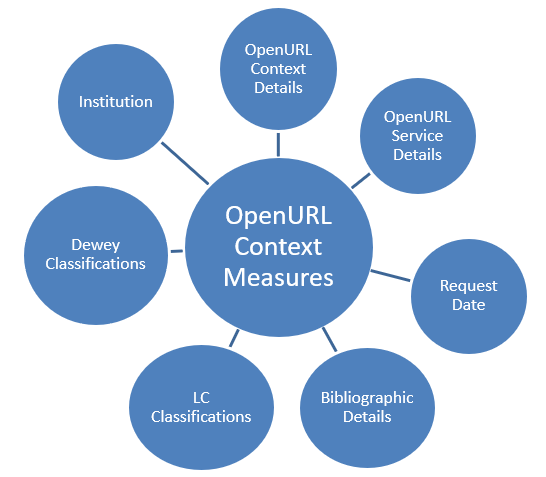
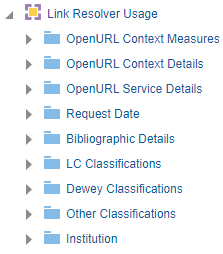
Field Descriptions
The following lists the fields available in Link Resolver Usage.
OpenURL Context Measures
The OpenURL Context Measures table is a fact table that stores all measures relating to the OpenURL Context. All fields are taken from the CONTEXT_OBJECT table. The primary key is CONTEXT_OBJECT_ID.
| Field | Description | Additional Information |
|---|---|---|
| Number of Requests | The number of times an OpenURL request was sent to the Alma Link resolver. | |
| Number of Clicked Requests | Indicates if at least one of the services was selected | Values are 1 and 0. Each time a request is selected, 1 is added to the total sum. |
| Number of Requests Without Services | The number of incoming OpenURLs that do not result in any services | |
| Number of Services (total) | The total number of services offered per incoming OpenURL request | The number of services offered per incoming open URL request from:
|
| Number of Electronic Services | The number of electronic services that appear when a user selects View it | The number of electronic services that appear when a user selects View it. |
| Number of Digital Services | The number of digital representations that appear when a user selects View it | In order for this field to have data, you must select the Include Representation services in link resolver statistics check box (Configuration > Fulfillment > Discovery Interface Display Logic > Other Settings). |
| Number of Clicked Services (total) | The total number of services selected | |
| Number of Electronic Clicked Services | The number of electronic services a user selects from the View it menu | |
| Number of Digital Clicked Services | The number of digital representations a user selects from the View it menu. | In order for this field to have data, you must select the Include Representation services in link resolver statistics check box (Configuration > Fulfillment > Discovery Interface Display Logic > Other Settings). |
| % Clicks from Requests | The percentage of incoming OpenURL requests that were selected | % Clicks from Requests = (Number of selected requests / Number of Requests) * 100 |
| % Requests Without Services from Requests | The percentage of incoming OpenURL requests that do not have services | % Requests Without Services from Requests = (Number of requests without services / Number of requests) * 100 |
OpenURL Context Details
The OpenURL Context details table is a dimension table that stores the details of the OpenURL context object. The primary key is CONTEXT_OBJECT_ID. The context object is the part of the OpenURL that contains the metadata information that identifies the resource to which the OpenURL links.
| Field | Description | Additional Information |
|---|---|---|
| Title | The title of the OpenURL Context | |
| Author | The Author of the OpenURL Context | |
| ISSN | The ISSN of the OpenURL Context | |
| ISBN | The ISBN of the OpenURL Context | |
| Material Type | The Material Type of the OpenURL Context | |
|
Network Inventory Group
|
The network inventory group | This field allows you to filter and display link resolver usage by library or campus. This is relevant for institutions using the inventory network groups. |
| Request ID | The Request ID of the OpenURL Context | |
| Request Type | The request type of the the OpenURL Context | Possible values are:
|
| Article Title | The Article Title of the OpenURL Context | |
| EISSN | The EISSN of the OpenURL Context | |
| Source | The Source of the OpenURL Context | The database/index that generates an OpenURL to the link resolver in order to obtain context-sensitive services for an electronic resource citation/reference. |
| Normalized Source | A standardized and human-readable name based on the provider of the resource in the open URL | |
| Open URL | The OpenURL | |
| Source Type | The Source Type |
This field allows libraries to easily gather data about from where users are coming when using the Alma Link Resolver.
The following are the possible values for the Source Type field:
|
The Source Field
The Source field indicates the database/index that generates an OpenURL to the link resolver, which is used to obtain context-sensitive services for an electronic resource citation/reference. It appears in the OpenURL after the dash—for example, after &rfr_id=info:sid/primo.exlibrisgroup.com-. It also appears in the Primo PNX record and can be found within the OpenURL in either the ‘sid' or the ‘rfr_id' parameters, as described below:
| OpenURL Includes | Extracted Source | Normalized Source | Extraction Logic |
|---|---|---|---|
|
rfr_id=info:sid/Elsevier:SD |
info:sid/Elsevier:SD |
Elsevier |
If the sid/rfr_id do not include dashes, the entire parameter value is taken as the source. |
|
sid=EBSCO |
EBSCO |
EBSCO |
If the sid/rfr_id do not include dashes, the entire parameter value is taken as the source. |
|
rfr_id=info:sid/primo.exlibrisgroup.com-alexanderstreet |
alexanderstreet |
Alexander Street |
If the sid/rfr_id include dashes, the source will often be extracted from the last portion of the parameter. |
|
sid=ProQ:_1999-05732-009 |
ProQ:_1999-05732-009 |
ProQuest Ebook Central |
In case the section after the dash is not meaningful, the entire sid/rfr_id value will be considered as source. |
By comparing the Source with other parameters such as Number of Clicked Requests, you can analyze trends in the use of electronic resources.
The following are some guidelines that indicate how the source is determined:
- If a patron selects on a title in Primo that is in Alma, the source is the source ID of the system, which is located in the Control section of the Primo normalized XML (PNX) record.
- If the source has a colon in it, either the user was a staff member testing the link within Alma, or the user received access to an article from within a database by being referred back to the uresolver to see if the user has a subscription that covers it.
- If the source has an underscore or consists of letters such as wj (Wiley journals), the user received access to the article from a PCI record in Primo.
- If the user accessed a resource from Leganto, the source is leganto_ followed by the course code for the course to which the citation was associated.
The source google does not have a colon and means Google Scholar.
The following is an example of an OpenURL with the source in bold:
OpenURL Service Details
The OpenURL Service Details table is a dimension table that stores the details of the OpenURL service. You can use the fields of this dimension to determine how many times a service was clicked and other information.
| Field | Description | Additional Information |
|---|---|---|
| Electronic Collection ID | The electronic collection ID | |
| Electronic Collection Name | The electronic collection name | |
| Has Service | Indicates (Yes\No) if the request has services | |
| Interface Name | The interface name | |
| Is Clicked Service | Indicates (Yes\No) if the service was clicked | |
| Is Digital Service | Indicates (Yes\No) if the service is a digital service | |
| Is Electronic Service | Indicates (Yes\No) if the service is an electronic service | |
| Is Network Service | Indicates (Yes\No) if the service is from the Network Zone | |
| Portfolio ID | The portfolio ID | |
| Service Type | The service type |
Request Date
The Request Date table is a dimension table that stores the details about the date of the request. The primary key of the table is DATE_KEY.
| Field | Description | Additional Information |
|---|---|---|
| Request Date | The date of the request. | |
| Request Start of Week | The date of the first business day of the week | |
| Request Week Number | The number of the week of the year | |
| Request Month Key | The month key of the request (for example: 1, 2, 3). | This field is recommended if you want to sort by month. |
| Request Month | The month of the request. | For example: January, February). |
| Request Full Month | The month and the year of the request. | For example: January 2014. |
| Request Quarter | The quarter of the request. | For example: Q1, Q2. |
| Request Year | The year of the request. | For example: 2014. |
| Request Fiscal Month Key | The fiscal month key of the request (for example: 1, 2, 3). | This field is recommended if you want to sort by the fiscal month. |
| Request Fiscal Year | The fiscal year of the request. | |
| Request Date Filter | Used to filter report results by date. | |
| Request Year-Month | The year and the month in a format such as 2023-1 | |
| Request Date | Stores the Hierarchy column that allows the user to drill down from the year to the month to the specific request date. | Using this column, a user may view the accumulative measures in each level of the hierarchy. |
Bibliographic Details
The Bibliographic Details table is a dimension table that stores the bibliographic details of the physical item. The primary key of the table is MMS_ID.
The field descriptions can be found in the Bibliographic Details shared dimension.
LC Classifications
Using this dimension, the user may drill down from Group1 to Group4. In each level, the user may see measures accumulated to the relevant group and see the number of items grouped by classification.
The field descriptions can be found in the LC Classifications shared dimension.
Dewey Classifications
Books can be classified with Dewey Classifications.
In Dewey Classifications, topics are ordered in a hierarchy that is indicated by a three digit number. The highest level of the hierarchy is indicated by a number with one significant digit followed by two zeros, such as 600. The second level in the hierarchy is indicated by a number with two significant digits followed by one zero, such as 630. The third level in the hierarchy is indicated by a number with three significant digits such as 636.
The field descriptions can be found in the Dewey Classifications shared dimension.
Other Classifications
Institution
Shared Dimensions with Other Subject Areas
For information concerning shared dimensions with other subject areas, see Shared Dimensions.
Page tags: article:topicInstitutionproduct:almacontent:Documentationlang:englishBibliographic DetailsLC ClassificationsDewey ClassificationsOpenURL Context MeasuresOpenURL Context DetailsRequest Date
