
Physical Items Historical Events
Create reports on historical events of physical items.
The Physical Items Historical Events subject area allows you to create reports on the following historical events of physical items:
- Item Transit Event
- Item Temporary location Event
- Item Process Status change events
- Work Order Dept. Status change events
The following are examples of business questions that can be answered with this subject area:
- Which items were in a temporary location any time over the past two years?
- What are the details for items sent in-transit in the past?
- What are the details for items that were in a temporary location in the past?
- What work order department was an item in and what was the work order status code?
- What are the process statuses that an item went through and what are the process status change dates?
- The data in the Physical Items Historical Events subject area begins from August 2017.
- Creating analytics reports using the fields of this subject area is only possible for live institutions.
- If an Item is created initially in a temporary location, its first move to a permanent location is not considered an event in Analytics.
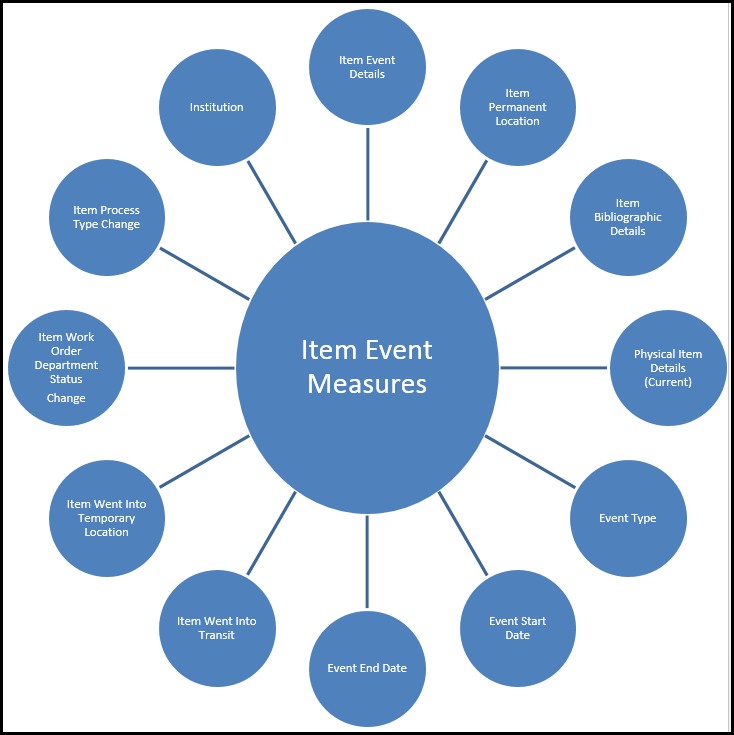
Field Descriptions
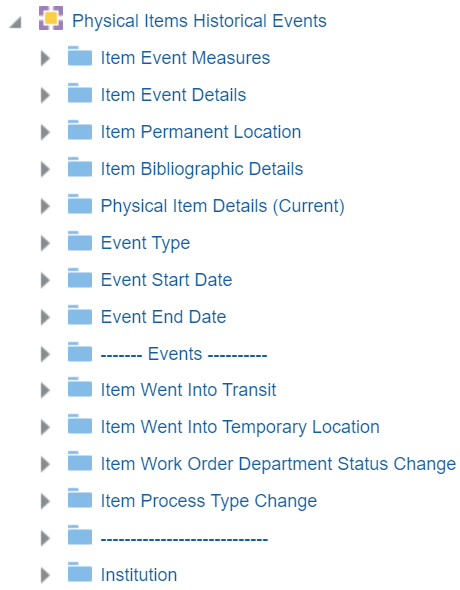
Item Event Measures
The Item Event Measures table is a measures table that stores item event measures about the items.
| Field | Description | Additional Information | Data Type |
|---|---|---|---|
| Num of Events | The number of events | ||
| Num of Ended Events | The number of ended events | ||
| Num of Items | The number of items | ||
| Num of Unique Titles | The number of unique titles (mms ids) associated to a item event (limited to events in the SA) | INT | |
| Total Event Duration (days) | The total event duration in days | ||
| Avg Event Duration (days) | The average event duration in days | ||
| Total Event Duration (hours) | The total event duration in hours | ||
| Avg Event Duration (hours) | The average event duration in hours |
Item Event Details
The Item Event Details table is a dimension table that stores the item event details about the items.
| Field | Description | Additional Information |
|---|---|---|
| Barcode | The barcode of the item | This field is limited to 128 characters. |
| Request Type | The request type of the item | |
| Item ID | The ID of the item | |
| Request ID | The Request ID of the item | |
| Event ID | The event ID of the item | |
| Event Creator | The event creator |
Item Permanent Location
The Item Permanent Location table is a dimension table that stores the permanent location details about the items.
Item Bibliographic Details
The Item Bibliographic Details table is a dimension table that stores the bibliographic details about the items.
The field descriptions can be found in the Bibliographic Details shared dimension.
Physical Item Details (Current)
The Physical Item Details (Current) table is a dimension table that stores the current physical item details about the items.
| Field | Description | Additional Information |
|---|---|---|
| Accession Number | A sequential code used to file items on the shelf. | |
| Barcode | The unique identifier of the specific physical item. | This field is limited to 128 characters. |
| Base Status | Indicates the availability of the item in its permanent location (in place/not in place). | |
| Chron I | The main level of chronology - usually the year. | |
| Chron J-M | Additional chronology fields | |
| Creation Date | The date that the physical item was created. | |
| Creator | The username of the operator that created the physical item. | |
| Description | The description of the item. | |
| Display Temp Call Number | A normalized temporary call number for display. | |
| Due Back Date | Indicates the date that the item is due back at the library. | |
| Enum A | The main level of enumeration - usually the volume. | |
| Enum B-H | Additional enumeration fields | |
| Expected Receiving Date | The date when a purchased item is expected to arrive at the library. | |
| Fulfillment Note | The fulfillment note. | |
| Holding ID | The unique identifier of the holding | |
| Internal Note 1-3 | Holds internal notes | |
| Inventory Date | The last time inventory was checked (not currently in use). | |
| Inventory Number | The inventory number | |
| Inventory Price | The price of the physical inventory for each physical item | |
| Is Magnetic | Whether the item is magnetic material or not. | |
| Item Call Number | The item call number for display | |
| Item Call Number Type | The item call number type | |
| Item Policy | ||
| Last Loan Date | The last time the item was loaned. | |
| Library ID | The ID of the library. | |
| Library Address Line 1 | The first line of the address of the institution. It usually includes the building number and the street name. | Configured from Configuration > General > Add a Library or Edit Library Information > Contact Information tab. This is taken from the address configured as the Preferred address.
The label in Alma is Address Line 1. |
| Library City | The city of the library. | Configured from Configuration > General > Add a Library or Edit Library Information > Contact Information tab. This is taken from the address configured as the Preferred address.
The label in Alma is City. |
| Library Country | The country of the library. | Configured from Configuration > General > Add a Library or Edit Library Information > Contact Information tab. This is taken from the address configured as the Preferred address.
The label in Alma isCountry. |
| Library Postal Code | The postal code of the library. | Configured from Configuration > General > Add a Library or Edit Library Information > Contact Information tab. This is taken from the address configured as the Preferred address.
The label in Alma is Postal code. |
| Library State Province | The state or province of the library. | Configured from Configuration > General > Add a Library or Edit Library Information > Contact Information tab. This is taken from the address configured as the Preferred address.
The label in Alma is State/Province. |
| Lifecycle | Indicates whether the item is active or deleted. | |
| Material Type | Describes the nature of the material represented by the item record. | |
| Modification Date | The date that the physical item was modified. | |
| Modified By | The user that modified the physical item. | |
| Num of Items | The number of items in the repository | |
| Originating System ID | The ID of the item in the source system from which it has been imported. | |
| Permanent Call Number | A code used to file the items on the shelf | |
| Permanent Call Number Type | The call number type. | Possible values are:
|
| Permanent LC Classification Code | Stores the letters that the LC class number start with such as BF, QA, etc. | |
| Permanent LC Classification Number | Stores the numbers that follow the letters until the first period that is followed by a letter | |
| Permanent LC Classification Top Line | Stores the LC class number top line that represents the code and numbers until the first period followed by a letter. | For example, when lc_class_number is NB933.F44, the top line is NB933). |
| Permanent Physical Location | The permanent physical location | |
| Physical Item ID | The ID of the physical item | |
| PO Line ID | The ID of the PO line | |
| Process Type Current | When the item is being processed (acquisition/loan/bindery/etc) this indicates the type of processing. | |
| Provenance Code | A code used to identify separate items that belong to different groups (but may be shelved together). | |
| Receive Number | A sequential number assigned by the library to help maintain inventory. | |
| Receiving Date | The date the material was actually received/activated for the first time. | |
| Receiving Date and Time | The date and time the material was actually received/activated for the first time | |
| Replacement Cost | The replacement cost | In order to filter your report based on the Replacement Cost field, you must add a second copy of this field and edit the formula with the following CAST("Physical Item Details"."Replacement cost" AS DOUBLE). This causes Alma Analytics to treat the field as numeric. |
| Statistics Note 1-3 | Holds statistic notes | |
| Storage Location ID | The ID of the storage location. | |
| Summary Holding | Free-text enumeration and chronology data | |
| Temporary Call Number Type | A call number type provided when the item is in a temporary location. | |
| Temporary Item Policy | The code of the temporary item policy | |
| Temporary Library | The temporary library | |
| Temporary Library Code (Active) | The code of the active (not deleted) temporary library | |
| Temporary Library Name (Active) | The name of the active (not deleted) temporary library | |
| Library Address Line 1 | The address of the library. | Configured from Configuration > General > Add a Library or Edit Library Information > Contact Information tab. This is taken from the address configured as the Preferred address.
The label in Alma is Address Line 1. |
| Library City | The city of the library. | Configured from Configuration > General > Add a Library or Edit Library Information > Contact Information tab. This is taken from the address configured as the Preferred address.
The label in Alma is City. |
| Library Country | The country of the library. | Configured from Configuration > General > Add a Library or Edit Library Information > Contact Information tab. This is taken from the address configured as the Preferred address.
The label in Alma isCountry. |
| Library State Province | The state or province of the library. | Configured from Configuration > General > Add a Library or Edit Library Information > Contact Information tab. This is taken from the address configured as the Preferred address.
The label in Alma is State/Province. |
| Library Postal Code | The postal code of the library. | Configured from Configuration > General > Add a Library or Edit Library Information > Contact Information tab. This is taken from the address configured as the Preferred address.
The label in Alma is Postal code. |
| Temporary Physical Location in Use | The temporary physical location in use | |
| Times Loaned | The number of loans including in house and not in house loans in Alma and also loans from pre-migration. | |
| Weeding Date | A date assigned by the library as the weeding date. By default it is the date that the weeding number was assigned | |
| Weeding Number | A sequential number assigned by the library to help maintain inventory. |
Event Type
The Event Type table is a dimension table that stores the event type details.
| Field | Description | Additional Information |
|---|---|---|
| Event Type | The event type | |
| Event Type Description | The event type description | Possible values are:
|
Event Start Date
The Event Start Date table is a dimension table that stores the event start date.
| Field | Description | Additional Information |
|---|---|---|
| Event Start Date | The start date of the event | |
| Event Start - Start of Week | The date of the first business day of the week | |
| Event Start Week Number | The number of the week of the year | |
| Event Start Time | The start time of the event | |
| Event Start Date and Time | The start date and time of the event | |
| Event Start Month Key | The start month of the event in number format such as 2 for February | |
| Event Start Month | The start month of the event such as February | |
| Event Start Full Month Key | The start month and the year of the event in a display format such as Feb 12 | |
| Event Start Full Month | The start month and the year of the event in a display format such as Feb 12 | |
| Event Start Quarter | The start quarter of the event | |
| Event Start Year | The start year of the event | |
| Event Start Fiscal Month Key | The start fiscal month of the event in number format such as 2 for February | |
| Event Start Fiscal Year | The start fiscal year of the event | |
| Event Start Date Filter | Used to filter report results by date. | |
| Event Start Year-Month | The year and the month in a format such as 2023-1 |
Event End Date
The Event End Date table is a dimension table that stores the event end date.
| Field | Description | Additional Information |
|---|---|---|
| Event End Date | The end date of the event | |
| Event End - Start of Week | The date of the first business day of the week | |
| Event End Week Number | The number of the week of the year | |
| Event End Time | The end time of the event | |
| Event End Date and Time | The end date and time of the event | |
| Event End Month Key | The end month of the event in number format such as 2 for February | |
| Event End Month | The end month of the event such as February | |
| Event End Full Month Key | The end month and the year of the event in a display format such as Feb 12 | |
| Event End Full Month | The end month and the year of the event in a display format such as Feb 12 | |
| Event End Quarter | The end quarter of the event | |
| Event End Year | The end year of the event | |
| Event End Fiscal Month Key | The end fiscal month of the event in number format such as 2 for February | |
| Event End Fiscal Year | The end fiscal year of the event | |
| Event End Date Filter | Used to filter report results by date. | |
| Event End Year-Month | The year and the month in a format such as 2023-1 |
Item Went Into Transit
The Item Went Into Transit tables are dimension tables that store details about items that went into transit.
Transit from Library
| Field | Description | Additional Information |
|---|---|---|
| Library Address Line 1 | The first line of the address of the institution. It usually includes the building number and the street name. | Configured from Configuration > General > Add a Library or Edit Library Information > Contact Information tab. This is taken from the address configured as the Preferred address.
The label in Alma is Address Line 1. |
| Library City | The city of the library. | Configured from Configuration > General > Add a Library or Edit Library Information > Contact Information tab. This is taken from the address configured as the Preferred address.
The label in Alma is City. |
| Transit from Library Code | The code of the library from which the item when into transit | |
| Transit from Library Code (Active) | The code of the active (not deleted) library from which the item when into transit | |
| Library Country | The country of the library. | Configuration > General > Add a Library or Edit Library Information > Contact Information tab. This is taken from the address configured as the Preferred address.
The label in Alma isCountry. |
| Transit from Library Description | The description of the library from which the item when into transit | |
| Transit from Library Name | The name of the library from which the item when into transit | |
| Transit from Library Name (Active) | The name of the active (not deleted) library from which the item when into transit | |
| Library Postal Code | The postal code of the library. | Configured from Configuration > General > Add a Library or Edit Library Information > Contact Information tab. This is taken from the address configured as the Preferred address.
The label in Alma is Postal code. |
| Library State Province | The state or province of the library. | Configured from Configuration > General > Add a Library or Edit Library Information > Contact Information tab. This is taken from the address configured as the Preferred address.
The label in Alma is State/Province. |
| Transit from Unit Type | The unit type from which the item when into transit |
Transit from Circulation Desk
| Field | Description | Additional Information |
|---|---|---|
| Transit from Circ Desk Code | The circulation desk code from which the item when into transit | |
| Transit from Circ Desk Name | The circulation desk name from which the item when into transit | |
| Transit from Circ Desk Description | The circulation desk description from which the item when into transit | |
| Transit from Has Self Check | Indicates if the circulation desk from which the item when into transit has a self chack machine | |
| Transit from Hold Shelf | The hold shelf of the circulation desk from which the item when into transit | |
| Transit from Hold Shelf Period | The period of the the hold shelf of the circulation desk from which the item when into transit | |
| Transit from Hold Shelf Sort | The sort of the hold shelf of the circulation desk from which the item when into transit | |
| Transit from Payment Cash | Indicates if the circulation desk from which the item when into transit accepts cash payments | |
| Transit from Payment Credit Card | Indicates if the circulation desk from which the item when into transit accepts credit card payments | |
| Transit from Primary Indicator | The primary indicator of the circulation desk from which the item when into transit | |
| Transit from Print Receipt | Indicates if the circulation desk from which the item when into transit can print receipts | |
| Transit from Reading Room Desk | The reading room desk of the circulation desk from which the item when into transit |
Transit from Department
| Field | Description | Additional Information |
|---|---|---|
| Transit from Department | The transit from department |
Transit to Library
| Field | Description | Additional Information |
|---|---|---|
| Library Address Line 1 | The first line of the address of the institution. It usually includes the building number and the street name. | Configured from Configuration > General > Add a Library or Edit Library Information > Contact Information tab. This is taken from the address configured as the Preferred address.
The label in Alma is Address Line 1. |
| Library City | The city of the library. | Configured from Configuration > General > Add a Library or Edit Library Information > Contact Information tab. This is taken from the address configured as the Preferred address.
The label in Alma is City. |
| Transit to Library Code | The code of the library to which the item when into transit | |
| Transit to Library Code (Active) | The code of the active (not deleted) library to which the item when into transit | |
| Library Country | The country of the library. | Configuration > General > Add a Library or Edit Library Information > Contact Information tab. This is taken from the address configured as the Preferred address.
The label in Alma isCountry. |
| Transit to Library Description | The description of the library to which the item when into transit | |
| Transit to Library Name | The name of the library to which the item when into transit | |
| Transit to Library Name (Active) | The name of the active (not deleted) library to which the item when into transit | |
| Library Postal Code | The postal code of the library. | Configured from Configuration > General > Add a Library or Edit Library Information > Contact Information tab. This is taken from the address configured as the Preferred address.
The label in Alma is Postal code. |
| Library State Province | The state or province of the library. | Configured from Configuration > General > Add a Library or Edit Library Information > Contact Information tab. This is taken from the address configured as the Preferred address.
The label in Alma is State/Province. |
| Transit to Unit Type | The unit type to which the item when into transit |
Transit to Circulation Desk
| Field | Description | Additional Information |
|---|---|---|
| Transit to Circ Desk Code | The circulation desk code to which the item when into transit | |
| Transit to Circ Desk Name | The circulation desk name to which the item when into transit | |
| Transit to Circ Desk Description | The circulation desk description to which the item when into transit | |
| Transit to Has Self Check | Indicates if the circulation desk to which the item when into transit has a self chack machine | |
| Transit from Hold Shelf | The hold shelf of the circulation desk to which the item when into transit | |
| Transit to Hold Shelf Period | The period of the the hold shelf of the circulation desk to which the item when into transit | |
| Transit to Hold Shelf Sort | The sort of the hold shelf of the circulation desk to which the item when into transit | |
| Transit to Payment Cash | Indicates if the circulation desk to which the item when into transit accepts cash payments | |
| Transit to Payment Credit Card | Indicates if the circulation desk to which the item when into transit accepts credit card payments | |
| Transit to Primary Indicator | The primary indicator of the circulation desk to which the item when into transit | |
| Transit to Print Receipt | Indicates if the circulation desk to which the item when into transit can print receipts | |
| Transit to Reading Room Desk | The reading room desk of the circulation desk to which the item when into transit |
Transit to Department
| Field | Description | Additional Information |
|---|---|---|
| Transit to Department | The transit to department |
Fulfillment Network Only
| Field | Description | Additional Information |
|---|---|---|
| From Another Institution | Indicates the institution in the fulfillment network from which the item transited | |
| From Another Institution Library | Indicates the institution librray in the fulfillment network from which the item transited | |
| From Another Institution Circulation Desk | Indicates the circulation desk institution in the fulfillment network from which the item transited | |
| To Another Institution | Indicates the institution in the fulfillment network to which the item transited | |
| To Another Institution Library | Indicates the institution librray in the fulfillment network to which the item transited |
| Field | Description | Additional Information |
|---|---|---|
| Is Fulfillment Network | Indicates if the institution is part of a fulfillment network |
Item Went Into Temporary Location
The Item Went Into Temporary Location tables are dimension tables that store details about items that went into a temporary location.
Source Location
| Field | Description | Additional Information |
|---|---|---|
| Source Library Address Line 1 | The first line of the address of the institution. It usually includes the building number and the street name.. | Configured from Configuration > General > Add a Library or Edit Library Information > Contact Information tab. This is taken from the address configured as the Preferred address.
The label in Alma is Address Line 1. |
| Source Library City | The city of the library. | Configured from Configuration > General > Add a Library or Edit Library Information > Contact Information tab. This is taken from the address configured as the Preferred address.
The label in Alma is City. |
| Source Library Code | The code of the source library | |
| Source Library Code (Active) | The code of the active (not deleted) source library | |
| Source Library Country | The country of the library. | Configuration > General > Add a Library or Edit Library Information > Contact Information tab. This is taken from the address configured as the Preferred address.
The label in Alma isCountry. |
| Source Library Description | The description of the source library | |
| Source Library Name | The name of the source library | |
| Source Library Name (Active) | The name of the active (not deleted) source library | |
| Source Library Postal Code | The postal code of the library. | Configured from Configuration > General > Add a Library or Edit Library Information > Contact Information tab. This is taken from the address configured as the Preferred address.
The label in Alma is Postal code. |
| Source Library State Province | The state or province of the library. | Configured from Configuration > General > Add a Library or Edit Library Information > Contact Information tab. This is taken from the address configured as the Preferred address.
The label in Alma is State/Province. |
| Source Unit Type | The unit type of the source library | |
| Source Location Code | of the source library | |
| Source Location Name | The location name of the source library | |
| Source Location Type | The location type of the source library | |
| Source Campus Code | The campus code of the source library | |
| Source Campus Name | The campus name of the source library | |
| Source Campus Description | The campus description of the source library | |
| Source External Name | The external name of the source library | |
| Source Remote Storage Code | The remote storage code of the source library | |
| Source Call Number Type | The call number type of the source library |
Temporary Location
| Field | Description | Additional Information |
|---|---|---|
| Temporary Library Address Line 1 | The first line of the address of the institution. It usually includes the building number and the street name.. | Configured from Configuration > General > Add a Library or Edit Library Information > Contact Information tab. This is taken from the address configured as the Preferred address.
The label in Alma is Address Line 1. |
| Temporary Library City | The city of the library. | Configured from Configuration > General > Add a Library or Edit Library Information > Contact Information tab. This is taken from the address configured as the Preferred address.
The label in Alma is City. |
| Temporary Library Code | The code of the temporary library | |
| Temporary Library Code (Active) | The code of the active (not deleted) temporary library | |
| Temporary Library Country | The country of the library. | Configuration > General > Add a Library or Edit Library Information > Contact Information tab. This is taken from the address configured as the Preferred address.
The label in Alma isCountry. |
| Temporary Library Description | The description of the temporary library | |
| Temporary Library Name | The name of the temporary library | |
| Temporary Library Name (Active) | The name of the active (not deleted) temporary library | |
| Temporary Library State Province | The state or province of the library. | Configured from Configuration > General > Add a Library or Edit Library Information > Contact Information tab. This is taken from the address configured as the Preferred address.
The label in Alma is State/Province. |
| Temporary Library Postal Code | The postal code of the library. | Configured from Configuration > General > Add a Library or Edit Library Information > Contact Information tab. This is taken from the address configured as the Preferred address.
The label in Alma is Postal code. |
| Temporary Unit Type | The unit type of the temporary library | |
| Temporary Location Code | The location code of the source library | |
| Temporary Location Name | The location name of the temporary library | |
| Temporary Location Type | The location type of the temporary library | |
| Temporary Campus Code | The campus code of the temporary library | |
| Temporary Campus Name | The campus name of the temporary library | |
| Temporary Campus Description | The campus description of the temporary library | |
| Temporary External Name | The external name of the temporary library | |
| Temporary Remote Storage Code | The remote storage code of the temporary library | |
| Temporary Call Number Type | The call number type of the temporary library |
| Field | Description | Additional Information |
|---|---|---|
| Due Back Date | Indicates the date that an item in a temporary location is due back to its permanent location |
Item Work Order Department Status Change
The Item Work Order Department Status Change table is a dimension table that stores details on the item work order department status change.
| Field | Description | Additional Information |
|---|---|---|
| Work Order Type | The work order type | |
| Work Order Department | The work order department | |
| Work Order Status | The work order status | |
| Work Order Next Status | The next work order status |
Item Process Type Change
The Item Process Type Change table is a dimension table that stores details on the item process type change.
| Field | Description | Additional Information |
|---|---|---|
| Process Type | The process type | |
| Process Type Next Status | The next status of the process type |
Institution
Page tags: article:topicproduct:almacontent:Documentationlang:english
