
Requests
Create reports and dashboards for the requests area.
Using the Requests subject area, the Design Analytics user may create reports and dashboards that help to answer the following types of business questions:
- How many items were requested per patron type?
- How many items were requested per material type?
- What is the fill rate for requests per material\patron type?
- How long does it take from the time that the request is placed until it is fulfilled?
- Which titles have the highest demand? (based on open requests)
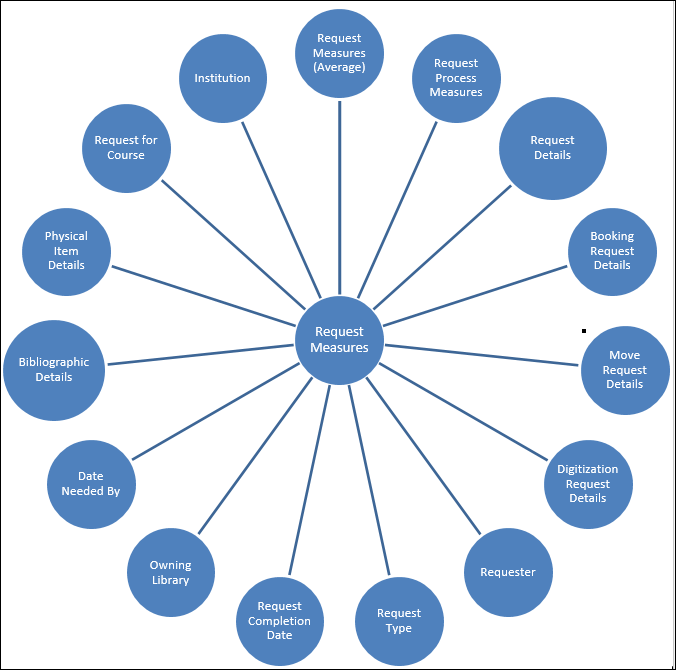
Report Creation Tips
- Although request data in Alma goes back only 5 years from the Creation Date, in Analytics it goes back as far as the available data.
- Requests are linked to the MMS ID of the bibliographic record, so when creating reports for requests, use the MMS ID and not the barcode.
Filtering Results Using the Active Request Flag
An active request is a request that is still in process, as opposed to a completed request, which is no longer in process. Canceled requests are marked with the relevant Rejected status (Rejected, Rejected by Library, Rejected by Patron (see Request Status).
Canceled requests may be considered active if the requested item is still in process, for example, it is being removed from a hold shelf or a work order department. Therefore, requests that were canceled may in some cases still appear with Active Request Flag=Yes and in other cases with Active Request Flag=No.
Rejected requests, both active and inactive, are not retrievable in the Alma user interface, but do appear in reports. To prevent inactive requests from appearing in reports, the requests must be deleted. To delete inactive requests, contact Ex Libris Support.
Another option is to scan in the rejected request ID from the Scan In item page. This completes the request, triggers it to reappear in Requests Monitor, and adds a Request Completion Date in Analytics.
Typically you would run different reports for each population. For example, for active requests, you can run a report on titles with a high number of requests and for completed requests, you can run a trend analysis of average time to patron collection.

The Active Request Flag field is located in the Request Details folder.
Filtering Results Using the Request Type Description Flag
Requests in Alma are used for both internal processes (for example binding) as well as for patron facing processes. User this filter to narrow your results only to the type of requests in which you are interested.

The Request Type Description field is located in the Request Type folder.
Report on Items with a Large Number of Requests
It is often useful for libraries to see their titles with a large number of open requests and to be able to see for these titles how many items are available in the library.
The following procedure describes how to create a report that displays this information.
- Select Create > Analysis and then SelectSubject Area > Requests.
- Create a report with the following columns, for example:
- MMS ID
- Title
- Num of Items
- Times Loaned
- # of Requests
- Request Type Description
- Active Request Flag
- Add the following filters to the report:
- Request Type Description is equal to Patron physical item request
- # of Requests is greater than 3(for example)
- Active request is equal to Yes
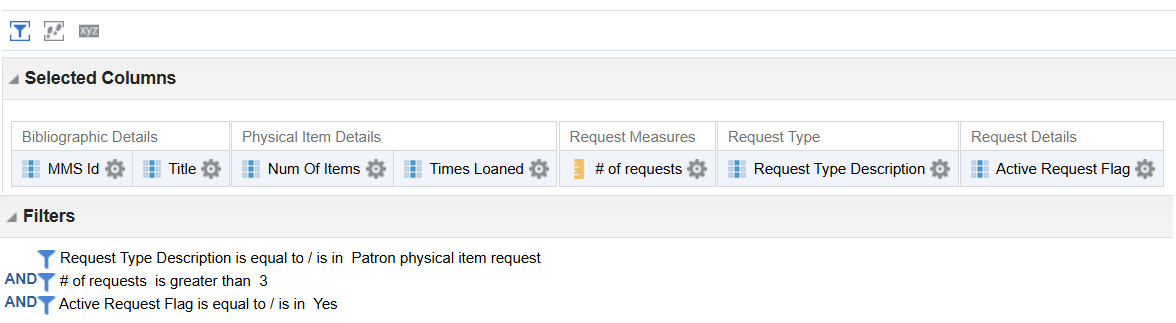 Report Criteria
 - Delete the fields with the filters as these are not needed in the report itself.
- Run the report.
Field Descriptions
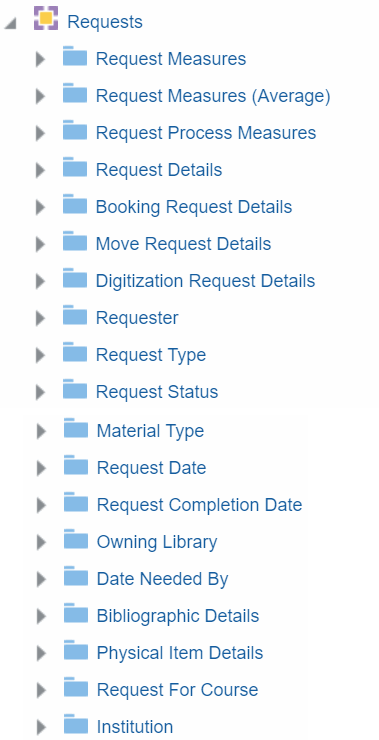
Request Measures
| Field | Description | Additional Information | Data Type |
|---|---|---|---|
| # of Requests | The number of requests. | ||
| # of Unique Titles | The number of unique titles (mms ids) associated to a request | INT | |
| Time to Available (Days/Hours) | The time between the request being placed and its becoming active. | For open requests that are not yet active, analytics calculates the total time until the current date. | |
| Time to Process (Days/Hours) | The time between the request becoming active and its being placed on the shelf for pickup. | For open requests that are active but not yet on the shelf for pickup, analytics calculates the total time until the current date. | |
| Time to Patron Collection (Days/Hours) | The time between the request being placed on the shelf for pickup and its being fulfilled. | For open requests that are placed on the shelf for pickup but are not yet fulfilled, analytics calculates the total time until the current date.
When a request is no longer active, it is moved to the History table. In that case, this field reflects the time from the date that the item was moved to the hold shelf until the date it was moved to the History table. |
|
| Total Request Time (Days/Hours) | The total amount of time between the request being placed and its being fulfilled. | For open requests, Alma Analytics will calculate the total time until this date. |
Request Measures (Average)
| Field | Description | Additional Information |
|---|---|---|
| Average Time to Available (Days/Hours) | The average time between the request being placed and its becoming active. | |
| Average Time to Process (Days/Hours) | The average time between the request becoming active and its being placed on the shelf for pickup. | |
| Average Time to Patron Collection (Days/Hours) | The average time between the request being placed on the shelf for pickup and its being fulfilled. | |
| Average Total Request Time (Days/Hours) | The average total amount of time between the request being placed and its being fulfilled. |
Request Process Measures
| Field | Description | Additional Information |
|---|---|---|
| Await Approval Time | The total amount of time that the request was in the Await Approval step. (The amount of time that the request waited for approval.) | |
| Deposit Item Time | The total amount of time that the request was in the Deposit Item step. (The time from when the digital material was ready to be deposited until the digital file was created.) | |
| Digitize Item Time | The total amount of time that the request was in the Digitize Item step. (The time from when the item was ready at the digitization department until it was digitized.) | |
| Document Delivery Time | The total amount of time that the request was in the Document Delivery step. (The time from when the digital material was ready until it was delivered.) | |
| Hold Shelf Processing Time | The total amount of time that the request was in the Hold Shelf Processing step. (The time it took the library to make the item ready to be placed on the hold shelf.) | |
| On Hold Shelf Time | The total amount of time that the request was in the On Hold Shelf step. (The amount of time the item was on the hold shelf until it was either picked up or removed from the hold shelf.) | |
| Pickup from Shelf Time | The total amount of time that the request was in the Pickup from Shelf step. (The amount of time that it took for the staff to pick up the item from the shelving location.) | |
| Transit Item Time | The total amount of time that the request was in the Transit Item step. (The amount of time the item was in transit between circulation desks and libraries.) | |
| Waiting for Remote Storage Time | The total amount of time that the request was in the Waiting for Remote Storage and Communicating With Remote Storage steps. (The amount of time that the request was waiting for the remote storage facility to receive a request and provide an item to fulfill the request.) | |
| Work Order Department Time | The amount of time that the item was in the Work Order Department step. (The amount of time that the item was in the work order department.) |
Request Details
| Field | Description | Additional Information |
|---|---|---|
| Active Request Flag | An active request is a request that is still in process. | Filter with this flag to Yes to display currently active requests (typically used for reports on titles with high demand). Filter with this flag to No to display completed requests (typically used for trend analysis and fill rate calculations). For more information, see Filtering Results Using the Active Request Flag. |
| Cancellation Reason | The cancellation reason inserted when a request is cancelled. | |
| Cancellation Note | The note added when a request is cancelled. | |
| Current Process | The name of the current activity. | The following are the possible values for this field. The values as they appear in Alma are displayed in parenthesis, if they are different:
|
| Creator | The creator of the request. | After a request is completed, moved to missing, or canceled, this field displays that user. For the original creator of the request, use the Request Creator field.
When the request is made by a staff user, this field contains the staff user's name. When it is created via Primo\API, it contains the value system. This field appears in the Alma UI with the "Creator" label when viewing a request. |
| Caused Recall | Indicates if the request caused a recall of an item that is on loan. | |
| From Another Institution | The institution from which items were requested in a fulfillment network | |
| From Another Institution Circ Desk | The circulation desk from which items were requested in a fulfillment network | |
| From Another Institution Library | The library from which items were requested in a fulfillment network | |
| In Transit Flag | This field reflects an internal process and not the In Transit request status. | Yes indicates that the item is in transit, for example, to re-shelving after a patron returns the item. |
| Manual Description | Contains a free text description. For multi-volume requests it describes the specific issue. | |
| Modification Date | The date that the request was modified. | |
| Modified By | The user that modified the request. | |
| No Pickup Flag | Refers to the first step of a request, which is to take the item from the shelf. Indicates that there is no need to take the item off the shelf. | |
| Note | The note entered by the user. | |
| Override on Shelf Request Policy | Indicates that the pickup location was chosen after overriding the default suggestions. | |
| Pickup Location | The pickup location of the requested item. | |
| Pickup Location Type | The pickup location type of the requested item. | |
| Pickup Slip Printed Flag | Indicates whether a pickup slip was printed. | |
| Related to Resource Sharing Request | Indicates whether the request is related to a resource sharing borrowing request. | |
| Request Creator | The original creator of the request | This field displays the original creator of the request as opposed to the Creator field which, after a request is completed or cancelled, displays the user that completed or cancelled the request. |
| Request ID | The ID of the request. | |
| Search Type | Indicates whether the request is item level or title level. | |
| Triggered Recall | Indicates whether the request triggered a recall.
The value changes from Yes to No when the request status changes to Completed. This means that this field is not useful for creating reports that show a history of recalls. Instead, use the Caused Recall field whose value will remain Yes after the request is completed. |
|
| Volume Issue | The volume and issue of the request for requests of specific volumes. | |
| Managed by Library (latest step) | Indicates which library managed the latest step of the request | |
| Managed by Unit (latest step) | Indicates which unit (department) managed the latest step of the request | |
| Managed by Desk (latest step) | Indicates which desk managed the latest step of the request | |
| Status (latest step) | The status of the latest step of the request | |
| Associated Course Code | The code of a course that was active during the time the item was requested. The item belonged to a citation that was part of the reading list of the course. | |
| Associated Course Name | The name of a course that was active during the time the item was requested. The item belonged to a citation that was part of the reading list of the course. |
Booking Request Details
| Field | Description | Additional Information |
|---|---|---|
| Booking Start Time | The start time of the booking request. | |
| Booking End Time | The end time of the booking request. | |
| Booking Original Start Time | The original start time of the booking request. | |
| Booking Original End Time | The original end time of the booking request. | |
| Override Booking Request Policy | The policy of the override booking request. |
Move Request Details
| Field | Description | Additional Information |
|---|---|---|
| Move Call Number | The call number of the item in the library to which the item is moved. | |
| Move Call Number Type | The call number type of the item in the library to which the item is moved. | |
| Move Due Back | The due back date of the item in the library to which the item is moved | |
| Move Item Policy | The item policy of the item in the library to which the item is moved | |
| Library Address Line 1 | The first line of the address of the institution. It usually includes the building number and the street name. | Configuration > General > Add a Library or Edit Library Information > Contact Information tab. This is taken from the address configured as the Preferred address.
The label in Alma is Address Line 1. |
| Library City | The city of the library. | Configuration > General > Add a Library or Edit Library Information > Contact Information tab. This is taken from the address configured as the Preferred address.
The label in Alma is City. |
| Library Code | The code of the library to which the item is moved. | |
| Library Code (Active) | The code of the active (not deleted) library to which the item is moved. | This field is empty if the library is deleted. |
| Library Country | The country of the library. | Configuration > General > Add a Library or Edit Library Information > Contact Information tab. This is taken from the address configured as the Preferred address.
The label in Alma isCountry. |
| Library Description | The description of the library to which the item is moved. | |
| Library Name | The name of the library to which the item is moved. | |
| Library Name (Active) | The name of the active (not deleted) library to which the item is moved. | This field is empty if the library is deleted. |
| Library Postal Code | The postal code of the library. | Configuration > General > Add a Library or Edit Library Information > Contact Information tab. This is taken from the address configured as the Preferred address.
The label in Alma is Postal code. |
| Library State Province | The state or province of the library. | Configuration > General > Add a Library or Edit Library Information > Contact Information tab. This is taken from the address configured as the Preferred address.
The label in Alma is State/Province. |
| Campus Code | The code of the campus to which the item is moved. | |
| Campus Description | The description of the campus to which the item is moved. | |
| Campus Name | The name of the campus to which the item is moved. | |
| Location Code | The code of the location to which the item is moved. | |
| Location Name | The name of the location to which the item is moved. | |
| Location Type | The type of the location to which the item is moved. |
Digitization Request Details
| Field | Description | Additional Information |
|---|---|---|
| Approval Note | The approval note of the digitization request. | |
| Approval Status | The approval status of the digitization request. | |
| Requires Approval | Indicates whether the digitization request requires approval. | |
| Requires Copyright Clearance | Indicates whether the digitization request requires copyright clearance. | |
| Requires Deposit | Indicates whether the digitization request requires a deposit. | |
| Reject Reason | The reject reason of the digitization request. | |
| Partial Digitization Flag | Indicates whether the digitization request is full or partial. | |
| Patron Digitization Flag | Indicates whether the patron made a digitization request. |
Requester
Request Type
| Field | Description | Additional Information |
|---|---|---|
| Request Type Code | The request type code. | See the table below for a list of request type codes and descriptions |
| Request Type Description | The type of request. | See the table below for a list of request type codes and descriptions |
The following table displays the Request Type Code and the corresponding description:
| Request Type Code | Request Type Description |
|---|---|
| AcqWorkOrder | Acquisition technical services |
| BOOKING | Booking request |
| ELECTRONIC_TO_DIGITIZATION | Patron electronic digitization request |
| GENERAL_DIGITIZATION | General digitization request |
| GENERAL_HOLD | General hold request |
| LIBRARY_ELECTRONIC_DIGITIZATION | Library electronic digitization request |
| LIBRARY_PHYSICAL_DIGITIZATION | Library physical digitization request |
| MOVE_TO_PERMANENT | Move permanently |
| MOVE_TO_TEMPORARY | Move temporarily |
| PATRON_PHYSICAL | Patron physical item request |
| PHYSICAL_TO_DIGITIZATION | Patron digitization request |
| RESOURCE_SHARING_E2D_SHIPMENT | Ship digitally from electronic |
| RESOURCE_SHARING_ITEMLESS_P2D_SHIPMENT | Ship digitally |
| RESOURCE_SHARING_ITEMLESS_PHYSICAL_SHIPMENT | Ship physically |
| RESOURCE_SHARING_P2D_SHIPMENT | Ship digitally |
| RESOURCE_SHARING_PHYSICAL_SHIPMENT | Ship physically |
| RESTORE | Restore item |
| STAFF_ELECTRONIC_DIGITIZATION | Staff electronic digitization request |
| STAFF_PHYSICAL_DIGITIZATION | Staff digitization request |
| TRANSIT_FOR_RESHELVING | Transit for reshelving |
Request Status
| Field | Description | Additional Information |
|---|---|---|
| Request Status Code | The request status code. | |
| Request Status | The status of the request. | Values can be:
|
Material Type
| Field | Description | Additional Information |
|---|---|---|
| Material Type Code | The material type code. | |
| Material Type Description | The material type specified in the request. | Values can be: Audiobook, Audio cassette, Book, Compact Disc, Flash Card, Bound Issue, Issue, DVD, and Other. |
Request Date
| Field | Description | Additional Information | Data Type | Data Size |
|---|---|---|---|---|
| Request Date | The current course end date of the purchase request | The date in the format DD/MM/YYYY | DATE | |
| Request Time | The time the item was requested. | The time in the format of HH:MM:SS.. This field allows you to create reports such as the number of requests by hour at the circulation desk. | VARCHAR | 10 |
| Request Date Start of Week | The date of the first business day of the week | The date in the format DD/MM/YYYY | DATE | |
| Request Date Week Number | The number of the week of the year | There are 52 weeks in a year. | VARCHAR | 2 |
| Request Date Month Key | The month of the date in number format | For example - February will show the number 2 in this column. This field is useful when you want to sort by month. | INT | |
| Request Date Month | The month of the date in text format | The month, for example, "February" | VARCHAR | 20 |
| Request Date Full Month | The year and month that the purchase request was modified | The month in text format and the year. For example - Feb 25 (for February 2025) | VARCHAR | 20 |
| Request Date Quarter | The quarter in the year in which the purchase request was modified | The quarter of the date in a display format such as Q1 | VARCHAR | 20 |
| Request Date Year | The year in which the purchase request was modified | The year of the date in the format YYYY . For example - 2025 | VARCHAR | 20 |
| Request Date Year-Month | The year and the month in which the purchase request was modified | The year and the month in the format YYYY-MM | VARCHAR | 250 |
| Request Date Fiscal Month Key | The fiscal month of the date in number format | For example - If the fiscal year starts in June, this column will show the number 1 for June, the number 2 for July, and so on. | INT | |
| Request Date Fiscal Year | The fiscal year of the date in string format | The year is presented according to the description in the mapping table "Fund and Ledger Fiscal Period". For more information, see Configuring Fund and Ledger Fiscal Periods | VARCHAR | 50 |
| Request Date Filter | Used to filter report results by date | Possible values:
|
VARCHAR | 100 |
Request Completion Date
| Field | Description | Additional Information |
|---|---|---|
| Request Completion Date | The date of the request completion. | |
| Request Completion Start of Week | The date of the first business day of the week | |
| Request Completion Week Number | The number of the week of the year | |
| Request Completion Month | The month of the request completion. | For example: January, February). |
| Request Completion Month Key | The month key of the request completion (for example: 1, 2, 3). | This field is recommended if you want to sort by month. |
| Request Completion Fiscal Month Key | The fiscal month key of the request completion (for example: 1, 2, 3). | This field is recommended if you want to sort by month. |
| Request Completion Full Month | The month and the year of the request completion. | For example: January 2014. |
| Request Completion Quarter | The quarter of the request completion. | For example: Q1, Q2. |
| Request Completion Year | The year of the request completion. | For example: 2014. |
| Request Completion Fiscal Year | The fiscal year of the request completion. | For example: 2014. |
| Request Completion Date Filter | Used to filter report results by date. | |
| Request Completion Year-Month | The year and the month in a format such as 2023-1 |
Owning Library
Date Needed By
| Field | Description | Additional Information |
|---|---|---|
| Date Needed Month | The month of the date that the request is needed. | |
| Date Needed Start of Week | The date of the first business day of the week | |
| Date Needed Week Number | The number of the week of the year | |
| Date Needed Month Key | The month key of the date that the request is needed. | |
| Date Needed Full Month | The full month of the date that the request is needed. | |
| Date Needed Fiscal Month Key | The fiscal month key of the date that the request is needed. | |
| Date Needed Quarter | The quarter of the date that the request is needed. | |
| Date Needed Year | The year of the date that the request is needed. | |
| Date Needed Fiscal Year | The fiscal year of the date that the request is needed. | |
| Date Needed Date | The date that the request is needed. | |
| Date Needed Date Filter | Used to filter report results by date. | |
| Date Needed Year-Month | The year and the month in a format such as 2023-1 |
Bibliographic Details
Physical Item Details
| Field | Description | Additional Information |
|---|---|---|
| Accession Number | A sequential code used to file items on the shelf. | |
| Barcode | The unique identifier of the specific physical item | |
| Base Status | Indicates the availability of the item in its permanent location (in place/not in place) | |
| Call Number Normalized | The normalized call number | |
| Chron I | The main level of chronology - usually the year | |
| Chron J-M | Additional chronology fields | |
| Creation Date | The date that the physical item was created. | |
| Creator | the username of the operator that created the physical item | |
| Description | Description of the item | |
| Dewey Top Line | Store the first 3 digits of the Dewey classification | |
| Display Temp Call Number | A normalized temporary call number for display | |
| Due Back Date | Indicates the date that an item in a temporary location is due back to its permanent location | Date fields can consist of a partial date, such as just the year or a month and year. |
| Due Back Date (Calendar) | Indicates the date that an item in a temporary location is due back to its permanent location | Calendar Date fields always consist of a month, date, and year. If the information is not provided, 01 is added, so that a date of 2020 is rendered 01/01/2020. This date format is useful when filtering the report by date. |
| Enum A | The main level of enumeration - usually the volume | |
| Enum B-H | Additional enumeration fields | |
| Expected Receiving Date | The date when a purchased item is expected to arrive at the library | Date fields can consist of a partial date, such as just the year or a month and year. |
| Expected Receiving Date (Calendar) | The date when a purchased item is expected to arrive at the library | Calendar Date fields always consist of a month, date, and year. If the information is not provided, 01 is added, so that a date of 2020 is rendered 01/01/2020. This date format is useful when filtering the report by date. |
| Fulfillment Note | The fulfillment note | |
| Has Committed to Retain | Indicates if the library has committed to retain the item | |
| Holding ID | The unique identifier of the holding | |
| Internal Note 1-3 | Internal notes 1-3 | |
| Inventory Date | The last time inventory was checked (not currently in use) | |
| Inventory Number | The inventory number | |
| Inventory Price | The price of the physical inventory for each physical item | |
| Is Magnetic | Whether the item is magnetic material or not. | |
| Item Call Number | The call number of the item | |
| Item Call Number Type | The type of the call number of the item | |
| Item Policy | Defines the conditions under which a request for this item can be fulfilled | |
| Last Loan Date | The last time the item was loaned | |
| Library Address Line 1 | The first line of the address of the institution. It usually includes the building number and the street name. | |
| Library City | The city of the library. | |
| Library Country | The country of the library. | |
| Library Name (Active) | The library name of active (not deleted) libraries | |
| Library Postal Code | The postal code of the library. | |
| Library State Province | The state or province of the library. | |
| Lifecycle | Indicates whether the item is active or deleted | |
| Material Type | Describes the nature of the material represented by the item record | |
| Modification Date | The date that the physical item was modified. | |
| Modified By | The user that modified the physical item. | |
| Num of Items | Stores the number of items (one for each item) | |
| Originating System ID | The ID of the item in the source system from which it has been imported | |
| Permanent Call Number | A code used to file the items on the shelf | |
| Permanent Call Number Type | The call number type. | Possible values are:
|
| Permanent LC Classification Code | Stores the letters that the LC class number start with such as BF, QA, etc. | |
| Permanent LC Classification Number | Stores the numbers that follow the letters until the first period that is followed by a letter | |
| Permanent LC Classification Top Line | Stores the LC class number top line that represents the code and numbers until the first period followed by a letter. | For example, when lc_class_number is NB933.F44, the top line is NB933). |
| Permanent Physical Item Location Code | The code of the physical item location | |
| Physical Item ID | The ID of the physical item | |
| PO Line ID | The ID of the PO line. | |
| Process Type | When the item is being processed (acquisition/loan/bindery/etc) this indicates the type of processing | |
| Provenance Code | A code used to identify separate items that belong to different groups (but may be shelved together) | |
| Receiving Date | The date the material was actually received/activated for the first time | |
| Receiving Date and Time | The date and time the material was actually received/activated for the first time | |
| Replacement Cost | The replacement cost | In order to filter your report based on the Replacement Cost field, you must add a second copy of this field and edit the formula with the following CAST("Physical Item Details"."Replacement cost" AS DOUBLE). This causes Alma Analytics to treat the field as numeric. |
| Retention Note | A free-text note concerning the library's commitment to retain the item | |
| Retention Reason | The reason the library has committed to retain the item | |
| Statistics Note 1-3 | Holds statistic notes | |
| Storage Location ID | The ID of the storage location | |
| Summary Holding | Free-text enumeration and chronology data | |
| Temp Call Number Type | A call number type provided when the item is in a temporary location | |
| Temp Physical Location In Use | Whether the item is currently (at the time at which the report is run) in a temporary location or in a permanent location.
For example: An item was moved from a permanent location to a temporary location on November 28, 2017. It was loaned on November 29, 2017, and when it was loaned, it was still in a temporary location. It was returned from loan on December 13, 2017. On December 14, 2017 it was returned to its permanent location. If an Analytics report was run between November 28 and December 13, the Temp Physical Location In Use is Yes. If the report was run before November 28 or after December 13, the Temp Physical Location In Use is No. |
|
| Temporary Item Policy | The code of the temporary item policy | |
| Temporary Library | The temporary library | |
| Temporary Library Code (Active) | The active (not deleted) temporary library code | |
| Temporary Library Name (Active) | The active (not deleted) temporary library name | |
| Temporary Library Address Line 1 | The address of the library. | Configuration > General > Add a Library or Edit Library Information > Contact Information tab. This is taken from the address configured as the Preferred address.
The label in Alma is Address Line 1. |
| Temporary Library City | The city of the library. | Configuration > General > Add a Library or Edit Library Information > Contact Information tab. This is taken from the address configured as the Preferred address.
The label in Alma is City. |
| Temporary Library Country | The country of the library. | Configuration > General > Add a Library or Edit Library Information > Contact Information tab. This is taken from the address configured as the Preferred address.
The label in Alma isCountry. |
| Temporary Library Postal Code | The postal code of the library. | Configuration > General > Add a Library or Edit Library Information > Contact Information tab. This is taken from the address configured as the Preferred address.
The label in Alma is Postal code. |
| Temporary Library State Province | The state or province of the library. | Configuration > General > Add a Library or Edit Library Information > Contact Information tab. This is taken from the address configured as the Preferred address.
The label in Alma is State/Province. |
| Temporary Physical Location | Whether the item is currently (at the time at which the report is run) in a temporary location or in a permanent location. | |
| Times Loaned | The number of loans including in house and not in house loans in Alma and also loans from pre-migration. | |
| Weeding Date | A date assigned by the library as the weeding date. By default it is the date that the weeding number was assigned | |
| Weeding Number | A sequential number assigned by the library to help maintain inventory. |
Request for Course
Shared Dimensions with Other Subject Areas
Vendor
| Field | Description | Additional Information |
|---|---|---|
| Vendor Code | Stores the vendor code unique to the institution | All the vendors that have been on the order, not just the active vendor. |
| Vendor Name | Stores the vendor name | |
| Creation Date | The date the vendor was created. | |
| Modification Date | The date the vendor was modified. | |
| Additional Code | A code in addition to the vendor code. | |
| ERP Code | A code used by an institution's financial system, such as the Enterprise Resource Planning (ERP) system | |
| Vendor Status | The status of the vendor | Possible values:
|
Institution
Page tags: article:topicInstitutionproduct:almacontent:Documentationlang:englishBibliographic DetailsPhysical Item DetailsRequesterRequest DateOwning LibraryReport Creation TipsRequest MeasuresRequest Measures (Average)Request Process MeasuresRequest DetailsBooking Request DetailsMove Request DetailsDigitization Request DetailsRequest TypeRequest StatusMaterial TypeRequest Completion DateDate Needed ByRequest for Course
