
Titles
Create reports/dashboards relating to Titles.
Using the Titles subject area, you can create reports/dashboards relating to Titles and answer the following types of business questions:
- What is the usage for specific bibliographic records in the library? For example, what is the usage for books published before the year 2000 that have a physical copy in the library?
- Which / how many bibliographic records do not have inventory of any type?
- How many loans were taken for bibliographic records according to LC (or any other) Classification?
- How many electronic portfolios are not related to any collections?
- Which collections received many link-resolver requests without services?
For a video describing bibliographic records distribution data visualization, see Bibliographic Records Distribution Data Visualization.
-
All fields in the Titles subject area are updated monthly except for specific fields in the Bibliographic Details dimension. The fields in the Bibliographic Details dimension are updated daily, except for the following, which are updated monthly: Author, ISBN, ISSN, MMS ID, Title, Title (Normalized), and Title Author Combined and Normalized. As a result, depending on how a report is made, the user may see what appear to be discrepancies until the measure fields are updated. For example, a title may be included in the Number of Titles (Active) measure field, but in the Bibliographic Details dimension have a value of Deleted in the Lifecycle field. This is because Number of Titles (Active) was not yet updated, while Lifecycle was already updated.
-
After creation, newly added titles in Alma appear in Analytics only after the monthly update, following the creation date. To have the monthly update available, the out-of-the-box report in Analytics > Access Analytics > Catalog > Shared Folders > Alma > Titles > Reports > Analytics Titles Subject Area Update can be used.
-
For information on using the Titles subject area to perform an overlap analysis of titles with both physical and electronic inventory, see Overlap Analysis and Physical Item Usage for Weeding (Deselection) in Alma Analytics.
-
Digital collections without inventory (without digital representations) cannot be retrieved in Analytics.
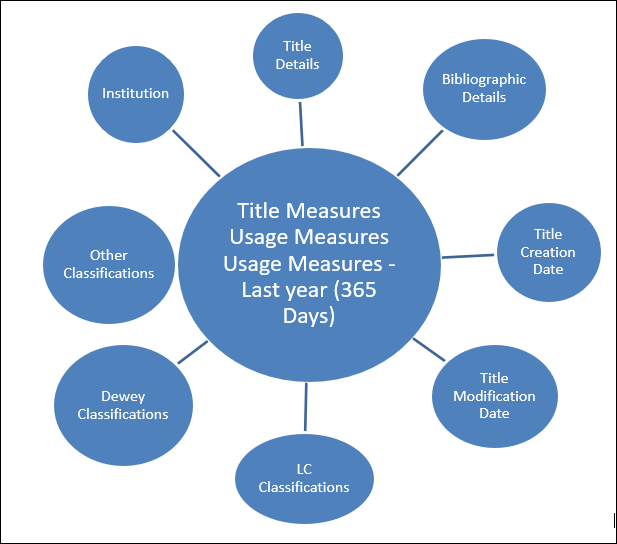
Field Descriptions
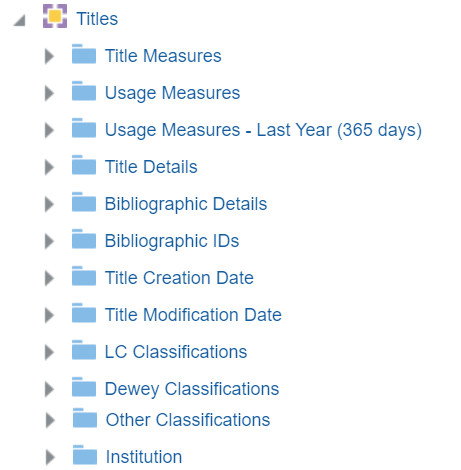
The following fields are available in Titles.
Title Measures
The Title Measures table is a fact table that stores all measures relating to tiles, such as number of titles, number of physical items, number of portfolios, and number of electronic collections.
| Field | Description | Additional Information |
|---|---|---|
| Number of Titles (All) | The total number of titles, including active and deleted. | |
| Number of Titles (Active) | The total number of active (not deleted) titles found in the repository. | |
| Number of Titles (Deleted) | The total number of deleted titles. | |
| Number of Titles with Physical Items (Active) | The number of titles with active (not deleted) physical items | |
| Number of Titles with Physical Items or Holdings Records (Active) | The number of titles with active (not deleted) physical items or holding records | |
| Number of Titles with Holdings Records and No Items (Active) | The number of titles with active (not deleted) holding records and no items | |
| Number of Titles with Electronic Portfolios (Active) | The number of titles with active (not deleted) electronic portfolios | |
| Number of Titles with Electronic Collections (Active) | The number of titles with active (not deleted) electronic collections | |
| Number of Titles with Digital Representations (Active) | The number of titles with active (not deleted) digital representations | |
| Num of Titles (Instances) with Work | The number of titles with a related work. | |
| Number of Titles linked to CZ | The number of titles linked to the Community Zone | |
| Number of Titles linked to NZ | The number of titles linked to the Network Zone | |
| Number of Titles not linked to CZ or NZ | The number of titles not linked to either the Community Zone or the Network Zone | |
| Num of Titles Created with AI | The number of titles created by the AI Assistant | |
| Num of Titles Enriched with AI | The number of titles enhanced by the AI Assistant | |
| Number of Physical Items (All) | The total physical items, including active and deleted. | |
| Number of Physical Items (Active) | The total number of active (not deleted) physical items. | |
| Number of Physical Items (Deleted) | The total number of deleted physical items. | |
| Number of Holdings (All) | The total number of holdings records. | |
| Number of Holdings (Active) | The number of active (not deleted) holdings. | |
| Number of Holdings (Deleted) | The number of deleted holdings. | |
| Number of Portfolios (All) | The total number of portfolios, including active and deleted. | |
| Number of Portfolios (Active) | The total number of active (not deleted) portfolios. | |
| Number of Portfolios (Deleted) | The total number of deleted portfolios. | |
| Number of Electronic Collections (All) | The total number of electronic collections, including active and deleted. | |
| Number of Electronic Collections (Active) | The total number of active (not deleted) electronic collections. | |
| Number of Electronic Collections (Deleted) | The total number of deleted electronic collections. | |
| Num of Digital Representations (All) | The total number of digital representations, including active and deleted. | |
| Num of Digital Representations (Active) | The total number of active (not deleted) digital representations. | |
| Num of Digital Representations (Deleted) | The total number of deleted digital representations. | |
| Num of Research Assets (Active) | The number of active (not deleted) research assets | |
| Num of Research Assets Files | The number of research asset files |
Usage Measures
The Usage Measures table is a fact table that stores all measures relating to usage, such as number of loans, number of link resolver requests, and number of borrowing requests.
| Field | Description | Additional Information |
|---|---|---|
| Number of Loans (In House + Not in House) | The total number of loans, including in house and not in house loans. | |
| Number of Loans (In House) | The total number of in house loans. | |
| Number of Loans (Not in House) | The total number of not in house loans. | |
| Number of Link Resolver Services | The number of link resolver services. | |
| Number of Link Resolver Clicked Services | The number of link resolver selected services. | |
| Number of Link Resolver Requests | The number of link resolver requests. | |
| Number of Link Resolver Clicked Requests | The number of link resolver selected requests. | |
| Number of Link Resolver Requests Without Services | The number of link resolver requests without services. | |
| Number of Requests (Active) | The number of active (not deleted) requests. | |
| Number of Requests (Historical) | The number of historical requests. | |
| Number of Borrowing Requests | The number of borrowing requests. | |
| Number of Lending Requests | The number of lending requests. |
Usage Measures - Last Year (365 Days)
The Usage Measures table is a fact table that stores all measures relating to usage for the last 365 days, such as Number of Loans, Number of Link resolver Requests, and Number of Borrowing Requests.
| Field | Description | Additional Information |
|---|---|---|
| Number of Loans (In House + Not in House) | The total number of loans, including in house and not in house loans in the last 365 days. | |
| Number of Loans (In House) | The total number of in house loans in the last 365 days. | |
| Number of Loans (Not in House) | The total number of not in house loans in the last 365 days. | |
| Number of Link Resolver Services | The number of link resolver services in the last 365 days. | |
| Number of Link Resolver Clicked Services | The number of link resolver selected services in the last 365 days. | |
| Number of Link Resolver Requests | The number of link resolver requests in the last 365 days. | |
| Number of Link Resolver Clicked Requests | The number of link resolver selected requests in the last 365 days. | |
| Number of Link Resolver Requests Without Services | The number of link resolver requests without services in the last 365 days. | |
| Number of Reading List Citations | The number of reading list citations. | |
| Number of Requests (Active) | The number of active (not deleted) requests in the last 365 days. | |
| Number of Requests (Historical) | The number of historical requests in the last 365 days. | |
| Number of Borrowing Requests | The number of borrowing requests in the last 365 days. | |
| Number of Lending Requests | The number of lending requests in the last 365 days. |
Title Details
The Title Details table is a dimension table that stores information about the title such as the library name and code for physical and electronic inventory.
| Field | Description | Additional Information | Data Type | Data Size |
|---|---|---|---|---|
| Coverage Information Combined | The combined coverage information for physical and electronic inventory. | Used when performing an overlap analysis | ||
| Data updated as of (Titles Subject Area) | The last date data was uploaded to the Titles subject area. | For more information, see the note at the top of this page. | ||
|
New for March! Expected Update Day of Month
|
The day of the month on which the Title information is updated.
|
For example, the value 12 indicates the Title information is updated on the 12th of each month.
In rare cases, there might be a delay of up to 3 days.
|
INT
|
|
| Has Active Digital Representations | Indicates if the title has active (not deleted) digital representations | |||
| Has Active Electronic Collections | Indicates if the title has active (not deleted) electronic collections | |||
| Has Active Electronic Portfolios | Indicates if the title has active (not deleted) electronic portfolios | |||
| Has Active Holdings Records | Indicates if the title has active (not deleted) holding records | |||
| Has Active Physical Items | Indicates if the title has active (not deleted) physical items | |||
| Has Active Research Assets | Indicates if the title has active (not deleted) research assets | |||
| Has Holdings Committed to Retain | Indicates whether the title has any physical holdings that are committed to retain. | VARCHAR2 | 4 | |
| Has Item Committed to Retain | Indicates if the item was marked (Yes/No) as Committed to Retain | |||
| Has P-Inventory Committed to Retain | Indicates whether the title has any physical items/holdings that are committed to retain. | VARCHAR2 | 4 | |
| Has Perpetual Electronic Access | Indicates (Yes/No) if the access type of the electronic resource (electronic collection and portfolio) related to the title is Perpetual. | A Perpetual access type indicates the right to permanently access the electronic resources related to the title during the period of a license agreement.
|
||
| Item Retention Reasons | The reason selected for retaining the item | |||
| Last Loan Date (In House) | The date of the last in house loan | |||
| Last Loan Date (Not In House) | The date of the last not in house loan | |||
| Library Code (Digital) | The library code for digital resources. | |||
| Library Code (Electronic) | The library code for electronic resources. | |||
| Library Code (Physical) | The library code for physical resources. | Alma retains the information of deleted items for historical purposes. Therefore, this field includes data from deleted items. | ||
| Library Name (Digital) | The library name for digital resources. | |||
| Library Name (Electronic) | The library name for electronic resources. | |||
| Library Name (Physical) | The library name for physical resources. | Alma retains the information of deleted items for historical purposes. Therefore, this field includes data from deleted items. | ||
| Permanent Call Number | A code used to file the items on the shelf | This information is taken from the holdings record. | ||
| Summary Holding | A summary of holdings of physical and electronic inventory. | Used when performing an overlap analysis |
Bibliographic Details
The Bibliographic Details table is a dimension table that stores the details of the bibliographic record. The primary key of the table is MMS_ID.
The field descriptions can be found in the Bibliographic Details shared dimension.
Bibliographic IDs
The Bibliographic IDs table is a dimension table that stores the bibliographic IDs of the physical item.
| Field | Description | Additional Information |
|---|---|---|
| ISBN valid single (Normalized) | Displays the contents of one MARC field 020 subfield a of the ISBN per row for each MMS ID | |
| ISSN 022 a single (Normalized) | Displays the contents of one MARC field 022 subfield a of the ISSN per row for each MMS ID | |
| OCLC Control Number single (035a) | Displays one OCLC number per row for each MMS ID |
Linked Open Data
The Linked Open Data table is a dimension table that contains fields that are relevant to the BIBFRAME metadata schema.
| Field | Description | Additional Information | Mapping from BIBFRAME |
|---|---|---|---|
| Has Work | Indicates if the instance has related work. | Values are Yes, No, and Null. After re-indexing, Null no longer appears. | |
| Instance URI | The Uniform Resource Identifier (URI) that identifies the instance. | <bf:Instance rdf:about= | |
| Work MMSID | The MMS ID for the work of the instance. | From the work record.<bf:AdminMetadata> <bf:identifiedBy> <bf:Local> <rdf:value>Work MMS ID</rdf:value> </bf:Local> <bf:source>ALMA</bf:source> | |
| Work URI | The Uniform Resource Identifier (URI) that identifies the work of the instance. | <bf:instanceOf rdf:resource= |
Title Creation Date
The Title Creation Date table is a dimension table that stores details about the title creation date. Key fields are used whenever calculations are required. Description fields may be used for formatting the display of the report. Alma stores the following types of fields:
- Calendar Fields – These are date fields as they display in the calendar.
- Fiscal Date Fields – These are date fields that match the institution's fiscal period. In the examples below, the fiscal period of the institution is for fiscal year 2012 that starts June 1, 2011 and ends May 31, 2012.
Based on the levels included in the report, this dimension enables users to determine the number of indexed titles at the levels described in the following table.
| Field | Description | Additional Information | Data Type | Data Size |
|---|---|---|---|---|
| Title Creation Date | The current course end date of the purchase request | The date in the format DD/MM/YYYY | DATE | |
| Title Creation Start of Week | The date of the first business day of the week | The date in the format DD/MM/YYYY | DATE | |
| Title Creation Week Number | The number of the week of the year | There are 52 weeks in a year. | VARCHAR | 2 |
| Title Creation Month Key | The month of the date in number format | For example - February will show the number 2 in this column. This field is useful when you want to sort by month. | INT | |
| Title Creation Month | The month of the date in text format | The month, for example, "February" | VARCHAR | 20 |
| Title Creation Full Month | The year and month that the purchase request was modified | The month in text format and the year. For example - Feb 25 (for February 2025) | VARCHAR | 20 |
| Title Creation Quarter | The quarter in the year in which the purchase request was modified | The quarter of the date in a display format such as Q1 | VARCHAR | 20 |
| Title Creation Year | The year in which the purchase request was modified | The year of the date in the format YYYY . For example - 2025 | VARCHAR | 20 |
| Title Creation Year-Month | The year and the month in which the purchase request was modified | The year and the month in the format YYYY-MM | VARCHAR | 250 |
| Title Creation Fiscal Month Key | The fiscal month of the date in number format | For example - If the fiscal year starts in June, this column will show the number 1 for June, the number 2 for July, and so on. | INT | |
| Title Creation Fiscal Year | The fiscal year of the date in string format | The year is presented according to the description in the mapping table "Fund and Ledger Fiscal Period". For more information, see Configuring Fund and Ledger Fiscal Periods | VARCHAR | 50 |
| Title Creation Date Filter | Used to filter report results by date | Possible values:
|
VARCHAR | 100 |
Title Modification Date
The Modification Date table is a dimension table that stores details about modification of titles.
Key fields are used whenever calculations are required. Description fields may be used for formatting the display of the report. Alma stores the following types of fields:
- Calendar Fields – These are date fields as they display in the calendar.
- Fiscal Date Fields – These are date fields that match the institution's fiscal period. For the examples below, the fiscal period of the institution is for fiscal year 2012 that starts June 1, 2011 and ends May 31, 2012.
Using this dimension, the user can drill down from year to month to the specific date on which the physical title was created.
| Field | Description | Additional Information | Data Type | Data Size |
|---|---|---|---|---|
| Title Creation Date | The current course end date of the purchase request | The date in the format DD/MM/YYYY | DATE | |
| Title Creation Start of Week | The date of the first business day of the week | The date in the format DD/MM/YYYY | DATE | |
| Title Creation Week Number | The number of the week of the year | There are 52 weeks in a year. | VARCHAR | 2 |
| Title Creation Month Key | The month of the date in number format | For example - February will show the number 2 in this column. This field is useful when you want to sort by month. | INT | |
| Title Creation Month | The month of the date in text format | The month, for example, "February" | VARCHAR | 20 |
| Title Creation Full Month | The year and month that the purchase request was modified | The month in text format and the year. For example - Feb 25 (for February 2025) | VARCHAR | 20 |
| Title Creation Quarter | The quarter in the year in which the purchase request was modified | The quarter of the date in a display format such as Q1 | VARCHAR | 20 |
| Title Creation Year | The year in which the purchase request was modified | The year of the date in the format YYYY . For example - 2025 | VARCHAR | 20 |
| Title Creation Year-Month | The year and the month in which the purchase request was modified | The year and the month in the format YYYY-MM | VARCHAR | 250 |
| Title Creation Fiscal Month Key | The fiscal month of the date in number format | For example - If the fiscal year starts in June, this column will show the number 1 for June, the number 2 for July, and so on. | INT | |
| Title Creation Fiscal Year | The fiscal year of the date in string format | The year is presented according to the description in the mapping table "Fund and Ledger Fiscal Period". For more information, see Configuring Fund and Ledger Fiscal Periods | VARCHAR | 50 |
| Title Creation Date Filter | Used to filter report results by date | Possible values:
|
VARCHAR | 100 |
Dewey Classifications
Titles can be classified with Dewey Classifications.
In Dewey Classifications, topics are ordered in a hierarchy that is indicated by a three digit number. The highest level of the hierarchy is indicated by a number with one significant digit followed by two zeros, such as 600. The second level in the hierarchy is indicated by a number with two significant digits followed by one zero, such as 630. The third level in the hierarchy is indicated by a number with three significant digits such as 636.
Note that the Dewey number is taken from the 852 subfield h of the holdings record and not from the 082 of the bibliographic record.
The field descriptions can be found in the Dewey Classifications shared dimension.
LC Classification
Using this dimension, the user can drill down from Group1 to Group4. In each level, the user may see measures accumulated to the relevant group and see the number of items grouped by classification.
The field descriptions can be found in the LC Classifications shared dimension.
Other Classifications
Institution
Page tags: article:topicInstitutioncontent:Documentationlang:englishBibliographic DetailsDewey ClassificationsLC ClassificationTitle MeasuresUsage MeasuresUsage Measures - Last Year (365 Days)Title DetailsTitle Creation DateTitle Modification Dateproduct:alma_specto
