
Digital Usage
Create reports and dashboards relating to digital usage.
Using the Digital Usage subject area, you can create reports and dashboards relating to digital usage and answer the following types of business questions:
- How many times was the digital representation viewed?
- How many times was the digital representation shared?
- How many times was the digital representation access denied?
- How many and which of the digital files were downloaded?
- How many and which of the digital files were viewed?
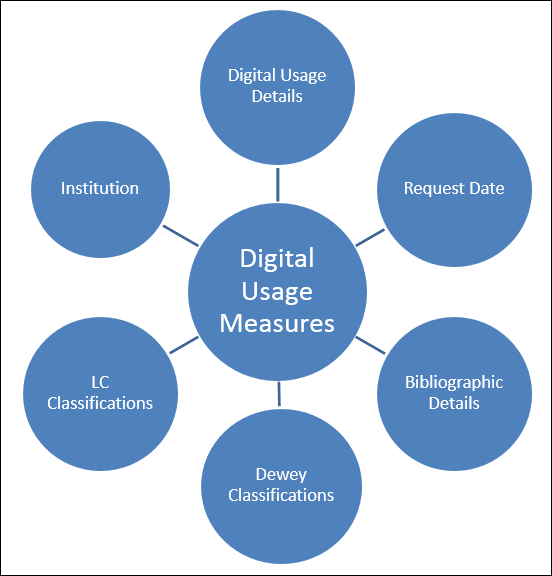
Field Descriptions
The following fields are available in Licenses.
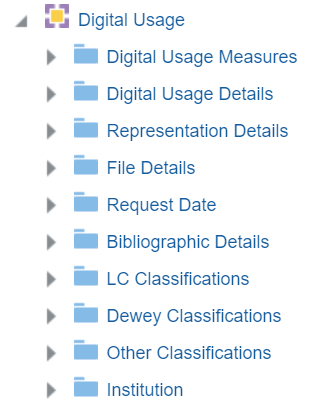
Digital Usage Measures
The Digital Usage Measures table is a fact table that stores all measures relating to digital usage, such as number of digital representation views and number of digital file views.
- If the representation has an access rights policy that requires the patron to acknowledge a copyright statement. If the patron does not accept the copyright statement, it counts as a representation view but not as a file view.
- If the representation has a digital lending access rights policy and the maximum number of concurrent users is exceeded, so that the patron needs to join a waitlist, it counts as a representation view but not as a file view.
| Field | Description | Additional Information |
|---|---|---|
| Num of digital representation views | The number of digital representation views | |
| Num of digital representation shares | The number of digital representation shares | |
| Num of digital representation access denied | The number of digital representation access denied | The number of times access to the digital representation has been denied due to the access rights policy blocking the user. |
| Num of digital file views | The number of digital file views | In the Universal viewer and the Internet Archive Book Reader Viewer, there is no support for counting the number of files viewed (no event is triggered when moving between files), as there is for the Digital Viewer. |
| Num of digital file downloads | The number of digital file downloads |
Digital Usage Details
The Digital Usage Details table is a dimension table that stores additional details about digital usage.
| Field | Description | Additional Information |
|---|---|---|
| Request ID | The request ID | |
| Delivery Type | The delivery type of the representation | Possible Values:
|
| Representation ID | The representation ID | |
| File ID | The file ID | |
| Usage level | The usage level | |
| Creator | The creator of the usage, for example, the user who viewed or downloaded the file. |
Representation Details
The Representation Details table is a dimension table that stores information about digital representations. The Rep Entity fields refer to fields that appear in the Digital Representation Resource Editor when selecting an Entity Type.
| Field | Description | Additional Information |
|---|---|---|
| Rep Creation Date | The date that the representation was created | |
| Rep Creator | The creator of the representation | |
| Rep Delivery URL | The delivery URL of the representation | |
| Rep Deposit ID | The deposit ID of the representation | |
| Rep Digitization ID | The digitization ID of the representation | |
| Rep Entity Author | The Author value of the representation entity type | |
| Rep Entity Creator | The Creator value of the representation entity type | |
| Rep Entity Date | The Date value of the representation entity type | |
| Rep Entity Day in Month | The Day in Month value of the representation entity type | |
| Rep Entity End Page | The End Page value of the representation entity type | |
| Rep Entity End Time | The End Time value of the representation entity type | |
| Rep Entity Issue | The Issue value of the representation entity type | |
| Rep Entity Number | The Number value of the representation entity type | |
| Rep Entity Season Month | The Season/Month value of the representation entity type | |
| Rep Entity Start Page | The Start Page value of the representation entity type | |
| Rep Entity Start Time | The Start Time value of the representation entity type | |
| Rep Entity Title | The Title value of the representation entity type | |
| Rep Entity Track | The Track value of the representation entity type | |
| Rep Entity Type | The entity type of the representation | |
| Rep Entity Volume | The Volume value of the representation entity type | |
| Rep Entity Year | The Year value of the representation entity type | |
| Rep Label | The label of the representation | |
| Rep Last View Date | The last date that the representation was viewed | |
| Rep Lifecycle | The lifecycle of the representation | |
| Rep Link Param 1-5 | The representation link parameters 1-5 | |
| Rep Modification Date | The modification date of the representation | |
| Rep Modified By | The user who modified the representation | |
| Rep Originating System ID | The origination system ID of the representation | |
| Rep Public Note | The public note of the representation | |
| Rep Remote Code | The remote code of the representation | |
| Rep Type Code | The code of the type of the representation | |
| Rep Usage Type | The usage type of the representation | |
| Is Deposit | Indicates if the representation entered the repository as a deposit | |
| Is Digitization | Indicates if the representation entered the repository from a digitization request |
File Details
The File Details table is a dimension table that stores information about the digital file details.
| Field | Description | Location in Alma | Additional Information | Data Type | Data Size |
|---|---|---|---|---|---|
| File Creation Date | The creation date of the file | ||||
| File Creator | The creator of the file | ||||
| File Deleted Type | The type of the deleted file | ||||
| File Extension | The extension of the file | ||||
| File Format Description | The file's Format Library format description | New for March! File Format field in the Technical Information section of the file in Specto Preservation | This is relevant only for institutions using Specto Preservation | VARCHAR | 255 |
| File Format ID | The file's Format Library format ID in Specto Preservation | New for March! File Format field in the Technical Information section of the file in Specto Preservation | This is relevant only for institutions using Specto Preservation | VARCHAR | 255 |
| File Format Version | The file's Format Library format version | New for March! File Format field in the Technical Information section of the file in Specto Preservation | This is relevant only for institutions using Specto Preservation | VARCHAR | 255 |
| File ID | The ID of the file | ||||
| File Internal Path | The internal path of the file | ||||
| File Label | The label of the file | ||||
| File Last View Date | The last date the file was viewed | ||||
| File Lifecycle | The lifecycle of the file | ||||
| File Mime Type | The Mime type of the file | ||||
| File Modification Date | The modification date of the file | ||||
| File Modified By | The user who modified the file | ||||
| File Name | The name of the file | ||||
| File Original ID | The original ID of the file | ||||
| File Original Name | The original name of the file | ||||
| File Original Path | The original path of the file | ||||
|
File Technical Issue Details
|
The file's preservation technical error description
|
New for March! Displayed on the file as a badge in the Content List section of the Title in the Technical Analysis Workbench in Specto Preservation
|
This is relevant only for institutions using Specto Preservation.
Multiple values are separated by a semicolon (;)
|
VARCHAR
|
255
|
|
File Technical Issue Type
|
The file's preservation technical error types in Specto Preservation, for example Format Identification, Technical MD Extraction, etc.
|
New for March! Displayed on the file as a badge in the Content List section of the Title in the Technical Analysis Workbench in Specto Preservation
|
This is relevant only for institutions using Specto Preservation.
Multiple values are separated by a semicolon (;)
|
VARCHAR
|
255
|
Request Date
The Request Date table is a dimension table that stores information about the digital request date. For the purposes of this table, a request is the same as usage.
| Field | Description | Additional Information | Data Type | Data Size |
|---|---|---|---|---|
| Request Date | The current course end date of the purchase request | The date in the format DD/MM/YYYY | DATE | |
| Request Start of Week | The date of the first business day of the week | The date in the format DD/MM/YYYY | DATE | |
| Request Week Number | The number of the week of the year | There are 52 weeks in a year. | VARCHAR | 2 |
| Request Month Key | The month of the date in number format | For example - February will show the number 2 in this column. This field is useful when you want to sort by month. | INT | |
| Request Month | The month of the date in text format | The month, for example, "February" | VARCHAR | 20 |
| Request Full Month | The year and month that the purchase request was modified | The month in text format and the year. For example - Feb 25 (for February 2025) | VARCHAR | 20 |
| Request Quarter | The quarter in the year in which the purchase request was modified | The quarter of the date in a display format such as Q1 | VARCHAR | 20 |
| Request Year | The year in which the purchase request was modified | The year of the date in the format YYYY . For example - 2025 | VARCHAR | 20 |
| Request Year-Month | The year and the month in which the purchase request was modified | The year and the month in the format YYYY-MM | VARCHAR | 250 |
| Request Fiscal Month Key | The fiscal month of the date in number format | For example - If the fiscal year starts in June, this column will show the number 1 for June, the number 2 for July, and so on. | INT | |
| Request Fiscal Year | The fiscal year of the date in string format | The year is presented according to the description in the mapping table "Fund and Ledger Fiscal Period". For more information, see Configuring Fund and Ledger Fiscal Periods | VARCHAR | 50 |
| Request Date Filter | Used to filter report results by date | Possible values:
|
VARCHAR | 100 |
Bibliographic Details
The Bibliographic Details table is a dimension table that stores the bibliographic details of the digital usage. The primary key of the table is MMS_ID.
The field descriptions can be found in the Bibliographic Details shared dimension.
Ex Libris works with content providers worldwide to enrich the metadata available in the Alma Community Zone. To enrich the journal/serial content in the CZ, we work directly with the Library of Congress CONSER feed for electronic serials, which we match against our knowledge base to enrich with all of the relevant metadata fields that they supply (for more details, see Community Zone Serial Records Enrichment) and enrich the CZ records with all relevant metadata, including the 050 fields (when available). In the case of book content, we work with multiple providers who are willing to share their metadata with the Alma community globally (for more details, see Community Zone Monograph Records Enrichment). If you have local access to these classifications, you may want to consider working with the local extension for these records whenever an update is not available. (For more details, see Working with Local Extension Fields for Community Zone-linked Records.)
The Bibliographic Details table contains two kinds of fields, those derived from the MARC record and those that come from Alma. Although in analytics there is no distinction made between these fields, for explanatory purposes we have divided them into two tables below.
The Bibliographic Details table includes all bibliographic records in the catalog whether they have inventory or not.
| Field | Note | Mapping from MARC21 | Mapping from UNIMARC | Mapping from Dublin Core | Data Type | Data Size |
|---|---|---|---|---|---|---|
| Action Note | A note that contains information about the retention and the retention reason of the bibliographic record. | 583 | Not relevant | Not relevant | VARCHAR | VARCHAR |
| Author | The term Author refers to the individual or group of individuals responsible for creating or producing the work being documented. The author is the primary contributor to the work, and their name is typically listed prominently in the bibliographic record to identify the originator of the content. Depending on the type of work and the citation style, the author's name may be followed by additional information such as their credentials, institutional affiliation, and the date of publication. | 100,110,111 | 700,701,710,711 | Currently empty, planned to come from dc:creator, dcterms:creators | VARCHAR | 4000 |
| Author (Contributor) | The Author (Contributor) role refers to the specific role or function played by an individual or group in the creation or production of a work. This role is important for cataloging and documenting the contributions of different individuals or entities to a particular resource. The Author (Contributor) role is a way to categorize and describe the responsibilities of contributors beyond just being the primary author. |
711 a,c-e,i,j,n,q,u and its 880 700 a-e,j,q,u and its 880 710 a-e,i,n,u and its 880 |
700 a-d,f,p 701 a-d,f,p 710 a-h,p 711 a-h,p 720 a,f" 721 a,f 702 a-d,f,g 712 a-h,p 722 a,f |
Currently empty, planned to come from dc:contributor, dcterms:contributor | VARCHAR | VARCHAR |
| Begin Publication Date | The Begin Publication Date refers to the earliest date associated with the publication or release of a particular work. It is a critical piece of information that helps users understand when the work was first made available to the public. The publication date can be essential for citing the work correctly, tracking its historical context, and assessing its relevance to specific time periods. | 008 pos. 07-10 | 100.Date1 | Not relevant for Dublin Core | VARCHAR | 255 |
| BIB 008 MARC | The contents of the MARC 008 bibliographic field. The BIB 008 field in a MARC bibliographic record is a fixed-length data element used to provide additional information about the bibliographic record itself. It contains various control information that helps catalogers and library systems manage and process the record. | 008 | Not relevant for Dublin Core | VARCHAR | 50 | |
| BIB LDR MARC | The BIB LDR refers to the Leader field (LDR) within the bibliographic record. The Leader is a fixed-length data element that provides control information about the bibliographic record itself. It is a critical component of MARC records, and each position within the Leader serves a specific purpose. The Leader field is typically 24 characters in length. The Leader field is used to convey fundamental information about the structure, organization, and characteristics of the bibliographic record. | LDR | Not relevant for Dublin Core | VARCHAR | 50 | |
| Bibliographic Acquisition Accession Number Note | The identification code assigned to materials acquired in a single and separate transfer of custody. | 541 e | Not relevant for Dublin Core | VARCHAR | 255 | |
| Bibliographic ID | A Bibliographic ID is a unique identifier assigned to a specific bibliographic entry or resource. It serves as a way to distinguish and locate a particular work within a library's catalog or database. The purpose of a bibliographic ID is to facilitate efficient retrieval and management of bibliographic records and to ensure that each record is distinct. | 010 excluding numeric subfields | 020 a | dcterms:identifier dcterms:ISBN, dcterms:identifier dcterms:ISSN | VARCHAR | 255 |
| Bibliographic Level | The Bibliographic Level is a classification that describes the scope and content of a bibliographic record. It helps users understand the nature of the resource being described in the record. The bibliographic level is often indicated using a one-letter code or abbreviation. Common bibliographic levels include: Monograph (m), Serial (s), Collection (c), Integration (i), Monographic Series (a), and so forth. | Position 7 of the LDR field of the bibliographic record | Position 7 of the LDR field of the bibliographic record | Not relevant for Dublin Core | VARCHAR | 255 |
| Bibliographic Source of Acquisition Note | The name of the people or organization that is the source of the material. | 541 a | Not relevant for Dublin Core | VARCHAR | 255 | |
| Category of Material | The Category of Material is a classification or designation that describes the format or physical nature of the material being cataloged. It helps users and catalogers understand the medium in which a resource is presented. | Position 0 of the 007 field | 200 b | Not relevant for Dublin Core | VARCHAR | 255 |
| DC Coverage | DC Coverage refers to an element used to provide information about the spatial or temporal topic of the resource, spatial applicability of the resource, or jurisdiction under which the resource is relevant. | Relevant only for Dublin Core | Relevant only for Dublin Core | dc:coverage dcterms:coverage dcterms:spatial dcterms:temporal | VARCHAR | |
| DC Description | DC Description refers to Dublin Core (DC) metadata elements used to describe resources in a standardized way, particularly in digital libraries and online cataloging systems. | Relevant only for Dublin Core | Relevant only for Dublin Core | dc:description dcterms:description dcterms:abstract | VARCHAR | 4000 |
| DC Format | The file format, physical medium, or dimensions of the resource. The information in this field is entered as free text. | Relevant only for Dublin Core | Relevant only for Dublin Core | dc:format dcterms:format | VARCHAR | 256 |
| DC License | DC License is a Dublin Core element used to specify the terms and conditions associated with the use of a resource. It provides information about the licensing or copyright status of a digital or physical resource, allowing users to understand how they can legally use, share, or redistribute the resource. The DC License element is particularly important in digital libraries, repositories, and online cataloging systems where access to digital content is provided. | Relevant only for Dublin Core | Relevant only for Dublin Core | It will be populated by dcterms:license | VARCHAR | 4000 |
| DC Provenance | DC Provenance refers to an element used to provide a statement of any changes in ownership and custody of the resource since its creation that are significant for its authenticity, integrity, and interpretation | Relevant only for Dublin Core | Relevant only for Dublin Core | dcterms:provenance | VARCHAR | 4000 |
| DC Relation | DC Relation refers to an element used to provide information about a related resource to the described resource. | Relevant only for Dublin Core | Relevant only for Dublin Core | dc:relation dcterms:relation dcterms:isVersionOf dcterms:hasVersion dcterms:isReplacedBy dcterms:replaces dcterms:isRequiredBy dcterms:requires dcterms:isPartOf dcterms:hasPart dcterms:isReferencedBy dcterms:references dcterms:isFormatOf dcterms:hasFormat dcterms:conformsTo | VARCHAR | 4000 |
| DC Rights | DC Rights refers to an element used to provide information about the intellectual property rights or copyright status of a resource. This element helps users understand the legal rights and permissions associated with the resource and whether there are any restrictions on its use. | Relevant only for Dublin Core | Relevant only for Dublin Core |
dc:rights and dcterms:rights |
VARCHAR | 4000 |
| DC Source | DC Source refers to an element used to provide information about a related resource from which the described resource is derived. | Relevant only for Dublin Core | Relevant only for Dublin Core |
dc:source dcterms:source |
VARCHAR | 4000 |
| DC Type | DC Type refers to an element used to provide information about the nature or genre of the resource. | Relevant only for Dublin Core | Relevant only for Dublin Core |
dc:type dcterms:type |
VARCHAR | 255 |
| Edition | Edition refers to a specific version or variation of a publication. The edition information provides details about changes, updates, or variations that have occurred since the original publication. Including the edition helps users and researchers identify the specific version of a book or other resource they are looking for. | 250 subfields a,b | 205 a,b,f,g | dcterms:isVersionOf | VARCHAR | 255 |
| Electronic location and access | The location and access URl for the electronic resource. | 856 all subfields | 856 all subfields | Not relevant for Dublin Core | VARCHAR | 4000 |
| End Publication Date | The End Publication Date is the second date available in the 008 field, and it is used to indicate "Date 2." It is described as "A date specified by the code in 008/06 (Type of date/Publication status)." | 008 pos. 11-14 | 100.Date2 | Not relevant for Dublin Core | VARCHAR | 255 |
| Enriched with AI | Indicates that the bibliographic record of the resource was enriched by the AI Asisstant. | VARCHAR | 4 | |||
| Form of Item | The Form of Item refers to a specific code or indicator that describes the physical format or medium of the resource being cataloged. This information helps library users understand the physical characteristics of the item and whether it is in a print or non-print format. | 008 pos. 29 (Maps and Visual Material) or 23 (other material configurations) | Not relevant for Dublin Core | VARCHAR | 1 | |
| General Note | A General Note is a field used to provide additional information or commentary about the resource being described. General notes can include various types of information that may not fit into specific structured fields within the bibliographic record. These notes are often used to convey contextual details, historical significance, or other relevant information about the resource. | 500 a, 5 | 300 a | Not relevant for Dublin Core | VARCHAR | 4000 |
| Government Publication | A Government Publication is a term used to identify materials that are published or produced by government entities at various levels of government, including federal, state, local, and international governments. For more information regarding the values of MARC 008 Pos. 28, see here. |
008 pos. 28 According to MARC21 Format for Bibliographic Data, 008 pos. 28 is Government Publication for the following material types: Books, Computer Files, Continuing Resources, Maps, and Visual Materials.For Music 008 pos. 28 is Accompanying matter. For Mixed material 008 pos. 28 is Undefined.Consequently, when using this field, you may want to filter out records with Material Type = Music and Material Type = Mixed material. |
Not relevant for Dublin Core | VARCHAR | 1 | |
| ISBN | ISBN is a unique identifier for books, and it is used to facilitate the identification and cataloging of books and related materials. Field in analytics includes also cancelled and invalid ISBNs. | 020 a, z 776 z | 010 a | dcterms:identifier dcterms:ISBN | VARCHAR | 255 |
| ISBN Valid | A unique identifier for books and related materials. To be considered valid, an ISBN must adhere to the established ISBN standards and conventions. Field in analytics does not include cancelled and invalid ISBNs. | 020 a | Not relevant for Dublin Core | VARCHAR | 255 | |
| ISSN | An ISSN (International Standard Serial Number) is a unique identifier for serial publications, which include periodicals, journals, magazines, and other recurring publications. Field in analytics includes also cancelled and invalid ISSNs. | 022 l,a 776 x (for non-physical records) | 011 a f | dcterms:identifier dcterms:ISSN | VARCHAR | 255 |
| ISSN Valid | A unique identifier for serial publications. To be considered valid for bibliographic records, an ISSN must adhere to the established standards and conventions for ISSN formatting and structure. Field in analytics does not include cancelled and invalid ISBNs. | 022 a | Not relevant for Dublin Core | VARCHAR | 255 | |
| Language Code | Language codes are used to indicate the language(s) in which a particular resource is written or presented. Language codes are typically standardized to ensure consistency in cataloging and bibliographic records. | 008 pos. 35-37 | 101 a | Currently comes from dc:language. Planned to come from dc:language and dcterms:language | VARCHAR | 255 |
| Language Of Cataloging | The Language of Cataloging refers to the language in which the cataloging or metadata for a particular resource is created. | 040 b | 100 a,22-24 | Not relevant for Dublin Core (Value None is displayed) | VARCHAR | 4000 |
| Local Note | A Local Note is a type of note that provides specific information or instructions related to a library's unique policies, holdings, or services. Local notes are typically used to convey information that is specific to the individual library or cataloging institution and may not be relevant to libraries elsewhere. For Borrowing Requests, the Source is stored in this field. | 590 a, 5 | Not relevant for Dublin Core | VARCHAR | 4000 | |
| Material Type | See the table, Fields that Identify the Bibliographic Material Type, in the Material Types in Search Results section for a description of material type. | MARC control LDR Material Type | Planned to be empty. Currently comes from dc:type This field holds a fixed set of values designated for all record formats. For DC, the mapping is controlled from Configuration Resources > Cataloging > DCMI Material Type Mapping page. Any dc:type value not defined on this pages gets by default the value Computer File. For more information, see DCMI Material Type Mapping. | VARCHAR | 4000 | |
| Material Type Code | Code of the material type described above (in Material Type). | MARC control LDR Material Type | Not relevant for Dublin Core | VARCHAR | 255 | |
| National Agricultural Library Call Number | The call number used by the American National Agricultural Library. | 070 a | Not relevant for Dublin Core | |||
| Network Number | A Network Number typically refers to a unique identifier assigned to a bibliographic record within a library network or consortium. | 035 a z | 053 a z |
dc:identifier , dcterms:identifier |
VARCHAR | 4000 |
| OCLC Control Number (019) | The OCLC Control Number (019 field) is used by OCLC to record and index OCLC control numbers of records that have been deleted or will be processed as duplicate records. For more information on the OCLC Control Number 019 and its subfields, see here. Leading zeros are not displayed. |
019 a When the subfield begins with one of the following prefixes:
|
Not relevant for Dublin Core | VARCHAR | 4000 | |
| OCLC Control Number (035a) | Subfield "a" in the 035 field is used to record the main OCLC Control Numbers. For more information on the OCLC Control Number 035 and its subfields, see here. Leading zeros are not displayed. |
035 a When the subfield begins with one of the following prefixes:
|
035 a | Not relevant for Dublin Core | VARCHAR | 4000 |
| OCLC Control Number (035a+z) | The OCLC Control Number can include both the main OCLC Control Number in subfield "a" and any related or canceled OCLC Control Numbers in subfield "z." This practice is useful for indicating changes or updates to cataloging records and for maintaining a historical record of previous control numbers associated with the same resource. For more information on the OCLC Control Number 035 and its subfields, see here. Leading zeros are not displayed. |
035a+z When the subfield begins with one of the following prefixes:
|
035a+z | Not relevant for Dublin Core | VARCHAR | 4000 |
| OCLC Control Number (035z) | Subfield "z" in the 035 field is used to record related or canceled OCLC Control Numbers, providing a historical record of control numbers associated with a specific resource. For more information on the OCLC Control Number 035 and its subfields, see here. Leading zeros are not displayed. |
035 z When the subfield begins with one of the following prefixes:
|
035 z | Not relevant for Dublin Core | VARCHAR | 4000 |
| Open Access | Open Access (OA) refers to a publishing model that provides unrestricted and free access to scholarly and research publications on the Internet. It signifies that the full text or content of the publication is freely available to anyone, without requiring payment or subscription. Values are Yes and No. | Based on 506 f 506 2 | Not relevant for Dublin Core | VARCHAR | 4 | |
| Original Cataloging Agency | The MARC code or the name of the organization that created the original record. | 040 a | 081 b | Not relevant for Dublin Core | VARCHAR | 255 |
| Place Code | The Place Code is a code that represents the place of publication for a printed or published resource. | 008 pos. 15-17 | 102$$a | dcterms:spatial | VARCHAR | 50 |
| Place of Publication - City | The city where a printed or published resource was published or produced. |
Derived from the place code in 008 pos. 15-17. If the value of this field in the bibliographic record does not exist in the official list of place codes, the value for this field in Alma Analytics will be "No place, unknown, or undetermined". |
Not relevant for UNIMARC | Not relevant for Dublin Core | VARCHAR | 200 |
| Place of Publication - Country | The country where a printed or published resource was published or produced. |
Derived from the place code in 008 pos. 15-17. For a list of country codes, see: MARC Code List for Countries If the value of this field in the bibliographic record does not exist in the official list of place codes, the value for this field in Alma Analytics will be "No place, unknown, or undetermined". |
Derived from the place code 102$$a. For a list of country codes, see: List of ISO 3166 Country Codes If the value of this field in the bibliographic record does not exist in the official list of place codes, the value for this field in Alma Analytics will be "No place, unknown, or undetermined". If there are multiple place codes in this field, only the first value is displayed. |
Not relevant for Dublin Core. Value No place, unknown, or undetermined is displayed) | VARCHAR | 200 |
| Place of Publication - State | The state where a printed or published resource was published or produced. | Derived from the place code in 008 pos. 15-17. If the value of this field in the bibliographic record does not exist in the official list of place codes, the value for this field in Alma Analytics will be "No place, unknown, or undetermined". | Not relevant for UNIMARC | Not relevant for Dublin Core | VARCHAR | 200 |
| Publication Date | The Publication Date refers to the date when a printed or published resource was officially issued, published, or made publicly available. |
The publication date is determined as follows:
|
The publication date is determined as follows:
|
dc:date, dcterms:date, dcterms:created, dcterms:available, dctrems:issued, dcterms:dateAccepted | VARCHAR | 255 |
| Publication Place | The Publication Place refers to the city or location where a printed or published resource was officially published, issued, or produced. | 260 a. When 260 a is empty, it is taken from 264 a | 210 a 214 a | Not relevant for Dublin Core (use Place Code) | VARCHAR | 255 |
| Publisher | The Publisher refers to the entity or organization responsible for producing, printing, and distributing a printed or published resource. |
260 b 264 b |
210 c 214 c |
dcterms:publisher, dc:publisher |
VARCHAR | 255 |
| Resource Type | Constructed based on existing bibliographic fields such as the LDR and 008. For more information, see The Resource Type Field. | Not relevant for Dublin Core | VARCHAR | 4000 | ||
| Series | A Series refers to a related group of publications or resources that share common characteristics, themes, or subjects and are published under a common title or series name. |
800 t,v 810 t,v 811 t,v 830 a,n,p,v |
410 a,h,i,o,t,x | dcterms:isPartOf | VARCHAR | 4000 |
| Series Statement | A Series Statement refers to the title or name of a series to which a printed or published resource belongs. | 490 a,v,x | 225 a,v,x | Not relevant for Dublin Core | VARCHAR | 4000 |
| Source of Description Note | A note used by the Community Zone with details on AI enrichment. | 588 $$a | Not relevant | Not relevant for Dublin Core | VARCHAR | 1000 |
| Subjects | Subjects refer to the specific topics, themes, or subjects covered by a printed or published resource. | 6XX excluding 69X, 630, 689 | 600 a,b 602 603-8 610 616 617 | dc:subject dcterms:LCSH,MESH,DDC,UDC,LCC | VARCHAR | 4000 |
| Subjects (Names) | Subjects (Names) refers to the specific individuals, organizations, or entities associated with a printed or published resource. |
600 a,b,c,d,e,l,t.u 610 a,b,c,d,e,l,n,t,u 611 a,b,c,d,e,j,l,n,q,t,u |
600 a,b,c,d,f,t (obsolete),p 601 a,b,c,d,e,f,t (obsolete) 601 a,b,c,d,e,f,t (obsolete) |
Not relevant for Dublin Core | VARCHAR | 4000 |
| Title | The Title refers to the name or title of a printed or published resource. The title is one of the most critical elements of bibliographic cataloging because it helps users identify and distinguish one resource from another. |
245 a,b 249 a,b,c,v |
200 a,c,d,e,h,i | dc:title | VARCHAR | 4000 |
| Title (Complete) | The information from MARC field 245, subfields $a, $n, $p, $h, $b, $c, $f, $g, $k, $s. | 245 a,n,p,h,b,c,f,g,k,s | 200 a-i | dc:title, dcterms:title, dc:alternative | VARCHAR | 4000 |
| Title (Filing) |
The title with common words such as "The" and "An" removed to help with sorting the title alphabetically. Any text between double arrows (<<>>) is removed. For a video describing the use of this field, see Sort Analytics Reports by Filing Title - Ignoring "The", "A", and "An". |
240 a,c,p 245 a,c,p |
200 a,e 500 |
Not relevant for Dublin Core | VARCHAR | 4000 |
| Title (Normalized) |
The normalized Title. This field is useful when you want to compare titles that may have been catalogued differently. This field is built in the following manner: Alma does the following to the 245 field (except subfields c,h,6 and 8) in the following order:
|
245 a,b,n,p 249 a,b,c,v |
200 a,c,d,e,h,i | dc:title | 4000 | |
| Title Author Combined and Normalized | 100 characters of the normalized title and the first four letters of the author in lowercase letters, with spaces removed. | See Author and Title Fields | See Author and Title Fields | See Author and Title Fields | VARCHAR | 110 |
| Title Committed to Retain |
Title Committed to Retain refers to a commitment made by a library to retain and preserve a specific resource. This commitment is important for ensuring the long-term availability and accessibility of important scholarly or historical materials. Indicates (Yes/No) if the bibliographic record is marked as Committed to Retain. |
Configurable from Configuration > Resources > Collection Retention > Bibliographic Collection Retention Definition. For more information, see Bibliographic Record Retention. | Not relevant for Dublin Core | VARCHAR | 4 | |
| Type of date | The Type of Date refers to the nature or purpose of a date included in the record. It specifies what the date represents or signifies within the bibliographic context. The type of date can provide important information to users and catalogers about the significance of the date included in the record. |
008 pos. 6 For more information on the options available for Type of date in 008 pos. 6, see here. |
100 pos 8 | Not relevant for Dublin Core | VARCHAR | 255 |
| Uniform Resource Identifier | A Uniform Resource Identifier (URI) is a string of characters used to identify a resource on the internet or within a particular system. URIs are often used to provide direct links or references to online resources related to the bibliographic entry, such as a digital version of a book, an electronic journal article, or additional related materials. | 856 u | 856 u |
dc:identifier (dcterms:URI) ,dcterms:identifier (dcterms:URI) |
VARCHAR | 4000 |
| Uniform Resource Identifier Field Exists |
Indicates whether a Uniform Resource Identifier (URI) Exists for the bibliographic record. Values are 0 or 1, where "0" means No and "1" means Yes. Indicates if 856 subfield u contains data. |
Not relevant for Dublin Core | INT | |||
| Uniform Title | A Uniform Title is a standardized title used to represent a specific work, especially when that work has been published under multiple titles or in various editions, languages, or formats. | 240 130 |
500 The Uniform Title is only mapped if the first indicator = 1. If the first indicator for UNIMARC 500 is empty or 0, the value is not mapped to Analytics. |
Not relevant for Dublin Core | VARCHAR | 4000 |
The following table describes other fields in the shared dimension (taken from Alma and not MARC):
| Field | Description | Data Type | Data Size |
|---|---|---|---|
| Active Course Code | Active Course Code is the code of the course in the Alma course reserves. For more information see here. | VARCHAR | 4000 |
| Active Course Name | Active Course Name is the name of the course in the Alma course reserves. For more information see here. | VARCHAR | 4000 |
| Bibliographic Lifecycle | The Lifecycle of the bibliographic record. Possible values are Deleted and In Repository. This allows you to filter reports and to remove Deleted records. | VARCHAR | 50 |
| Bibliographic Rank | Alma assesses the comprehensiveness and depth of MARC 21 bibliographic entries, considering various elements such as identifiers, names, subjects, informative LDR and 008 fields, publication details, among others. This evaluation is reflected in the Bibliographic Rank, designed as a useful aid for libraries in pinpointing records requiring further scrutiny. For more information, see here. | INT | |
| Brief Level | Brief Level refers to the level of detail provided in a bibliographic description. It indicates how much information is included in the bibliographic record, with brief descriptions containing less detailed information compared to full or comprehensive descriptions. In Alma, ten levels of brief records can be defined from 01 through 10, where 01 represents the most brief record and 10 represents a full record. For more information see here. | VARCHAR | 2 |
| Chinese Classification | The Chinese Classification of the bibliographic record. For more information, see here. | VARCHAR | 50 |
| Collection ID |
The ID of the collection or collections the bibliographic record is associated with as defined at Resources > Manage Inventory > Manage Collections. Relevant only for bibliographic records that are part of a collection. One MMS_ID can be attributed to multiple titles collections, therefore a delimited list of collections are defined for the MMS. |
VARCHAR | 4000 |
| Collection Name |
The Name of the collection or collections the bibliographic record is associated with as defined at Resources > Manage Inventory > Manage Collections. Relevant only for bibliographic records that are part of a collection. |
VARCHAR | 4000 |
| Created with AI | Indicates that the bibliographic record of the resource was created by the AI Assistant. | VARCHAR | 4 |
| Creation Date | The timestamp of the bibliographic record creation date. | DATETIME | |
| Creation Date (Calendar) | The creation date without a timestamp. This date format is useful when filtering the report by date. | DATE | |
| Creator | The name of the user that created the record | VARCHAR | 255 |
| Dewey Classification | The Dewey classification of the record. | VARCHAR | 255 |
| Dewey Classification Top Line | The first 3 digits of the Dewey Classification | VARCHAR | 15 |
| Earliest Possible Publication Year (Under Construction) |
This field will be available in a future release. A normalized version of the publication date to the earliest possible value when the exact date is not known. It is taken from MARC21 008 pos. 07-10 or UNIMARC 100.Date1. This field is normalized with all non-numeric characters converted to 0s. Values below 1500 and over 6000 will have the value 1. |
VARCHAR | 255 |
| Edition Simplified (Combined) | The values of the Edition Simplified (Num) and Edition Simplified (Text) fields. | VARCHAR | 255 |
| Edition Simplified (Num) | The number of the edition found in the MARC 250 field, simplified. | VARCHAR | 255 |
| Edition Simplified (Text) | The text of the edition found in the MARC 250 field, simplified. | VARCHAR | 255 |
| Export to Libraries Australia |
Indicates whether the record is published to Libraries Australia. This field appears only when the Customer Parameter national_catalog is defined. The field name is as defined in the parameter. Possible values:
|
VARCHAR | 255 |
| Export to WorldCat |
Indicates that publication status is applied to a record. Possible values:
|
VARCHAR | 255 |
| Has Local Extensions | Indicates if the Community Zone-linked record has local extensions (Y/N). | VARCHAR | 3 |
| ISBN (Normalized) | An ISBN that has been formatted or standardized according to established rules or conventions. | VARCHAR | 255 |
| ISSN (Normalized) | An ISSN that has been formatted or standardized according to established rules or conventions. | VARCHAR | 255 |
| Language Description | The language name of the title, based on the Language Code field on the record. | VARCHAR | 255 |
| LC Classification Top Line |
The combined LC code and classification call numbers until the first period which is followed by a letter. If there are no periods then the entire string is taken until there is a space. The length is limited to 50 characters. For example:
The LC Classification Top Line will contain one value. For MARC21, if the bibliographic record has:
Recent data may not be available if it has not yet been received from CONSER. |
VARCHAR | 50 |
| Link ID | The link ID, if the record is linked to the Community Zone or Network Zone. For more information concerning this field and the next two, see Understanding the fields Link ID Linked to CZ and Linked to NZ in the Bibliographic Details folder. | VARCHAR | 50 |
| Linked to CZ | Indicates if the record is linked to the Community Zone. | VARCHAR | 3 |
| Linked to NZ | Indicates if the record is linked to the Network Zone. | VARCHAR | 3 |
| Local Param 1-30 |
These fields of information are from MARC fields in Alma, which were configured specifically for your institution. All MARC fields other than control fields can be added as local parameters. Accordingly, MARC fields from 010 to 999 can be mapped to local parameters, including indicators. It is possible to define and select specific subfields for export, rather than including all subfields by default. You can define:
To utilize these fields, it is necessary to contact Ex Libris Support and provide them with the three-digit MARC field codes, as well as any specific subfields or indicators you would like included. |
VARCHAR | 4000 |
| Managed by Provider |
Indicates if the electronic resource is managed by the provider. Possible values are Yes or No. Relevant only for electronic resources. |
VARCHAR | 3 |
| MMS ID | The MMS ID of the inventory item (physical, electronic, or digital). | VARCHAR | 255 |
| Modification Date | The latest (most recent) timestamp of the bibliographic record modification date. | DATETIME | |
| Modification Date (Calendar) | The latest (most recent) modification date without a timestamp. This date format is useful when filtering the report by date. | DATE | |
| Modified By | The name of the user that modified the record. | VARCHAR | 255 |
| Network ID | This field is used by institutions implementing a Network Zone. It is the same as the MMS ID of the bibliographic record in the Network Zone and can be used to create reports that show the MMS ID in the member institution (using the existing MMS ID), as well as the corresponding MMS ID in the Network Zone. | VARCHAR | 50 |
| Originating System |
The system where the bibliographic record originated. If Unknown is displayed in this field, see the following document: How to set up Alma so that the “Originating System” in Analytics will be properly populated. |
VARCHAR | 4000 |
| Originating System ID | The Originating System Version is the metadata record field that enables uploading records in the correct sequence by preventing the update of an existing record with an older version of the same record. This prevents older bibliographic records from overlaying or merging with newer records. The Originating System Version field is created from the record’s 005 control field the first time the record is imported. For information regarding normalizing the Originating System Version field, see the Update originating system information process and the procedure To configure normalization for managing the Originating System and Originating System Version information. | VARCHAR | 16 |
| Peer Reviewed | Indicates if the article was peer reviewed. | VARCHAR | 4 |
| Preservation Status |
The preservation status of the title in Rosetta Plus/Pro. Possible values:
|
VARCHAR | 255 |
| Provider Name | The name of the provider who manages the bibliographic record that is included in the CZ (Community Zone). Relevant only for electronic titles that are linked to the CZ and when an external provider manages the CZ record. | VARCHAR | 255 |
| Record Format |
The format of the bibliographic record. Examples:
|
VARCHAR | 4000 |
| Suppressed from Discovery | Indicates whether the record is suppressed from external discovery systems. | VARCHAR | 3 |
Dewey Classifications
Books can be classified with Dewey Classifications.
In Dewey Classifications, topics are ordered in a hierarchy that is indicated by a three digit number. The highest level of the hierarchy is indicated by a number with one significant digit followed by two zeros, such as 600. The second level in the hierarchy is indicated by a number with two significant digits followed by one zero, such as 630. The third level in the hierarchy is indicated by a number with three significant digits such as 636.
Note that the Dewey number is taken from the 852 subfield h of the holdings record and not from the 082 of the bibliographic record.
The field descriptions can be found in the Dewey Classifications shared dimension.
The Dewey Classification is displayed in Analytics in the Dewey Classifications shared dimension, available in several subject areas. Dewey classification information is derived from the bibliographic record in most subject areas, except for the Physical Items subject area, where it can be derived from either the holdings record or the bibliographic record.
From the Bibliographic Record:
-
For MARC21
Take from field 082$$a
-
For UNIMARC
Taken from field 676$$
There are three levels of the Dewey Classification stored in Alma Analytics. Each level is referred to by a numbered group (Group1, Group2, and Group3).
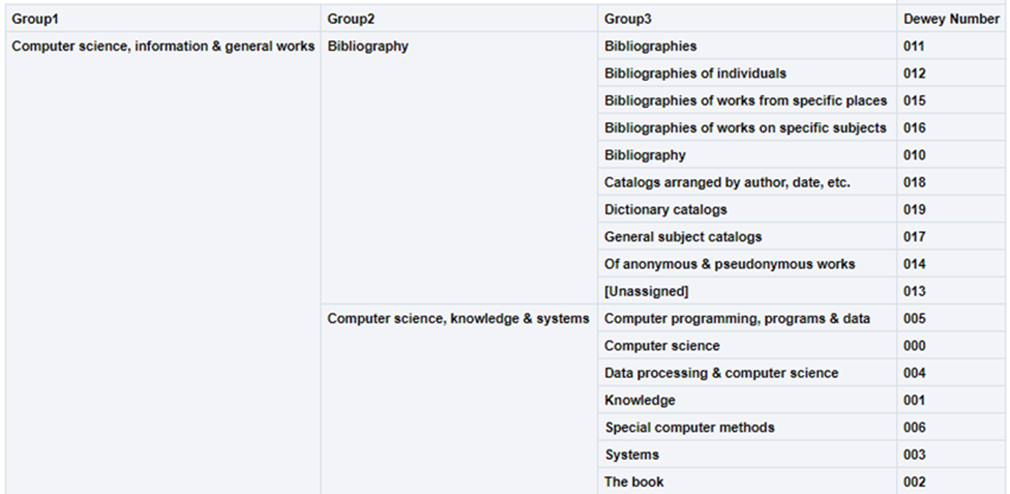
Using the hierarchy option in this dimension, the user can drill down from Group1 to Group3. In each level, the user can see measures accumulated to the relevant group.
For example:
-
000 Computer science, information & general works
-
010 Bibliography
-
000 Computer science, information & systems
-
005 Computer programming, programs & data
-
000 Computer science
-
004 Data processing & computer sciences
-
-
This is presented in Alma Analytics as follows:
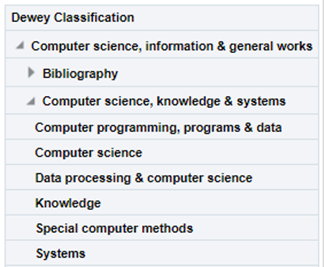
If there is more than one classification code, the last one appears.
| Field | Description | Data Type | Data Size |
|---|---|---|---|
| Group1 | The name (label) of the first Dewey classification level. | VARCHAR | 500 |
| Group2 | The name (label) of the second Dewey classification level. | VARCHAR | 500 |
| Group3 | The name (label) of the third Dewey classification level. | VARCHAR | 500 |
| Dewey Number |
The Dewey Number is a unique classification code assigned to a specific subject or topic category. The first 3 digits of the Dewey Classification. |
VARCHAR | 15 |
| Dewey Classifications | The hierarchy column that allows the user to drill down from the first level of the Dewey Classification to the third level. |
LC Classification
Using this dimension, the user can drill down from Group1 to Group4. In each level, the user may see measures accumulated to the relevant group and see the number of items grouped by classification.
The field descriptions can be found in the LC Classifications shared dimension.
The Library of Congress Classification (LCC) is displayed in Analytics in the LC Classification shared dimension, available in several subject areas. LC classification information is derived from the bibliographic record in most subject areas, except for the Physical Items subject area, where it can be derived from either the holdings record or the bibliographic record.
From the Bibliographic Record:
-
For MARC21
Taken from field 050$$a. If 050$a has no content, 090$a is used.
-
For UNIMARC
Taken from field 680$$a
There are five levels of the LC Classification stored in Alma Analytics. Each level is referred to by a numbered group (Group1, Group2, Group3, Group4 and Group5).
Using the hierarchy option in this dimension, the user can drill down from Group1 to Group4. In each level, the user can see measures accumulated to the relevant group.
For example:
-
SF1-1100 Animal culture
-
SF87 Acclimatization
-
... .
-
SF191-275 Cattle
-
SF250.5-275 Dairy processing. Dairy products
-
SF221-250 Dairying
-
-
This is presented in Alma Analytics as follows:
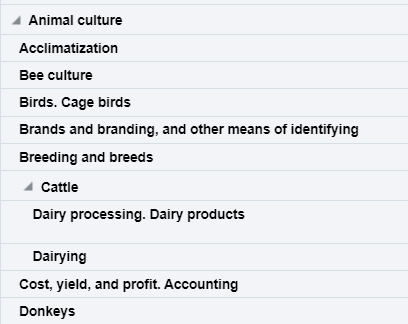
If there is more than one classification code, the last one appears.
Ex Libris works with content providers worldwide to enrich the metadata available in the Alma Community Zone. To enrich the journal/serial content in the CZ, we work directly with the Library of Congress CONSER feed for electronic serials, which we match against our knowledge base to enrich with all of the relevant metadata fields that they supply (for more details, see Community Zone Serial Records Enrichment). We receive weekly updates from CONSER and enrich the CZ records with all relevant metadata, including the 050 fields (when available). In the case of book content, we work with multiple providers who are willing to share their metadata with the Alma community globally (for more details, see Community Zone Monograph Records Enrichment). If you have local access to these classifications, you may want to consider working with the local extension for these records whenever an update is not available. (For more details, see Working with Local Extension Fields for Community Zone-linked Records)
| Field | Description | Data Type | Data Size |
|---|---|---|---|
| Group1 | Group1 is the name given for the first level of the LC Classification and is the primary division used to organize and group related topics, subjects, or materials. | VARCHAR | 500 |
| Group2 | Group2 is the name given for the second level of classification. | VARCHAR | 500 |
| Group3 | Group3 is the name given for the third level of classification. | VARCHAR | 500 |
| Group4 | Group4 is the name given for the fourth level of classification. | VARCHAR | 500 |
| Group5 | Group5 is the name given for the fifth level of classification. | VARCHAR | 500 |
| Start Range |
Start Range refers to the beginning point of a designated range within a classification system. The Start Range indicates the initial classification number or identifier within a specified range that encompasses a set of related subjects, topics, or materials. For example, in PS501-689 (Collections of American literature), the start range is PS501. Possible start range values are hard coded to the beginning of LC Classification groups. |
VARCHAR | 50 |
| End Range |
End Range refers to the concluding point of a designated range within a classification system. The End Range specifies the final classification number or identifier within a defined range that encompasses a set of related subjects, topics, or materials. For example, in PS501-689 (Collections of American literature), the end range is PS689. Possible end range values are hard coded to the end of LC Classification groups. |
VARCHAR | 50 |
| Classification Code |
Classification Code refers to a unique alphanumeric identifier assigned to a specific subject or topic category within the library's classification system. The Classification Code is composed of letters and numbers that represent various facets of a work, such as its subject, genre, or format. For example, in the LC classification "PN1997.2.D56," the "PN" portion represents the general subject area (Performing Arts), and the "1997.2.D56" further refines the classification to a specific work or aspect within that category. |
VARCHAR | 50 |
| Start Range Number | The numbers that come after the letter(s) in the start range. | DOUBLE | |
| End Range Number | The numbers that come after the letter(s) in the end range. | DOUBLE | |
| Classifications | The Hierarchy column that enables the user to drill down from the first level of the classification to the fourth level. Using this column provides the user with the option to view the accumulative measures. Note that the fifth level is not included in this field. | Hierarchy |
For a Knowledge Article related to LC Classifications, see Analytics LC Classification code shows Unknown even though a call number is present in Alma.
Other Classifications
The Other Classifications table is a dimension table that contains fields for classification systems other than LC and Dewey. Like LC and Dewey classifications, you can drill down to different levels, or groups. At each level, the measures associated with the selected group are displayed.
| Field | Description | Additional Information | Mapping from MARC 21 | Data Type | Data Size |
|---|---|---|---|---|---|
| Chinese Classifications | |||||
| Classification Code | The Chinese classification code. | If the code is not found or in an incorrect format Unknown is displayed. | The 090 $a and 093 $a fields in the MARC record. (For CNMARC, the 690 $a field.) | VARCHAR | 50 |
| Group 1-7 (Chinese) | The name of the levels of classification in Chinese. | The group name in Chinese as defined by the National Library of China. | VARCHAR | 500 | |
| Group 1-7 (English) | The names of the levels of classification in English. | The group name in English as defined by the National Library of China. | VARCHAR | 500 | |
| Chinese Classifications (Taiwan) | |||||
| Classification Code | The Chinese (Taiwan) classification code. | If the code is not found or in an incorrect format Unknown is displayed. | When the OTHER_CLASS_SCHEME value in the MARC 084 $2 field is ncsclt the classification code value is taken from the MARC 084 $a field. | VARCHAR | 10 |
| Group 1-3 (Chinese-Taiwan) | The name of the levels of classification in Chinese-Taiwan. | The group name in Chinese as defined by the National Central Library of Taiwan. | VARCHAR | 250 | |
| Group 1-3 (English) | The names of the levels of classification in English. | The group name in English as defined by the National Central Library of Taiwan. | VARCHAR | 250 | |
| NLM Classifications | |||||
| Has W1 | Indicates that the 060 field of the bibliographic record has a value containing the W1 code. This indicates that the item is a journal. A second value in the 060 field is the subject classification code that appears for the NLM Classification Code analytics field. | ||||
| NLM Classification Code | The letters at the beginning of the NLM classification code entered in the MARC field. |
|
Taken from the 060 $a field or, if empty, from the 096 $a field of the MARC record. | VARCHAR | 250 |
| NLM Classification Number | The numbers that come after the letters of the NLM classification code. | Taken from the 060 $a field or, if empty, from the 096 $a field of the MARC record. | VARCHAR | 50 | |
| NLM Group 1-5 | The names of the levels of classification. | The group name as defined by NLM. | VARCHAR | 4000 | |
| NLM Geographic Classifications | |||||
| NLM Geographic Code | The code of the geographic location, used for various purposes by NLM. | Taken from the 060 $a field . | VARCHAR | 50 | |
| NLM Geographic Name | The name of the geographic location, used for various purposes by NLM. | The Geographic Name from NLM that corresponds to the Geographic Code. | VARCHAR | 255 | |
| U.S. SuDoc Classifications | |||||
| U.S. SuDoc Classification Code | The letters at the beginning of the classification code entered in the MARC field. |
|
When the first indicator is 0, this is taken from the 086 $a field in the MARC record. | VARCHAR | 250 |
| U.S. SuDoc Classification Number | The characters (usually numbers) that come after the letters in the SuDoc Classification code entered in the MARC field. | When the first indicator is 0, this is taken from the 086 $a field in the MARC record. | VARCHAR | 50 | |
| U.S. SuDoc Agency | The name of the top level (parent) U.S. government agency. | Unlike other classification systems, the SuDoc system groups publications together by the publishing agency, that is, a U.S. government agency. | The agency name that matches the classification code, as defined by SuDoc. | VARCHAR | 4000 |
| U.S. SuDoc SubAgency | The name of subordinate bureau or division of the parent U.S. agency. |
A subagency is displayed if a publication is published by a subordinate bureau or division within a parent agency. If the top level agency is the publishing agency, then that agency is also listed as the subagency. |
The subagency name that matches the classification number, as defined by SuDoc. | VARCHAR | 4000 |
| U.S. SuDoc Title | Title designates either a specific publication title or category of the publication. | The title that matches the classification number, as defined by SuDoc. | VARCHAR | 4000 | |
Institution
The shared Institution dimension allows the Network Zone to view reports according to institution. If an analytics report is run from the Network Zone in a collaborative network implementing a Network Zone, all member institutions are included in the report for Institution Code and Institution Name. If an analytics report is run from an institution that is not part of a collaborative network implementing a Network Zone, only the single institution from which the report is run is included in the report for Institution Code and Institution Name.
This dimension is available in every subject area. It contains the following fields:
| Field | Description | Additional Information | Data Type | Data Size |
|---|---|---|---|---|
| Institution Code | The code of the institution. |
Configured from: Configuration > General > Add a Library or Edit Library Information > Summary tab. The label in Alma is Code located on the right pane. |
VARCHAR | 50 |
| Institution Name | The name of the institution. |
Configured from: Configuration > General > Add a Library or Edit Library Information > Summary tab. The label in Alma is Organization unit name. |
VARCHAR | 255 |
| Institution Address Line 1 | The first line of the address of the institution. It usually includes the building number and the street name. |
Configured from: Configuration > General > Add a Library or Edit Library Information > Contact Information tab. This is taken from the address configured as the Preferred address. The label in Alma is Address Line 1. |
VARCHAR | 1000 |
| Institution City | The city of the institution. |
Configured from: Configuration > General > Add a Library or Edit Library Information > Contact Information tab. This is taken from the address configured as the Preferred address. The label in Alma is City. |
VARCHAR | 255 |
| Institution State Province | The state or province of the institution. |
Configured from: Configuration > General > Add a Library or Edit Library Information > Contact Information tab. This is taken from the address configured as the Preferred address. The label in Alma is State/Province. |
VARCHAR | 320 |
| Institution Country | The country of the institution. |
Configured from: Configuration > General > Add a Library or Edit Library Information > Contact Information tab. This is taken from the address configured as the Preferred address. The label in Alma is Country. |
VARCHAR | 320 |
| Institution Postal Code | The postal code of the institution. |
Configured from: Configuration > General > Add a Library or Edit Library Information > Contact Information tab. This is taken from the address configured as the Preferred address. The label in Alma is Postal code. |
VARCHAR | 200 |
| Institution Timezone | The timezone of the institution. | The timezone is set during implementation. | VARCHAR | 255 |
| Data Available As Of | When the institution data became available in analytics. | Displayed at the bottom of the main Analytics menu. | VARCHAR | 255 |
| Data Updated As Of | When the institution data was taken from the Alma database. | Displayed at the bottom of the main Analytics menu. | VARCHAR | 255 |
Page tags: article:topicInstitutionproduct:almacontent:Documentationlang:englishBibliographic DetailsDewey ClassificationsLC ClassificationRequest DateDigital Usage MeasuresDigital Usage Details
