
Configuring and Working with Cloud Apps
Per configurare le Cloud Apps, è necessario disporre del seguente ruolo:
- Amministratore di Sistema Generale
Cloud Apps è un framework aperto che consente agli sviluppatori di scrivere app che funzionano all'interno dei prodotti per l'istruzione superiore Ex Libris, come Alma, il back-office di Primo VE, Esploro, Leganto e Rapido. Aggiunge nuove funzionalità oltre alle funzionalità principali di Ex Libris, che possono integrarsi con altri sistemi o fornire scorciatoie ed efficienze per flussi specifici dell'istituzione.
Enabling Cloud Apps
Una volta abilitate da un'istituzione, le Cloud Apps possono essere cercate e installate dall'utente finale. Le Cloud Apps possono rispondere al contesto della sessione dell'Utente, offrendo funzionalità aggiuntive a seconda della pagina corrente.
The Cloud Apps icon  appears in the top toolbar.
To enable Cloud Apps:
- Select the Cloud Apps Configuration page from the Alma General Configuration menu (Configuration Menu > General > General Configuration).
- Select Enable Cloud Apps. Si apre una pagina sul Developer Network.
- Legga il contratto di Cloud Apps e selezioni la casella di controllo di conferma.
- Select Activate Cloud Apps for [Institution_Code].
- Esci da Alma e poi accedi di nuovo. If you have performed the above steps, logged in and out of your Alma account, and you still do not see the Cloud Apps icon in the top toolbar, open a case with Customer Support to enable it.
To limit which Cloud Apps can be installed by users in your institution:
- Select the Cloud Apps Configuration page from the Alma General Configuration menu (Configuration Menu > General > General Configuration).
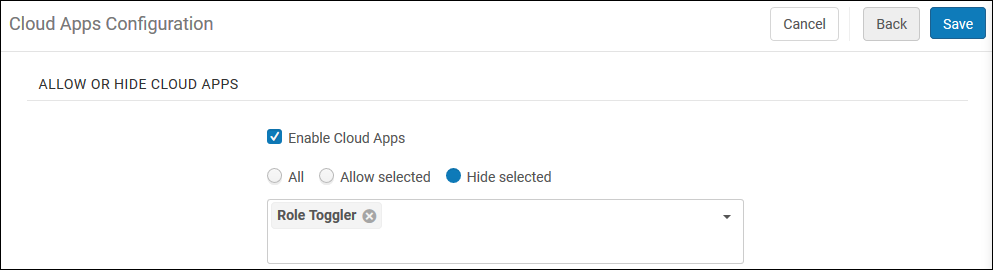
- In the Allow or Hide Cloud Apps section, choose All,Allow Selected, or Hide Selected to define which Apps the users will see.
-
Quando si sceglie Consenti selezionati o Nascondi selezionati, selezionare la freccia rivolta verso il basso e scegliere quali app nascondere o consentire.
- Seleziona Salva.
Le modifiche all'elenco delle app cloud consentite avranno effetto dopo il Suo prossimo accesso.
Allow users to activate only those cloud apps for which they have the required roles/privileges to operate:
- Select the Cloud Apps Configuration page from the Alma General Configuration menu (Configuration Menu > General > General Configuration).
- Check the Hide cloud apps for users who are missing roles for the relevant APIs used by the cloud app checkbox.
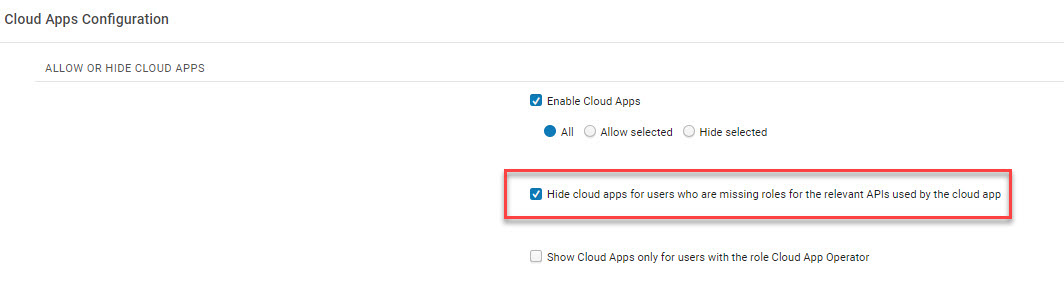
After selecting this option, Cloud Apps that have previously been activated by users that are missing roles for the relevant APIs used by that cloud app, will be hidden from the Activated Apps tab.
To allow only users with the Cloud App Operator role to activate and use cloud apps:
-
Select the Cloud Apps Configuration page from the Alma General Configuration menu (Configuration Menu > General > General Configuration).
-
Check the Show cloud apps only for users with the Cloud App Operator checkbox.
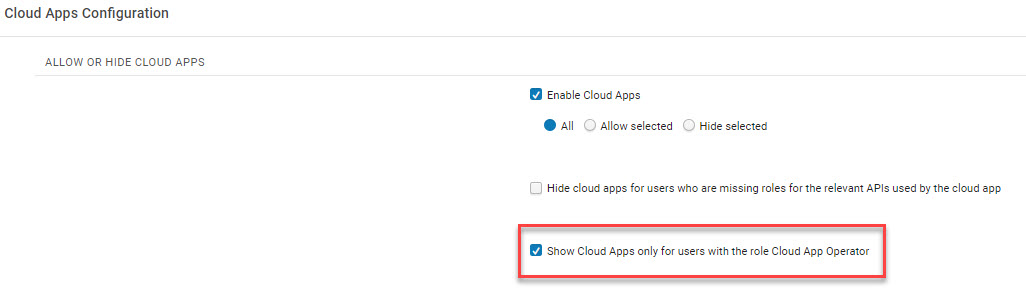
After selecting this option, no users will be able access Cloud Apps until they are assigned the Cloud App Operator role.
Using Cloud Apps
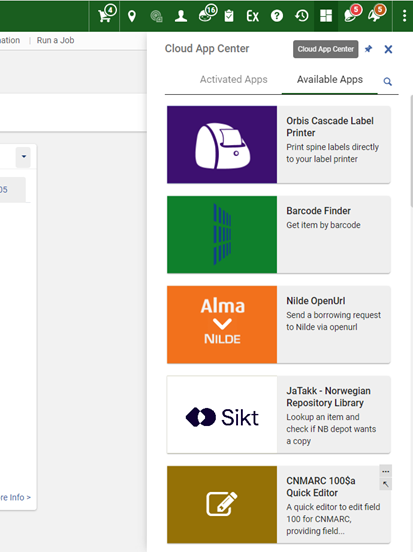
Per utilizzare le Cloud Apps, selezioni l'icona delle Cloud Apps nell'angolo in alto a destra del nuovo layout di Alma. This opens the Cloud App Center, which contains two tabs,Activated Apps, which shows those apps that have been installed and are available to run, and Available Apps, which shows all the apps that can be used. È possibile navigare o cercare in entrambe le tab.
To use Cloud Apps in a sliding panel, such as in the All Titles search and resource sharing (see New Layout), first open the Cloud App and pin it. Dopodiché può aprire il Pannello a scomparsa.
To find and install Cloud Apps:
- Selezionare il Cloud Apps Center.
If the Show Cloud Apps checkbox was marked, then only users with the Cloud App Operator role will be see the Cloud Apps Center icon
. - Selezioni App disponibili e sfogli l'elenco delle app, oppure selezioni l'icona Cerca per cercare un'app specifica. Ogni App include le seguenti informazioni:
- Descrizione
- Sviluppatore di applicazioni
- Link al codice su GitHub.
- Collegamento all'app nell'Ex Libris App Center
- App's license
- Qualsiasi sito esterno utilizzato dall'app
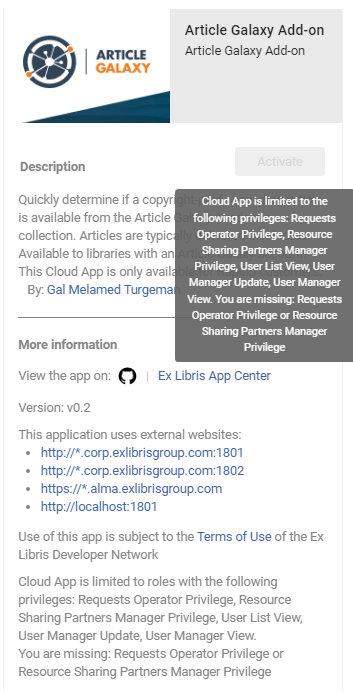
- Required privileges - only visible if the Hide cloud apps checkbox was marked (see Limit Cloud Apps Activation).
- Selezionare Attiva. Note that if the Hide cloud apps checkbox was marked and the user does not have the relevant privileges, a tool tip with the missing privileges displays when hovering over the Activate button.
To use Cloud Apps:
-
Selezionare il Cloud Apps Center.
If the Show Cloud Apps checkbox was marked, then only users with the Cloud App Operator role will be see the Cloud Apps Center icon
. - Select Activated Apps and browse the list of Apps, or select the Search icon to search for a specific App.
- Selezionare l'app desiderata e seguire il prompt sotto l'elenco dell'app.
Quando un'app è installata, sono disponibili le seguenti azioni:
- Uninstall the app

- Change settings

- Configure the app (for administrators only)

- View help for the app

Watch the Cloud Apps in Alma video (4:22 minutes).
Developing Cloud Apps
To get started developing Cloud Apps for use by your and other institutions, see the Ex Libris Cloud Apps on the Developer Network.
FAQ
- D: Quando vedremo le app cloud per Leganto, Esploro e gli altri software cloud di Ex Libris?
A: Currently there are Cloud Apps that are relevant for Alma. È possibile creare applicazioni cloud per tutti i prodotti della piattaforma Ex Libris, inclusi Leganto ed Esploro. L'utente può creare app utilizzando Cloud Apps CLI. Queste app possono poi essere aggiunte all'App Center, dove potranno essere scoperte dalla comunità. - D: Dove posso trovare informazioni su tutte le app Cloud disponibili?
A: All Cloud Apps will be in the developer network in the App Center. - D: Quando installo un'app, verrà installata solo per me o per l'intera istituzione? A: Installing an app installs it only for the user. Si noti che gli amministratori possono configurare le app Cloud disponibili per l'installazione da parte dell'Utente.
- D: Ho un'idea per un'app, cosa dovrei fare?
A: Institutions that have developer knowledge and skills, can create Cloud Apps for themselves. On the main Cloud Apps page you will be able to find links to Getting Started,Documentation and Tutorials on how to create a Cloud App. In alternativa, può suggerire l'idea alla comunità e vedere se qualcuno è disposto a realizzarla per Lei. - Q: I need support for a Cloud App I'm using. Chi dovrei contattare?
A: The Cloud App framework supports a help link in the App details. Invitiamo tutti gli sviluppatori di app a fornire un collegamento alla Guida con documentazione su come utilizzare l'app e su come ricevere ulteriore assistenza, se necessario. Può accedere al link Aiuto nei dettagli dell'app (cliccando sui 3 puntini di sospensione…). Cloud Apps developed by Ex Libris are covered by standard support procedures. That means a SalesForce case can be opened for apps identified with the "Ex Libris" tag in the App Center. - Posso testare un'app cloud nella nostra sandbox?
A: Activation and configuration of Cloud Apps are done separately in your sandbox and production environments. Se desidera testare una particolare Cloud App nella Sua sandbox prima di renderla disponibile al Suo Utente in produzione, può utilizzare le liste consentite e non consentite nella sandbox e in produzione per controllare dove l'app può essere installata. - D: Come riceviamo gli aggiornamenti delle Cloud App installate?
A: Updates to individual Cloud Apps are made by the app's developer and deployed to the Ex Libris cloud by the developer. L'utente non deve eseguire alcuna azione. Dopo il loro prossimo accesso, utilizzeranno automaticamente l'app aggiornata. - D: Come vengono determinati i privilegi per le app Cloud? Un'app Cloud ha accesso a qualsiasi dato in Alma?
A: One of the main benefits of Cloud Apps is that they use the context of the logged-in user. Se un'app cloud tenta di accedere a dati per i quali l'utente attualmente connesso non dispone del ruolo appropriato, l'app riceve un errore di autorizzazione negata da Alma. - Q: Can Cloud Apps send my data to other systems?
A: Cloud Apps can interact with external systems to improve the productivity of your staff. Per essere completamente trasparenti, le App Cloud devono dichiarare a quali sistemi sono in grado di connettersi. Queste informazioni sono visualizzate nel pannello delle informazioni prima che un'applicazione sia installata. - Q: Are Cloud Apps checked for security issues before they are deployed to the Ex Libris cloud?
A: A new Cloud App undergoes a security audit as part of the deployment to ensure it is not using any code libraries with known security issues. Anche le app cloud vengono revisionate manualmente da Ex Libris prima di essere rilasciate. - Q: Are API requests made from Cloud Apps counted against our daily institutional API governance threshold?
A: API requests from Cloud Apps are not counted in the institutional governance thresholds. Le chiamate API di Cloud App sono soggette a una propria soglia, i cui dettagli tecnici sono descritti nella documentazione per gli sviluppatori di Cloud App.
