
Widget
Configuring Widgets
- Amministratore di Sistema Generale
In addition to the pre-defined widgets (see Managing Widgets) and Analytics widgets ( see Working with Analytics Objects), Alma lets you link to other widgets to allow staff users to display them on their Alma home page.
I widget sono larghi 497 pixel e alti al massimo 300 pixel. Se i contenuti che appaiono nel widget superano queste dimensioni, le barre di scorrimento verticali e/o orizzontali vengono aggiunte automaticamente.
I widget non possono essere creati dalle dashboard.
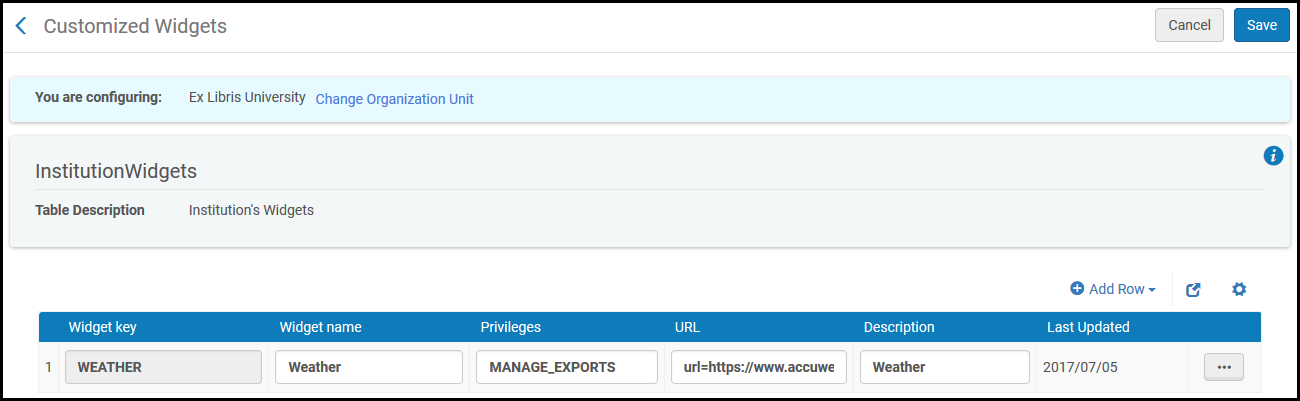
The Customized Widgets page (Configuration Menu > General > Widgets > Customized Widgets) enables you to configure additional widgets.
I widget predefiniti (come Discovery Ricerca e Primo dashboard) non possono essere rimossi.
Per ulteriori informazioni sui widget:
- For information about the Scheduled Jobs Status widget, see Viewing Scheduled Job Summary Status.
- For information about configuring notification in the Notification widget, see Configuring the Home Page Notification Widget.
- For information on the Primo dashboard and search box, see Adding Primo Search Box to the Alma Home Page. Questo è applicabile solo agli ambienti Alma-Primo.
- For information about the Discovery Search widget, see Configuring the Discovery Search Widget. Questo è applicabile solo agli ambienti di Primo VE.
- To manage widgets on your home page, see Managing Widgets.
Adding a Widget
Il widget che aggiungi a livello di istituzione si applica a tutte le biblioteche all'interno dell'istituzione.
- On the Customized Widgets page (Configuration Menu > General > Widgets > Customized Widgets), select Add Row and enter a key and name for the new widget. Il nome del widget apparirà sopra il widget. La chiave del widget è un nome permanente che non può essere modificato.La chiave Widget non può contenere spazi. Use underscore ('_') instead of the space, if needed.
- Inserire quanto segue:
- L'URL deve essere HTTPS. Se inserisce un URL non HTTPS, il widget non verrà visualizzato nella dashboard.
- La pagina web deve consentire di essere incorporata in un X-Frame. Si prega di nota che le pagine della documentazione di Ex Libris e dell'Ideas Exchange non possono essere incorporate in un X-Frame e quindi non possono essere utilizzate per i widget.
- Privilegi – Indica i privilegi necessari per aggiungere e visualizzare il widget. Lasci vuoto per tutti i privilegi.
- URL – l'URL della pagina Web creata per fungere da widget. (Non aggiungere url= prima dell'URL; Alma lo aggiunge.)
- Descrizione – Una descrizione del widget
- Selezionare Aggiungi riga. Il nuovo widget è salvato e appare in fondo alla Lista dei widget definiti.
- Selezioni Salva per memorizzare i dettagli del nuovo widget.
A user can add any widget defined here to the Alma home page; see Managing Widgets.
Per eliminare un widget, selezioni Elimina nelle azioni di riga Lista.
Configuring the Homepage Notifications Widget
- Amministratore di Sistema Generale
Il widget delle notifiche della home page visualizza annunci generali e informazioni dalla tua istituzione. Gli utenti possono includere o rimuovere il widget dalla loro home page, come qualsiasi altro widget.
You configure the notifications that appear in this widget on the Home page Notifications page (Configuration Menu > General > General Configuration > Homepage Notifications).
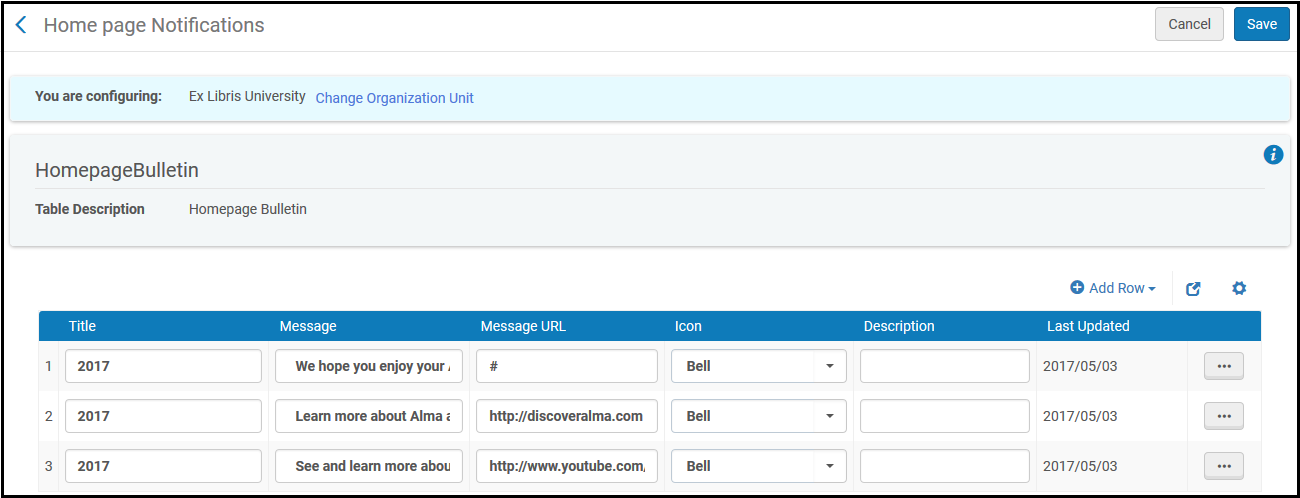
To configure the Notifications widget:
- Nella pagina delle notifiche della home page, seleziona Aggiungi riga e compila i seguenti campi:
- Icon- Select one of the icon types:
- Bell
- Calendario
- Segno di spunta
- Punto esclamativo
- Impostazioni
- Star
- Strumenti
- Title- A title for the notification.
- messaggio – Il messaggio che desidera che appaia nel widgetNotifiche
- messaggio URL – l'URL al quale desidera che il messaggio sia collegato
- Descrizione – una descrizione del messaggio (per uso interno)
- Icon- Select one of the icon types:
- Selezioni Aggiungi riga per aggiungere il messaggio al widget Notifiche.
- Seleziona Salva per salvare le modifiche.
Per eliminare una notifica, selezioni Elimina nell'azione di riga Lista.
Le notifiche nel widget sono ordinate in base alla data di aggiornamento (in ordine discendente).
