Data Sharing Profile
- 一般システム管理者
概要
新技術により、データ駆動型の意思決定をサポートするリソースとサービスを評価する新しい方法を図書館と司書に提供しています。さまざまな図書館の情報を分析する今日の能力は、すべての参加図書館に新しい洞察と知識を提供する絶好の機会を提供します。Ex Librisは、図書館がサービスを充実し、ユーザーニーズの変化パターンを特定するために必要とする高度な評価とコミュニティデータの分析を図書館が利用できるようにする際に、データのプライバシーと機密性を維持することに最大の努力をしています。
Frequently Asked Questions
What data is included if you opt-in?
Title level holdings, non-identifiable fulfillment and reading list statisticswill be included.データは匿名化されます。匿名化されたデータのソース (機関や個人) を特定する方法はありません。
Will personal or financial data be included?
これらの新しい分析機能には、一切の個人データや財務データ (予算、注文、請求書など) は含まれません。
Will user data be included?
個々のユーザーの情報 (個人が特定できるものもできないものも) は、使用されるデータの一部ではありません。たとえば利用情報は、ユーザー情報から完全に切り離された貸出・電子アクセス数の形式で提供されます。
How will my institution data be anonymized?
貴機関のデータは、他の参加機関からの類似データに含まれる前に匿名化されます。This includes obscuring all information linked to your institution, including institution codes and identifiers.
If I include data will I be getting ads to purchase resources from ProQuest?
いいえ。データの匿名化により、参加機関の特定や参加機関への連絡は一切できなくなります。
Once I've opted-in, can I opt-out?
はい。You can opt-out at any time.Should you withdraw from including your data,all your data will be removed from the community data and from the Collection Development and Selection analysis.
In a consortium with a Network Zone, if one institution opts in, is there a potential to inadvertently allow access to all of the network members' data?
いいえ。機関がオプトインしてデータを共有することに同意すると、特定の機関のデータのみが共有され、ネットワークの機関やネットワークメンバーが共有されることはありません。
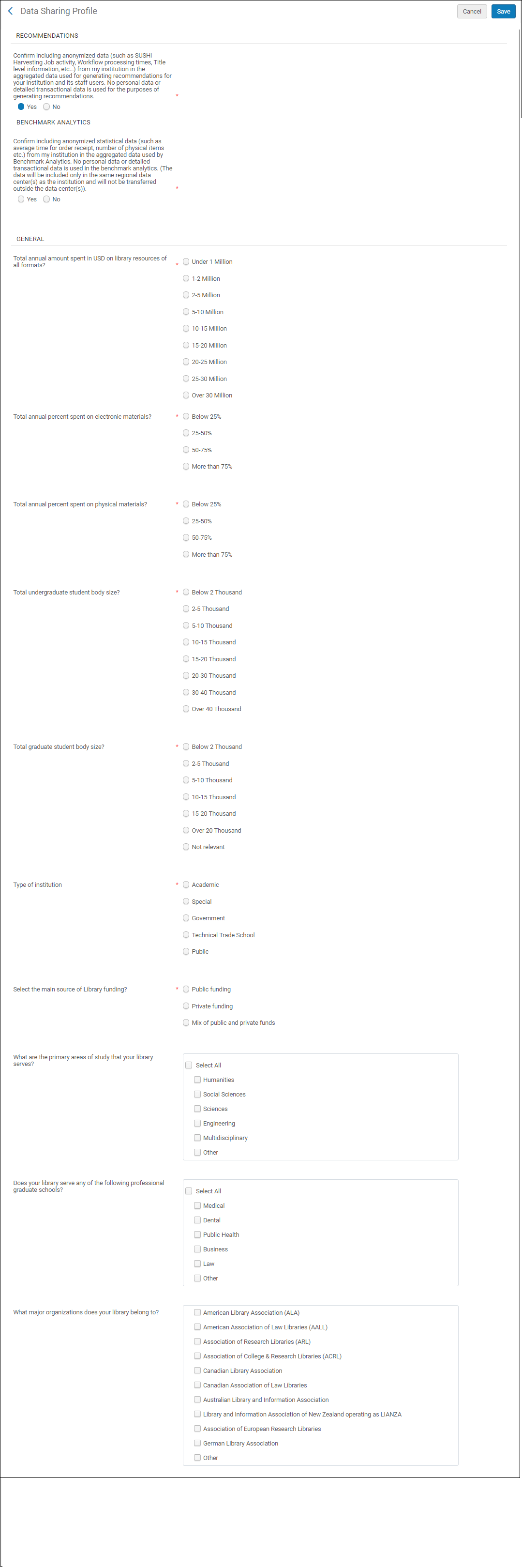
Data Sharing Profile
Resource Sharing
Resource Sharing enables institutions to shareholding information for resource sharing purposes.When set to Yes, this indicates that the institution has agreed to share its information.The default setting for this option is No. We strongly recommend setting this option to Yes.
Recommendations
DARAとして知られるこのサービスは、貴機関が効率を改善し、コストと間接経費を削減し、Almaをさらに活用するために、推奨事項を生成します。推奨事項は、特に貴機関の匿名化されたデータを他機関のデータと比較することにより作成されます。To enable Recommendations, you must select Yes to the Recommendations question.推奨の要否の質問に対していいえを選択すると、匿名化されたデータを推奨事項の作成に使用しないことを選択できます。
For more information about DARA, see DARA – Data Analysis Recommendation Assistant.
Benchmark Analytics
ベンチマークアナリティックスにより、貴機関のパフォーマンスを類似の機関と比較する分析リポートを作成できます。Almaは、これを行うために、匿名化されたデータを貴機関から収集します。To enable Benchmark Analytics, you must select Yes to the Benchmark Analytics question.ベンチマークアナリティックスを無効にするには、いいえを選択します。このページの「一般」セクションにある質問に答えると、Alma が使用する貴機関のプロファイルが作成されます。また、貴機関と類似した他機関が特定され、比較が実施されるとともに関連情報が提供されます。
匿名化された統計データの使用を確認すると、すべての統計データは匿名化して集計され、そこに個人データや詳細な取引データは含まれません。機関ごとにこのデータを識別する方法はありません。No identifiable personal or financial data of any kind (funds, orders, invoices, fines, and fees, etc.) is included in Benchmark Analytics.If you do not allow your anonymized statistical data to be aggregated, you will not see any statistical data in Alma Benchmark Analytics.
If you agree to allow your anonymized statistical data to be aggregated and at a future time you decide to no longer allow your anonymized statistical data to be aggregated, within one month your anonymized statistical data will be removed, and you will no longer see any statistical data in Alma Benchmark Analytics If you do not agree to allow your anonymized statistical data to be aggregated and at a future time you decide to allow your anonymized statistical data to be aggregated, within one month your anonymized statistical data will be added, and you will be able to take advantage of Alma Benchmark Analytics.
- The aggregated and anonymized statistical data will be used only within the same regional data center as the institution and will not be transferred outside the data center.
- 複数の地域データセンターを横断してAlmaベンチマークアナリティックスリポートを作成することはできません。
- Institutions that are live with Alma for less than a year and have agreed to share their anonymized statistical data can use and take advantage of Alma Benchmark Analytics, but their own data is not shared.Alma のベンチマークアナリティックスには、適切な統計式を維持するため、1年以上前のデータのみが含まれます。
Configuration
Configure the data sharing services from Configuration > General > General Configuration > Data Sharing Profile.