
機関の言語を設定
- 一般システム管理者
The Institution Languages mapping table (Configuration Menu > General > General Configuration > Institution Languages) allows you to configure which languages are supported by the institution.利用可能な言語は、Ex Librisが事前に定義しています;各言語は有効にしたり無効にしたりできます。言語をサポートできるのは、下記のコンテキストです:
- 顧客向けインターフェース - 通知(Eメールおよび SMS)、セルフチェック機メッセージ、Primo VE、Primo の Get It、View It、My Account タブが含まれます。
- スタッフ向けインターフェイス – ユーザー向けインターフェイスや、Almaにおけるその他すべてのバックオフィス要素など
外部トランスレータ―を使用すると、場合によっては、特定のラベルおよびボタンの表示や機能に問題が発生することがあります。上記のように、機関言語マッピングテーブルでサポートされている言語を使用することをお勧めします。
機関の言語マッピングテーブルには、次の言語が含まれています。
| 言語コード | 言語名 |
|---|---|
| ar | アラビア語 |
| ca | カタロニア語・バレンシア語 |
| cs | チェコ語 |
| cy | ウェールズ語 |
| da | デンマーク語 |
| de | ドイツ語 |
| en | 英語 |
| es | スペイン語 |
| eu | バスク語 |
| fi | フィンランド語 |
| fr | フランス語 |
| ga | アイルランド語 |
| gl | ガリシア語 |
| haw | ハワイ語 |
| he | ヘブライ語 |
| hu | ハンガリー語 |
| is | アイスランド語 |
| it | イタリア語 |
| ja | 日本語 |
| ko | 韓国語 |
| It | リトアニア語 |
| mi | マオリ語 |
| ms | マレー語 |
| nb | ノルウェー語、ブークモール。ブークモール・ノルウェー語 |
| nl | オランダ語;フラマン語 |
| nn | ノルウェー語ニーノシュク、ニーノシュク、ノルウェー語 |
| no | ノルウェー語 |
| pl | ポーランド語 |
| pt | ポルトガル語(ブラジル) |
| ru | ロシア語 |
| se | 北部サーミ |
| sv | スウェーデン語 |
| th | タイ語 |
| tr | トルコ語 |
| uk | ウクライナ語 |
| zh | 中国語 |
| zh-tw | 繁体字中国語 |
For more information about mapping tables, see Mapping Tables.
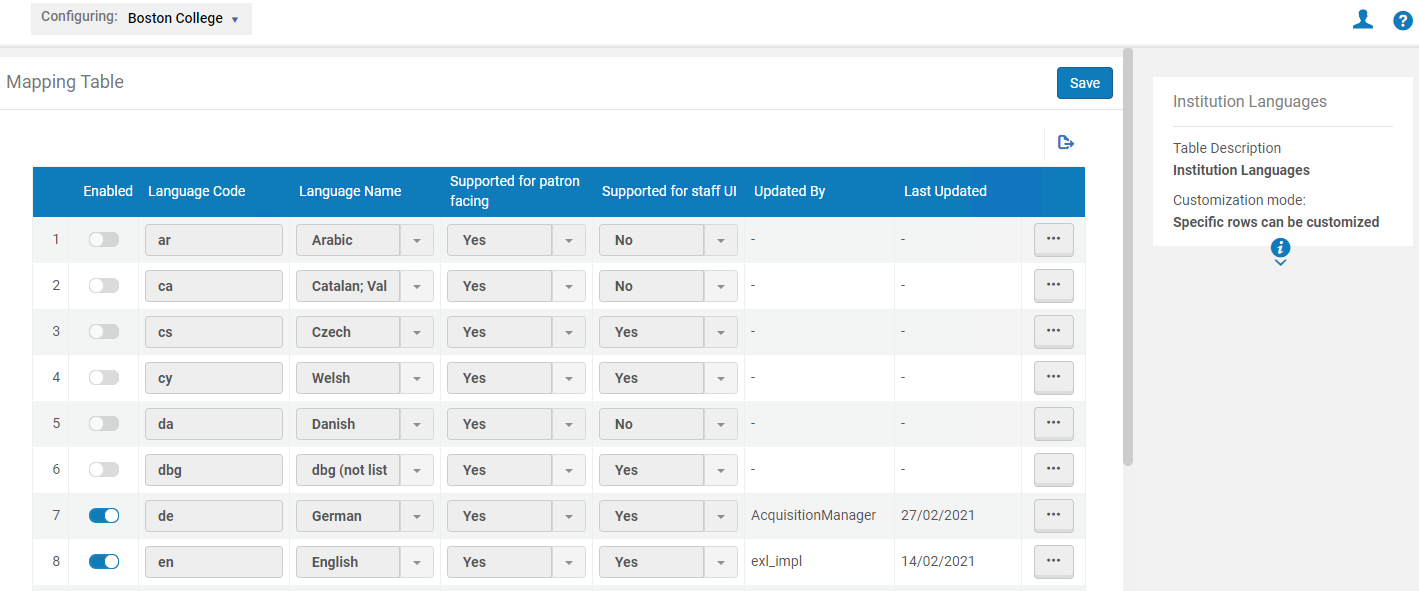
このページでは、言語を有効または無効にできます。Almaでの変更を確認するには、Almaへのログインおよびログアウトが必要な場合があります。
ユーザー向けのサポート列は、その言語がユーザー向けインターフェイス (EメールやSMSによる通知、セルフチェック機のメッセージ、Primoの「入手する」「見る」「My Account」タブ) でサポートされるかどうかを示します。The Supported for Staff UI column indicates whether the language can be selected as the staff-facing interface (when you select the name of the user in the top right-hand corner of Alma and select the language from the Language drop-down list):
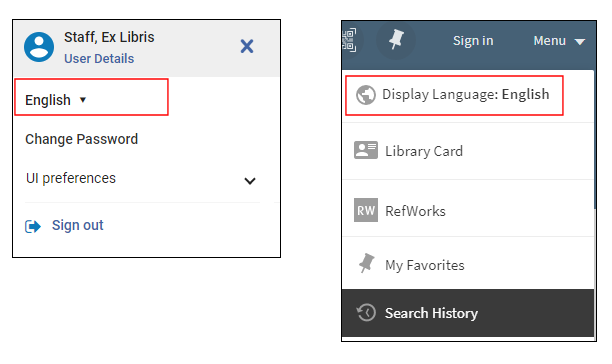
For information regarding the configuration of the display languages for Primo, see Configuring Display Languages for Primo.
The values in the Supported for Patron Facing column and Supported for Staff UI column are read-only and cannot be edited.
If a staff user selected an enabled language as their interface language, then physical location names can only be edited for that language.To change the name of a physical location in a different language, select that language as the interface language.
If a patron selected an enabled language as their Preferred Language, all emails received by the patron display in this language (see the Preferred Language field in the Quick User Management Page Fields table in Adding Users).
