
NACSIS設定
このページには、NACSIS-CAT/ILL システムを操作できるようにするために機関が Alma で設定する必要があるすべての設定が含まれています。For information on working with NACSIS-ILL see Integration with NACSIS-CAT/ILL.
システムタイプ NACSIS の統合プロファイル
The information for all communication with the NACSIS-CAT/ILL system is captured in the Central Catalog Integration profile of system type 'NACSIS'.
- On the Integration Profile List page (Administration > General Configuration > Configuration Menu > External Systems > Integration Profiles), select Add Integration Profile.統合プロファイルウィザードの最初のページが表示されます。
- Under "Code", select a code for the integration profile.
- 「名前」の下で、統合プロファイルの名前を選択します。
- Under "Integration Type", select 'Central Catalog Integration'.
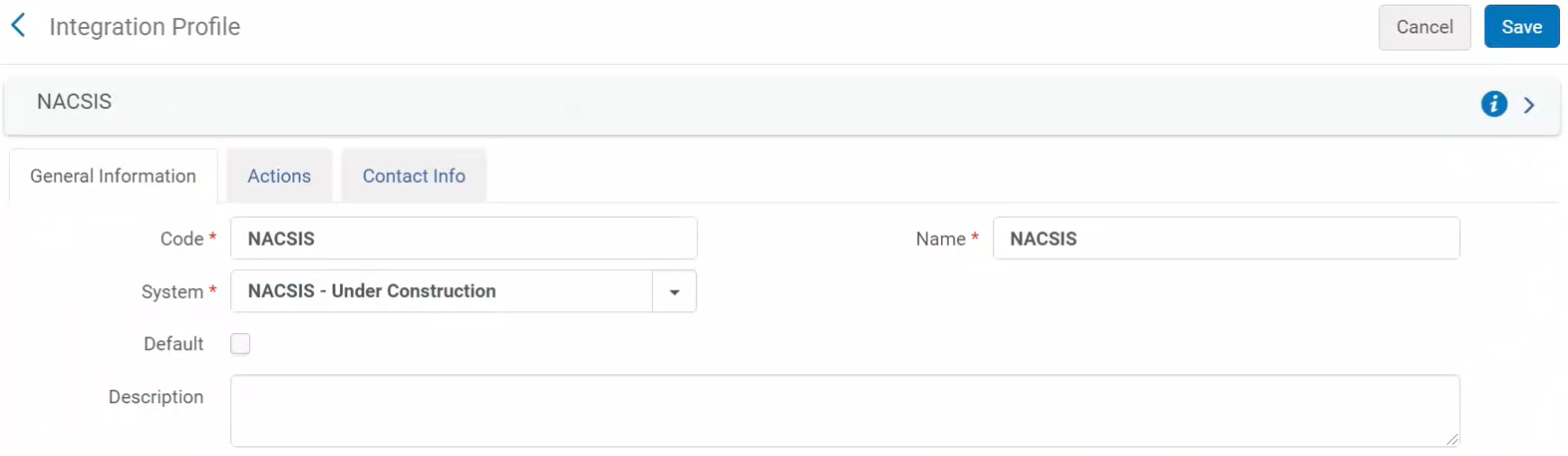
- 「システム」の下で「NACSIS」を選択します。
- Select Next.You are taken to the next page.
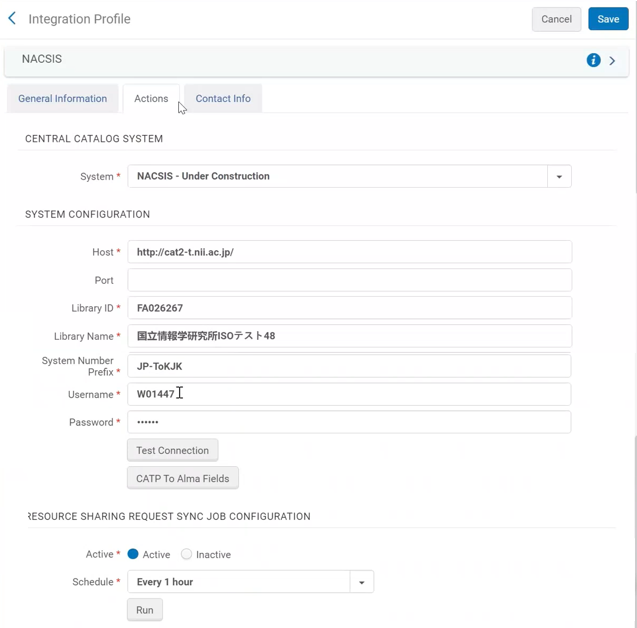
-
このページで、次の情報を入力します。
NACSIS 統合プロファイルページ - アクションタブ 分野 説明 中央カタログシステム システム まだ入力されていない場合は、「NACSIS」を選択します。 システム設定 ホスト NACSIS にアクセスするための URL を入力します。 ライブラリ ID FANO ID(NACSIS ライブラリ識別子)を入力してください ライブラリ名 ライブラリ名を入力します。 ユーザー名 NACSIS にアクセスするための認証資格情報を入力します。
パスワード CATPから Alma フィールドへ CAT-P フィールドと MARC タグのマッピングを入力します。 リソースシェアリクエスト同期ジョブ設定 有効 Select Active to activate the scheduling of the synchronization job (for information about the job, see Synchronization Job "Import Resource Sharing Requests"). スケジュール NACSIS 要求を取得する同期ジョブのスケジュールを選択します。 実行 実行を選択すると、いつでもジョブをアドホックに実行します。 作品の設定
For more information regarding the configuration of import profiles for NACSIS, see Import Profile Configuration for NACSIS.
リポジトリインポートプロファイル NACSIS から書誌レコードをインポートするときに使用するインポートプロファイル。 機関インポートプロファイル(名前) NACSIS から名称権限レコードをインポートするときに使用するインポートプロファイル。 権限インポートプロファイル(統一タイトル) NACSIS から統一タイトルレコードをインポートするときに使用するインポートプロファイル。 - 保存を選択します。If the job "Import Resource Sharing Requests" is scheduled, it will run according to the selected schedule.あるいは、いつでもジョブを実行することもできます。そのためには、実行を選択します。The job can be monitored on the Monitor Jobs page; see Viewing Running Jobs.レポートの詳細については以下を参照してください。
NACSIS パートナー
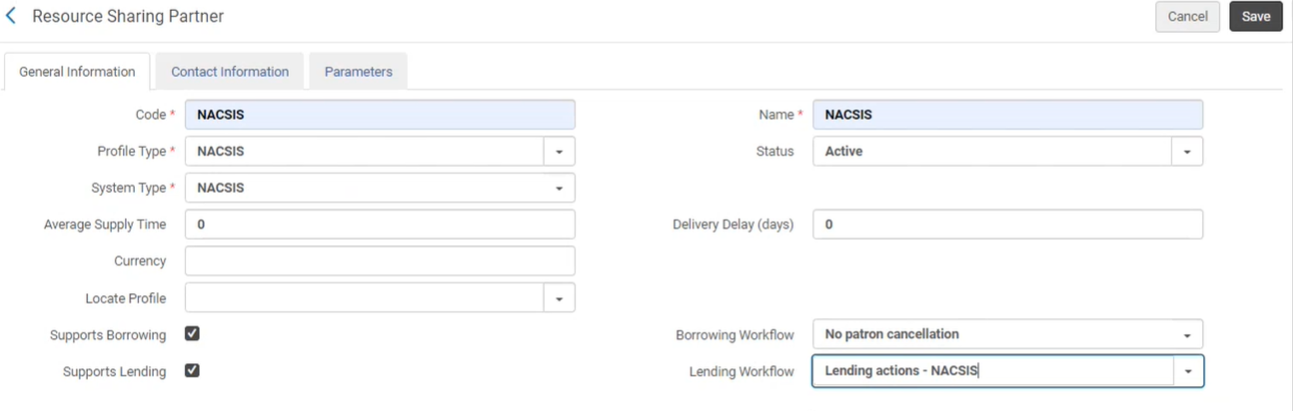
Alma と NACSIS-ILL 間のリソースシェアコミュニケーションを有効にするには、所属機関に対して NACSIS リソースシェアパートナーを定義する必要があります。See Resource Sharing Partners.
Make sure to configure the workflow profiles.See Configuring Workflow Profiles.
NACSIS ユーザー識別子
The NACSIS user identifier needs to be set on the Alma user that will be working with NACSIS-ILL system, creating borrowing and lending requests.
各ユーザーには、Alma で定義された一意の NACSIS ユーザー識別子が必要です。
- Open the Find and Manage Users page (Admin > User Management > Manage Users).
- 希望するユーザーを見つけて、このユーザーの行のアクションの「編集」を選択します。
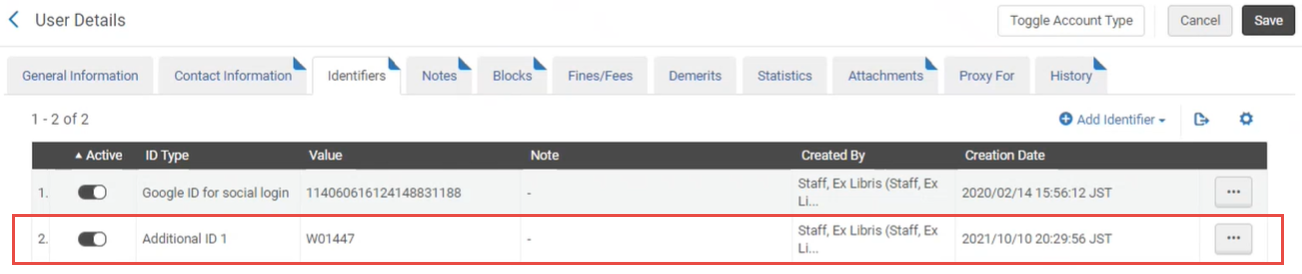
- Open the Identifiers tab.
- 「識別子を追加」を選択します。
- In the dialog that opens, indicate the following information: Identifier Type- select 'Additional ID 1'.Value- Enter the NACSIS user identifier (NACSIS User Name).
- 追加して閉じるを選択します。
- [保存]を選択します。
NACSIS のインポートプロファイル構成
To configure the import profile for the integration with NACSIS, see Managing Import Profiles.
NACSIS レコード形式 (CAT-P) を Alma 形式 (MARC21) にクロスウォークすることが必須です。これは、物理ソース形式とソース形式を CAT-P に設定し、ターゲット形式を MARC21 書誌/権限に設定することによって行われます。
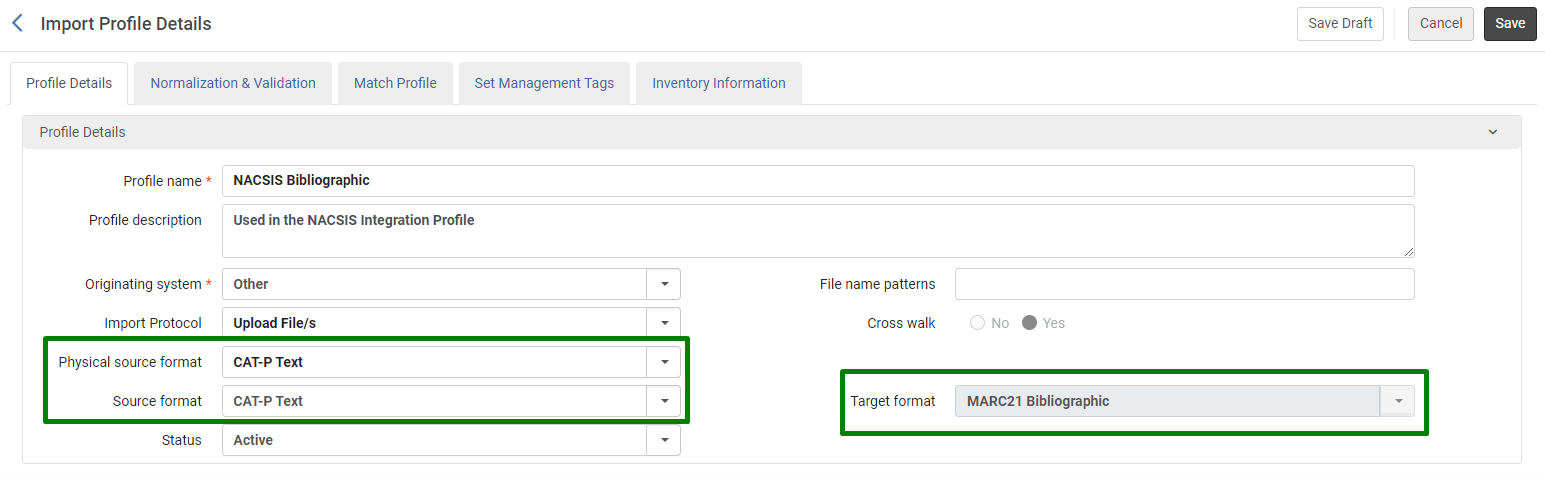
In order to enable the Physical source format CAT-P, please contact Clarivate support.
Configuring Paper Format for NACSIS Shipping Costs
価格を含めた用紙フォーマットを設定できます。This enables the user to select the relevant paper format for shipping costs which automatically updates the unit price (see NACSIS Shipping Costs).
-
設定 > フルフィルメント > 用紙フォーマットに移動します。
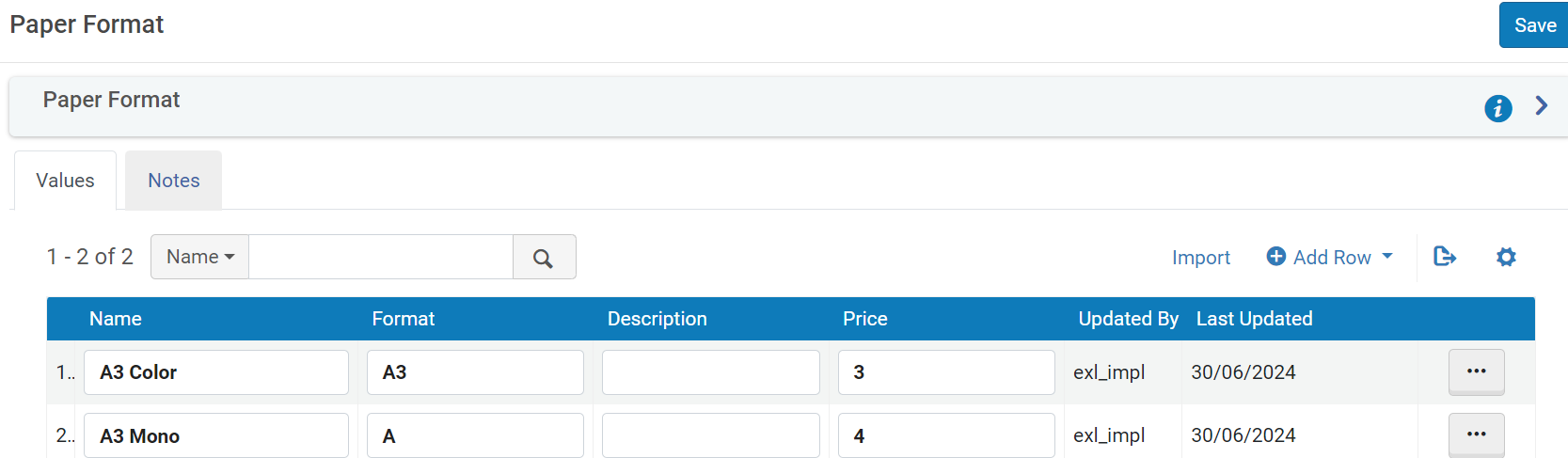 単価フィールド
-
Select Add Row to add a new row or Import to import the data from a file.
-
Add the Name Format and Price.The Name and Price appear in the NACSIS Shipping Costs page.
-
The Unit price on the NACSIS Shipping Costs page is automatically updated per the Price on the Paper Format configuration page and the Quantity on the NACSIS Shipping Costs page.
Page tags: article:topic product:alma content:Documentation lang:english
