
Configuring Ex Libris Secure FTP Service
Ex Libris provides out-of-the-box FTP servers using Ex Libris Secure FTP service for file transfer between Alma and external systems. This is an alternative to using institution's own FTP solutions, the option that remains available (see Configuring S/FTP Connections).
Il server FTP sicuro di Ex Libris fornisce una directory separata per ciascun cliente. This folder contains two sub-directories: Production and Sandbox. Avete accesso in lettura/scrittura a queste directory. Per maggiori informazioni su questa funzionalità, guardi il video Utilizzo del servizio FTP sicuro di Ex Libris.
Limitations to the Ex Libris FTP server directories:
- Max 4GB for the directory
- Data retention period - 30 days
The ability to use the Ex Libris FTP server is enabled by default. You can select to use the connection to the Ex Libris Secure FTP Service from the List of S/FTP Connections page (Configuration Menu > General > External Systems > S/FTP Definitions).
The Ex Libris Secure FTP Server is always located in the same region as the Alma institution: for EU customers, it will be in the EU, for CA customers -- in CA, etc.
Per alcuni clienti, l'ambiente Sandbox utilizza un server diverso dall'ambiente di produzione. È possibile accedere a entrambi i server con la stessa chiave privata, indipendentemente da dove sia stata generata.
To select the Ex Libris FTP server connection:
-
The Ex Libris Secure FTP Service section appears on the List of S/FTP Connections page (Configuration Menu > General > External Systems > S/FTP Definitions). You do not need to configure any information here, because the server/port and the user are already provided.

-
To get the private key with which to log into the Ex Libris Secure FTP Service, select Regenerate private key. Alma downloads a file with the RSA private key. Use the key to log in to the Ex Libris Secure FTP Service (using FileZilla or another FTP client of your choice). Per maggiori informazioni sul servizio FTP sicuro di Ex Libris, clicchi qui.
Once you received the RSA private key and connected to the Ex Libris Secure FTP Service, save the key file in a secured location. Make sure to not select Regenerate private key again. La rigenerazione di una nuova chiave ripristinerà la connessione al servizio FTP di Ex Libris. -
Facoltativamente, fare clic su Parametro facoltativo per configurare la crittografia a chiave pubblica PGP per i file creati da Alma.
Examples for Working with the Ex Libris Secure FTP Service
Once the connection to Ex Libris Secure FTP Service was established, you can select the Ex Libris Secure FTP in all locations in Alma where a connection to FTP server needs to be established.
For example:
- You can select it on the I ntegration Profiles page. Appare come prima opzione nel menu a discesa "Tipo di connessione S/FTP":

- Può selezionarlo nella pagina Dettagli profilo di importazione e nella pagina EDI Fornitore. (On these pages, select the FTP connection via a radio button and not a dropdown.)
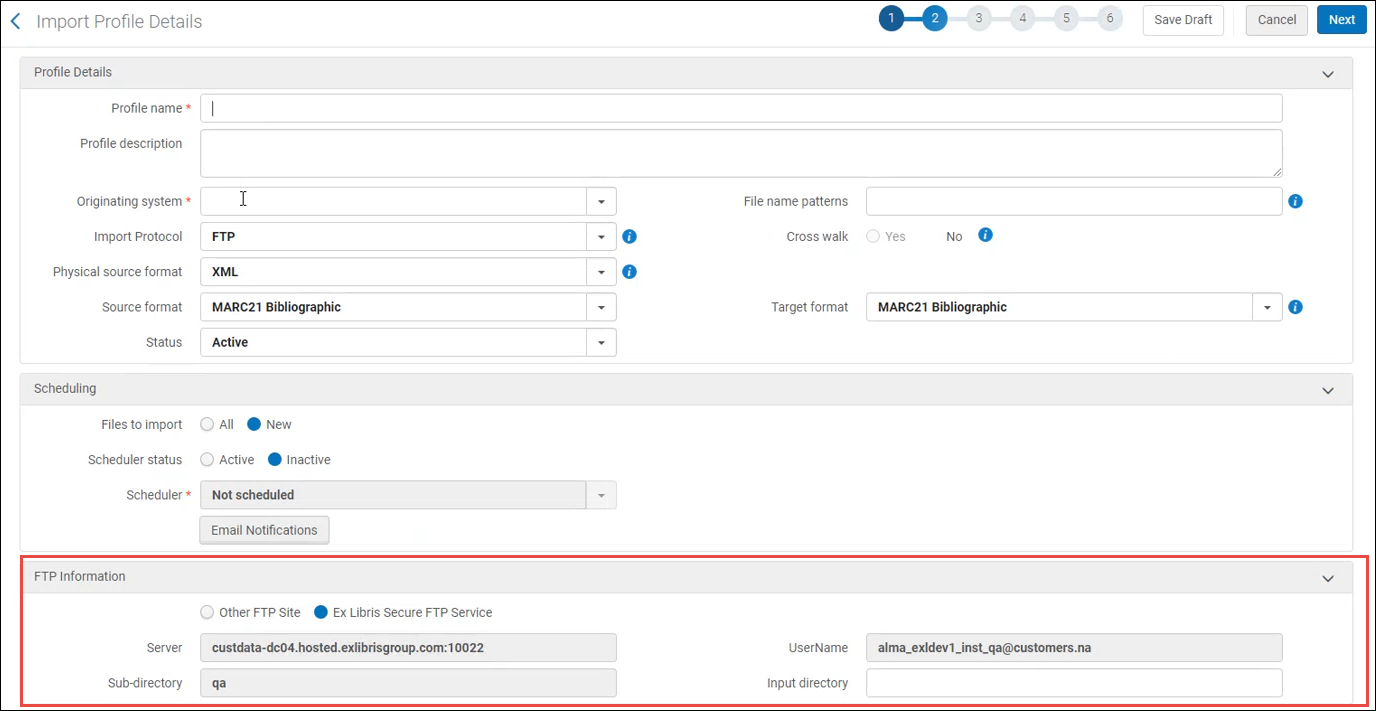
In both cases, when you selected the Ex Libris Secure FTP Service option, the other fields related to FTP definition become disabled.
