
Courses
The Courses product integration allows students to view their courses per term.
Overview
The Courses product integration allows students to view their courses per term.
Vendors
The Courses product integration is currently supported by the:
- Ellucian Banner (XE)
- Ellucian Colleague (custom) ERP systems
- RESTful API
User Experience
The following section describes information relating to the user experience for the Courses product integration.
User Activities
- Students select the Courses tile to display a list of terms.
- Student select a term to display the courses associated with that term.
Authentication
The Courses product integration requires the student's identifier from the vendor's system. This is obtained with token based authentication attributes.
The connection to the vendor is handled as part of the generic API Configuration under the Vendor section. The first part of the API Configuration details the URL to which to connect and any parameters that are required. The second part relates to the API Authentication for the URL, which is vendor-specific, and could also be specific to the vendor instance the client is running.
Offline Support
None. Students must be online to retrieve their course data.
Screenshots
The following is an overview of the Courses product integration user interface for a reference when configuring it:
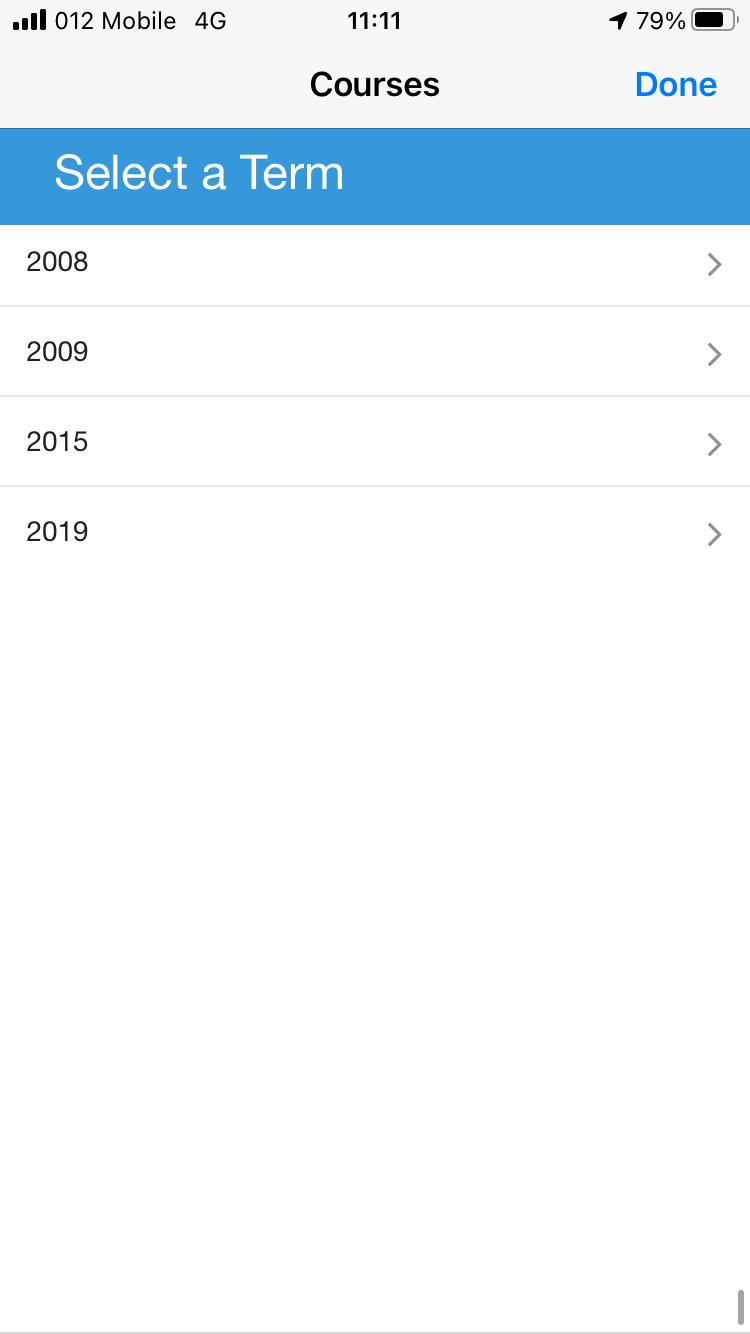
|
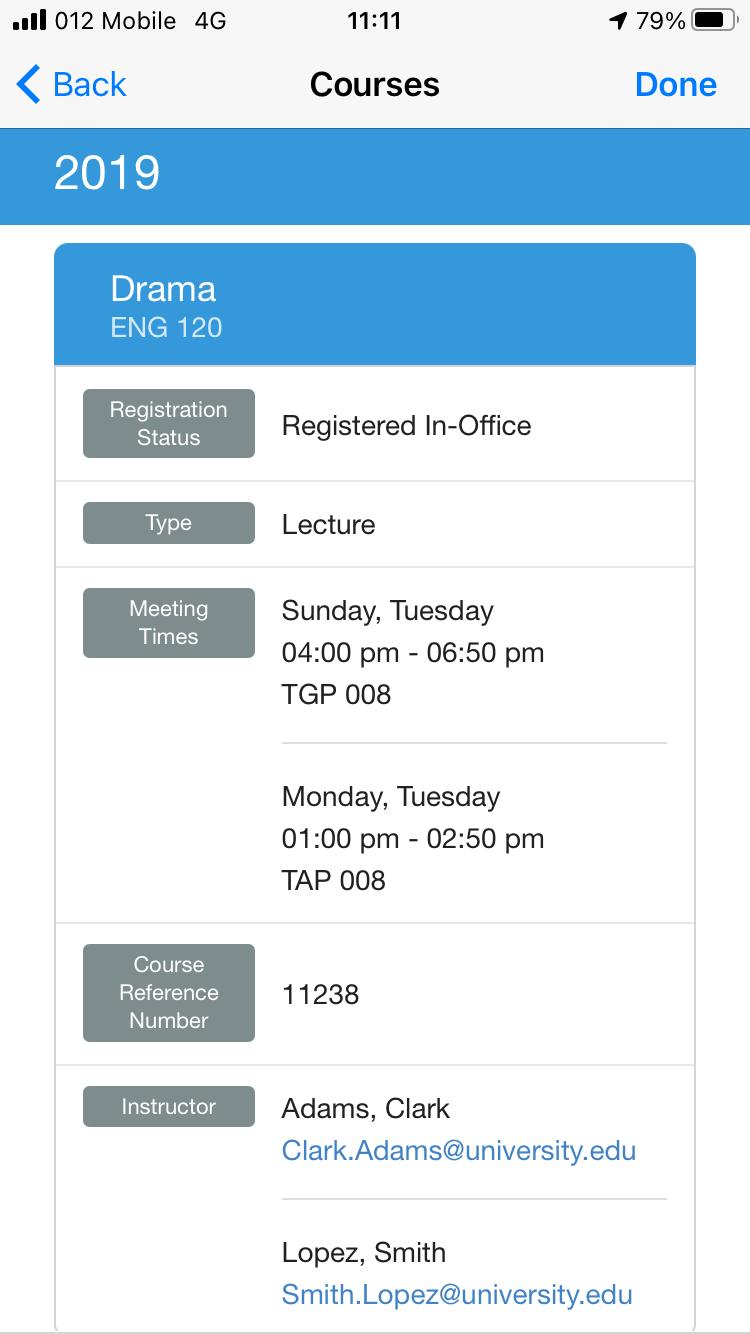
|
Technical Overview
The following section describes technical information for the Courses product integration.
Prerequisites
The following prerequisites are required to configure the Courses product integration:
- User identifier mapping
- If you have CMAuth configured, map the relevant vendor ID in the integration profile (Additional Mapping), for example:bannerId=employeeID, where employeeID is the relevant user attribute on the vendor’s backend system.
- If you have LDAP configured, verify that the relevant attribute is returned as an attribute from the LDAP response.
- The campusM native app (Android/iOS) must be updated with the June 2020 release or later.
Required Format
Select one of the following links for the required format for that vendor:
Ellucian Banner 9 (Also Referred to as XE) Vendor
- campusM uses two API calls to fetch courses data:
- The first call is to retrieve all of the available terms of the student:
https:// {HOST}/StudentApi/api/terms
- The second call is to retrieve the courses data for the selected term:
• https://{HOST}/StudentApi/api/students/{userId}/class-schedules?term={termId}
- The first call is to retrieve all of the available terms of the student:
- Banner 9 is the latest release of Banner.
- XE is an add-on to Banner that allows customers to extend it.
- For all integrations done prior to this PI, Banner 9 and XE have been interchangeable.
- The following is an example of a JSON response for the terms API:
[
{
"version": 0,
"id": 1,
"acyr_code": {
"version": 0,
"id": 16,
"code": "2010",
"description": "2019-2020"
},
"code": "202040",
"description": "Summer 2020",
"endDate": "2020-07-23",
"financialAidPeriod": 1,
"financialAidProcessingYear": "9293",
"financialAidTerm": "1",
"financialEndPeriod": 12,
"housingEndDate": "2020-07-23",
"housingStartDate": "2020-06-03",
"startDate": "2020-06-03",
"trmt_code": {
"version": 0,
"id": 2,
"code": "M",
"description": "Summer Semester"
}
}
]
- The following is an example of Courses JSON response:
[
{
"studentCourseRegistrations": [
{
"academicYear": "2019",
"academicYearDescription": "2018-2019",
"completionDate": "2019-05-03",
"courseNumber": "434",
"courseReferenceNumber": "10040",
"courseRegistrationStatus": {
"code": "RW",
"description": "**Web Registered**"
},
"courseTitle": "Principles of Physiology",
"creditHour": 3.0,
"faculty": [
{
"bannerId": "A00120999",
"displayName": "Vanterpool, Conwin",
"primaryIndicator": true
}
],
"gradingMode": "S",
"gradingModeDescription": "Standard Letter Grade",
"instructionalMethod": "TR",
"instructionalMethodDescription": "Traditional",
"level": {
"ceuInd": false
},
"meetingTimes": [
{
"beginTime": "1300",
"building": "CH",
"buildingDescription": "Carter Hall",
"campus": "M",
"campusDescription": "Main AAMU Campus",
"creditHourSession": 3.0,
"endDate": "2019-05-03",
"endTime": "1350",
"friday": true,
"hoursWeek": 2.5,
"meetingScheduleType": "L",
"meetingType": "CLAS",
"meetingTypeDescription": "Class",
"monday": true,
"room": "216-AUD",
"saturday": false,
"startDate": "2019-01-07",
"sunday": false,
"thursday": false,
"tuesday": false,
"wednesday": true
}
],
"partOfTerm": "1",
"partOfTermDescription": "Full Term",
"scheduleDescription": "Lecture",
"scheduleType": "L",
"sequenceNumber": "01",
"startDate": "2019-01-07",
"subject": "BIO",
"subjectDescription": "Biology",
"term": "201910",
"termDescription": "Spring 2019"
}
],
"totalBill": 8.0,
"totalCeu": 0.0,
"totalCredit": 5.0
}
]
RESTful API
- campusM uses two API calls to fetch the courses data:
- The first call is to retrieve all of the available terms for the student:
https://{HOST}/getTerms?userId={userId}
- The second call is to retrieve the courses data for the selected term:
https://{HOST}/getCourses?termId={termId}&userId={userId}
- The first call is to retrieve all of the available terms for the student:
- The terms API returns a JSON response with the following structure:
[
{
"termId": 1,
"description": "Fall 2020",
"termCode": "202010"
},
{
"termId": 2,
"description": "Spring 2020",
"termCode": "202020"
}
]
- The courses per term API returns a JSON response with the following structure:
[
{
"termCode": "2006",
"courseNumber":"120",
"subject":"ENG",
"courseTitle":"Drama",
"courseRegistrationStatusDescription":"Registered In-Office",
"creditHour":"3.0",
"scheduleDescription":"Lecture",
"courseReferenceNumber":"11238",
"meetingTimes":[
{
"beginTime":"1600",
"endTime":"1850",
"location":"TGP 008",
"days":[
"Sunday",
"Tuesday"
]
},
{
"beginTime":"1300",
"endTime":"1450",
"location":"TAP 008",
"days":[
"Monday",
"Tuesday"
]
}
],
"lecturer":[
{
"name":"Adams, Clark",
"emailAddress":"Clark.Adams@university.edu"
},
{
"name":"Lopez, Smith",
"emailAddress":"Smith.Lopez@university.edu"
}
]
},
{
"termCode": "2006",
"courseNumber":"322",
"subject":"FCS",
"courseTitle":"Trends and Issues",
"courseRegistrationStatusDescription":"Web Registered",
"creditHour":"3.5",
"scheduleDescription":"Lecture",
"courseReferenceNumber":"11653",
"meetingTimes":[
{
"beginTime":"1730",
"endTime":"2030",
"location":"CS 250",
"days":[
"Wednesday"
]
}
],
"lecturer":[
{
"name":"Lopez, Smith",
"emailAddress":"Smith.Lopez@university.edu"
}
]
}
]
Technical Flow Diagram
Both Banner and RESTful API currently require Basic Authentication API Authentication for all implementations that are currently available. "No Auth" can sometimes be used in testing.
Configuration
The following table describes the configuration options available for the Courses product integration.
Note that while most of these fields are not mandatory, they are displayed with their default values unless otherwise stated.
| Field Name | Description | Mandatory | Data Type | Default | Example |
|---|---|---|---|---|---|
| Enable Product Integration | Check this box to enable Courses for use in the app. | No | Checkbox | Unchecked | |
| Product Integration Description | Description for this Courses instance. | Yes | String | Courses | |
| Screen Title | Appears in the top header (of the product integration). | No | String | Courses | |
| Vendor | |||||
| Vendor Name | Defines to which vendor the integration connects. | Yes | Drop-down list | n/a | BannerXE |
|
API Configuration This section contains the API details to define the API structure. You can test the API configuration. See Testing API Product Integration Configuration. |
|||||
| Base URL to retrieve the information | The URL for the API endpoint or vendor server. | Yes | URL | https://myDomain.com | |
|
Parameter Input Option
|
The parameter input option for the relevant vendor's user identifier. Possible values:
|
Yes
|
Drop-down list
|
Username
|
|
| Authentication Type | Select one of the following options:
|
Yes | Drop-down list | ||
|
Terms Configuration For Banner XE only |
|||||
|
Exclude By Term Code
|
Enter one or more term codes, or partial codes, to exclude.
Including '%' in the code for a wildcard sequence, e.g. '%5' excludes any term code ending in 5. Entering just '5' excludes any term code that includes a 5 anywhere in it.
|
No
|
List
|
%5
|
|
|
Exclude By Term Description
|
Enter one or more term descriptions, or partial descriptions, to exclude.
Use '%' for a wildcard sequence, e.g. '%Test' excludes any term description ending with Test. Entering just 'Test' by itself excludes any term description that includes Term anywhere in it.
|
No
|
List
|
Non-Academic
|
|
| General | |||||
| Display Registration Status | Enables or disables the registration status on the course detail page. | No | Checkbox | Checked | |
| Display Credit Hours | Enables or disables the credit hours on the course detail page. | No | Checkbox | Checked | |
| Display Type | Enables or disables the type on the course detail page. | No | Checkbox | Checked | |
| Display Meeting Times | Enables or disables the meeting times on the course detail page. | No | Checkbox | Checked | |
| Display Course Reference Number | Enables or disables the course reference number on the course detail page. | No | Checkbox | Checked | |
| Display Instructor | Enables or disables the instructor on the course detail page. | No | Checkbox | Checked | |
| Past Terms (in days) | Display past terms for the last number of days (Banner XE only). | No | String | 0 | |
| Next Terms (in days) | Display future terms for the next number of days (Banner XE only). | No | String | 0 | |
| Input Time Format | The format of the times coming back from the API | No | Date format | hmm | |
| Display Time Format | The format to display any time in, throughout the integration | No | Time format |
HH:mm |
|
| Look and Feel | |||||
| Primary Theme Color | Used for the Screen Title header and other header elements. | No | Hex code | #444444 | |
| Secondary Theme Color | Used for the Grade block headers. | No | Hex code | #6f8ea4 | |
|
Text/Labels Text/Labels for the Courses product integration |
|||||
| Courses Page Title | Uses for the Courses page header. | No | String | Courses | |
| Terms Page Header | Used for the Terms page header. | No | String | Select a Term | |
| No Data Message | Displayed if no courses are found for a term. | No | String | No courses found. | |
| Registration Status Label | Used for the Registration Status block header. | No | String | Registration Status | |
| Type Label | Used for the Type block header. | No | String | Type | |
| Meeting Times Label | Used for the Meeting Times block header. | No | String | Meeting Times | |
| Credit Hours Label | Used for the Credit Hours block header. | No | String | Credit Hours | |
| Course Reference Number Label | Used for the Course Reference Number block header. | No | String | Course Reference Number | |
| Instructor Label | Used for the Instructor block header. | No | String | Instructor | |
| Unknown Terms Text | Displayed any time a term is to be displayed, but there is no valid description for that term. | No | String | Unknown Term | |
| Terms Service Failure Message | This message appears when the integration is unable to reach or process the terms API correctly. | No | String | The page is having trouble fetching academic terms - please try again shortly. | |
| No Terms Message | This message appears when there are no terms. | No | String | No terms found. | |
| Service Failure Message | This message appears when the integration is unable to reach or process the service call correctly. | No | String | The page is having trouble fetching your courses - please try again shortly. | |
|
Import/ Export Configuration You can configure product integration and then export it to another campusM environment, for example, from sandbox to production or from preview to production. |
|||||
| Import Configuration | Use this option to load configuration from JSON of an exported product integration. | ||||
| Export Configuration | Create a JSON file with all product integration configurations. | ||||
Page tags: article:topiccontent:Documentationproduct:campusmlang:english
