
Grades
The Grades product integration allows campusM to list a user's grades per course and per term.
Overview
The Grades product integration allows campusM to list a user's grades per course and per term.
Vendors
Grades can be retrieved with:
- Ellucian Banner XE / 9
- Ellucian Colleague (custom) ERP systems
- Ellucian Colleague (Web API)
- RESTful API
- Oracle PeopleSoft
User Experience
The following section describes information relating to the user experience for the Grades product integration.
User Activities
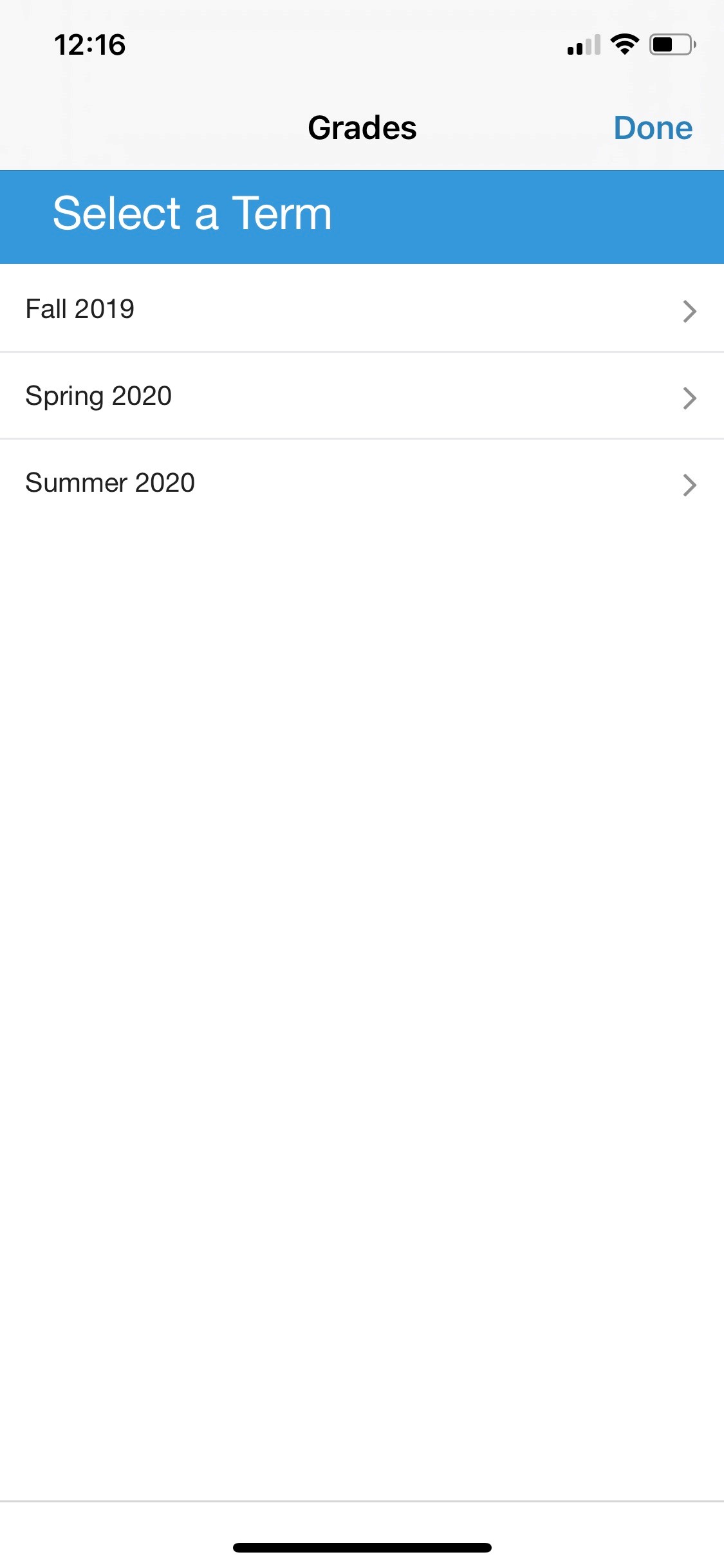
- The user selects the Grades tile and a list of terms appears.
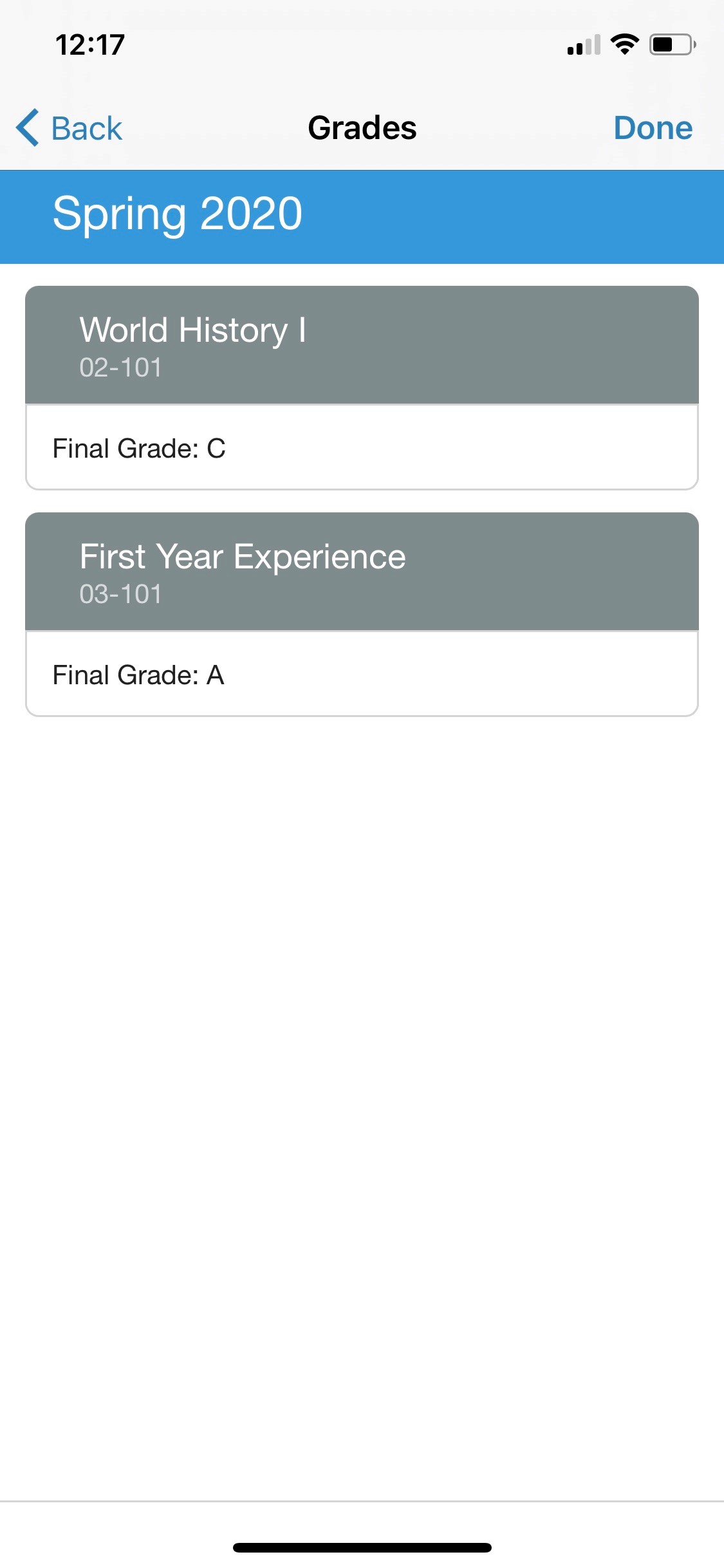
- The user selects a term and the grades associated with that term appear.
Authentication
The Grades product integration requires the user's identifier from the vendor's system. This is obtained with the token based authentication attributes.
The connection to the vendor is handled as part of the generic API Configuration under the Vendor section. The first part of the API Configuration details the URL to which to connect and any parameters that are required. The second part relates to the API Authentication for the URL, which is vendor-specific, and could also be specific to the vendor instance the client is running. For example, although all Banner integration so far use Basic Authentication on the Banner server, its possible for a vendor to use something different.
Offline Support
None. Users must be online to retrieve their grades data.
Screenshots
The following is an overview of the Grades product integration user interface for a reference when configuring it:
|
|
|
Select Term
|
Grades Per Term
|
Technical Overview
The following section describes technical information for the Grades product integration.
Prerequisites
The following prerequisites are required to configure the Grades product integration:
- User identifier mapping
- If you have CMAuth configured, map the relevant vendor ID in the integration profile (Additional Mapping), for example:bannerId=employeeID, where employeeID is the relevant user attribute on the vendor’s backend system.
- If you have LDAP configured, verify that the relevant attribute is returned as an attribute from the LDAP response.
- Access to the client's API – access is required for your data center's IPs range.
- campusM test users with a valid vendor ID available through the IDP attributes. The ideal types of test user include:
- A test user with grades for the current valid term and any older terms, if possible.
- A test user with no grades at all.
- A test user that is not on the vendor's backend system.
Required Format
Select one of the following links for the required format for that vendor:
- Ellucian Banner XE (and Banner 9) Vendor
- Ellucian Colleague (Custom) Vendor
- RESTful API
- Oracle PeopleSoft Vendor
Ellucian Banner EX (and Banner 9) Vendor
- campusM uses two API calls to fetch grades data:
- The first call is to retrieve all of the available terms of the student:
https:// {HOST}/StudentApi/api/terms
- The second call is to retrieve the grades data for the selected term:
https://{HOST}/StudentApi/api/students/{userId}/grades?term={termId}
- The first call is to retrieve all of the available terms of the student:
- The following is an example of a JSON response for the Terms API:
[ {
"version": 0,
"id": 1,
"acyr_code": {
"version": 0,
"id": 16,
"code": "2010",
"description": "2019-2020"
},
"code": "202040",
"description": "Summer 2020",
"endDate": "2020-07-23",
"financialAidPeriod": 1,
"financialAidProcessingYear": "9293",
"financialAidTerm": "1",
"financialEndPeriod": 12,
"housingEndDate": "2020-07-23",
"housingStartDate": "2020-06-03",
"startDate": "2020-06-03",
"trmt_code": {
"version": 0,
"id": 2,
"code": "M",
"description": "Summer Semester"
}
}
]
- The following is an example of a JSON response for the Grades API:
[ { "courseNumber": "101", "courseTitle": "World History I", "creditHour": 3.0, "crn": "70029", "gradeFinal": "C", "gradeInAcadHistory": "C", "gradeMidterm": "D", "gradeRolled": "Y", "level": { "code": "UG", "description": "Undergraduate" }, "registrationStatus": { "code": "RE", "description": "**Registered In-Office**" }, "classFormat": { "code": "L", "description": "Lecture" }, "sequenceNumber": "02", "subject": { "code": "HIS", "description": "History" }, "term": { "code": "201870", "description": "Fall 2018" } }, { "courseNumber": "101", "courseTitle": "First Year Experience", "creditHour": 1.0, "crn": "70825", "gradeFinal": "A", "gradeInAcadHistory": "A", "gradeMidterm": "A", "gradeRolled": "Y", "level": { "code": "UG", "description": "Undergraduate" }, "registrationStatus": { "code": "RE", "description": "**Registered In-Office**" }, "classFormat": { "code": "L", "description": "Lecture" }, "sequenceNumber": "03", "subject": { "code": "ORI", "description": "Orientation" }, "term": { "code": "201870", "description": "Fall 2018" } }
Ellucian Colleague (Custom) Vendor
- campusM uses two API calls to fetch grades data:
- The first call is to retrieve all of the available terms of the student:
https://{HOST}/ColleagueApi/students/{userId}/terms
- The second call is to retrieve the grades data for the selected term:
https://{HOST}/ ColleagueApi/students/{userId}/academic-credits
- The first call is to retrieve all of the available terms of the student:
- A direct connection to the Ellucian Colleague (custom) API is required. Any middleware or client-specific implementation causes the API response to deviate from what the cloud platform is expecting.
- The following is an example of a JSON response for the Terms API:
[
{
"Term": "2020S",
"Description": "Summer Semester 2020"
},
{
"Term": "2020CS",
"Description": "Summer Cohort Semester 2020"
}
]
- The following is an example of a JSON response for the Grades API:
{ "AcademicTerms": [ { "TermId": "14/X1", "GradePointAverage": 0, "Credits": 6, "ContinuingEducationUnits": 0, "AcademicCredits": [ { "Id": "1010776", "CourseId": "86", "StudentId": null, "SectionId": null, "CourseName": "EN-000", "Title": "Eng Lit/Comp. AP Testing", "VerifiedGradeId": "P", "VerifiedGradeTimestamp": "2014-10-22T16:13:00", "Credit": 6, "GpaCredit": 0, "GradePoints": 0, "CompletedCredit": 6, "ContinuingEducationUnits": 0, "Status": "TransferOrNonCourse", "StatusDate": null, "TermCode": "14/X1", "MidTermGrades": [], "GradingType": "Graded", "SectionNumber": "", "HasVerifiedGrade": true, "AdjustedCredit": 6, "IsNonCourse": false, "StartDate": null, "EndDate": null, "IsCompletedCredit": true, "ReplacedStatus": "NotReplaced", "ReplacementStatus": "NotReplacement" } ] } ], "NonTermAcademicCredits": [ { "Id": "1003018", "CourseId": "804", "StudentId": null, "SectionId": null, "CourseName": "FL-000X", "Title": "Foreign Language Equivalency", "VerifiedGradeId": "P", "VerifiedGradeTimestamp": "2015-10-29T12:28:26", "Credit": 0, "GpaCredit": 0, "GradePoints": 0, "CompletedCredit": 0, "ContinuingEducationUnits": 0, "Status": "TransferOrNonCourse", "StatusDate": null, "TermCode": "", "MidTermGrades": [], "GradingType": "Graded", "SectionNumber": "", "HasVerifiedGrade": true, "AdjustedCredit": 0, "IsNonCourse": true, "StartDate": null, "EndDate": null, "IsCompletedCredit": true, "ReplacedStatus": "NotReplaced", "ReplacementStatus": "NotReplacement" } ], "GradeRestriction": { "IsRestricted": false, "Reasons": [] }, "TotalCreditsCompleted": 0, "OverallGradePointAverage": 0, "StudentId": null }
Colleague (Web API)
campusM uses several API calls to fetch grades data:
- The first is because the Colleague Web API authenticates via a session token:
- https://{HOST}/colleagueApi/session/proxy-login
- The second call is to retrieve all relevant terms for the student:
- https://{HOST}/colleagueApi/terms
- The third call is to retrieve the grades data for the selected term. This will re-use any available session token or re-authenticate with the proxy-login API:
- https://{HOST}/colleagueApi/students/{username}/academic-credits
RESTful API
- campusM uses two API calls to fetch the grades data:
- The first call is to retrieve all of the available terms for the student:
https://{HOST}/getTerms?userId={userId}
- The second call is to retrieve the grades data for the selected term:
https://{HOST}/getGrades?termId={termCode}&userId={userId}
- The first call is to retrieve all of the available terms for the student:
- The Terms API returns a JSON response with the following structure:
[
{
"termId": 1,
"description": "Fall 2020",
"termCode": "202010"
},
{
"termId": 2,
"description": "Spring 2020",
"termCode": "202020"
}
]
- The grades per term API returns a JSON response with the following structure:
[
{
"id": "1",
"title": "Grade for Intro to Bio",
"finalGrade": "A",
"midTermGrade": "B",
"termCode": "202010",
"courseCode": "BIOB 170",
"courseName": "Intro to Bio",
"linkUrl": "https://www.google.com/",
"linkText": "View more information",
"additionalDetails": "A minimum of a C is needed for this course for a Biology Degree."
},
{
"id": "2",
"title": "Grade for Test Course",
"finalGrade": "75%",
"midTermGrade": "75%",
"termCode": "202010",
"courseCode": "C01",
"courseName": "Test Course",
"linkUrl": "https://www.google.com/",
"linkText": "View more information about Test Course",
"additionalDetails": "A minimum of a C is needed for this course for a Math Degree."
}
]
| External Field Name | Internal CampusM Field Name | Description | Mandatory Yes/No | Data Type | Default | Example |
|---|---|---|---|---|---|---|
| Term ID | termId | A unique ID for the term | Yes | String | - | 1 |
| Term Description | description | A description for the term (displayed to the end user for term selection) | Yes | String | - | Fall 2020 |
| Term Code | termCode | The code for the term (this is used to associate grades with relevant terms) | Yes | String | - | 202010 |
| External Field Name | Internal CampusM Field Name | Description | Mandatory Yes/No | Data Type | Default | Example |
|---|---|---|---|---|---|---|
| Grade Information ID | id | A unique ID for the course grade information | Yes | String | - | 1 |
| Grade Title | title | The title for the course grade information | No | String | - | Grade for Intro to Bio |
| Final Grade for the Course | finalGrade | The final grade the student achieved for the course (optionally displayed to the end-user) | No | String | - | A |
| Midterm Grade for the Course | midTermGrade | The midterm grade the student achieved for the course (optionally displayed to the end-user) | No | String | - | B |
| Term Code | termCode | The code for the term (this is used to associate grades with relevant terms) | Yes | String | - | 202010 |
| Course Code | courseCode | The code for the course (optionally displayed to the end-user) | No | String | - | BIOB 170 |
| Course Title | courseName | The name of the course | Yes | String | - | Intro to Bio |
| Link URL | linkUrl | The URL provided to link to additional information | No | String | - | https://www.google.com/ |
| Link Text | linkText | The display text for the link URL (optionally displayed to the end-user) | No | String | - | View more information |
| Additional Details | additionalDetails | Additional information (optionally displayed to the end-user) | No | String | - | A minimum of a C is needed for this course for a Biology Degree. |
Oracle PeopleSoft
Create a PeopleSoft query that meets the requirements described below.
Query Format
The Terms API and Grades API both follow the same request format:
GET https://{domain and base path}/{PeopleSoft query name}/JSON/NONFILE
Basic Authentication must be set on the service.
Query Parameters:
isconnectedquery=n
maxrows=0
prompt_uniquepromptname={the relevant value; this is configurable in the Product Integration configuration page}
prompt_fieldvalue={the relevant value; this is configurable in the Product Integration configuration page}
json_resp=true
Here is an example for the Terms API call (assume basic auth is set):
GET https://example-domain.edu/PSIGW/RES...S/JSON/NONFILE
isconnectedquery=n
maxrows=0
prompt_uniquepromptname=EMPLID
prompt_fieldvalue=EXAMPLEID01
json_resp=true
Here is an example for the Grades API call (assume basic auth is set):
GET https://example-domain.edu/PSIGW/RES...S/JSON/NONFILE
isconnectedquery=n
maxrows=0
prompt_uniquepromptname=EMPLID,TERM_CODE
prompt_fieldvalue=EXAMPLEID01,0931
json_resp=true
The domain and base path in these examples is:https://example-domain.edu/PSIGW/RES...ery.v1/PUBLIC/
The query name for the Terms example is: EXAMPLE_QUERY_TERMS
The query name for the Grades example is: EXAMPLE_QUERY_GRADES
The ending path should always be: /JSON/NONFILE
Expected Terms Response
The response must follow the format below. campusM expects the names of the row attributes to match this example.
{
"status": "success",
"data": {
"query": {
"numrows": 2,
"queryname=": "EXAMPLE_QUERY_TERMS",
"rows": [
{
"attr:rownumber": 1,
"TERM_DESCRIPTION": "Fall 2024",
"TERM_CODE": "0931"
},
{
"attr:rownumber": 2,
"TERM_DESCRIPTION": "Spring 2025",
"TERM_CODE": "0941"
}
]
}
}
}
Expected Grades Response
The response must follow the format below. campusM expects the names of the row attributes to match this example.
{
"status": "success",
"data": {
"query": {
"numrows": 2,
"queryname=": "EXAMPLE_QUERY_GRADES",
"rows": [
{
"attr:rownumber": 1,
"COURSE_NAME": "Example Course Name",
"FINAL_GRADE": "A",
"COURSE_CODE": "FA-464-01",
"TERM_CODE": "0931"
},
{
"attr:rownumber": 2,
"COURSE_NAME": "Another Example Course Name",
"FINAL_GRADE": "A",
"COURSE_CODE": "PH-308-01",
"TERM_CODE": "0931"
}
]
}
}
}
Configuration
The following table describes the configuration options available for the Grades product integration.
Note that while the majority of these fields are not mandatory, they are displayed with their default values unless otherwise stated.
| Configuration Option | Description | Mandatory | Data Type | Default | Example |
|---|---|---|---|---|---|
| Enable Product Integration | Select to enable the product integration on the user's campusM app. | No | Checkbox | Unchecked | |
| Product Integration Description | A description of the product integration for internal use | Yes | |||
| Screen Title | Appears in the top header (of the integration, in the app). | No | String | Grades | |
| Vendor | |||||
| Vendor Name | Defines to which vendor the integration connects | Yes | Object | n/a | BannerXE |
| API Configuration This section contains the API details to define the API structure. You can test the API configuration. See Testing API Product Integration Configuration. | |||||
| Base URL to retrieve the information | The URL for the API | Yes | URL | https://{HOST}
|
|
| Parameter Input Option | The parameter input option for Banner ID or Ellucian Colleague (custom). Possible values: Username, Token Property, and Constant. It is sent as the path parameter. | Yes | Drop-Down list | Token Property | |
| Authentication Type | Select one of the following options:
For Restful API, the following options are also available:
|
Yes | Drop-down list | ||
|
Terms Configuration For Banner XE only |
|||||
|
Exclude By Term Code
|
Enter one or more term codes, or partial codes, to exclude.
Include '%' in the code for a wildcard sequence, e.g. '%5' will exclude any term code ending in 5. Entering just '5' will exclude any term code that includes a 5 anywhere in it.
|
No
|
List
|
%5
|
|
|
Exclude By Term Description
|
Enter one or more term descriptions, or partial descriptions, to exclude.
Use '%' for a wildcard sequence, e.g. '%Test' will exclude any term description ending with Test. Entering just 'Test' by itself will exclude any term description that includes Term anywhere in it.
|
No
|
List
|
Non-Academic
|
|
| API Configuration for Colleague (Web API) | |||||
| URL to retrieve the information | The URL for the API server. The protocol, hostname, and optionally port (if required) are needed. | Yes | URL | https://(HOST)
|
|
| URL Query Parameters | Any query parameters required for the Colleague (Web API) server. Currently none. | No | Parameter | ||
| URL Path Parameters | Any path parameters required for the Colleague (Web API) server. Currently none. | No | Parameter | ||
| General Headers | Any additional headers required for the Colleague (Web API) server. We currently require one set as follows:
The header key can be changed if your Colleague server accepts a different key name, but the value cannot be changed. |
Yes | Header | ||
| Authentication Type | Select one of the following options based on your Colleague server setup:
|
No | Drop-Down list | Auth | |
| Parameter Input Option | The parameter input option for Colleague ID required for the Colleague Web API.
Possible values:
Typically, this is the user's "username" attribute. |
Yes | Drop-Down list | Username | |
| Proxy ID | Required to fetch the session token | Yes | String | ||
| Proxy Password | Required to fetch the session token | Yes | String | ||
| Token Expiry | The time in hours to store a Web API session token for up to a maximum of 24 hours. | No | Integer | 1 | |
| Limit Terms From | Limit Terms From Set a cut-off date, and terms that start before this date are not shown | Yes | String | 2021-01-01 | |
| Include Drops | Include dropped credits when fetching grade records | No | Checkbox | Unchecked | |
| Grades Page | |||||
| Show Course Code | Shows the course code on the Grades detail page | No | Checkbox | Checked | |
| Show Midterm Grade |
Shows the midterm grade for each course, if available.
Not applicable for either Colleague vendor. |
No | Checkbox | Unchecked | |
| Show Final Grades |
Shows the final grade for each course, if available.
Only available for Banner XE. |
No | Checkbox | Checked | |
| Show Additional Details |
Shows additional details for each course, if available.
Only available for Restful API. |
No | Checkbox | Checked | |
| Show Grade Links |
Shows the additional information link for each course, if available.
Only available for Restful API. |
No | Checkbox | Checked | |
| Past Terms (in days) |
Shows pas terms for the last number of days.
Only available for Banner XE. |
No | String | 0 | |
| Next Terms (in days) |
Shows future terms for the next number of days.
Only available for Banner XE. |
No | String | 0 | |
| Look and Feel | |||||
| Primary Theme Color | Used for the Screen Title header and other header elements. | No | Hex code | #444444 | |
| Secondary Theme Color | Used for the Grade block headers. | No | Hex code | #6f8ea4 | |
| Text/Labels | |||||
| Term Page Title | Used for the Terms page header. | No | String | Terms | |
| Term Page Subtitle | Used for the Terms page header. | No | String | Please choose a term to view grades | |
| Final Grade Text | The phrase used to describe a final grade for a course. | No | String | Final Grade | |
| Midterm Grade Text | The phrase used to describe a midterm grade for a course. | No | String | Midterm Grade | |
| Additional Details Text | Show Additional Details must be enabled. This sets the label for the additional details field. | No | String | Additional Details | Additional Details Text |
| Grade Link Text | Show Grade Links must be enabled. This text will appear if a grade link was included in the service, but no description for the link was included. | No | String | View more information | Grade Link Text |
| No data Message | This message will appear when there is no data | No | String | No Grades found | |
| Terms Service Failure Message | This message will appear when the integration is unable to reach or process the Terms API correctly. | No | String | The page is having trouble fetching academic terms - please try again shortly. | |
| No Terms Message | This message will appear when there are no terms | No | String | ||
| Service Failure Message | This message will appear when the integration is unable to reach or process the service call correctly. | No | String | The page is having trouble fetching your grades - please try again shortly. | |
| Import/ Export Configuration You can configure product integration and then export it to another campusM environment, for example, from sandbox to production or from preview to production. | |||||
| Export | Create a JSON file with all product integration configuration. | No | |||
| Import | Use this option in order to load configuration from JSON of an exported product integration. | No | |||
Page tags: article:topiccontent:Documentationproduct:campusmlang:english
