
UniWellBeing
Overview
Displays social engagement activities, tools, and educational content to empower all students to self-help and build positive habits, coping skills, and resilience.Vendors
User Experience
The following section describes information relating to the user experience for the Student Engagement and Retention product integration.
User Activities
- Users can see activities on the live tile.
- Users can select specific activities.
- Users can select a tile to link out to relevant links.
Authentication
The Student Engagement product integration requires the user's email address which is obtained from the token-based authentication attributes.
The connection to the vendor is handled as a part of the API Configuration component (in App Manager, in the product instance). This is found under the Vendor section.
Offline Support
Data is not cached. Must be online to use.
Screenshots
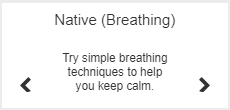
Live Title
We recommend using 2 wide x 1 high or 3 wide x 1 high.
Configuration
| Configuration Option | Description | Mandatory | Data Type | Default | Example |
|---|---|---|---|---|---|
| Manage Integration | |||||
| Enable Product Integration | Select to enable the product integration | Yes | Checkbox | False | |
| Product Integration Description | A description of the product integration for internal use | Yes | String | ||
| Vendor | |||||
| Vendor Name | Defines which vendor the integration connects to. | Yes | Object | UniWellBeing | |
| UniWellBeing Configuration | |||||
| Base URL to retrieve the information | For example: https://myDomain.com | Yes | String | ||
| API Key | Sets the client ID for the integration | Yes | String | ||
| API Secret | Sets the client secret for the integration | Yes | String | ||
| Live Tile | |||||
| Flip Rate | Flip rate in seconds | No | Number | 60 | |
| Add User Controls | No | Boolean | False | ||
| Display Logo | No | Boolean | False | ||
| Logo | Log to display on the tile | No | URI | https:// | |
| Error Message | No | String | An error has occurred, please try again later. | ||
| Import/Export Configuration | |||||
| Export | Creates a json file with the product integration configuration | No | |||
| Import | Use this option in order to load configuration information from JSON of an exported product integration | No | |||
