
Customizing Cookie Policy Messages
Encore can display customized cookie policy messages for each language and suite defined in your system. You can add a link in these messages to your library's privacy policy to provide further information to patrons.
For more information, see the following sections:
How Cookie Policy Messages Work
Encore automatically enables this feature when your library enters cookie policy messages in the Administration Application. When enabled, patrons who have never visited the page or who have cleared their cookies will receive a pop-up window at the top of their screen. For example:
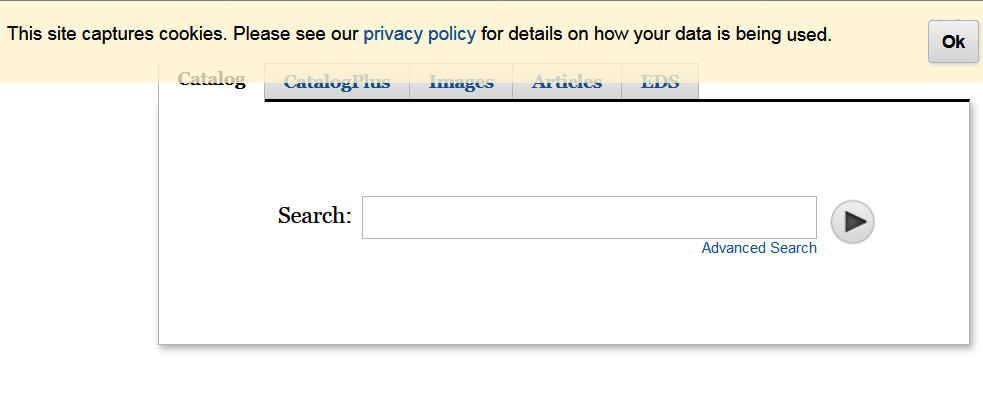
The patron must click OK to remove the message. If you include a link to the privacy policy page in the cookie policy message, the patron can click the link to view the policy before agreeing to the use of cookies.
Your library can define a different message for each suite and language. If there is no cookie policy message for a specific language and suite combination, Encore does not display a pop-up message to those patrons.
Adding, Editing, or Deleting Cookie Policy Messages
To add, edit, or delete cookie policy messages:
- Log in to the Administration Application, and click Encore Customization.
- If your library uses Encore suites, select the suite you want to edit from the Current suite drop-down list.
- In the subapplication list, click Other. Encore displays a list of settings.
- Locate the Cookie Policy Popup Content section, and click Edit.
- Enter the cookie policy message for each language used by your library. If you do not want to display a cookie policy message, delete all content.
These boxes can accept HTML markup. To include a link to your privacy policy, wrap the link text in an <a> tag (for example, "Please see our <a>privacy policy for details</a>."). Encore adds a hyperlink to the privacy policy page corresponding to that suite and language.
- When you are finished making your changes, click Save.
- (Optional) Repeat steps 2-7 to change the cookie policy messages for a different suite.
